Indledning
Thank you for choosing the iTOMA CKS801 Alarm Clock. This device combines a digital alarm clock with convenient features such as wireless charging, a USB charging port, dual alarms, an adjustable night light, and an indoor temperature and humidity display. This manual will guide you through the setup, operation, and maintenance of your new alarm clock to ensure optimal performance and user experience.
Produktegenskaber
- Trådløs opladningsfunktion: Compatible with most universal wireless charging enabled mobile phones.
- USB opladningsport: Provides an additional port for charging other mobile devices.
- Dual Alarm with Snooze: Set two independent alarms with a 9-minute snooze function (up to 6 times).
- Justerbar natlampe: Features two night light modes for ambient lighting.
- 4-Level Display Dimmer: Juster lysstyrken på LED-displayet.
- Indoor Temperature and Humidity Display: Shows ambient temperature (Celsius/Fahrenheit) and relative humidity.
- 12/24 timers tidsformat: Select your preferred time display format.
Enhedslayout
Familiarize yourself with the buttons and display elements of your iTOMA CKS801 alarm clock.
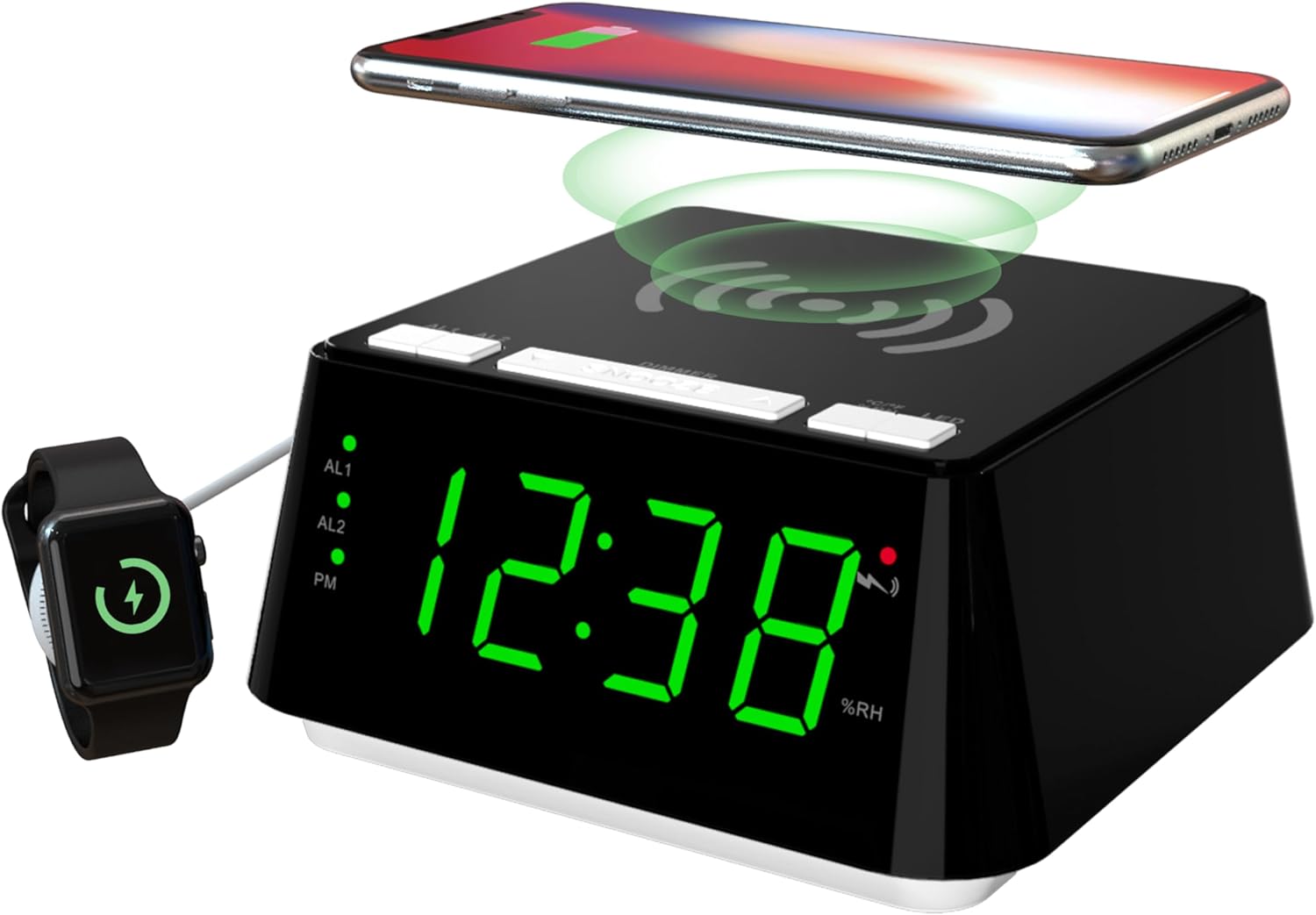
Billede 1: Front og top view of the iTOMA CKS801 alarm clock, showing the digital time display, alarm indicators (AL1, AL2), PM indicator, humidity percentage (%RH), and the wireless charging pad on top. A smartphone is shown wirelessly charging, and a smartwatch is connected to the USB port.
- Toppanel: Wireless charging pad, SNOOZE/DIMMER button, AL1/AL2 buttons, °C/°F/%RH button, LED (Night Light) button.
- Forreste display: Large LED display showing time, AL1/AL2 indicators, PM indicator, temperature, and humidity.
- Bagside: Power input, USB charging port.
Opsætning
- Strømtilslutning: Connect the provided power adapter to the DC input port on the back of the alarm clock and then plug it into a standard wall outlet. The display will light up.
- Indstilling af starttidspunkt: Upon first power-up, the clock may display a default time. Refer to the "Time Setting" section under Operating Instructions to set the correct time.
Betjeningsvejledning
1. Tidsindstilling
- Tryk og hold på TIDSINDSTILLING button (if available, otherwise use a combination of buttons, e.g., SNOOZE/DIMMER for setting mode and AL1/AL2 for adjustment).
- Brug AL1 or AL2 buttons (or dedicated UP/DOWN buttons if present) to adjust the hour.
- Tryk på TIDSINDSTILLING button again to move to minute adjustment. Use AL1 or AL2 for at justere minutter.
- Tryk på TIDSINDSTILLING knappen én gang til for at bekræfte og afslutte tidsindstillingstilstanden.
- For at skifte mellem 12-timers og 24-timers format skal du trykke på °C/°F/%RH button while the time is displayed. The PM indicator will appear for 12-hour format afternoon times.
2. Alarm Setting (AL1 & AL2)

Billede 2: Close-up of the iTOMA CKS801 display and top buttons, illustrating the dual alarm indicators (AL1, AL2) and the three alarm modes: ALL-7-DAY, WEEKDAY, and WEEKEND.
- Setting Alarm 1 (AL1):
- Tryk og hold på AL1 knappen. Timevisningen blinker.
- Brug SNOOZE / DIMMER button (or dedicated UP/DOWN) to adjust the alarm hour.
- Trykke AL1 again to move to minute adjustment. Use SNOOZE / DIMMER for at justere minutter.
- Trykke AL1 again to select the alarm mode (ALL-7-DAY, WEEKDAY, WEEKEND). Use SNOOZE / DIMMER to cycle through modes.
- Trykke AL1 once more to confirm and activate Alarm 1. The AL1 indicator will light up.
- Setting Alarm 2 (AL2): Follow the same steps as for AL1, using the AL2 knap.
- Aktivering/deaktivering af alarmer: Tryk kort på AL1 or AL2 button to toggle the respective alarm on or off. The AL1/AL2 indicator will show its status.
- Snooze-funktion: Når en alarm lyder, skal du trykke på den store SNOOZE / DIMMER button on top to activate snooze. The alarm will pause for 9 minutes and sound again. This can be repeated up to 6 times.
- Stop af en alarm: To stop an alarm completely, press any other button (e.g., AL1, AL2, LED) except the SNOOZE/DIMMER button. The alarm will reset for the next day.
3. Trådløs opladning

Billede 3: A smartphone placed on the top surface of the iTOMA CKS801 alarm clock, indicating active wireless charging with a charging icon on the phone screen.
- Place your Qi-compatible smartphone directly on the wireless charging pad located on the top surface of the alarm clock.
- Sørg for, at telefonen er centreret på opladningspad'en for optimal opladning.
- A charging indicator (usually on your phone screen) will confirm that charging has begun.
- Remove any metal objects or thick cases from your phone that may interfere with wireless charging.
4. USB -opladningsport
- Locate the USB charging port on the rear of the alarm clock.
- Tilslut din enheds USB-opladerkabel til denne port.
- This port provides a convenient way to charge non-wireless charging devices or additional accessories like smartwatches.
5. Night Light Operation

Billede 4: The iTOMA CKS801 alarm clock displaying the time, with its integrated night light illuminated, casting a soft glow around the base.
- Tryk på LED button on the top panel to turn the night light on.
- Tryk på LED button again to cycle through the available night light modes (e.g., different brightness levels or colors, if applicable, as the description mentions "two modes").
- Tryk på LED button repeatedly until the night light turns off.
6. Temperatur- og fugtighedsvisning

Billede 5: Two iTOMA CKS801 alarm clocks side-by-side, one displaying "23C" (Celsius) and the other "73F" (Fahrenheit), demonstrating the temperature display feature.

Billede 6: The iTOMA CKS801 alarm clock displaying "55%RH", indicating the indoor humidity percentage.
- The alarm clock automatically displays the indoor temperature and humidity.
- To switch between Celsius (°C) and Fahrenheit (°F) for temperature, briefly press the °C/°F/%RH knap.
- Luftfugtigheden vises som en procentdeltage (%RH).
7. Skærmdæmperkontrol

Billede 7: Fire views of the iTOMA CKS801 alarm clock, demonstrating the four levels of display brightness: High (L-3), Medium (L-2), Low (L-1), and Off.
- Tryk kort på SNOOZE / DIMMER button to cycle through the 4 levels of display brightness: High (L-3), Medium (L-2), Low (L-1), and Off.
- Select the brightness level that is most comfortable for your environment.
Opretholdelse
- Rensning: Tør enheden af med en blød, tør klud. Brug ikke slibende rengøringsmidler eller opløsningsmidler.
- Placering: Place the alarm clock on a stable, flat surface away from direct sunlight, heat sources, and moisture.
- Magt: Brug altid den originale strømadapter, der fulgte med enheden.
Fejlfinding
| Problem | Mulig årsag/løsning |
|---|---|
| Uret er slukket eller flimrer. |
|
| Trådløs opladning virker ikke. |
|
| Alarmen lyder ikke. |
|
| Incorrect temperature/humidity reading. |
|
Specifikationer
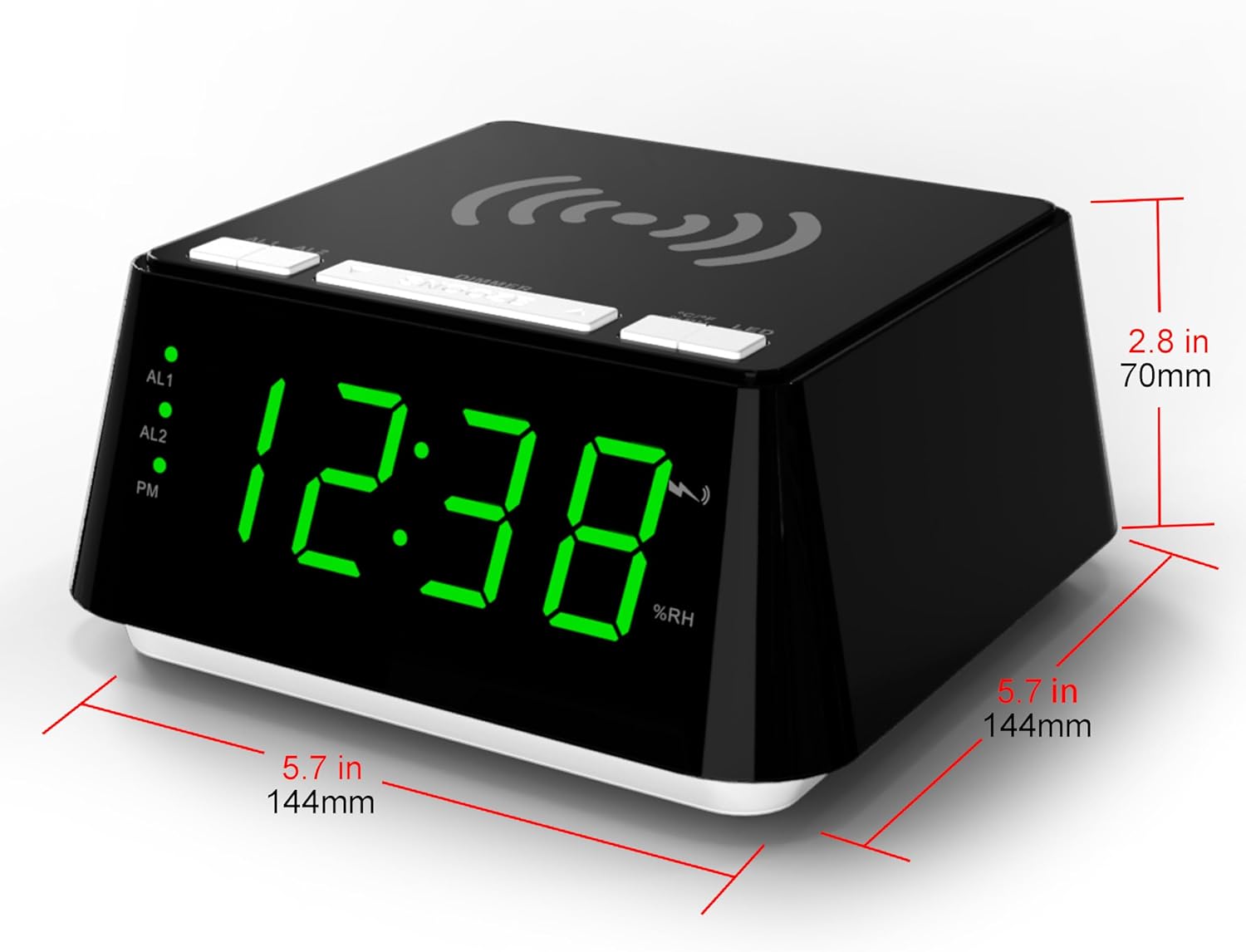
Billede 8: Diagram showing the dimensions of the iTOMA CKS801 alarm clock: 5.7 inches (144mm) in width, 5.7 inches (144mm) in depth, and 2.8 inches (70mm) in height.
| Feature | Detalje |
|---|---|
| Model | CKS801 |
| Dimensioner (L x B x H) | 14.4 x 13 x 7.11 cm (5.7 x 5.1 x 2.8 tommer) |
| Vægt | 381.02 g (0.84 lbs) |
| Display Type | Digital LED |
| Farve | Green (LED display color, product casing is black) |
| Strømkilde | AC Power Adapter (Batteries not required for operation) |
| Særlige funktioner | Alarm, Wireless Charging, USB Charging, Night Light, Temperature Display, Humidity Display |
Garanti og support
For warranty information or technical support, please refer to the documentation included with your purchase or visit the official iTOMA website. If you encounter any issues not covered in this manual, please contact iTOMA customer service for assistance.


