GTMedia V8 Finder BT03 DVB-S2 Satellite Signal Finder
Brugermanual
Indledning
This manual provides detailed instructions for the setup, operation, maintenance, and troubleshooting of your GTMedia V8 Finder BT03 DVB-S2 Satellite Signal Finder. This device is designed to assist in the precise alignment of satellite dishes by providing accurate signal strength and quality readings, connecting via Bluetooth to a mobile application.
Pakkens indhold
Kontroller venligst, at alle varer er til stede i din pakke:
- 1 x GTMedia V8 Finder BT03 DVB-S2 Unit
- 1 x Mini USB-kabel

Figur 1: The GTMedia V8 Finder BT03 package contents, including the device and a mini USB cable, alongside the product box.
Produkt overview
The GTMedia V8 Finder BT03 is a compact and efficient satellite signal finder. It features a DVB-S2 demodulator, allowing for precise signal acquisition. Its Bluetooth connectivity enables seamless integration with a dedicated mobile application for enhanced control and data visualization.

Figur 2: Top view of the GTMedia V8 Finder BT03, showing the LNB input connector and the device's compact design.

Figur 3: Vinklet view of the GTMedia V8 Finder BT03, highlighting the USB 5V input port for power.
Opsætning
Follow these steps to set up your GTMedia V8 Finder BT03:
- Strømforsyning til enheden: Connect the provided Mini USB cable to the "Mini USB 5V IN" port on the V8 Finder BT03. Connect the other end to a 5V power source, such as a USB wall adapter or a power bank. The device will power on automatically.
- Tilslutning til LNB: Connect the satellite signal cable from your LNB (Low Noise Block) to the "LNB IN" port on the V8 Finder BT03.
- Bluetooth-forbindelse:
- Download the official "V8 Finder" application from your mobile device's app store (available for Android and Apple).
- Aktiver Bluetooth på din mobilenhed.
- Open the "V8 Finder" application and follow the in-app instructions to connect to your V8 Finder BT03 device. The device name should appear in the app's Bluetooth scanning list.
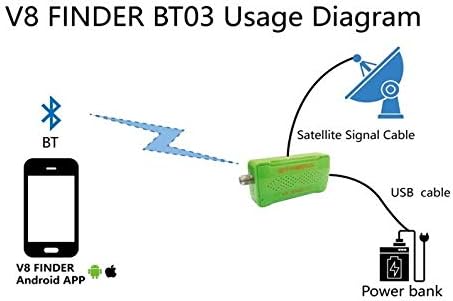
Figur 4: Diagram illustrating the connection setup for the V8 Finder BT03, showing the device connected to a satellite signal cable, powered by a USB cable to a power bank, and wirelessly connected via Bluetooth to a mobile phone running the V8 Finder app.
Betjeningsvejledning
Once connected, use the mobile application to operate the V8 Finder BT03:
- Satellitvalg: Within the app, select the desired satellite from the comprehensive list. The device supports full satellite selection.
- Signalopsamling: Adjust your satellite dish's azimuth and elevation. The app will display real-time signal strength and quality readings, allowing for precise alignment. The device supports various modulation schemes including DVB-S2 CCM, QPSK, 8PSK, 16APSK, and 32APSK, as well as Legacy DVB-S.
- Symbol Rate Support: The device supports symbol rates from 1 to 60 Mod. It also features automatic standard recognition and supports VCM mode and dummy frame insertion.
- Blind scanning: Utilize the fast blind scan feature for automatic acquisition of RF frequency and symbol rates.
- DiSEqC Control: The device provides DiSEqC™ v2.2 modulation output for full control of LNB and satellite antenna.
- Signal Quality Monitoring: High-performance equalizer and echo cancellation ensure accurate readings. Integrated DC cancellers remove DC components, and an IQ imbalance compensator is included. Automatic roll-off factor detection (0.35/0.25/0.20) and automatic spectrum inversion are also supported.
Opretholdelse
To ensure the longevity and optimal performance of your GTMedia V8 Finder BT03, follow these maintenance guidelines:
- Rensning: Use a soft, dry cloth to clean the device. Do not use liquid cleaners or aerosols, as they may damage the internal components.
- Opbevaring: Opbevar enheden et køligt, tørt sted væk fra direkte sollys og ekstreme temperaturer.
- Håndtering: Håndter enheden forsigtigt. Undgå at tabe den eller udsætte den for hårde stød.
- Magt: Always use the specified 5V power input. Using an incorrect voltage kan beskadige enheden.
Fejlfinding
If you encounter issues with your GTMedia V8 Finder BT03, refer to the following common problems and solutions:
| Problem | Mulig årsag | Løsning |
|---|---|---|
| Enheden tænder ikke. | Ingen strømforsyning eller defekt kabel. | Ensure the Mini USB cable is securely connected to a 5V power source. Try a different USB cable or power source. |
| Kan ikke oprette forbindelse via Bluetooth. | Bluetooth is off on mobile device; app not open; device not discoverable. | Ensure Bluetooth is enabled on your phone. Open the V8 Finder app. Restart both the V8 Finder BT03 and your mobile device. Ensure the device is within Bluetooth range. |
| No signal readings in app. | LNB not connected; faulty LNB; incorrect satellite selected; dish not aligned. | Check the connection between the LNB and the "LNB IN" port. Verify the LNB is functioning correctly. Ensure the correct satellite is selected in the app. Adjust dish alignment. |
| Inaccurate signal readings. | Interference; faulty cable; LNB issue. | Check for any sources of interference. Inspect the satellite cable for damage. Ensure the LNB is correctly positioned and functioning. |
Specifikationer
| Feature | Beskrivelse |
|---|---|
| Model | V8 Finder BT03 |
| Dimensioner | 42 x 95 x 15 mm |
| Weight (1 set) | 0.12 kg |
| Farve | Blue (LED display), Green (device body) |
| Output Interface | LNB IN*1, Mini USB 5V IN*1 |
| Demodulation Standard | Multi-standard demodulation and decoding: DVB-S2 CCM, QPSK+1/4, 1/3, 2/5, 1/2, 3/5, 2/3, 3/4, 4/5, 5/6, 8/9, 9/10; 8PSK+3/5, 2/3, 3/4, 5/6, 8/9, 9/10; 16APSK+2/3, 3/4, 4/5, 5/6, 8/9, 9/10; 32APSK+3/4, 4/5, 5/6, 8/9, 9/10. Legacy DVB-S, QPSK+1/2, 2/3, 3/4, 5/6, 7/8. |
| Understøttede tilstande | VCM mode supported, Dummy frame insertion supported, Automatic standard recognition. |
| Symbolrate | Supports 1 to 60 Mod. |
| Scanningsfunktioner | Fast blind scan for RF frequency and symbol rate acquisition. |
| Signalbehandling | High-performance equalizer, Front-end echo cancellation, Simple AGC interface, Integrated DC cancellers, IQ imbalance compensator, Automatic roll-off factor detection (0.35/0.25/0.20), Automatic spectrum inversion. |
| Kontrollere | DiSEqC™ v2.2 modulation output for LNB and satellite antenna control. |
| Forbindelse | Bluetooth connection for Android and Apple applications. |
Garanti og support
For warranty information and technical support, please refer to the official GTMedia website or contact their customer service directly. This manual does not contain specific warranty details or support contact information.


