Indledning
This manual provides comprehensive instructions for the installation, operation, and maintenance of your PINEWORLD Q303Plus Smart Door Lock. This intelligent lock offers advanced security features and multiple unlocking methods for enhanced home security.
The PINEWORLD Q303Plus is designed with a durable 304 Stainless Steel body and an anti-collision acrylic panel, ensuring longevity and resistance. It integrates a biometric fingerprint module, touchscreen keypad, RFID card reader, and traditional mechanical key access.
Nøglefunktioner
- Four Unlocking Methods: Fingerprint, User Password, RFID Card, and Mechanical Key.
- Høj kapacitet: Supports up to 100 fingerprints and 100 ID cards.
- Advanced Biometric Recognition: Bio-Electrostatic Fingerprint Identification Technology for fast (<0.4s) and accurate recognition, including elderly and children's fingerprints.
- Anti-kig-adgangskode: Allows adding random numbers before and after the correct password to protect privacy.
- Nødkraft: Micro-USB emergency charging port for power bank access if batteries are depleted.
- Sikkerhedsfunktioner: Doorbell function, Burglar alarm, Low battery reminder, Idle handle design to prevent forcible entry, C-class stainless steel lock body for enhanced resistance.
- Automatisk låsning: Automatically locks when the door is closed; deadbolt engages by pulling up the door handle.
- Vendbart håndtag: Supports both right and left handle directions.
- Stemmeguide: Provides voice prompts for easier operation.

Figur 1: Overview of the four primary unlocking methods for the PINEWORLD Q303Plus Smart Door Lock.
Specifikationer
| Parameter | Værdi |
|---|---|
| Model | Q303 |
| Farve | Black front with Red Copper side (Black Silver) |
| Tilslutningstype | Wireless Fingerprint Smart Lock |
| Batteritype | R6 AAA Size Battery (not included) |
| Materiale | 304 Stainless Steel (lock body), Anti-collision acrylic panel (surface) |
| Håndtagslængde | 14 mm |
| Mortise Standard | 24*240 mm |
| Anbefalet arbejdstemperatur | -20°C to 50°C (>= -13°F) |
| Gældende dørtykkelse | 40 mm til 120 mm |
| Applicable Door Types | Composite Door, Wooden Door, Copper Door, Security Door, Stainless Steel Door |
| Produktdimensioner | 27.43 x 16 x 8.89 cm |
| Varens vægt | 454 g |
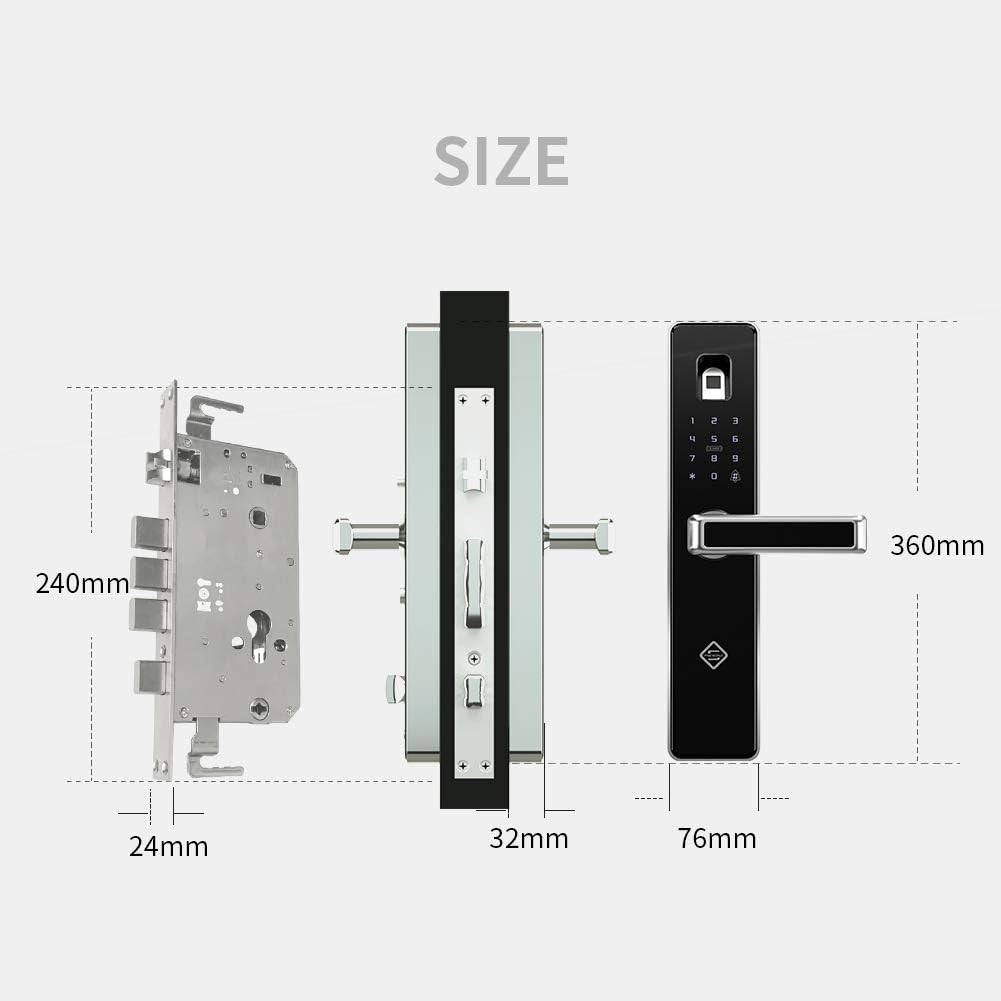
Figure 2: Dimensional specifications of the PINEWORLD Q303Plus Smart Door Lock components.
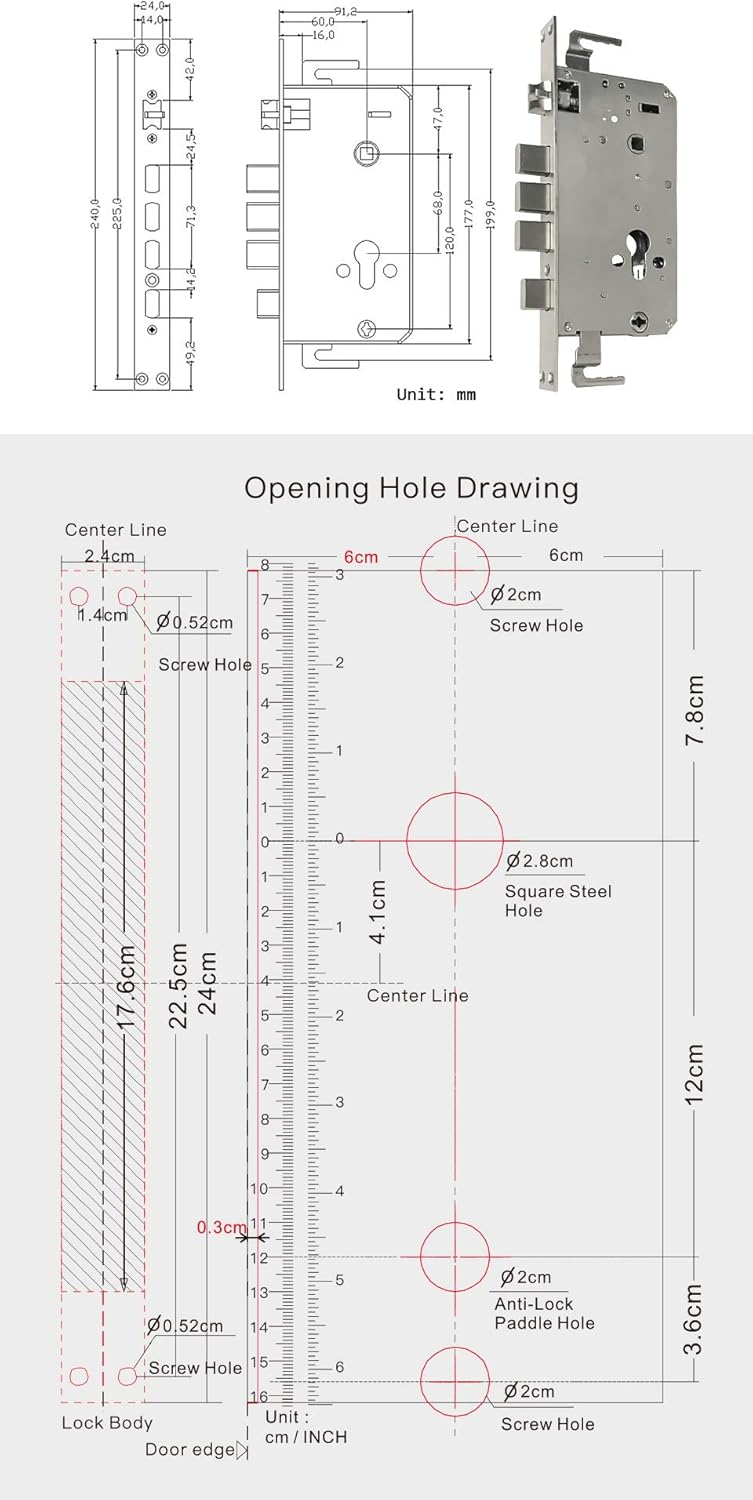
Figure 3: Detailed opening hole drawing for door preparation during installation.
Opsætning og installation
Before beginning installation, ensure your door thickness is between 40mm and 120mm. It is recommended to review the installation video for a visual guide.
For a detailed visual guide on installation, please refer to the official installation video by searching "PINEWORLD Q303" on YouTube or by visiting: https://youtu.be/oEx_O_a3sTAY.
General Installation Steps (Refer to video for details):
- Forbered døren: Ensure the door meets the thickness requirements. Use the provided template (refer to Figure 3) to drill necessary holes for the mortise and lock components.
- Installer mortise: Insert the mortise into the prepared cavity on the door edge. Ensure the lock tongue direction is correct for your door's opening. The lock features an interchangeable two-direction lock tongue.
- Installer frontpanelet: Connect the front panel (with keypad and fingerprint sensor) to the mortise, feeding necessary cables through the door.
- Install the Rear Panel: Connect the rear panel to the front panel, securing it with screws. Ensure all cables are properly connected and not pinched.
- Indsæt batterier: Install R6 AAA size batteries (not included) into the battery compartment.
- Test drift: After installation, test all unlocking methods (fingerprint, password, RFID card, mechanical key) and ensure the handle operates smoothly and the deadbolt engages correctly.

Figure 4: The PINEWORLD Q303Plus Smart Door Lock assembled, ready for installation.
Betjeningsvejledning
Oplåsningsmetoder:
- Lås op med fingeraftryk: Place a registered finger on the fingerprint sensor. The lock will unlock if the fingerprint is recognized. The system identifies fingerprints in less than 0.4 seconds.
- Adgangskodelås: Enter your registered password on the touchscreen keypad. For enhanced security, you can use the anti-peeping feature by entering random numbers before and after your actual password. The lock will unlock as long as the correct password sequence is embedded within the entered numbers.
- RFID-kortoplåsning: Present a registered RFID card to the IC card sensing button area on the lock. The lock will unlock upon successful recognition.
- Mekanisk nøgleoplåsning: In case of emergency or battery depletion, insert the mechanical key into the hidden keyhole and turn to unlock the door.
Låser døren:
- Automatisk låsning: The door will automatically lock when closed.
- Deadbolt Engagement: To engage the deadbolt for additional security, pull the door handle upward.
Andre funktioner:
- Dørklokke funktion: The lock includes a doorbell feature.
- Stemmeguide: Follow the voice prompts for easier setup and operation.
- Nødopladning: If batteries are completely drained, connect a power bank to the Micro-USB emergency charging port to temporarily power the lock and gain access.

Figure 5: Key components and features of the PINEWORLD Q303Plus Smart Door Lock.

Figure 6: The biometric fingerprint sensor in action, demonstrating rapid identification.
Opretholdelse
- Udskiftning af batteri: The lock will provide a low battery reminder. Replace all R6 AAA batteries promptly when indicated to ensure continuous operation.
- Rensning: Tør låsens overflade af med en blød, tør klud. Undgå at bruge slibende rengøringsmidler eller opløsningsmidler, der kan beskadige overfladen eller de elektroniske komponenter.
- Pleje af fingeraftrykssensor: Hold fingeraftrykssensoren ren og fri for snavs eller fugt for optimal ydeevne.
- Mekanisk nøgle: Store the mechanical key in a safe, accessible location outside the secured area for emergency use.
Fejlfinding
| Problem | Mulig årsag | Løsning |
|---|---|---|
| Lås reagerer ikke. | Døde batterier. | Replace batteries. Use Micro-USB emergency charging if needed. |
| Fingeraftryk ikke genkendt. | Fingerprint sensor dirty; unregistered fingerprint; dry/wet finger. | Clean sensor. Ensure finger is registered. Try again with a clean, appropriately moist finger. |
| Adgangskoden er ikke accepteret. | Incorrect password entered; anti-peeping feature misunderstood. | Verify password. Ensure correct sequence is entered, even with random numbers. |
| RFID card not working. | Card not registered; card damaged. | Register the card. Try another registered card. |
| Handle is loose or not engaging. | Installation issue; internal mechanism problem. | Recheck installation steps. Contact customer support if issue persists. |
| Doorbell function not working. | Problem med intern forbindelse. | Ensure proper installation. Contact customer support. |

Figure 7: The PINEWORLD Q303Plus features an idle handle design to prevent common 'cat eye' unlocking methods.
Garanti og support
PINEWORLD offers a money-back guarantee within 10 days if you are not satisfied with the product. A 30-day return policy is available for quality-related issues.
The product includes 3 years of technical guidance and service. For any product-related questions or technical assistance, please feel free to contact PINEWORLD customer support via Amazon Message. We aim to respond within 24 hours.


