Indledning
This manual provides essential information for setting up, operating, maintaining, and troubleshooting your Dell Precision 3510 Business Workstation Laptop PC. This product has been professionally inspected and tested to ensure it functions and appears like new, as part of the Amazon Renewed program.

Figure 1: Dell Precision 3510 Laptop displaying the Windows 10 operating system desktop.
Opsætning
1. Udpakning
Carefully remove the laptop and all accessories from the packaging. Ensure the power adapter is present.
2. Tilslutning af strømadapteren
- Tilslut strømkablet til strømadapteren.
- Sæt strømadapteren i en stikkontakt.
- Connect the adapter's barrel connector to the power input port on the laptop. The power input port is typically located on the side or rear of the laptop.
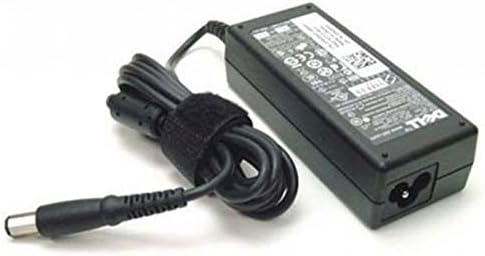
Figure 2: The Dell laptop power adapter, used to supply power to the device.
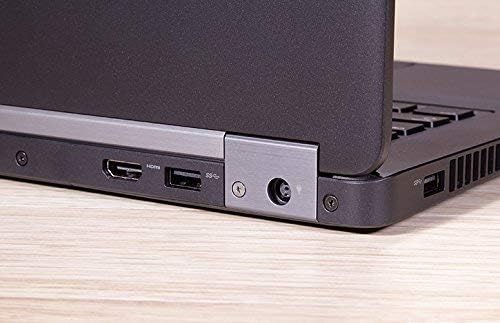
Figur 3: Et nærbillede view of the laptop's side, illustrating the HDMI port, a USB port, and the circular power input port.
3. Initial Boot
Once connected to power, open the laptop lid and press the power button, usually located above the keyboard or on the side. The laptop will begin the boot process. Follow any on-screen instructions for initial Windows 10 setup.
Drift
1. Tænd/sluk
- For at tænde: Tryk på tænd/sluk-knappen.
- For at lukke ned: Click the Start button (Windows icon) > Power > Shut down.
- For at genstarte: Click the Start button (Windows icon) > Power > Restart.
- At sove: Click the Start button (Windows icon) > Power > Sleep, or close the laptop lid.
2. Brug af tastatur og touchpad

Figure 4: The full keyboard layout with numeric keypad and the integrated touchpad with physical buttons on the Dell Precision 3510.
The laptop features a full-size keyboard and a multi-touch touchpad. Use the touchpad for cursor control and gestures. External mice can be connected via USB ports.
3. Tilslutning af eksterne enheder
The Dell Precision 3510 offers various ports for connecting external devices:
- USB-porte: For connecting external drives, mice, keyboards, and other USB devices.
- HDMI-port: Til tilslutning til eksterne skærme eller projektorer.
- VGA port: Til tilslutning til ældre eksterne skærme eller projektorer.
- Ethernet-port (RJ-45): Til kablede netværksforbindelser.
- Lydstik: Til hovedtelefoner eller eksterne højttalere.

Figur 5: En detaljeret view of the laptop's side, highlighting the Ethernet (RJ-45) port and the VGA port for video output.
Opretholdelse
1. Rensning
- Skærm: Brug en blød, fnugfri klud lidt damprengøres med vand eller et skærmrensemiddel. Sprøjt ikke væske direkte på skærmen.
- Tastatur og kabinet: Brug en blød klud. En dåse trykluft kan hjælpe med at fjerne støv mellem tasterne.
2. Batteripleje
To prolong battery life, avoid extreme temperatures and do not leave the laptop fully charged or fully discharged for extended periods. For optimal performance, allow the battery to discharge partially before recharging.
3. Softwareopdateringer
Regularly update your Windows 10 operating system and drivers to ensure optimal performance and security. Access Windows Update through the Settings menu.
Fejlfinding
This section addresses common issues you might encounter with your Dell Precision 3510.
1. Laptop Not Powering On
- Ensure the power adapter is securely connected to both the laptop and a working wall outlet.
- Kontroller, at stikkontakten fungerer ved at tilslutte en anden enhed.
- If using a power strip, ensure it is switched on.
2. Problemer med skærm
- If the screen is blank, try adjusting the display brightness using the function keys (Fn + F-keys).
- If an external monitor is connected, ensure the correct display output is selected (Fn + F-keys, or Windows Display Settings).
- Genstart den bærbare computer.
3. Langsom ydeevne
- Luk unødvendige programmer, der kører i baggrunden.
- Søg efter og installer eventuelle ventende Windows-opdateringer.
- Sørg for tilstrækkelig ledig plads på SSD'en.
- Kør en virus- og malwarescanning.
Specifikationer
| Model | Dell Precision 3510 |
| Processor | Intel Quad Core i5-6440HQ (2.3 GHz) |
| VÆDDER | 8 GB DDR4 |
| Opbevaring | 256 GB SSD |
| Grafik | AMD FirePro W5130M 2GB GDDR5 |
| Vise | 15.6 Inches, 1366 x 768 pixels |
| Operativsystem | Windows 10 Home |
| Trådløs forbindelse | 802.11abg, 802.11bgn, 802.11n |
| Havne | HDMI, USB, Ethernet (RJ-45), VGA, Audio Jack |
| Dimensioner (LxBxH) | 14.8 x 10 x 1.2 tommer |
| Vægt | 8.86 pund |
Garanti og support
Amazon Fornyet Garanti
This Dell Precision 3510 laptop is covered by the Amazon Renewed Guarantee. If you are not satisfied with your purchase, renewed products are eligible for replacement or refund within 90 days of receipt under this guarantee. For specific terms and conditions, please refer to the Amazon Renewed program details.
Teknisk support
For any technical issues or questions not covered in this manual, please contact the seller directly through your Amazon order history for assistance. They can provide product-specific support and guidance.


