1. Introduktion
This manual provides detailed instructions for the Cable Matters 10Gbps USB C Multiport Adapter, Model 201063-BLK. This device expands the connectivity of your USB-C or Thunderbolt 3/4/USB4 enabled computer, offering high-speed data transfer through various ports including USB-A, USB-C, MicroSD, UHS-II SD Card Reader, and a SATA 3.0 connection. Please read this manual thoroughly before use to ensure proper operation and to maximize the product's capabilities.
2. Sikkerhedsoplysninger
- Hold enheden væk fra vand, ild og høje temperaturer.
- Forsøg ikke selv at skille enheden ad eller reparere den. Kontakt kvalificeret servicepersonale.
- Use only the provided or recommended power adapter if external power is required.
- Undgå at tabe eller udsætte enheden for kraftige stød.
- Sørg for tilstrækkelig ventilation omkring enheden under drift.
3. Pakkens indhold
Bekræft at alle varer er til stede i din pakke:
- Cable Matters 10Gbps USB C Multiport Adapter (Model 201063-BLK)
- Optional AC Power Adapter (if included with your specific model)
- Instruktionsmanual
4. Produktet er slutview
The Cable Matters 10Gbps USB C Multiport Adapter is designed to expand your device's connectivity. It features multiple ports for various peripherals and storage devices.

Figur 4.1: Forside view of the Cable Matters 10Gbps USB C Multiport Adapter.
Port layout

Figur 4.2: Detaljeret view af adapterens porte.
- USB-C 3.1 Gen 2 (10 Gbps): For connecting USB-C peripherals.
- USB-A 3.1 Gen 2 (10 Gbps): For connecting USB-A peripherals.
- MicroSD Card Reader (UHS-I): For MicroSD, MicroSDHC, and MicroSDXC cards.
- UHS-II SD-kortlæser: For SD, SDHC, and SDXC cards, supporting UHS-II speeds for faster transfers.
- SATA 3.0 (2.5" or 3.5" Drive): For connecting SATA SSDs or HDDs.
- DC-IN (12V/2A): For optional external power when connecting power-hungry devices.
5. Opsætning
Follow these steps to set up your multiport adapter:
- Opret forbindelse til værtsenhed: Plug the integrated USB-C cable of the multiport adapter into an available USB-C or Thunderbolt 3/4/USB4 port on your computer.
- Valgfri strømtilslutning: If you plan to connect 3.5-inch SATA hard drives or multiple power-hungry devices, connect the optional AC power adapter to the DC-IN port on the multiport adapter and then to a power outlet.
- Driver installation: The adapter is plug-and-play and typically does not require additional drivers for most operating systems. Your computer should automatically detect and install the necessary drivers.
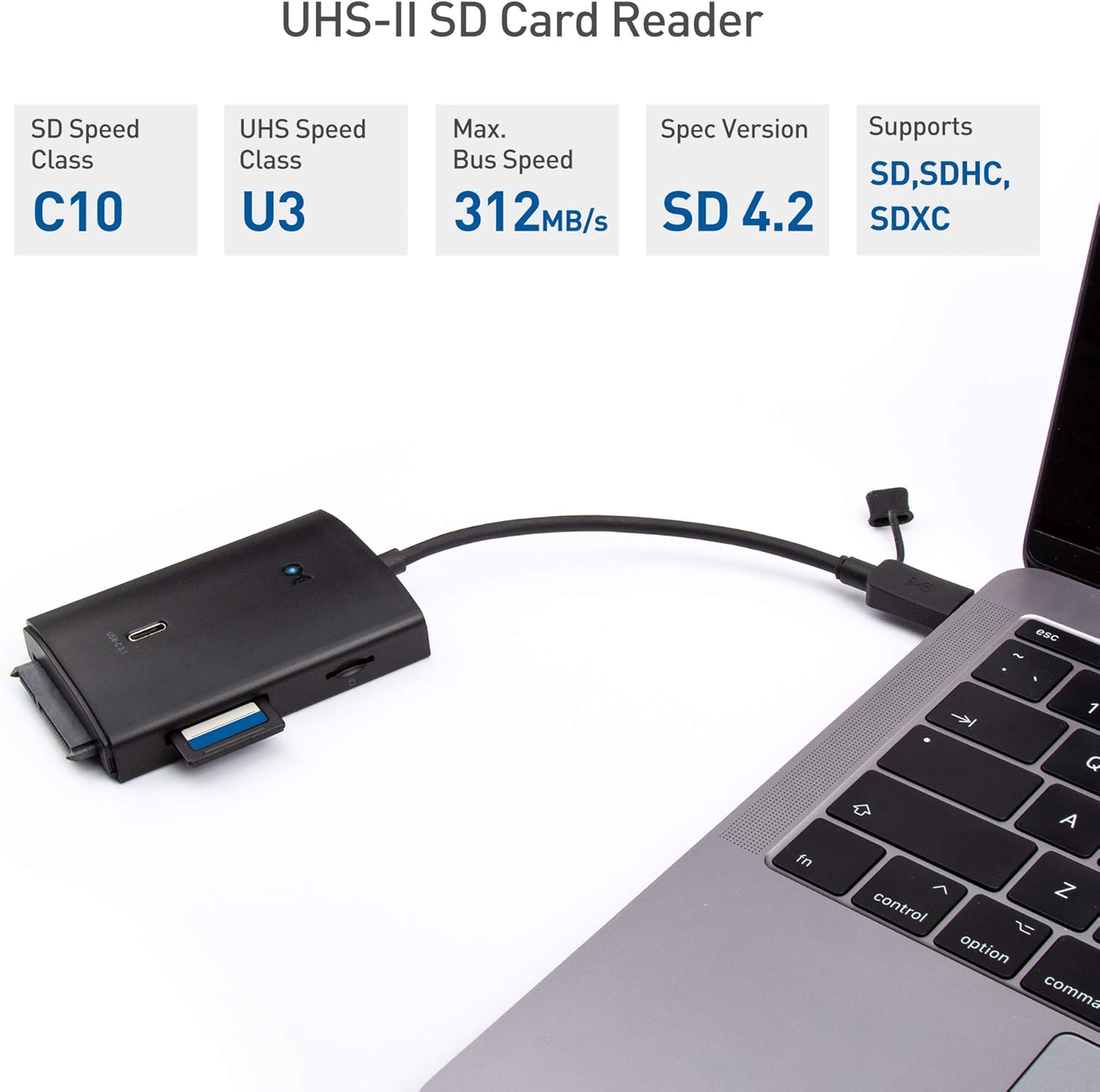
Figure 5.1: Connecting the adapter to a laptop.

Figure 5.2: Optional AC power adapter connection.
6. Betjeningsvejledning
Once connected, you can use the various ports on the adapter:
6.1. USB-A and USB-C Data Ports
- Connect USB-A or USB-C peripherals such as flash drives, external hard drives, keyboards, or mice to the respective 10Gbps ports.
- These ports support USB 3.1 Gen 2 speeds, offering data transfer rates up to 10Gbps.
6.2. SD and MicroSD Card Readers
- Insert your SD or MicroSD card into the corresponding slot. The UHS-II SD card reader provides significantly faster transfer speeds compared to UHS-I readers.
- Sørg for, at kortet er isat korrekt for at undgå skader.

Figure 6.1: Inserting an SD card.
6.3. SATA 3.0 Port
- Connect a 2.5-inch or 3.5-inch SATA SSD/HDD directly to the SATA 3.0 port.
- For 3.5-inch drives or when connecting multiple devices, ensure the optional AC power adapter is connected to provide sufficient power.
6.4. Data Transfer and Speed
The adapter supports high-speed data transfer. The actual speed achieved will depend on the capabilities of your host device, the connected peripherals, and the quality of cables used.
Video 6.1: Demonstration of the adapter's features, including port overview, connection, and speed tests for USB 3.1 Gen 2 and UHS-II SD card transfers.
7. Vedligeholdelse
- Clean the adapter with a soft, dry cloth. Do not use liquid or aerosol cleaners.
- Keep the ports free of dust and debris to ensure optimal connection.
- Opbevar adapteren et køligt og tørt sted, når den ikke er i brug.
8. Fejlfinding
8.1. Enhed ikke genkendt
- Ensure the adapter's USB-C cable is securely connected to your computer.
- Try connecting the adapter to a different USB-C or Thunderbolt 3/4/USB4 port on your computer.
- Genstart din computer.
8.2. Connected Device Disconnecting or Not Functioning
- If connecting power-hungry devices (e.g., 3.5-inch HDDs, multiple external drives), ensure the optional AC power adapter is connected to the multiport adapter and a power outlet.
- Verify that the connected device itself is functioning correctly when connected directly to your computer (if possible).
- Check for any loose connections between the peripheral and the adapter.
8.3. Langsomme dataoverførselshastigheder
- The maximum speed is limited by the slowest component in the connection chain (e.g., your computer's USB port, the connected device, or the cable).
- Ensure your computer's USB-C port supports USB 3.1 Gen 2 (10Gbps) or Thunderbolt 3/4/USB4 for optimal performance.
- Use high-quality cables for connected peripherals.
- For UHS-II SD cards, ensure you are using the dedicated UHS-II slot.
9. Specifikationer

Figur 9.1: Produktdimensioner.
| Feature | Detalje |
|---|---|
| Modelnummer | 201063-BLK |
| Produktdimensioner | 3.5 x 2.3 x 0.6 tommer |
| Varens vægt | 8 ounce |
| Mærke | Kabel betyder noget |
| Farve | Sort |
| Hardware-interface | Thunderbolt, USB, USB Type C |
| Kompatible enheder | Card Readers, Laptops, Smartphones |
| Samlet USB-porte | 2 (1x USB-A 10Gbps, 1x USB-C 10Gbps) |
| Kortlæsere | UHS-II SD, UHS-I MicroSD |
| SATA-port | SATA 3.0 (for 2.5"/3.5" drives) |
| Valgfri strømindgang | DC-IN 12V/2A |
10. Garanti og support
Cable Matters products are backed by a limited warranty. For specific warranty details, technical support, or to register your product, please visit the official Cable Matters webwebstedet eller kontakt deres kundeservice. Du kan også besøge Cable Matters Store for mere information.


