1. Introduktion
The Pyle PRJG98.5 is a compact digital multimedia projector designed for versatile projection of images, videos, audio, and text files. It supports Full HD 1080p resolution and features multiple input interfaces, making it suitable for home entertainment, office presentations, and educational use. This manual provides detailed instructions for setting up, operating, and maintaining your projector.
2. Sikkerhedsoplysninger
- Se ikke direkte ind i projektorlinsen, når lamp er tændt.
- Sørg for tilstrækkelig ventilation omkring projektoren for at forhindre overophedning. Bloker ikke ventilationsåbningerne.
- Brug kun den strømadapter, der følger med enheden.
- Avoid placing the projector in direct sunlight, near heat sources, or in environments with high humidity or dust.
- Forsøg ikke at skille projektoren ad eller ændre den. Overlad al service til kvalificeret personale.
- Hold projektoren væk fra vand eller andre væsker.
3. Pakkens indhold
Kontroller venligst, at alle varer er til stede i pakken:
- Digital Projector (Pyle PRJG98.5)
- Fjernbetjening
- VGA-kabel
- AC-kabel
- Strømledning
4. Produktet er slutview
The Pyle PRJG98.5 projector features a compact design with various input options and controls for an optimal viewoplevelse.

Figur 4.1: Pyle PRJG98.5 Digital Multimedia Projector and included remote control. The projector is black with a lens on the front and control buttons on top. The remote is also black with various function buttons.
4.1 Front- og toppanel
- Projektionsobjektiv: Sender billedet ud på skærmen.
- Fokusring: Justerer billedets skarphed.
- Keystone-justering: Corrects trapezoidal distortion.
- Kontrolknapper: Power, menu navigation, input selection.
4.2 Bagpanel (tilslutningsmuligheder)

Figur 4.2: Rear panel of the Pyle PRJG98.5 Projector, displaying various input ports including AV, USB (x2), HDMI, VGA, and DC power input. This allows connection to multiple devices.
- HDMI -indgang: Connects to devices like Blu-Ray players, game consoles, laptops.
- USB-porte (x2): For multimedia file playback from USB drives or charging devices.
- VGA (RGB) Input: Connects to computers and laptops.
- AV (RCA) Input: Connects to older video sources.
- DC strømindgang: Tilsluttes strømadapteren.
- Lydudgang: Til tilslutning af eksterne højttalere eller hovedtelefoner.
5. Opsætning
5.1 Placering
Position the projector on a stable, flat surface or mount it overhead. Ensure the projector is perpendicular to the projection surface for the best image quality. The adjustable screen size ranges up to 120 inches.
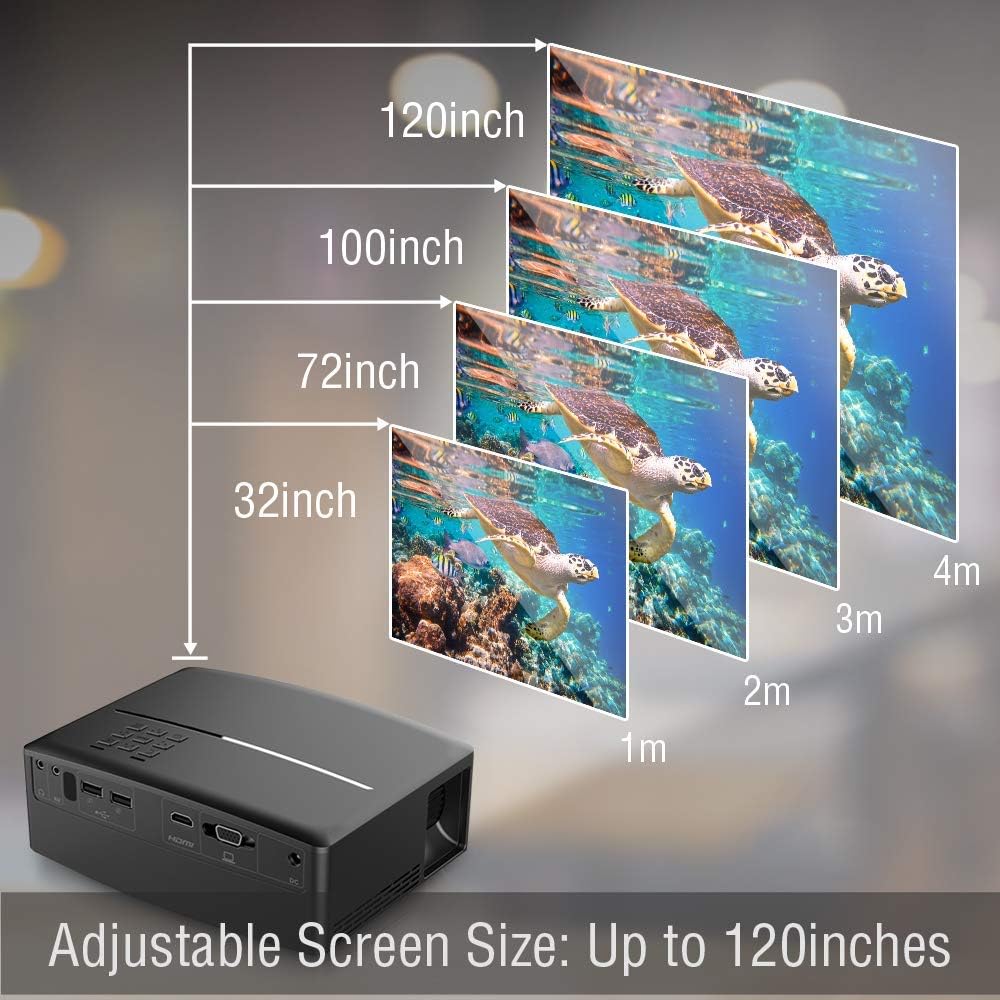
Figur 5.1: Illustration of the adjustable screen size capability of the Pyle PRJG98.5 Projector, showing projection sizes from 32 inches to 120 inches at varying distances from the screen.
5.2 Strømtilslutning
- Connect the power cord to the AC cable.
- Plug the AC cable into the DC Power Input port on the projector.
- Sæt den anden ende af netledningen i en stikkontakt.
5.3 Tilslutning af inputenheder
Projektoren understøtter forskellige inputkilder:
- HDMI: Connect an HDMI cable from your device (e.g., laptop, game console, Blu-Ray player) to the HDMI port on the projector.
- USB: Insert a USB flash drive into one of the USB ports for multimedia playback.
- VGA: Connect a VGA cable from your computer to the VGA port on the projector.
- AV: Use an RCA cable to connect to devices with AV output.
5.4 Billedjustering
After powering on the projector, adjust the image for clarity and proper display.
- Fokusjustering: Rotate the focus ring around the lens until the projected image is sharp and clear.
- Keystone-korrektion: If the image appears trapezoidal (wider at the top or bottom), use the keystone adjustment dial or lever on the projector to correct the distortion. The projector supports a 15-degree keystone angle adjustment.

Figur 5.2: Visual representation of keystone angle adjustment, showing how to correct a distorted rectangular display to a proper rectangular display using the projector's adjustment mechanism. The projector supports a 15-degree keystone adjustment.
6. Betjening
6.1 Tænd/sluk
- For at tænde: Tryk på tænd/sluk-knappen på projektoren eller fjernbetjeningen. Indikatorlampen tændes.
- For at slukke: Tryk på tænd/sluk-knappen igen. Bekræft nedlukningen, hvis du bliver bedt om det.
6.2 Valg af indgangskilde
After connecting your input device, select the corresponding source:
- Press the "Input" button on the projector or remote control.
- Use the arrow keys to navigate through the input options (HDMI, USB, VGA, AV).
- Tryk på "OK" eller "Enter" for at bekræfte dit valg.
6.3 Multimedia Playback (USB)
The projector supports various digital media file formats including AVI, MPG, MOV, MP3, WMV, and TXT.
- Indsæt et USB-flashdrev i USB-porten.
- Vælg "USB" som inputkilde.
- Naviger gennem file browser to select the desired media file (image, video, audio, text).
- Press "OK" or "Enter" to play the file.
6.4 Menunavigation
Use the "Menu" button on the projector or remote to access settings. Navigate with arrow keys and confirm with "OK" or "Enter". Options include picture adjustment, sound settings, and system settings.
7. Vedligeholdelse
7.1 Rengøring af linsen
Brug en blød, fnugfri klud, der er specielt designet til optiske linser, til forsigtigt at tørre projektorlinsen af. Brug ikke slibende rengøringsmidler eller overdreven kraft.
7.2 Rengøring af projektorhuset
Tør projektorens yderside af med en blød, tør klud. Ved genstridigt snavs, tør letampSkyl kluden med vand, og tør derefter straks efter.
7.3 Lamp Liv
LED lamp in your projector has an estimated life of 30,000+ hours. No user-replaceable lamp vedligeholdelse er påkrævet.
8. Fejlfinding
| Problem | Mulig årsag | Løsning |
|---|---|---|
| Intet billede vises | Strøm ikke tilsluttet; Forkert inputkilde; Enhed ikke tilsluttet korrekt. | Check power connection; Select correct input source; Ensure cables are securely connected. |
| Billedet er sløret | Fokus ikke justeret; Projektoren er for langt/tæt på skærmen. | Adjust the focus ring; Reposition the projector. |
| Billedet er trapezformet | Projektoren er ikke vinkelret på skærmen. | Adjust keystone correction. |
| Ingen lyd | Volume too low; Muted; External speakers not connected. | Increase volume; Unmute; Connect external speakers if desired. |
| Fjernbetjening virker ikke | Batteries low/dead; Obstruction between remote and projector. | Udskift batterierne; Sørg for frit udsyn til IR-modtageren. |
9. Specifikationer
| Billedteknologi | 4.0'' LCD + LED Lamp |
| Adjustable Screen Size | Up to 120'' -inches |
| Indfødt opløsning | 800 x 480 SVGA, 1080p Support |
| Farvetemperatur | Full Color, 16.7K |
| Kontrastforhold | 2,200:1 (Dynamic: 10,000:1) |
| Lysstyrke | 1,800 lumen |
| Lamp Liv | 30,000+ timer |
| Skalaforhold | 16:9, 4:3 |
| Opdateringshastighed | 60 Hz |
| Keystone Angle Adjustment | 15 ° grad |
| Digital File Støtte | AVI, MPG, MOV, MP3, WMV, TXT & More |
| Højttalerkraft | 2 x 5 watt |
| Strømforsyning | 120V (12V Power Adapter) |
| Dimensioner (L x B x H) | 7.5 cm x 6.3 cm x 2.7 cm |
| Varens vægt | 1.99 pund |
10. Garanti og support
For warranty information or technical support, please refer to the warranty card included with your product or visit the official Pyle webwebstedet. Behold din købskvittering som købsbevis.


