Indledning
This manual provides detailed instructions for the QIACHIP Wireless 433Mhz RF Transmitter and Receiver Module Kit. It covers product overview, specifications, setup, operating modes, and troubleshooting to ensure proper and safe operation of your modules.
Produkt overview
The QIACHIP 433Mhz RF module kit includes both transmitter and receiver units designed for wireless control applications. Each kit contains 10 transmitter modules, 10 receiver modules, and 20 antennas. These modules utilize the EV1527 learning code for secure communication and offer multiple working modes.

Image: A complete set of QIACHIP 433Mhz RF transmitter and receiver modules with antennas.

Image: A single pair of QIACHIP 433Mhz RF transmitter and receiver modules, illustrating one complete unit.
Specifikationer
Transmitter Module (TX118SA-4)
- Sendeeffekt: 11dBm
- Emissionsstrøm: 10 mA
- Brandhastighed: Maximum 10KB/S
- Operation Voltage: DC 3V-24V
- Encoding: EV1527 Learning Code
- Each module has a unique address code.
Receiver Module (RX480-E4)
- Working Voltage: DC 3.3V-5V
- Stillestrøm: ≤5mA
- Udgangsstrøm: 10 mA
- Arbejdshyppighed: 433 MHz
- Modtag følsomhed: -108dB
- Arbejdstemperatur: -25°C til 75°C
- Arbejdstilstande: Momentary, Toggle (Self-locking), Interlocked
- Produktion: 4 channel CMOS level signal corresponding to remote control A, B, C, D buttons.
Opsætning og ledningsføring
Proper wiring is essential for the functionality of the RF modules. Ensure all connections are secure and match the pin descriptions.
Receiver Module Pin Instruction

Billede: Nærbillede view of the QIACHIP receiver module showing pin labels (VT, D3, D2, D1, D0, +V, GND).
- GND: Ground or negative pole connection.
- +V: DC 3.3V-5V input for power.
- D0, D1, D2, D3: Data output pins. These correspond to the four channels of the remote control.
- VT: Output status indicator.
- MYRE: Antenna connection point. Solder the provided antenna for optimal range.
Transmitter Module Wiring Example

Image: A simplified circuit diagram illustrating the connection of the TX118SA-4 transmitter module to a DC 3V-24V power source and its wireless signal transmission to a receiver.
Connect the transmitter module to a DC power source within the 3V-24V range. The LED on the transmitter indicates operation. Ensure the antenna is properly connected to maximize transmission range.
Operating Modes and Pairing
The receiver module supports three working modes: Momentary, Toggle (Self-locking), and Interlocked. The mode must be set før pairing the transmitter and receiver.

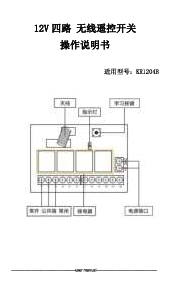
Image: The receiver module with the 'Learning button' highlighted, used for setting operating modes and pairing.
Setting Working Modes and Pairing
- Clear Existing Codes (Optional but Recommended): Press and hold the learning button on the receiver module for approximately 8 seconds until the indicator LED flashes rapidly and then turns off. This clears all previously paired transmitters.
- Vælg driftstilstand:
- Momentary Mode (Inching): Tryk på læringsknappen engang. The LED will flash once.
- Toggle Mode (Self-Lock): Tryk på læringsknappen to gange. The LED will flash twice. In this mode, pressing a button on the transmitter turns the corresponding channel ON, and pressing it again turns it OFF.
- Interlocked Mode: Tryk på læringsknappen tre gange. The LED will flash three times. In this mode, pressing one button on the transmitter turns its corresponding channel ON and simultaneously turns OFF any other active channels.
- Parring af senderen: After selecting the desired mode, press the learning button on the receiver module engang (for any mode). The LED will turn on, indicating it is ready for pairing. Then, immediately press any button on your transmitter. The receiver's LED will flash rapidly and then turn off, indicating successful pairing.
- Test funktionalitet: Press the paired button on the transmitter to verify the receiver responds according to the selected operating mode.
Important Note: The working mode must be set before pairing. Changing the mode after pairing may require re-pairing the transmitter.
Fejlfinding
- Modulet svarer ikke:
- Verify power connections to both transmitter and receiver.
- Ensure the transmitter and receiver are properly paired. Clear existing codes and re-pair if necessary.
- Check the operating mode setting. Incorrect mode can lead to unexpected behavior.
- Confirm the antenna is securely attached to both modules for optimal range.
- Begrænset rækkevidde:
- Ensure antennas are properly connected and not obstructed.
- Avoid placing modules near large metal objects or other sources of RF interference.
- Kontroller strømforsyningen voltage for both modules; insufficient voltage can reduce range.
- Forkert outputadfærd:
- This is often due to an incorrect working mode setting. Clear codes, set the desired mode, and then re-pair the transmitter.
- Ensure your external circuitry connected to the output pins (D0-D3) is correctly wired and compatible with CMOS level signals.
Opretholdelse
These modules are designed for durability and generally require minimal maintenance. Keep the modules clean and dry. Avoid exposing them to extreme temperatures, humidity, or corrosive environments. Ensure all wiring connections remain secure.
Supportinformation
For further assistance or technical inquiries, please refer to the QIACHIP official support channels or contact your retailer. Detailed product information and additional resources may be available on the manufacturer's webwebsted.