1. Introduktion
This manual provides comprehensive instructions for the installation, setup, operation, and maintenance of your Kwikset Smartcode 912 Z-Wave Plus Keypad Lever Lock. This keyless entry system offers enhanced security and convenience for your home.
The Smartcode 912 integrates Z-Wave technology, allowing for remote access and control when connected to a compatible smart home system. It features a backlit keypad for easy code entry, one-touch locking, and an auto-locking function. The lock also incorporates SmartKey Security for rekeying convenience.
2. Sikkerhedsoplysninger
Please read all instructions thoroughly before installation and use. Failure to follow these instructions could result in product damage, property damage, or personal injury.
- Do not use corrosive cleaners or abrasive materials on the lock finish.
- Ensure all components are installed correctly and securely before operation.
- Keep your user codes confidential.
- Always test the lock's functionality after installation and any programming changes.
3. Pakkens indhold
Bekræft, at alle følgende komponenter er inkluderet i din pakke:
- Udvendig montering
- Indvendig montage
- 2 nøgler
- SmartKey Læreværktøj
- Lås
- Slagplade
- 2 Levers (Tustin style)
- Installationshardware
- Installationsvejledning (dette dokument)
4. Installation
The Kwikset Smartcode 912 is designed for easy installation with basic tools. A screwdriver is typically the only tool required. This lock fits standard doors between 1-3/8" and 1-3/4" thick.
4.1 Forbered døren
- Ensure your door is properly prepped for a lever lock.
- Check the backset (distance from door edge to center of bore hole) and adjust the latch if necessary.
4.2 Monter låsen og låsepladen
- Sæt låsen ind i dørkanten og fastgør den med skruer.
- Install the strike plate on the door frame, aligning it with the latch.
4.3 Montering af den udvendige enhed
Position the exterior keypad assembly on the outside of the door, ensuring the cable passes through the door bore hole.
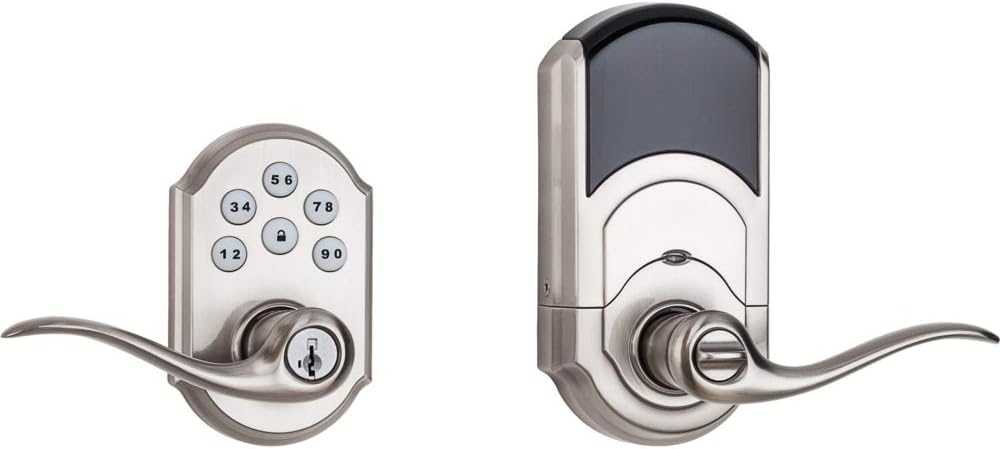
Image: Kwikset Smartcode 912 Z-Wave Plus Keypad Lever Lock, showing both the exterior keypad assembly and the interior battery housing and lever.
4.4 Montering af den indvendige enhed
Connect the cable from the exterior assembly to the interior assembly. Secure the interior assembly to the door using the provided screws. Ensure the levers are correctly oriented.

Billede: Interiør view of the Kwikset Smartcode 912 Z-Wave Plus Keypad Lever Lock, showing the battery cover and the thumb turn for manual locking.
4.5 Installation af batterier
Install 4 AA batteries into the interior assembly. The lock will perform a self-calibration process. Ensure the battery pack is securely seated.
5. Opsætning og programmering
5.1 Master Code Creation
The first step is to create a Master Code. This code is used to add or delete user codes and to configure lock settings. It does not unlock the door.
- Åbn batteridækslet på den indvendige del.
- Tryk én gang på knappen "Program".
- Indtast en ny masterkode på 4-8 cifre.
- Tryk på knappen "Lås".
- Re-enter the Master Code.
- Press the "Lock" button again.
A successful programming will be indicated by a green flash and a single beep. A red flash and three beeps indicate an error.

Image: Close-up of the Kwikset Smartcode 912 keypad, showing the numbered buttons and the lock button.
5.2 Tilføjelse af brugerkoder
Du kan programmere op til 30 unikke brugerkoder til nøglefri adgang.
- Åbn batteridækslet.
- Tryk én gang på knappen "Program".
- Indtast din masterkode.
- Tryk på knappen "Lås".
- Indtast en ny brugerkode på 4-8 cifre.
- Tryk på knappen "Lås".
5.3 Sletning af brugerkoder
Sådan sletter du en specifik brugerkode:
- Åbn batteridækslet.
- Tryk én gang på knappen "Program".
- Indtast din masterkode.
- Tryk på knappen "Lås".
- Indtast den brugerkode, du vil slette.
- Tryk på knappen "Lås".
5.4 Z-Wave-parring
To integrate your lock with a Z-Wave smart home system (hub required):
- Initiate the inclusion (pairing) process on your Z-Wave controller. Refer to your controller's instructions.
- On the lock, open the battery cover and press the "A" button (located on the interior assembly) once.
- The lock will attempt to pair. A successful pairing will be indicated by a green flash and a single beep.
Once paired, you can control the lock remotely and receive notifications via your Z-Wave smart home system.
6. Betjeningsvejledning
6.1 Unlocking the Door from Outside
- Enter a valid User Code on the keypad.
- The lock will unlock. Turn the lever to open the door.
6.2 Locking the Door from Outside
- Press the "Lock" button once. The lock will engage.
- Alternatively, if the auto-lock feature is enabled, the lock will automatically engage after a set time.
6.3 Locking/Unlocking from Inside
Use the thumb turn on the interior assembly to manually lock or unlock the door.
7. SmartKey Security
Your Kwikset Smartcode 912 features SmartKey Security, allowing you to rekey your lock to work with an existing Kwikset key. This is useful if you want all your Kwikset locks to operate with a single key.

Image: Diagram showing the SmartKey rekeying tool and the rekeying slot on the lock cylinder. This feature allows users to rekey their lock to an existing Kwikset key in seconds.
7.1 Rekeying Instructions
- Insert your functioning key into the cylinder and turn it 90 degrees clockwise.
- Sæt SmartKey-læringsværktøjet helt ind i SmartKey-hullet. Tryk godt fast, og fjern værktøjet.
- Fjern din funktionsnøgle.
- Sæt din nye nøgle helt ind i cylinderen, og drej den 90 grader mod uret.
- Remove the new key. The lock is now rekeyed.
Always test the new key multiple times to ensure successful rekeying.
8. Vedligeholdelse
8.1 Udskiftning af batteri
The lock will provide a low battery warning (e.g., flashing red light, audible beeps) when the batteries are running low. Replace all four AA batteries promptly.
- Fjern batteridækslet fra den indvendige enhed.
- Fjern de gamle batterier.
- Isæt fire nye AA alkaline-batterier, og sørg for at polariteten vender korrekt.
- Sæt batteridækslet på igen.
8.2 Rengøring
Rengør låsen med en blød,amp cloth. Do not use abrasive cleaners or solvents, as these can damage the finish and electronic components.
9. Fejlfinding
| Problem | Mulig årsag | Løsning |
|---|---|---|
| Låsen reagerer ikke på indtastning på tastaturet. | Lave eller døde batterier. Forkert kode indtastet. | Replace batteries. Verify correct user code. |
| Lock does not engage/disengage smoothly. | Misalignment of lock components. Door frame obstruction. | Check installation for proper alignment. Ensure door frame is clear. |
| Z-Wave pairing fails. | Controller not in inclusion mode. Lock too far from controller. | Ensure Z-Wave controller is in inclusion mode. Move controller closer or use a Z-Wave repeater. |
| Automatisk låsefunktion virker ikke. | Funktionen er ikke aktiveret eller forkert konfigureret. | Refer to programming instructions to enable and configure auto-lock. |
10. Specifikationer
- Modelnummer: 99120-037
- Materiale: Metal
- Slutte: Satin Nickel (Brushed)
- Dørtykkelse: 1-3/8" to 1-3/4"
- Strømkilde: 4 AA batterier (medfølger ikke)
- Forbindelse: Z-Wave Plus
- Brugerkoder: Op til 30 programmerbare koder
- Særlige funktioner: Keypad Entry, One-Touch Locking, Auto-Lock, SmartKey Security
- Produktdimensioner: 5.34 x 4.89 x 9.74 tommer
- Varens vægt: 4.09 pund
- UPC: 883351628600
11. Kvalitetssikring
Kwikset is committed to providing high-quality security products. The manufacturing process involves rigorous testing and adherence to strict standards to ensure reliability and durability.
Video: "Kwikset Means Quality" - This video highlights Kwikset's manufacturing processes and commitment to product quality and durability, showcasing various stages of lock production and testing.
12. Garanti og support
Kwikset tilbyder en omfattende garanti på sine produkter:
- Mekanisk og finishgaranti: Livstid
- Elektronikgaranti: 1 år
For full warranty details, product support, or technical assistance, please visit the official Kwikset website or contact Kwikset customer service. Contact information can typically be found on the Kwikset webwebsted eller produktemballage.
Du kan også besøge Kwikset-butik på Amazon for yderligere produktinformation og supportressourcer.


