1. Vigtige sikkerhedsinstruktioner
Læs venligst disse instruktioner omhyggeligt, inden du bruger enheden, og gem dem til senere brug. Manglende overholdelse af disse instruktioner kan resultere i elektrisk stød, brand eller andre farer.
- Udsæt ikke enheden for regn, fugt eller ekstreme temperaturer.
- Enheden må ikke skilles ad eller ændres. Overlad al service til kvalificeret personale.
- Hold enheden væk fra varmekilder såsom radiatorer, varmeapparater, komfurer eller andre apparater (herunder ampløftere), der producerer varme.
- Brug kun tilbehør/tilbehør specificeret af producenten.
- Rengør kun med en tør klud.
- Sørg for ordentlig ventilation, og bloker ikke ventilationsåbninger.
- Beskyt netledningen mod at blive trådt på eller klemt.
2. Produktet er slutview
The Mac Audio BT Tec 3000 is a versatile mobile stereo Bluetooth speaker featuring an alarm function and an FM tuner. It is designed for portable audio playback and includes a digital display.
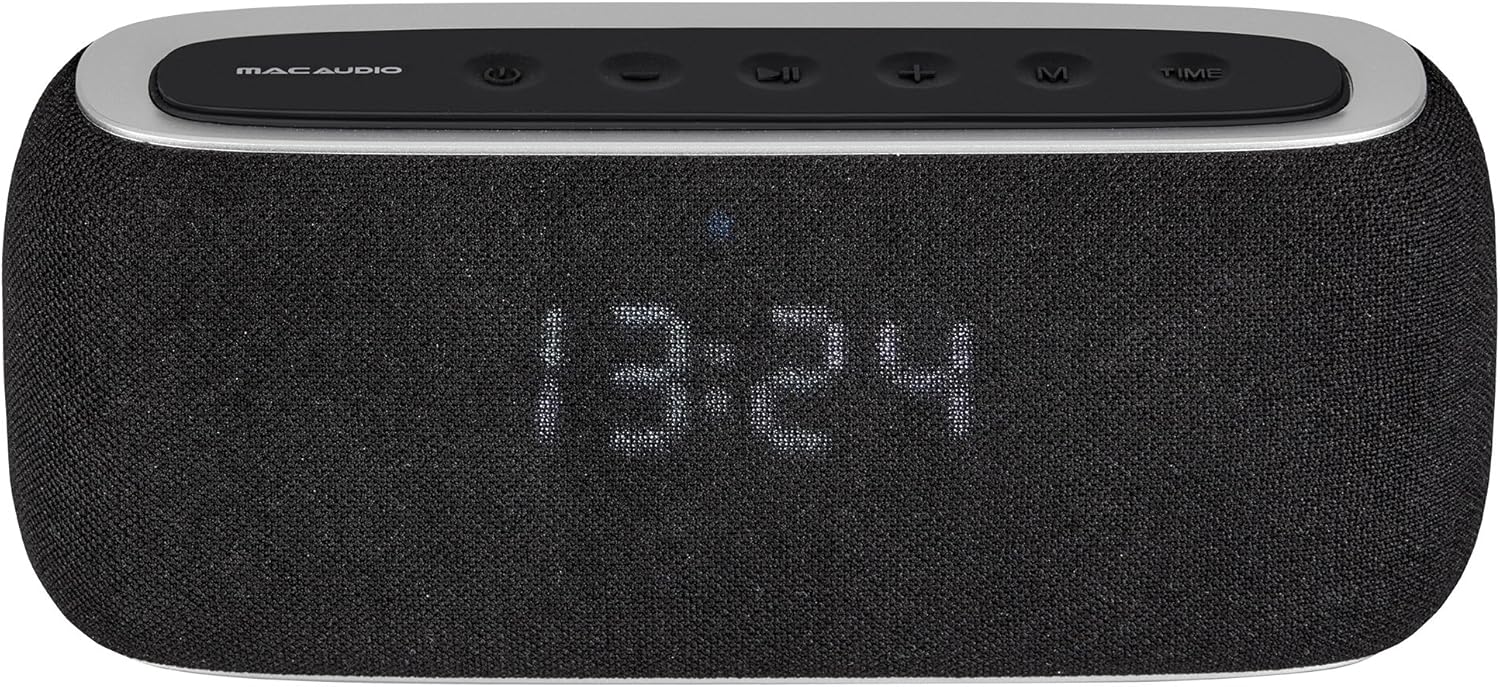
Figur 2.1: Front view of the BT Tec 3000 speaker. It features a black fabric grille covering the speakers and a digital display showing the time. The top panel has control buttons.
2.1 Betjeningselementer på øverste panel

Figur 2.2: Vinklet top view of the BT Tec 3000, highlighting the control buttons. From left to right: Power, Mode, Previous Track/Volume Down, Play/Pause, Next Track/Volume Up, M (Menu/Memory), Time.
- Power knap: Tænder/slukker enheden.
- Mode knap: Switches between Bluetooth, FM Radio, and AUX modes.
- Forrige nummer / Lydstyrke ned-knap: Short press for previous track (Bluetooth), long press for volume down.
- Afspil/pause knap: Afspiller eller sætter lyd på pause.
- Næste nummer / Lydstyrke op-knap: Short press for next track (Bluetooth), long press for volume up.
- M (Menu/Memory) Button: Used for menu navigation or saving FM stations.
- Tidsknap: Bruges til at indstille ur og alarm.
2.2 Bagpaneltilslutninger

Figur 2.3: Bag view of the BT Tec 3000 with the protective cover open, revealing the connectivity ports. These include an AUX input, a USB port, and a charging port.
- AUX-indgang: Til tilslutning af eksterne lydenheder via et 3.5 mm lydkabel.
- USB-port: For charging or playing audio from USB drives (if supported).
- Opladningsport: Til tilslutning af strømadapteren for at oplade det interne batteri.
3. Pakkens indhold
Kontroller venligst, at alle varer er til stede og i god stand, når du åbner pakken:
- Mac Audio BT Tec 3000 Speaker
- USB opladningskabel
- 3.5 mm AUX lydkabel
- Brugervejledning (dette dokument)
4. Opsætning
4.1 Opladning af enheden
Before first use, fully charge the BT Tec 3000. Connect the supplied USB charging cable to the charging port on the rear of the speaker and the other end to a USB power adapter (not included) or a computer USB port. The charging indicator will illuminate during charging and turn off when fully charged.
4.2 Tænd/sluk
Tryk og hold på Power knap on the top panel for approximately 3 seconds to turn the speaker on or off. The display will light up when the device is powered on.
4.3 Bluetooth -parring
- Sørg for, at højttaleren er tændt og i Bluetooth-tilstand. Hvis ikke, skal du trykke på Mode knap until "BT" or a Bluetooth icon appears on the display. The speaker will enter pairing mode automatically, indicated by a flashing Bluetooth icon.
- Aktiver Bluetooth på din mobilenhed (smartphone, tablet osv.) og søg efter tilgængelige enheder.
- Select "BT Tec 3000" from the list of found devices.
- Når højttaleren er parret, udsender den en bekræftelseslyd, og Bluetooth-ikonet på displayet holder op med at blinke.
- The speaker will automatically reconnect to the last paired device when in range and Bluetooth is enabled on both devices.
4.4 FM Radio Setup
- Tryk på Mode knap to switch to FM Radio mode. The display will show the current frequency.
- For automatic station scanning, long press the Afspil/pause knap. The speaker will scan and save available FM stations.
- To manually tune, short press the Forrige spor or Næste spor buttons to adjust the frequency.
4.5 Indstilling af ur og alarm
- Indstilling af uret:
- Tryk og hold på Tidsknap indtil timecifrene blinker.
- Brug Forrige spor og Næste spor knapper for at justere timen.
- Tryk på Tidsknap igen for at bekræfte timen og gå til minutterne.
- Adjust minutes using the Forrige spor og Næste spor knapper.
- Tryk på Tidsknap endnu en gang for at spare tid.
- Indstilling af alarm:
- Tryk kort på Tidsknap to enter alarm setting mode (display will show "AL").
- Tryk og hold på Tidsknap until the alarm hour digits flash.
- Adjust the alarm hour using the Forrige spor og Næste spor knapper.
- Tryk på Tidsknap to confirm and move to alarm minutes.
- Adjust alarm minutes using the Forrige spor og Næste spor knapper.
- Tryk på Tidsknap for at gemme alarmtidspunktet.
- For at aktivere/deaktivere alarmen skal du trykke kort på Tidsknap when the alarm time is displayed. An alarm icon will appear/disappear on the display.
5. Betjeningsvejledning
5.1 Lydstyrkekontrol
Tryk længe på Knappen Næste spor / lydstyrke op for at øge lydstyrken. Tryk længe på Forrige knap til spor / lydstyrke ned for at sænke lydstyrken.
5.2 Bluetooth-afspilning
Once paired with your device (see Section 4.3), you can control playback:
- Kort tryk Afspil/pause knap for at afspille eller sætte lyd på pause.
- Kort tryk Knappen Næste spor til næste sang.
- Kort tryk Forrige track-knap for den forrige sang.
5.3 FM-radiofunktion
After scanning for stations (see Section 4.4):
- Kort tryk Forrige spor or Næste spor knapper til at navigere gennem gemte stationer.
- To manually tune, long press the Forrige spor or Næste spor knapper.
5.4 AUX-indgang
Connect an external audio device (e.g., MP3 player) to the AUX input port on the rear of the speaker using the supplied 3.5mm audio cable. Press the Mode knap until "AUX" appears on the display. Audio will now play through the speaker from your connected device.
5.5 App kontrol
The BT Tec 3000 supports app control. Download the official Mac Audio app from your device's app store (iOS/Android) to access additional features and control options. Ensure your speaker is connected via Bluetooth to your mobile device for app functionality.
6. Vedligeholdelse
- Rensning: Use a soft, dry cloth to clean the surface of the speaker. Do not use liquid cleaners or abrasive materials.
- Opbevaring: Når højttaleren ikke er i brug i længere perioder, skal den opbevares køligt og tørt, væk fra direkte sollys og ekstreme temperaturer.
- Batteripleje: For at forlænge batteriets levetid bør du undgå at aflade batteriet helt ofte. Oplad enheden regelmæssigt, selvom den ikke er i brug.
7. Fejlfinding
| Problem | Mulig årsag | Løsning |
|---|---|---|
| Ingen strøm | Batteriet er afladet. | Oplad højttaleren med det medfølgende USB-kabel. |
| Kan ikke parres via Bluetooth | Speaker is not in pairing mode; Bluetooth is off on device; Speaker is already connected to another device. | Ensure speaker is in BT mode and flashing; Enable Bluetooth on your device; Disconnect from other devices. |
| Ingen lyd | Lydstyrken er for lav; Forkert tilstand valgt; Enheden er ikke tilsluttet korrekt. | Increase volume; Press Mode button to select correct input (BT, FM, AUX); Reconnect device. |
| Dårlig FM -modtagelse | Svagt signal; Interferens. | Relocate the speaker to an area with better reception; Rescan for stations. |
8. Specifikationer
| Feature | Detalje |
|---|---|
| Modelnavn | BT Tec 3000 |
| Modelnummer | 4023037753004 |
| Mærke | Mac-lyd |
| Forbindelsesteknologi | Bluetooth |
| Lydudgangstilstand | Stereoanlæg |
| Monteringstype | Bordplade |
| Speciel funktion | Bluetooth, Alarm Function, FM Tuner |
| Controller type | App kontrol |
9. Support og garanti
For technical support, warranty information, or further assistance, please visit the official Mac Audio webwebstedet eller kontakt deres kundeservice. Gem din købsbevis til garantikrav.
Note: Warranty terms and conditions may vary by region. Please refer to the warranty card included with your product or the manufacturer's webwebsted for detaljerede oplysninger.


