Indledning
This manual provides detailed instructions for the Microsoft N9Z-00017 All-In-One Media Keyboard. This wireless keyboard features an integrated multi-touch trackpad, media hotkeys, and 128-bit AES encryption for secure data transmission. It is designed for use with Smart TVs, laptops, and desktop computers, offering a convenient and versatile input solution.
Please read this manual thoroughly before using your keyboard to ensure proper setup and operation.
Opsætning
1. Pakkens indhold
- Microsoft N9Z-00017 All-In-One Media Keyboard
- USB trådløs modtager
- AA-batterier (forinstalleret eller inkluderet)
- Hurtigstartguide (hvis relevant)
2. Batteriinstallation
The keyboard typically comes with AA batteries pre-installed or included. If not, follow these steps:
- Find batteridækslet på undersiden af tastaturet.
- Skub eller løft dækslet for at åbne rummet.
- Isæt AA-batterierne, og sørg for at polerne vender korrekt (+ og -).
- Luk batterirummets dæksel forsvarligt.
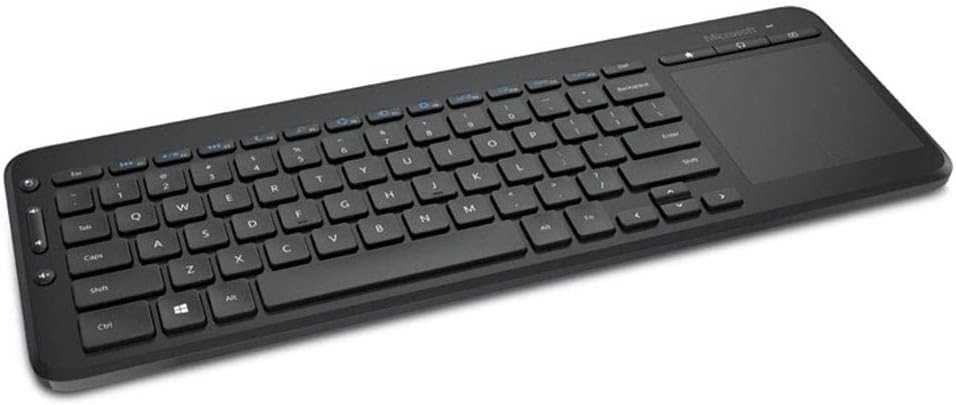
Image: The Microsoft All-In-One Media Keyboard, showing its compact design with an integrated touchpad on the right side. This image provides a general overview af produktets udseende.
3. Tilslutning af den trådløse modtager
- Locate the USB wireless receiver, usually stored in a compartment on the keyboard or included separately.
- Plug the USB wireless receiver into an available USB port on your computer or Smart TV.
- The operating system should automatically detect and install the necessary drivers. This process may take a few moments.
- Once installed, the keyboard should be ready for use.
Betjeningsvejledning
1. Grundlæggende tastaturfunktioner
The keyboard functions like a standard QWERTY keyboard. This specific model features a Turkish Q layout. All standard alphanumeric keys, function keys (F1-F12), and modifier keys (Shift, Ctrl, Alt) are present.
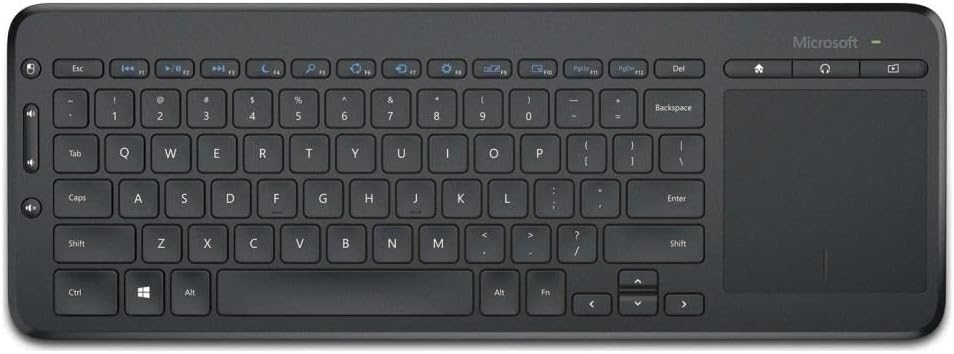
Billede: En top-down view of the Microsoft All-In-One Media Keyboard, clearly displaying the Turkish Q keyboard layout and the integrated multi-touch trackpad.
2. Integrated Multi-Touch Trackpad
The large integrated trackpad supports multi-touch gestures, allowing for intuitive navigation.
- Tryk med en enkelt finger: Venstre klik.
- To-finger tryk: Højreklik.
- To-finger rulning: Scroll vertically or horizontally.
- Pinch to Zoom: Zoom in or out (application dependent).
3. Media Hotkeys
Dedicated media hotkeys are located above the function keys for quick access to media controls and other common functions. These include volume control, mute, play/pause, and home screen access.
4. 128-bit AES Encryption
The keyboard utilizes 128-bit Advanced Encryption Standard (AES) technology to encrypt your keystrokes. This feature helps protect your personal and business information by securing the wireless communication between the keyboard and the receiver.
5. Enhedskompatibilitet
This keyboard is compatible with a range of devices, including:
- Smart Televisions
- Bærbare computere
- Stationære computere
Ensure your device has an available USB port for the wireless receiver.
Opretholdelse
1. Rengøring af tastaturet
- Disconnect the keyboard from its power source (remove batteries) before cleaning.
- Brug en blød, fnugfri klud lidt dampafsluttes med vand eller en mild rengøringsopløsning.
- Undgå at bruge slibende rengøringsmidler, opløsningsmidler eller aerosolspray direkte på tastaturet.
- Brug trykluft til rengøring mellem tasterne for at fjerne støv og snavs.
- Wipe the trackpad gently with a clean, dry cloth.
2. Udskiftning af batteri
When the keyboard's performance degrades or the battery indicator (if present) signals low power, replace the batteries:
- Open the battery compartment on the underside of the keyboard.
- Fjern de gamle AA-batterier.
- Insert new AA batteries, observing the correct polarity.
- Luk batterirummet forsvarligt.
- Bortskaf gamle batterier i henhold til lokale regler.
Fejlfinding
| Problem | Mulig årsag | Løsning |
|---|---|---|
| Tastaturet reagerer ikke |
|
|
| Keys not working correctly |
|
|
| Trackpad not responding |
|
|
Specifikationer
- Mærke: Microsoft
- Model: N9Z-00017
- Forbindelse teknologi: Trådløs
- Tastatur layout: Tyrkisk Q
- Kompatible enheder: Smart Television, Laptop, Desktop Computer
- Anbefalet brug: Office, Home Entertainment
- Sikkerhed: 128-bit AES-kryptering
- Strømkilde: AA batterier
Garanti og support
For warranty information, technical support, or to register your product, please visit the official Microsoft support website. You can typically find detailed warranty terms and contact information for customer service there.
Official Microsoft Support: support.microsoft.com
Gem venligst dit købsbevis for garantikrav.


