Indledning
The Xiaomi Mi Selfie Stick Tripod is a versatile accessory designed for mobile photography and videography. It integrates both a monopod (selfie stick) and a tripod into a single, compact unit. This device features a detachable Bluetooth remote control for convenient photo capture and a phone holder that rotates 360 degrees to accommodate various shooting angles. Its grip extends to securely hold a wide range of smartphone sizes, with an adjustment range of 56-89mm.
Hvad er der i æsken
- 1 x Xiaomi Mi Selfie Stick Tripod
- 1 x Bluetooth fjernbetjening
- 1 x brugermanual
Nøglefunktioner
- Integrated Monopod and Tripod Design
- Detachable Bluetooth Remote Control
- 360-Degree Rotatable Phone Holder
- Adjustable Phone Grip (56-89mm)
- Non-slip Pad for Stable Grip
Opsætning
1. Unfolding the Device
To use the device, gently pull the top section upwards to extend the monopod. The tripod legs are folded into the handle. To deploy the tripod, firmly grasp the handle and pull the bottom section downwards. The three legs will unfold and lock into place, forming a stable base.

Image: The Xiaomi Mi Selfie Stick Tripod in its extended monopod configuration, ready to hold a smartphone.
2. Tilslutning af din smartphone
Locate the phone holder at the top of the device. Gently pull the spring-loaded clamp open and insert your smartphone. Ensure the phone is securely seated within the holder. The holder can rotate 360 degrees; adjust it to your desired orientation (portrait or landscape).
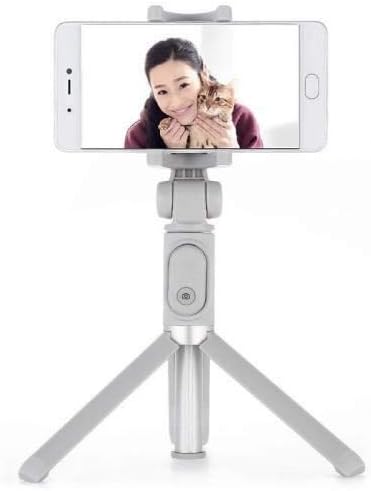
Image: The Xiaomi Mi Selfie Stick Tripod deployed as a tripod with a smartphone securely mounted, demonstrating its stability for hands-free use.
3. Pairing the Bluetooth Remote Control
- The Bluetooth remote control is integrated into the handle. To remove it, gently slide it out from its slot.
- Tryk og hold knappen på fjernbetjeningen nede, indtil indikatorlampen begynder at blinke, hvilket angiver, at den er i parringstilstand.
- Naviger til Bluetooth-indstillingerne på din smartphone.
- Søg efter available devices and select "XMZPG" or a similar name.
- Når parringen er færdig, holder indikatorlampen på fjernbetjeningen op med at blinke.

Billede: Et nærbillede view of the Xiaomi Mi Selfie Stick Tripod in its compact, folded state, highlighting the detachable Bluetooth remote control embedded in the handle.
Betjeningsvejledning
Brug som selfiestang
With your phone securely mounted and the device extended, hold the handle firmly. Use the Bluetooth remote control to trigger your phone's camera shutter. This allows for wider angle selfies and group photos.
Using as a Tripod
Extend the tripod legs and place the device on a flat, stable surface. Adjust the height of the monopod and the angle of your phone holder as needed. Use the Bluetooth remote control to take photos or start/stop video recording from a distance, ideal for stable shots, time-lapses, or video calls.
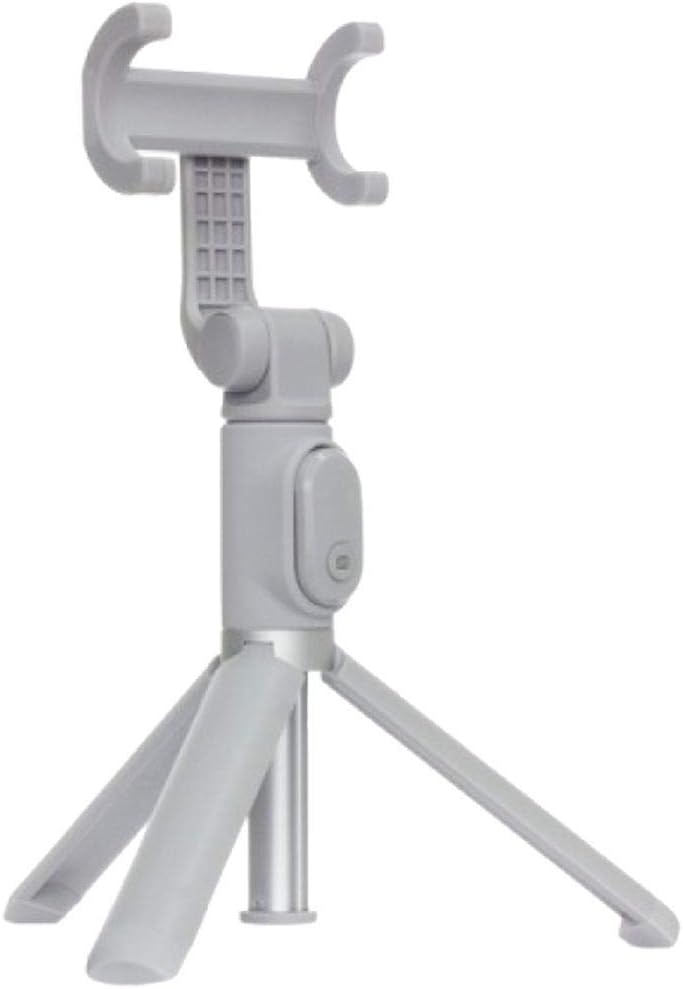
Image: The Xiaomi Mi Selfie Stick Tripod standing independently in tripod mode, demonstrating its stability and readiness for hands-free photography or videography.
Phone Holder Rotation
The phone holder can be rotated 360 degrees. Gently twist the holder to switch between portrait and landscape orientations without needing to remount your phone.
Opretholdelse
- Rensning: Tør enheden af med en blød, tør klud. Undgå at bruge skrappe kemikalier eller slibende materialer.
- Opbevaring: When not in use, fold the selfie stick tripod to its compact size and store it in a cool, dry place away from direct sunlight and extreme temperatures.
- Battery Replacement (Bluetooth Remote): The remote control uses a replaceable button cell battery (e.g., CR1632). To replace, locate the battery compartment on the side or back of the remote, open it, and insert a new battery with the correct polarity.
Fejlfinding
- Remote Control Not Pairing/Working:
- Ensure the remote control battery is not depleted. Replace if necessary.
- Sørg for, at Bluetooth er aktiveret på din smartphone.
- Unpair and re-pair the device in your phone's Bluetooth settings.
- Ensure the remote is fully charged if it's a rechargeable model (though this model uses a button cell).
- Telefonen sidder ikke ordentligt:
- Verify your phone's width is within the 56-89mm adjustment range of the phone holder.
- Fjern alle store telefoncovers, der kan forhindre en sikker pasform.
- Stativustabilitet:
- Ensure the tripod legs are fully extended and locked into place.
- Place the tripod on a flat, level, and stable surface.
- Avoid extending the monopod to its maximum length when using it as a tripod, especially with heavier phones, to maintain stability.
- Device Not Extending/Folding Smoothly:
- Check for any obstructions or debris in the extending mechanism.
- Do not force the mechanism; if it's stiff, try gently wiggling it while extending/folding.
Specifikationer
| Feature | Specifikation |
|---|---|
| Produktdimensioner | 1.77 x 1.93 x 7.48 cm (foldet) |
| Varens vægt | 3.52 ounce (0.1 kilo) |
| Modelnummer | FBA4071US |
| ASIN | B07DFBRTPV |
| Farve | Grå |
| Kompatible enheder | Smartphone |
| Phone Grip Adjustment Range | 56-89 mm |
| Batteritype (fjernbetjening) | 1 Lithium Ion battery required (typically CR1632) |
| Fabrikant | Xiaomi |
Garanti og support
For garantioplysninger og kundesupport henvises til den officielle Xiaomi website or contact your local authorized Xiaomi service center. Keep your purchase receipt as proof of purchase for any warranty claims.
Du kan også besøge embedsmanden XIAOMI-butik på Amazon for yderligere produktinformation og supportressourcer.


