Indledning
This manual provides instructions for the safe and efficient use of your BESTEK MRJ3006-BK Power Strip with USB. Please read this manual thoroughly before operation and retain it for future reference.
Produkt overview
The BESTEK MRJ3006-BK is a compact power solution designed to provide multiple charging options. It features 3 AC outlets and 4 USB charging ports, suitable for various electronic devices.
Nøglefunktioner:
- 7-i-1 opladning: Equipped with 3 standard AC outlets and 4 USB charging ports.
- USB hurtig opladning: Each USB port delivers up to 2.4A for efficient charging of smartphones and tablets.
- Omfattende sikkerhed: Includes overload protection, short-circuit protection, overcurrent protection, and overvoltage protection. FCC certified for safety.
- Kompakt og alsidigt design: Measures 2.56 x 2.56 x 2.72 inches, ideal for small spaces. Features a detachable base with two mounting options (screws or adhesive).
- 5-Foot Extension Cord: Provides flexibility for reaching distant power outlets.
Pakkeindhold:
- BESTEK 3-Outlet USB Power Strip
- Aftagelig fod
- Dobbeltsidet klæbemiddel
- 2 x skruer
- Brugervejledning (dette dokument)

Image: The BESTEK MRJ3006-BK Power Strip, illustrating its compact cube design and multiple ports.
Opsætning og installation
Monteringsmuligheder:
The power strip offers two methods for secure placement:
1. Screw Mounting:
- Use the provided screws to permanently attach the detachable base to a desired surface (e.g., under a desk or on a wall).
- Once the base is secured, align the power strip with the base and gently press down until it clicks into place.
2. Adhesive Mounting:
- Peel the backing from the double-sided adhesive and apply it to the bottom of the detachable base.
- Press the base firmly onto a clean, dry surface.
- Attach the power strip to the secured base.
Tilslutning til strøm:
- Plug the 5-foot extension cord into a standard 100-240V AC wall outlet.
- A blue indicator light on the top of the power strip will illuminate, indicating it is powered on.

Image: The detachable base can be secured using either screws for a permanent fixture or double-sided adhesive for a less permanent solution. This allows for flexible placement on or under various surfaces.
Betjeningsvejledning
Brug af AC-stikkontakter:
- Insert the plugs of your electronic devices into the 3 AC outlets located on the sides of the power strip.
- Ensure plugs are fully inserted.
Brug af USB-opladningsporte:
- Connect your USB-powered devices (e.g., smartphones, tablets) to the 4 USB ports on the top of the power strip using appropriate USB cables.
- The intelligent identification feature will automatically detect your device and deliver optimal charging speed up to 2.4A per port.

Image: The power strip allows simultaneous charging of up to 7 devices (3 AC, 4 USB). The USB ports feature intelligent identification for optimized charging.
Sikkerhedsoplysninger
To ensure safe operation and prevent damage to the device or personal injury, please observe the following:
- Do not exceed the maximum power rating of the device.
- Do not expose the power strip to moisture or extreme temperatures.
- Undgå at adskille eller ændre enheden.
- Opbevares utilgængeligt for børn.
- Ensure proper ventilation around the power strip during use.
- Denne enhed er kun designet til indendørs brug.
Indbyggede beskyttelser:
The BESTEK MRJ3006-BK incorporates multiple safety features:
- Overbelastningsbeskyttelse: Automatically cuts power if connected devices draw too much current.
- Kortslutningsbeskyttelse: Forhindrer skader fra elektriske kortslutninger.
- Overstrømsbeskyttelse: Beskytter mod for høj strøm.
- Overvoltage Beskyttelse: Beskytter enheder mod voltage pigge.
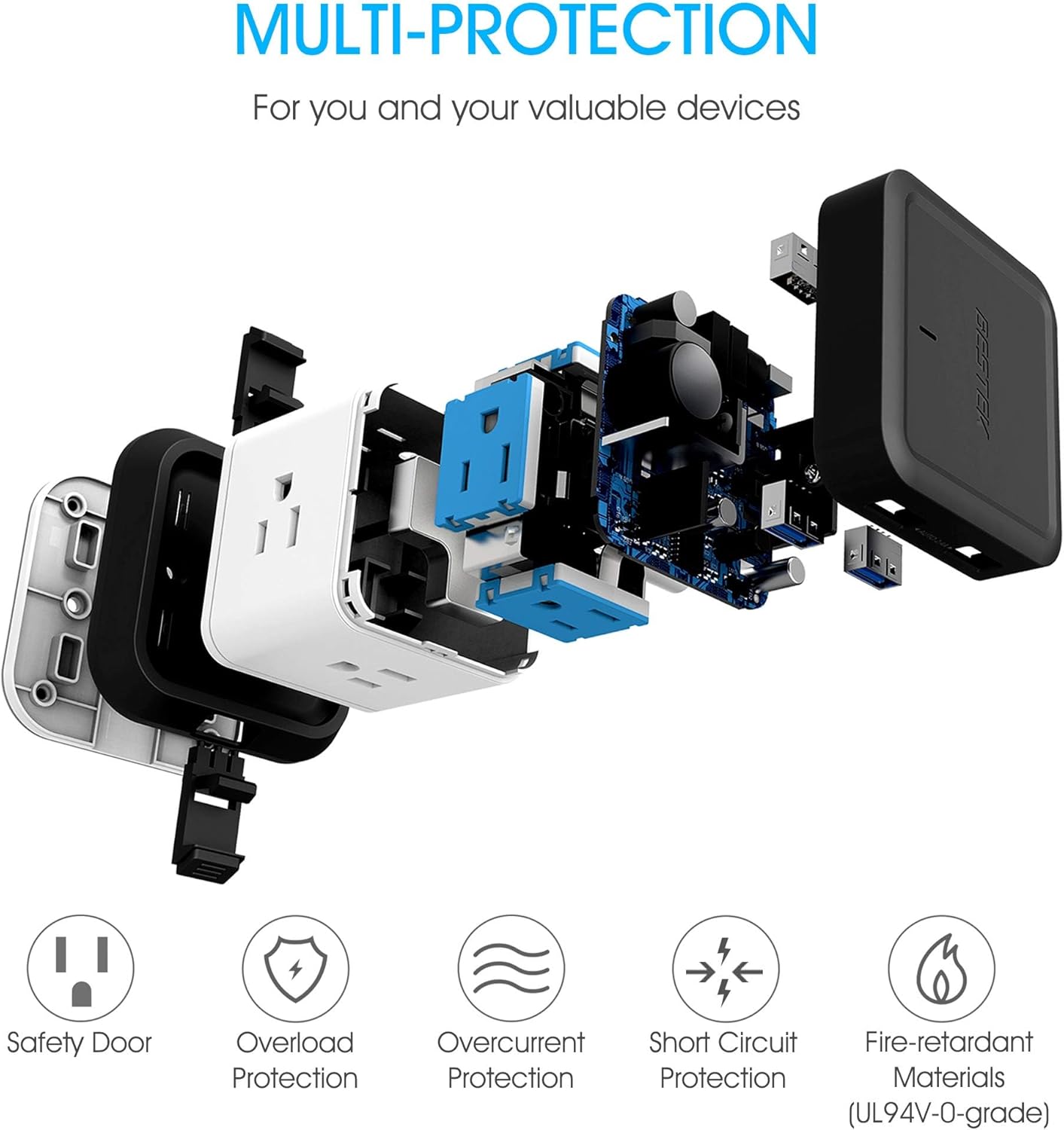
Image: An internal diagram showcasing the various protection mechanisms built into the power strip, including safety doors for outlets, and safeguards against overload, overcurrent, and short circuits, all housed within fire-retardant materials.
Fejlfinding
Ingen strøm til enheder:
- Spørgsmål: Devices connected to AC outlets or USB ports are not receiving power.
- Løsning:
- Verify the power strip's main plug is securely inserted into a functional wall outlet.
- Check if the blue indicator light on the power strip is illuminated. If not, try a different wall outlet.
- Ensure the total power draw of all connected devices does not exceed the power strip's maximum rating. Disconnect some devices if overloaded.
- If the power strip has a reset button (often integrated with overload protection), press it to reset the circuit.
Langsom USB-opladning:
- Spørgsmål: Devices are charging slowly via the USB ports.
- Løsning:
- Ensure your USB cable is not damaged and is suitable for fast charging.
- Some devices may draw more power than others. If multiple high-power devices are connected, charging speed may be distributed. Try charging fewer devices simultaneously.
- Confirm your device supports the 2.4A charging rate provided by the power strip.
Specifikationer
| Feature | Detalje |
|---|---|
| Modelnummer | MRJ3006-BK |
| Produktdimensioner | 2.56 x 2.56 x 2.72 tommer |
| Varens vægt | 1.01 pund |
| Samlet antal AC-udtag | 3 |
| Samlet USB-porte | 4 |
| USB Output (per port) | Op til 2.4A |
| Input bindtage | 100-240 volt |
| Længde på forlængerledning | 5 fod |
| Speciel funktion | Cube Power Strip, Surge Protection |
| Fabrikant | BESTEK GLOBAL LLC |
Opretholdelse
- Regularly inspect the power strip and its cord for any signs of damage.
- Clean the exterior with a dry, soft cloth. Do not use liquid cleaners.
- Ensure the outlets are free from dust and debris to maintain optimal contact.
Garanti og support
BESTEK products are designed for reliability and performance. For warranty information or technical support, please refer to the contact details provided on the product packaging or visit the official BESTEK webwebsted.
Kontaktoplysninger:
- E-mail: Se produktemballagen eller den officielle webwebsted.
- Telefon: Se produktemballagen eller den officielle webwebsted.
- Webwebsted: BESTEK Official Store


