Produkt overview
The JENSEN JCR-315 Digital AM/FM Dual Alarm Clock Radio is designed for convenience and functionality. It features a classic wooden exterior with a blue backlit digital LCD display. Key features include dual alarms, selectable wake-up options (radio or alarm), calendar display, sleep/snooze functions, and a built-in 1-amp USB charging port. The unit also offers a 3-setting dimmer switch for display brightness adjustment and a digital tuner with 10 AM and 10 FM station presets. An auxiliary input jack allows connection of external audio devices.

Billede: Forside view of the Jensen JCR-315 Digital AM/FM Dual Alarm Clock Radio, showcasing its wooden finish, fabric speaker grille, blue LCD display, and control buttons.
Opsætning og førstegangsbrug
Strømtilslutning
Connect the AC power cord to a standard 120-volt AC wall outlet. The unit is designed to operate on AC power.
Installation af batteribackup
For battery backup, install 2 AAA batteries (not included) into the battery compartment located on the bottom of the unit. This ensures that your time and alarm settings are retained during a power outage.
Antenneopsætning
Extend the telescopic antenna fully for optimal FM radio reception. For AM reception, the unit has a built-in antenna; try rotating the unit for better signal.
Indstilling af tid
- Tryk og hold på SÆT knappen, indtil tidsvisningen blinker.
- Brug UP or NED knapperne for at justere timetallet. Tryk på SÆT for at bekræfte.
- Brug UP or NED knapperne for at justere minuttallet. Tryk på SÆT for at bekræfte.
- Fortsæt med at trykke SÆT to cycle through and set the year, month, and date using the UP or NED knapper.
- Trykke SÆT again to exit time/date setting mode.

Billede: Forside view of the Jensen JCR-315 showing the digital display with the time set to 1:04, indicating the clarity of the blue backlit LCD.
Betjeningsvejledning
Tænd/sluk og lydstyrkekontrol
- Tryk på ON/OFF knappen for at tænde eller slukke for enheden.
- Drej på BIND knappen til at justere lydniveauet.
Radiobetjening (AM/FM)
- Tryk på AM/FM knappen for at skifte mellem AM- og FM-båndene.
- Brug TUNE + or TUNE - knapperne til manuelt at indstille til den ønskede frekvens.
- For automatisk at scanne efter den næste tilgængelige station, skal du trykke og holde nede TUNE + or TUNE -.
Indstilling af radioforudindstillinger
- Stil ind på den ønskede station.
- Tryk og hold på M+ knappen, indtil det forudindstillede nummer blinker.
- Brug UP or NED knapperne til at vælge det ønskede forudindstillede nummer (1-10 for AM, 1-10 for FM).
- Trykke M+ igen for at gemme stationen på den valgte forudindstilling.
- For at genkalde en forudindstillet station skal du trykke kort på M+ knappen for at bladre gennem gemte stationer.
Indstilling af dobbeltalarmer
- Tryk på ALARM button once for Alarm 1, or twice for Alarm 2. The alarm time will flash.
- Brug UP or NED knapperne for at indstille alarmens time, og tryk derefter på ALARM for at bekræfte.
- Brug UP or NED buttons to set the alarm minute, then press ALARM for at bekræfte.
- Select wake mode (Radio or Alarm Tone) using UP or NED, og tryk derefter på ALARM to confirm and activate the alarm. An alarm icon will appear on the display.
Snooze- og sovefunktioner
- Når alarmen lyder, skal du trykke på SLEEP / SNOOZE / DIMMER button to activate snooze, which will silence the alarm for approximately 9 minutes.
- For at indstille sleep-timeren skal du trykke på SLEEP / SNOOZE / DIMMER button repeatedly while the radio is playing to cycle through sleep times (e.g., 90, 60, 30, 15 minutes, OFF). The radio will turn off automatically after the selected time.
Display lysdæmper
- Tryk på SLEEP / SNOOZE / DIMMER button (when the unit is off or not in snooze/sleep mode) to cycle through the display brightness settings: Hi, Mid, Low.
USB-opladningsport
Connect your smartphone or other USB-powered device to the built-in 1-amp USB charging port on the back of the unit to charge it while you sleep or use the radio.

Billede: Side view of the Jensen JCR-315 showing a smartphone connected to its USB charging port, illustrating the charging capability.
Hjælpeindgang
Connect an external audio device (e.g., MP3 player, smartphone) to the AUX IN jack on the back of the unit using a 3.5mm audio cable (not included). The unit will automatically switch to AUX mode when a cable is inserted. Control playback from your connected device.
Opretholdelse
Rengøring af enheden
Tør ydersiden af enheden af med en blød, damp klud. Brug ikke slibende rengøringsmidler eller opløsningsmidler. Sørg for, at enheden er frakoblet, før du rengør den.
Udskiftning af batteri
If the unit experiences frequent power interruptions or if the time/alarm settings are not retained during power outages, replace the 2 AAA backup batteries. Ensure correct polarity when inserting new batteries.
Fejlfinding
| Problem | Mulig årsag | Løsning |
|---|---|---|
| Enheden tænder ikke. | Netledningen er ikke korrekt tilsluttet. | Ensure AC power cord is securely plugged into a working outlet. |
| Skærmen er svag eller svær at læse. | Dæmperindstillingen er for lav. | Tryk på SLEEP / SNOOZE / DIMMER button repeatedly to adjust brightness (Hi/Mid/Low). |
| Dårlig radiomodtagelse. | Antennen er ikke udstrakt eller enhedens position. | Fully extend the telescopic antenna for FM. For AM, rotate the unit for better signal. |
| Alarmen lyder ikke. | Alarmen er ikke indstillet, eller lydstyrken er for lav. | Verify alarm is set and activated (alarm icon visible). Ensure volume is not at minimum if waking to radio. |
| Tid/indstillinger mistet efter strømafbrydelsetage. | Backup batteries are dead or missing. | Installer eller udskift 2 AAA-backupbatterier. |
Specifikationer
| Feature | Detalje |
|---|---|
| Modelnummer | JCR-315 |
| Strømkilde | 120V AC 60Hz |
| Batteri backup | 2 x 'AAA'-batterier (medfølger ikke) |
| Radiobånd understøttet | AM, FM |
| Tuner-teknologi | Digital PLL |
| Forudindstillede stationer | 10 AM, 10 FM |
| Forbindelse | Auxiliary Input, USB Charging Port (1 Amp) |
| Produktmål (L x B x H) | 7.68" x 4.53" x 4.53" (19.5 cm x 11.5 cm x 11.5 cm) |
| Varens vægt | 2.1 pund (0.95 kg) |
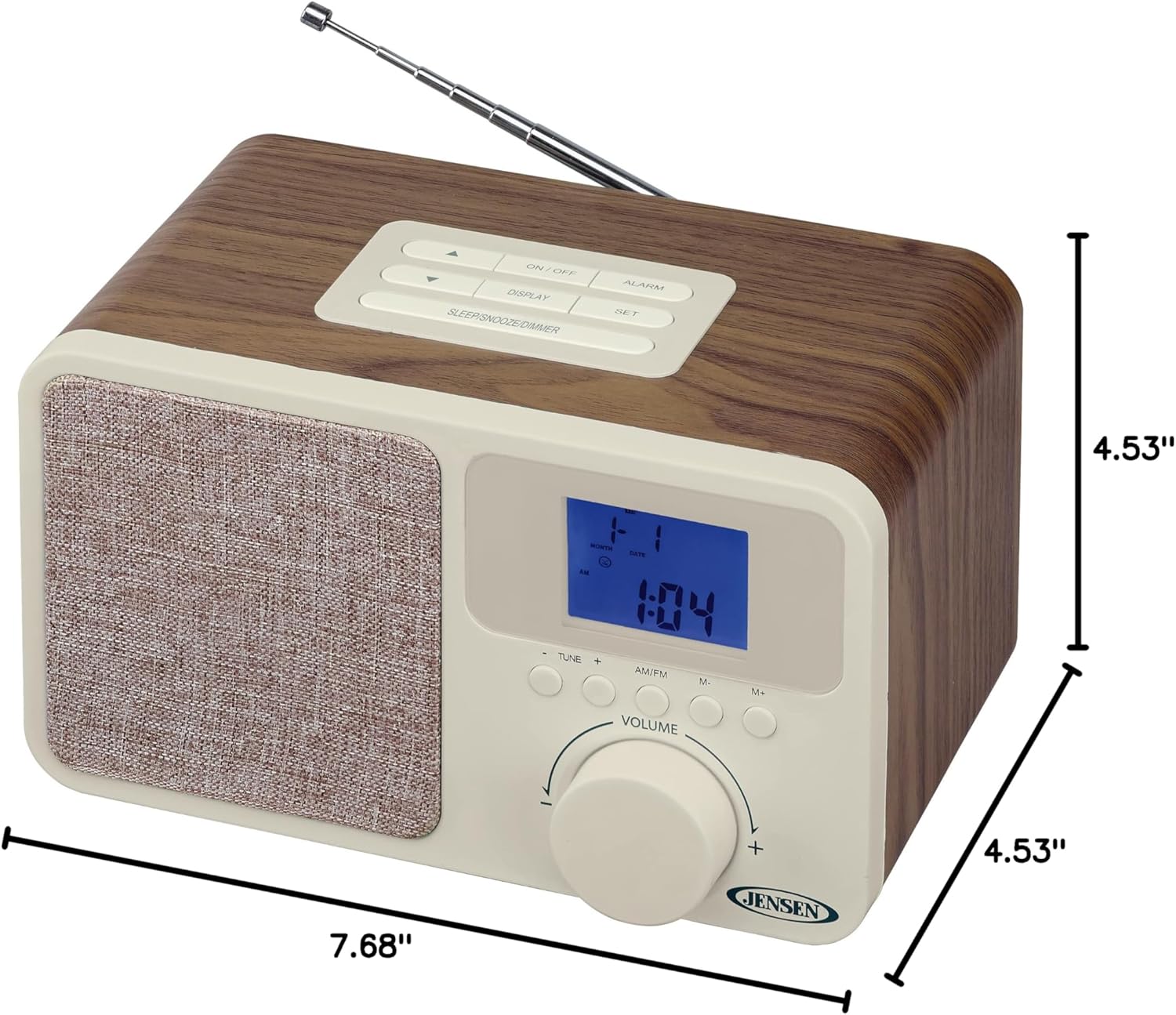
Image: The Jensen JCR-315 shown with its length (7.68"), width (4.53"), and height (4.53") dimensions clearly indicated.
Garanti og support
For warranty information, technical support, or service inquiries regarding your Jensen JCR-315 Digital AM/FM Dual Alarm Clock Radio, please refer to the warranty card included with your product or visit the official Jensen website. You may also find additional support resources by visiting the Jensen-butikken på Amazon.
Gem venligst din købskvittering som købsbevis i tilfælde af garantikrav.


