Indledning
The DigiTech Multi-Function LCD Wall Clock (Model XC0225) is a versatile device designed to provide convenient time display along with additional environmental information. This clock features a large LCD screen displaying time, date, day of the week, indoor temperature, and humidity. It also includes alarm and snooze functions, making it suitable for various settings, whether mounted on a wall or placed on a desktop.
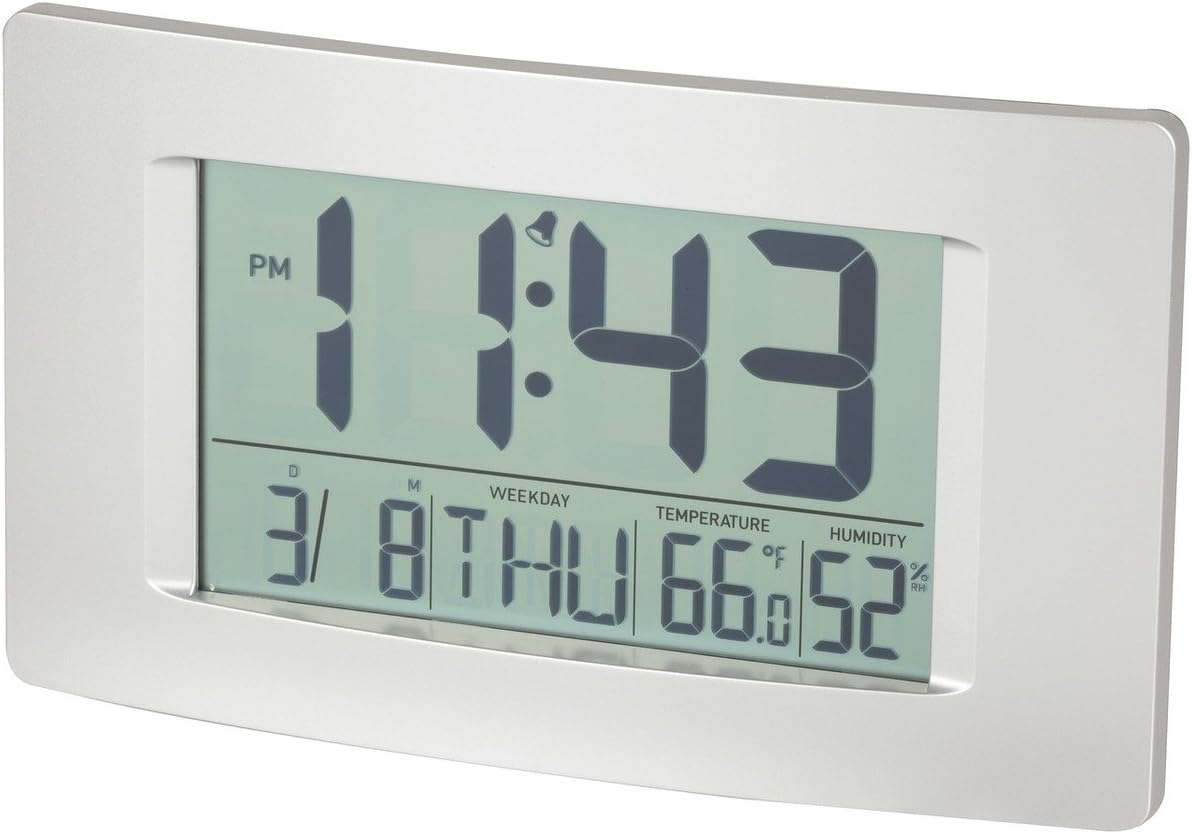
Figur 1: Forside view of the Multi-Function LCD Wall Clock.
Pakkens indhold
- DigiTech Multi-Function LCD Wall Clock (Model XC0225)
- Brugervejledning (dette dokument)
Note: 3 x AA-batterier kræves til drift og er ikke inkluderet i pakken.

Figure 2: Product packaging illustrating the clock and its features.
Opsætning
1. Batteriinstallation
- Find batterirummet på bagsiden af uret.
- Åbn batterirummets dæksel.
- Insert 3 x AA batteries, ensuring correct polarity (+ and -) as indicated inside the compartment.
- Luk batterirummets dæksel forsvarligt.
2. Første opstart
Upon battery installation, the clock will power on automatically and display default settings. You may need to adjust the time, date, and other settings as described in the "Operating Instructions" section.
3. Monteringsmuligheder
- Desktopplacering: Utilize the integrated stand on the back of the clock to place it on any flat surface.
- Vægmontering: Use the integrated hang-hole on the back of the clock to mount it securely on a wall using a suitable screw or hook (not included).
Betjeningsvejledning
The clock features several buttons on the back for setting and adjusting functions. Refer to the labels next to each button for their specific functions (e.g., MODE, UP, DOWN, ALARM, SNOOZE/LIGHT).
1. Indstilling af tid og dato
- Tryk på MODE button repeatedly until the time display starts flashing.
- Brug UP or NED knapper for at justere timen.
- Trykke MODE again to move to minutes, then use UP or NED at justere.
- Fortsæt med at trykke MODE for at gennemgå indstillingerne for år, måned og dag, og justere hver med UP or NED.
- Trykke MODE en sidste gang for at afslutte indstillingstilstand.
2. Setting Alarm
- Tryk på ALARM knappen én gang for at vise det aktuelle alarmtidspunkt.
- Tryk og hold på ALARM button until the alarm hour starts flashing.
- Brug UP or NED knapper for at justere alarmtiden.
- Trykke ALARM again to move to alarm minutes, then use UP or NED at justere.
- Trykke ALARM one last time to confirm and exit alarm setting mode.
- For at aktivere/deaktivere alarmen skal du trykke på ALARM button briefly when not in setting mode. An alarm icon will appear/disappear on the display.
3. Snooze-funktion
Når alarmen lyder, skal du trykke på SNOOZE / LYS button to activate the snooze function. The alarm will temporarily stop and sound again after the set snooze interval (1-60 minutes, adjustable in settings).
4. Valg af temperaturenhed (°C/°F)
Tryk kort på UP button (or a dedicated °C/°F button if present) to toggle between Celsius (°C) and Fahrenheit (°F) temperature display.
5. 12/24 timers format
Tryk kort på NED button (or a dedicated 12/24H button if present) to switch between 12-hour and 24-hour time formats.
Opretholdelse
1. Rensning
- Tør urets overflade af med en blød, tør klud.
- Brug ikke slibende rengøringsmidler, opløsningsmidler eller kemiske spray, da disse kan beskadige skærmen ellerasing.
2. Udskiftning af batteri
When the display becomes dim or functions become erratic, it is time to replace the batteries. Follow the "Battery Installation" steps in the Setup section to replace the 3 x AA batteries. Always replace all batteries at the same time with new ones.
Fejlfinding
| Problem | Mulig årsag | Løsning |
|---|---|---|
| Skærmen er tom eller svag. | Batterierne er døde eller forkert installeret. | Replace batteries with new 3 x AA batteries, ensuring correct polarity. |
| Tid/dato er forkert. | Not set correctly after battery installation or power interruption. | Følg instruktionerne under "Indstilling af tid og dato" for at nulstille. |
| Alarmen lyder ikke. | Alarm is not activated or alarm time is incorrect. | Ensure the alarm icon is displayed. Verify the alarm time setting. |
| Temperatur-/fugtighedsaflæsningerne virker unøjagtige. | Clock placed near heat sources, vents, or in direct sunlight. | Relocate the clock to an area with stable ambient temperature and humidity. Allow time for readings to stabilize. |
Specifikationer
| Feature | Detalje |
|---|---|
| Model | XC0225 |
| Display Type | Digital LCD |
| LCD størrelse | 194 mm (B) x 110 mm (H) |
| Funktioner | Time, Date, Day of Week, Alarm, Snooze, Indoor Temperature, Indoor Humidity |
| Tidsformat | 12 Hour / 24 Hour selectable |
| Temperaturområde | -9.9°C til +50°C (14.1°F til 122.0°F) |
| Fugtighedsområde | 20% til 95% relativ luftfugtighed (RH) |
| Snooze-varighed | 1 - 60 minutes (adjustable) |
| Strømkilde | 3 x AA batterier (medfølger ikke) |
| Dimensions (Overall, W x H x D) | 306 mm x 176 mm x 36 mm (ca.) |
| Vægt | 540g (without batteries) / 660g (shipping weight) |
| Monteringsmuligheder | Integrated Stand, Wall Hang-hole |

Figure 3: Main display area dimensions of the clock for reference.
Garanti og support
This DigiTech product comes with a 1-års garanti fra købsdatoen. Denne garanti dækker fejl i materialer og udførelse ved normal brug.
For technical support, warranty claims, or further assistance, please contact your retailer or the DigiTech customer service department. Please have your model number (XC0225) and proof of purchase ready when contacting support.


