Indledning
This instruction manual provides detailed guidance for the safe and efficient use of your Lenco Xemio-768 Digital Media Player. Please read this manual thoroughly before operating the device and retain it for future reference.
The Lenco Xemio-768 is a versatile digital media player capable of playing MP3/MP4 files, displaying photos, reading e-books, and recording voice memos. It features Bluetooth connectivity for wireless audio and an expandable memory via Micro SD card.
Pakkens indhold
- Lenco Xemio-768 Digital Media Player
- USB kabel
- In-Ear høretelefoner
- 8 GB Micro SD-kort (forinstalleret eller medfølger separat)
- Instruktionsmanual (dette dokument)
Enhed overview
Familiarize yourself with the various parts and controls of your Xemio-768 player.
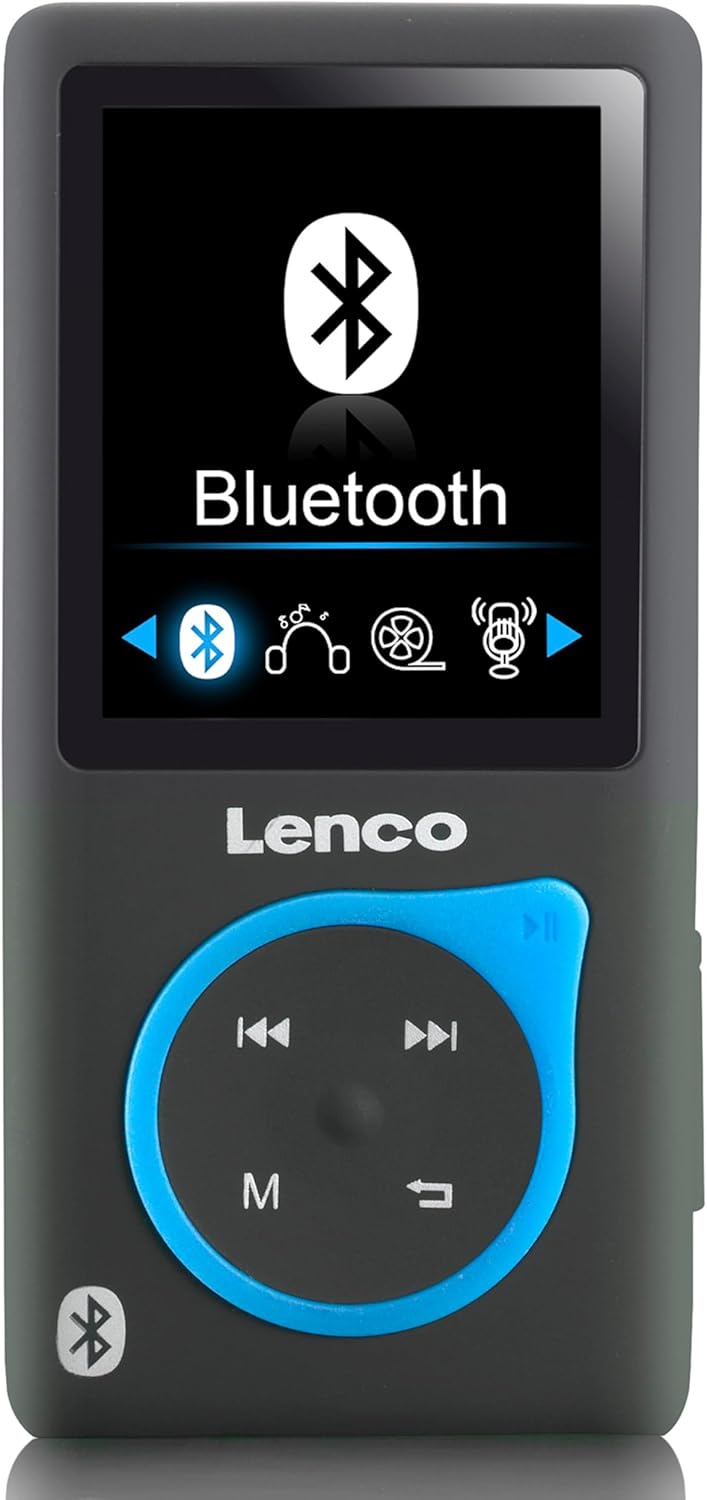
Billede 1: Front view of the Lenco Xemio-768 Digital Media Player. The screen displays the Bluetooth menu option. Below the screen are the Lenco logo and a circular control pad with playback buttons (previous, next, play/pause) and a menu button (M). A Bluetooth symbol is also visible on the bottom left of the device.
Key Controls and Ports:
- 1.8-tommer TFT LCD-skærm: Displays menus, media, and settings.
- Kontrolpude: Navigation and playback controls (Play/Pause, Next/Fast Forward, Previous/Rewind, Menu).
- Micro USB -port: Til opladning og dataoverførsel.
- Micro SD -kortplads: For memory expansion (supports up to 32GB).
- 3.5 mm hovedtelefonstik: For wired headphone connection.
- Indbygget mikrofon: Til stemmeoptagelse.
Opsætning
1. Opladning af enheden
- Connect the small end of the included USB cable to the Micro USB port on the player.
- Connect the larger end of the USB cable to a powered USB port on a computer or a USB wall adapter (not included).
- Batteriindikatoren på skærmen viser opladningsstatus. En fuld opladning tager typisk cirka 3 timer.
- Disconnect the USB cable once fully charged.
2. Indsættelse af et Micro SD-kort (valgfrit)
The player comes with an 8GB Micro SD card. If you wish to expand the storage, you can replace it with a card up to 32GB.
- Find Micro SD-kortstikket på siden af afspilleren.
- Indsæt forsigtigt Micro SD-kortet med de gyldne kontakter nedad, indtil det klikker på plads.
- For at fjerne det skal du forsigtigt skubbe kortet ind, indtil det klikker. Slip det derefter, hvorefter det springer ud.
3. Tilslutning af hovedtelefoner
- Kablede hovedtelefoner: Plug the 3.5 mm jack of the included in-ear headphones (or your own compatible headphones) into the headphone port on the player.
- Bluetooth-hovedtelefoner/-højttalere: Refer to the "Bluetooth Connectivity" section under Operating for wireless connection instructions.
4. Overførsel Files
- Tilslut afspilleren til din computer ved hjælp af USB-kablet.
- Afspilleren vises som et flytbart diskdrev på din computer.
- Drag and drop your desired music (MP3, WMA), videos (AMV, AVI), photos (JPG, BMP, GIF), or e-books (TXT) into the appropriate folders on the player's internal memory or Micro SD card.
- Engang fileNår filer er overført, skal du skubbe den flytbare disk sikkert ud af computeren, før du frakobler USB-kablet.
Betjeningsvejledning
Tænd/sluk
- To power on, press and hold the Power button (usually on the side) until the screen lights up.
- For at slukke skal du trykke på og holde tænd/sluk-knappen nede, indtil enheden lukker ned.
Menu navigation
- Use the directional buttons on the control pad to navigate through menu options.
- Press the central button (often Play/Pause) to select an option.
- Press the 'M' (Menu) button to go back to the previous menu or to access context-sensitive options during playback.
Musikafspilning
- Vælg "Musik" fra hovedmenuen.
- Browse through your folders and files to find the desired track.
- Press the central button to play the selected track.
- Brug Tidligere og Næste knapper til at springe spor over.
- Press the central button again to pause/resume playback.
Videoafspilning
- Vælg "Video" fra hovedmenuen.
- Naviger til din video files (AMV, AVI format).
- Select a video to begin playback.
Foto Viewer
- From the main menu, select "Photos".
- Browse your image files (JPG, BMP, GIF format).
- Vælg et billede til view det.
E-bog Reader
- From the main menu, select "E-book".
- Naviger til din tekst files (TXT-format).
- Vælg en file to open and read.
Stemmeoptagelse
- From the main menu, select "Recorder" or "Voice Memo".
- Vælg "Start optagelse" for at begynde.
- Press the central button to stop recording.
- Recordings are saved and can be accessed from the "Recordings" menu.
Bluetooth-forbindelse
- Ensure your Bluetooth headphones or speaker are in pairing mode. Refer to their respective manuals for instructions.
- On the Xemio-768, navigate to the "Bluetooth" menu.
- Vælg "Søg efter Devices" or "Pair New Device".
- Once your device appears in the list, select it to initiate pairing.
- Bekræft parring på begge enheder, hvis du bliver bedt om det.
- Når den er tilsluttet, vil lyden blive sendt trådløst til din Bluetooth-enhed.
Opretholdelse
Rensning
- Use a soft, dry, lint-free cloth to clean the device's exterior.
- Brug ikke slibende rengøringsmidler, alkohol eller opløsningsmidler, da disse kan beskadige overfladen.
- Undgå at fugt kommer ind i åbninger.
Batteripleje
- For at forlænge batteriets levetid bør du undgå at aflade batteriet helt ofte.
- Oplad enheden regelmæssigt, selvom den ikke er i brug i længere perioder.
- Opbevar enheden et køligt, tørt sted væk fra direkte sollys og ekstreme temperaturer.
Fejlfinding
| Problem | Mulig årsag | Løsning |
|---|---|---|
| Enheden tændes ikke. | Batteriet er afladet. | Oplad enheden ved hjælp af det medfølgende USB-kabel. |
| Kan ikke oprette forbindelse via Bluetooth. | Bluetooth device not in pairing mode; interference; device out of range. | Ensure your Bluetooth headphones/speaker are in pairing mode. Move closer to the player. Try restarting both devices. |
| Files are not recognized or played. | Ukorrekt file format; beskadiget file; Micro SD card issue. | Sikre files are in supported formats (MP3, WMA, AMV, AVI, JPG, BMP, GIF, TXT). Check if the Micro SD card is properly inserted or try another card. |
| Ingen lyd fra hovedtelefoner. | Headphones not properly connected; volume too low; corrupted audio file. | Check headphone connection. Increase volume. Test with different headphones or audio files. |
Specifikationer
- Model: Xemio-768
- Vise: 1.8-tommer TFT LCD
- Intern hukommelse: 8 GB (via Micro SD card)
- Udvidbar hukommelse: Op til 32 GB (Micro SD-kort)
- Understøttede lydformater: MP3, WMA
- Understøttede videoformater: AMV, AVI
- Understøttede billedformater: JPG, BMP, GIF
- Understøttet e-bogsformat: TXT
- Forbindelse: Bluetooth, mikro-USB
- Hovedtelefonstik: 3.5 mm
- Batteritype: Lithium polymer
- Batterilevetid: Approximately 3 hours (playback)
- Dimensioner: 0.09 x 4.15 x 8.5 cm
- Vægt: 28.5 g
Garanti og support
For garantioplysninger og teknisk support henvises til garantikortet, der følger med dit produkt, eller besøg den officielle Lenco webwebsted. Gem din købsbevis i tilfælde af garantikrav.


