1. Introduktion
This manual provides essential information for the proper setup, operation, and maintenance of your iiyama Prolite T2454MSC-B1AG 23.8-inch Full HD Multi-Touch Monitor. Please read this manual thoroughly before using the product to ensure optimal performance and safety.

Billede: Forside view of the iiyama Prolite T2454MSC-B1AG touch screen monitor.
2. Sikkerhedsoplysninger
Observe the following safety precautions to prevent damage to the monitor and ensure your safety.
- Udsæt ikke skærmen for regn eller fugt for at undgå brand- eller stødfare.
- Åbn ikke skærmen casing. Der er ingen dele indeni, som brugeren kan servicere. Overlad al service til kvalificeret servicepersonale.
- Placer skærmen på en stabil, plan overflade for at forhindre den i at falde.
- Sørg for tilstrækkelig ventilation omkring skærmen. Bloker ikke ventilationsåbningerne.
- Brug kun den netledning og adapter, der følger med skærmen.
- Tag stikket ud af stikkontakten, hvis skærmen ikke skal bruges i længere tid.
3. Pakkens indhold
Bekræft, at alle nedenstående varer er inkluderet i din pakke. Hvis der mangler eller er beskadigede varer, skal du kontakte din forhandler.
- iiyama Prolite T2454MSC-B1AG Monitor
- Power Cable(s) (region specific)
- USB kabel
- HDMI kabel
- Lynstartguide (ikke inkluderet i denne digitale manual)

Image: Included cables for the monitor, typically power, USB, and HDMI.
4. Opsætning
4.1 Physical Setup and Connections
Follow these steps to set up your monitor and connect it to your computer.
- Placering af monitoren: Place the monitor on a stable, flat surface. The flexible stand allows for various viewing angles. Adjust the stand to your preferred ergonomic position.
- Connecting Video Cable: Connect one end of the HDMI or VGA cable to the corresponding port on your computer's graphics card and the other end to the monitor's input port.
- Connecting USB Cable: For touch functionality, connect the supplied USB cable from your computer's USB port to the USB upstream port on the monitor.
- Tilslutning af strøm: Connect the power cable to the monitor's power input and then plug it into a wall outlet.
- VESA-montering (valgfrit): The monitor is VESA mount compliant (100x100mm). If you wish to wall mount or use a different stand, remove the factory stand and attach your VESA-compatible mounting solution.


Image: The monitor's adjustable stand allows for various viewing angles, from upright to reclined.

Billede: Nærbillede view of the monitor's rear input ports, including HDMI, VGA, and USB connections.

Billede: Bagside view of the monitor, highlighting the VESA mounting points for alternative installation.
4.2 Indledende tænding
After connecting all cables, press the power button on the monitor to turn it on. The monitor should automatically detect the input signal.
5. Betjeningsvejledning
5.1 Basic Touch Operation
The Prolite T2454MSC-B1AG features Projective Capacitive 10-point touch technology, allowing for intuitive interaction with your operating system and applications.
- Tryk på: Equivalent to a single mouse click.
- Dobbeltklik: Equivalent to a double mouse click.
- Tryk og hold: Svarende til et højreklik.
- Træk: Move an item by touching and dragging your finger across the screen.
- Knib-for-at-zoome: Brug to fingre til at zoome ind eller ud på indhold.
- Multi-Touch-bevægelser: Your operating system may support additional multi-touch gestures. Refer to your OS documentation for details.

Image: A user interacting with the multi-touch screen of the iiyama Prolite T2454MSC-B1AG monitor.
5.2 On-Screen Display (OSD) menu
The OSD menu allows you to adjust various display settings. The control buttons are located on the rear right side of the monitor.
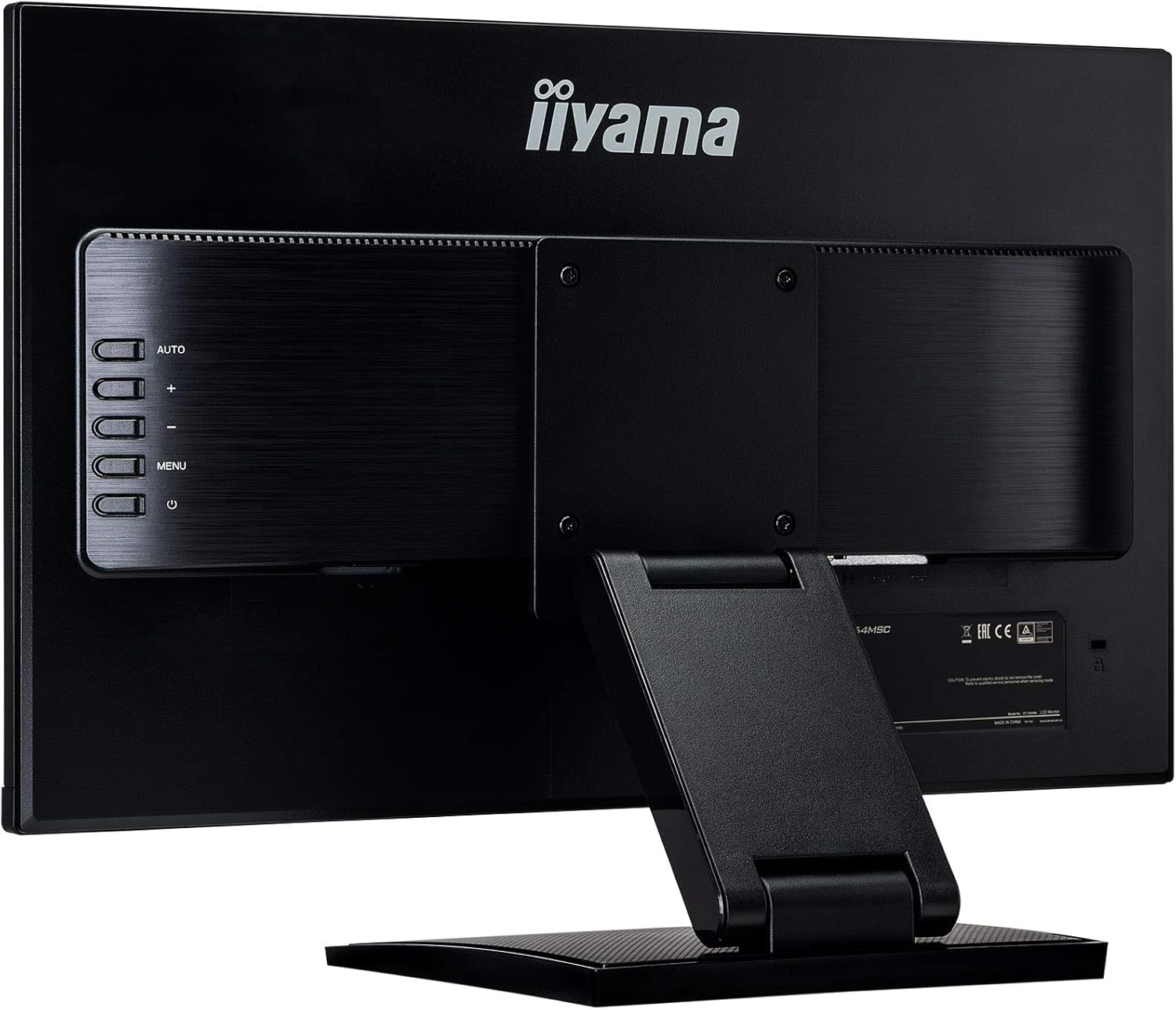
Billede: Bagside view of the monitor, highlighting the OSD control buttons for menu navigation.
- Power knap: Tænder eller slukker for skærmen.
- Menu-knap: Opens the OSD menu. Press again to exit or go back.
- Op/ned-knapper (+/-): Naviger gennem menupunkter eller juster værdier.
- Auto -knap: Automatically adjusts image settings for optimal display (primarily for analog VGA input).
Navigate the menu using the Up/Down buttons and confirm selections with the Menu button. Common settings include brightness, contrast, input selection, and color temperature.
6. Vedligeholdelse
Korrekt vedligeholdelse sikrer din skærms levetid og ydeevne.
- Rengøring af skærmen: Tør forsigtigt skærmen af med en blød, fnugfri klud. Fjern genstridige mærker ved atampRengør kluden med et mildt, ikke-slibende skærmrensemiddel. Spray ikke rengøringsmiddel direkte på skærmen.
- Rengøring af Casing: Brug en blød, tør klud til at tørre skærmen afasing. Undgå at bruge stærke rengøringsmidler eller slibende rengøringsmidler.
- Opbevaring: Hvis skærmen opbevares i en længere periode, skal alle kabler frakobles og opbevares et køligt og tørt sted, helst i originalemballagen.
7. Fejlfinding
Se tabellen nedenfor for almindelige problemer og deres løsninger.
| Problem | Mulig årsag | Løsning |
|---|---|---|
| Ingen strøm | Strømkabel ikke tilsluttet, eller strømudtag ikke aktivt. | Ensure power cable is securely connected to the monitor and a working power outlet. Check power switch. |
| Intet signal / Blank skærm | Videokabel ikke tilsluttet, eller forkert indgang valgt. | Check video cable connections (HDMI/VGA). Use the OSD menu to select the correct input source. |
| Touch-funktionen virker ikke | USB-kabel ikke tilsluttet, eller der er et problem med driveren. | Ensure the USB upstream cable is connected between the monitor and your computer. For Windows, touch drivers are usually automatic; for other OS, check manufacturer's webwebsted. |
| Billedet er sløret eller forvrænget | Incorrect resolution or refresh rate, or analog signal interference. | Set your computer's display resolution to 1920x1080 and refresh rate to 60Hz. For VGA, use the OSD's "Auto" adjustment. |
| Speakers not producing sound | Audio cable not connected (if using VGA) or volume too low. | If using HDMI, audio is carried over HDMI. If using VGA, ensure an audio cable is connected. Check monitor and computer volume settings. |
8. Specifikationer
Detailed technical specifications for the iiyama Prolite T2454MSC-B1AG monitor.
| Feature | Detalje |
|---|---|
| Mærke | iiyama |
| Model | T2454MSC-B1AG |
| Skærmstørrelse | 24 tommer (23.8") viewstand) |
| Display Type | LED LCD, IPS Technology |
| Opløsning | 1920 x 1080 (Fuld HD) |
| Aspektforhold | 16:9 |
| Touch-teknologi | Projective Capacitive (P-CAP) 10-point multi-touch |
| Svartid | 4 millisekunder |
| Opdateringshastighed | 60 Hz |
| Viewi vinkel | 178 Degrees (Horizontal/Vertical) |
| Billedkontrastforhold | 1000:1 |
| Særlige funktioner | Height Adjustment, Anti-Glare Coating, Built-in Speakers |
| Hardware-interface | HDMI, USB, VGA |
| Samlet USB-porte | 2 |
| Monteringstype | Desk Mount, Wall Mount (VESA 100x100mm) |
| Produktdimensioner | 54.05 x 12.8 x 38.8 cm (B x D x H) |
| Varens vægt | 5.5 kg |
| Strømforbrug | 24 watt (typisk) |

Image: Diagram illustrating the physical dimensions of the monitor.

Image: EU Energy Label for the iiyama T2454MSC-B1AG monitor, showing energy efficiency class E.
For flere detaljer henvises til EPREL-database.
9. Garanti og support
The iiyama Prolite T2454MSC-B1AG monitor typically comes with a manufacturer's warranty. Based on available information, the minimum guaranteed product support is 3 years.
- Garantiperiode: Please refer to your purchase documentation or the official iiyama website for the exact warranty period applicable in your region.
- Teknisk support: For technical assistance, troubleshooting beyond this manual, or warranty claims, please visit the official iiyama support webwebsted eller kontakt deres kundeservice.
- Online ressourcer: Additional drivers, firmware updates, and detailed manuals may be available on the iiyama official webwebsted.


