1. Introduktion
Tak for købetasing the Homtime D2qi Bluetooth Speaker with Wireless Charging and Alarm Clock. This device is designed to provide a versatile audio experience with convenient features for your daily life. Please read this manual carefully before use to ensure proper operation and to maximize the product's lifespan.
2. Sikkerhedsoplysninger
- Udsæt ikke enheden for ekstreme temperaturer, fugt eller direkte sollys.
- Holdes væk fra vand og andre væsker.
- Du må ikke selv adskille eller forsøge at reparere enheden. Overlad al service til kvalificeret personale.
- Use only the provided or recommended power adapter.
- Undgå at tabe eller udsætte enheden for kraftige stød.
3. Pakkens indhold
Tjek venligst pakken for følgende varer:
- Homtime D2qi Bluetooth Speaker
- Strømadapter
- Brugermanual
4. Produktet er slutview
The Homtime D2qi combines a high-quality Bluetooth speaker with a digital alarm clock and a convenient wireless charging pad. It features intuitive controls for easy operation.

Figur 4.1: Forside view of the Homtime D2qi speaker with a smartphone placed on its top surface for wireless charging.

Figure 4.2: The Homtime D2qi speaker positioned on a book, showcasing its compact design and the digital clock display.

Figure 4.3: The Homtime D2qi speaker in a home setting, demonstrating wireless charging functionality.
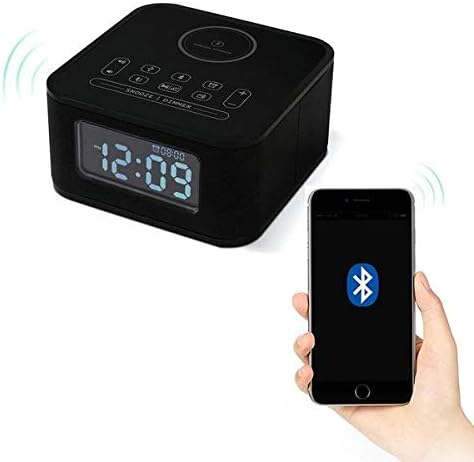
Figure 4.4: The Homtime D2qi speaker connected via Bluetooth to a smartphone.
5. Opsætning
5.1 Strømtilslutning
- Connect the provided power adapter to the DC input port on the back of the Homtime D2qi.
- Sæt strømadapteren i en almindelig stikkontakt.
- Displayet lyser op, hvilket indikerer, at enheden er tændt.
5.2 Indstilling af starttidspunkt
Ved første tænding eller efter strømafbrydelsetage, you may need to set the time. Refer to the 'Operating Instructions' section for detailed steps on setting the clock.
6. Betjeningsvejledning
6.1 Bluetooth-forbindelse
- Tryk på Bluetooth knap on the top panel to enter Bluetooth pairing mode. The Bluetooth indicator will flash.
- Aktiver Bluetooth på din smartphone eller lydenhed, og søg efter tilgængelige enheder.
- Select "Homtime D2qi" from the list.
- Once connected, the Bluetooth indicator will stop flashing and remain solid. You can now play audio through the speaker.
6.2 Trådløs opladning
- Place your Qi-compatible smartphone centrally on the wireless charging pad located on the top surface of the speaker.
- Ensure the phone is properly aligned with the charging coil.
- The charging indicator on your phone will show that charging has begun.
6.3 Vækkeurfunktion
- Tryk på Alarm knap for at gå ind i alarmindstillingstilstand.
- Brug +/- knapper for at justere time og minut.
- Tryk på Alarm knap igen for at bekræfte hver indstilling.
- For at aktivere/deaktivere alarmen skal du trykke på Alarm knap briefly when not in setting mode.
- For at snooze, tryk på Snooze/Dimmer-knap når alarmen lyder.
6.4 Radiofunktion
- Tryk på Mode knap for at skifte til FM-radiotilstand.
- Tryk og hold på Afspil/pause knap to auto-scan and save available stations.
- Brug Forrige/Næste knapper to navigate through saved stations.
6.5 Call Answering
Når højttaleren er tilsluttet via Bluetooth, kan den bruges til håndfri opkald.
- Tryk på for at besvare et indgående opkald Afspil/pause knap.
- Tryk på for at afslutte et opkald Afspil/pause knap igen.
7. Vedligeholdelse
- Rengør enheden med en blød, tør klud. Brug ikke slibende rengøringsmidler eller opløsningsmidler.
- Keep the charging pad free of dust and debris to ensure efficient wireless charging.
- Opbevar enheden et køligt og tørt sted, når den ikke er i brug i længere perioder.
8. Fejlfinding
| Problem | Mulig årsag | Løsning |
|---|---|---|
| Ingen strøm | Strømadapteren er ikke tilsluttet, eller der er en defekt stikkontakt. | Sørg for, at strømadapteren er korrekt tilsluttet enheden og en fungerende stikkontakt. |
| Ingen lyd fra højttaleren | Bluetooth not connected; volume too low; incorrect mode. | Ensure Bluetooth is paired. Increase volume on both the speaker and your device. Check if the speaker is in the correct mode (Bluetooth/Radio). |
| Trådløs opladning virker ikke | Telefonen er ikke Qi-kompatibel; telefonen er ikke justeret; telefoncoveret er for tykt. | Verify phone supports Qi wireless charging. Realign phone on the charging pad. Remove thick phone cases. |
| Buttons difficult to locate in the dark | Buttons are flush with the surface. | Familiarize yourself with button layout during daylight. Use the dimmer function to adjust display brightness. |
| Bluetooth disconnects automatically | Power saving feature; device out of range. | Reconnect Bluetooth manually. Keep devices within Bluetooth range (approx. 10 meters). |
9. Specifikationer
| Feature | Detalje |
|---|---|
| Mærke | Hjemmetid |
| Modelnummer | D2qi |
| Farve | Sort |
| Højttaler type | Bluetooth højttalere |
| Forbindelse | Trådløs |
| Kompatible enheder | Smartphones |
| Udgangseffekt | 5 - 10 watt |
| Produktets vægt | 0.5 kg |
| Pakkedimensioner | 19.6 x 18.8 x 14.8 cm |
| Hardware-interface | Audio/Video Port |
10. Garanti og support
Homtime products are manufactured to the highest quality standards. For warranty information and customer support, please refer to the warranty card included in your package or visit the official Homtime webwebstedet. Behold din købskvittering som købsbevis.


