1. Introduktion
Tak for købetasing the Bytech Massive Bluetooth Long Bar Speaker-BK. This manual provides essential information for the proper setup, operation, and maintenance of your new speaker. Please read this manual thoroughly before using the product to ensure optimal performance and longevity.
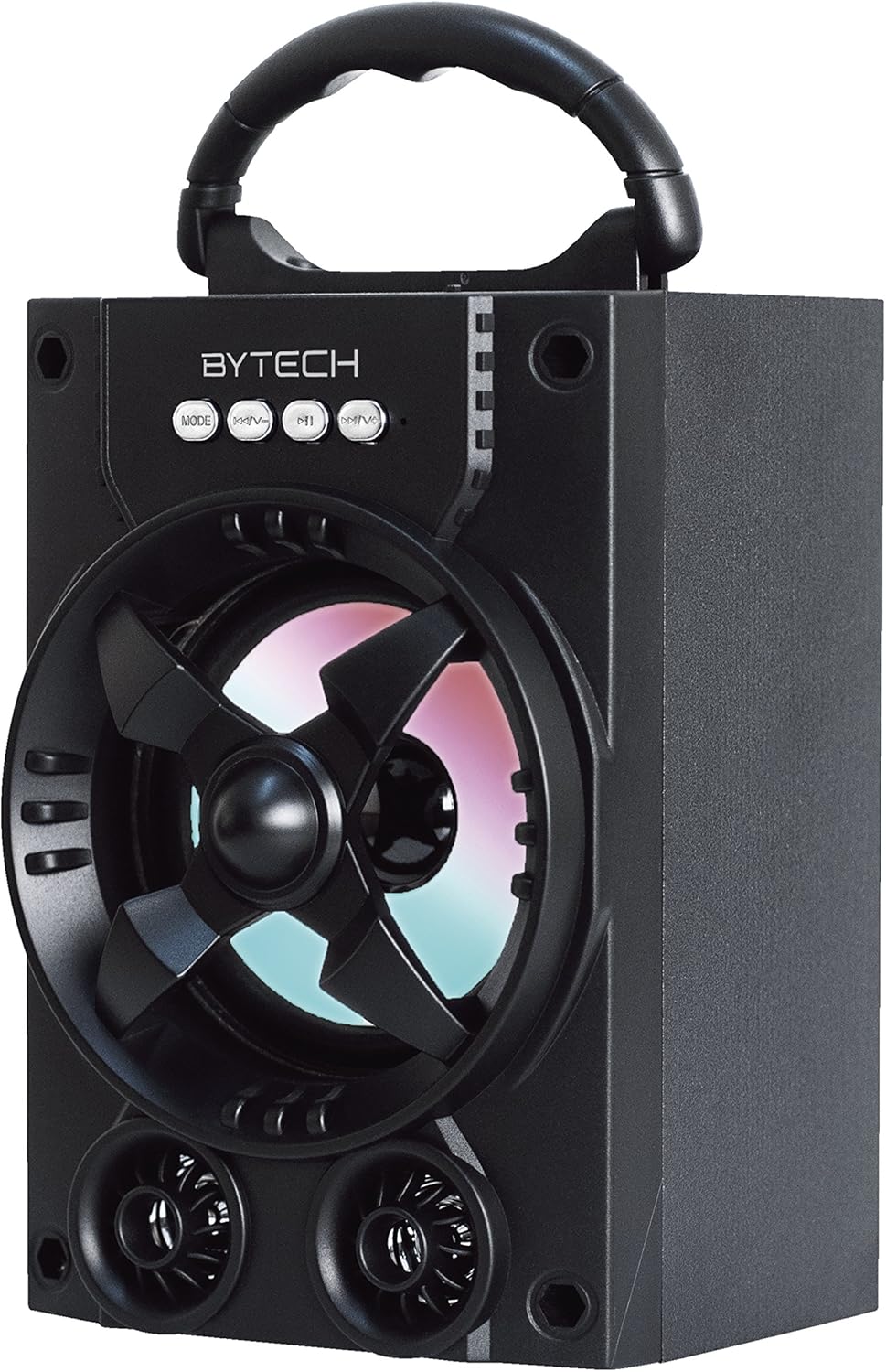
Figur 1.1: Forside view of the Bytech Massive Bluetooth Long Bar Speaker-BK, showcasing its design, handle, and speaker grille with LED lights.
2. Pakkens indhold
Tjek venligst pakken for følgende varer:
- Bytech Massive Bluetooth Long Bar Speaker-BK
- USB opladningskabel
- Brugervejledning (dette dokument)
Hvis der mangler eller er beskadigede varer, bedes du kontakte kundesupport.
3. Produktfunktioner
- LED Performance Lights: Dynamic LED lights that synchronize with your music for an enhanced audio-visual experience.
- Convenient Carrying Handle: Integrated handle for easy portability, allowing you to take your music anywhere.
- Universal Bluetooth Connectivity: Seamlessly connect wirelessly to your smartphone, tablet, or other Bluetooth-enabled devices.
- Surround sound: Designed to deliver a high-quality surround sound experience.
- Bærbart design: Ideal for various settings, including parties, outdoor gatherings, and personal use.

Figure 1.2: The speaker shown with its retail packaging, illustrating its key features such as multi-color LED lights, Bluetooth connectivity, and surround sound capability.
4. Kontroller og indikatorer
The speaker features intuitive controls and indicators for easy operation:
- MODE knap: Press to switch between available input modes (e.g., Bluetooth).
- V-knap: Press to decrease volume. Long press to skip to the previous track.
- V+ knap: Press to increase volume. Long press to skip to the next track.
- M knap: (Function not explicitly detailed, typically for mode or mute)
- LED lys: Indicate power status, charging status, and provide dynamic light effects during audio playback.
5. Opsætningsvejledning
5.1 Opladning af højttaleren
- Tilslut den lille ende af USB-opladerkablet til opladningsporten på højttaleren.
- Tilslut den store ende af USB-opladerkablet til en USB-strømadapter (medfølger ikke) eller en computers USB-port.
- The LED indicator will show charging status (e.g., red for charging, off when fully charged).
- Allow approximately 3-4 hours for a full charge before first use.
5.2 Tænd/sluk
- To power on, press and hold the Power button (location not specified, typically near charging port or on control panel) for a few seconds until you hear an audible prompt or see the LED lights activate.
- For at slukke skal du trykke på tænd/sluk-knappen igen, indtil højttaleren slukker.
5.3 Bluetooth -parring
- Ensure the speaker is powered on and in Bluetooth pairing mode (indicated by a flashing LED light or audible prompt).
- Gå til Bluetooth-indstillingerne på din smartphone eller tablet.
- Søg efter available devices. The speaker will appear as "BYTECH" or a similar name.
- Vælg højttaleren på listen for at starte parringen.
- Once successfully paired, the LED indicator will typically become solid, and you may hear a confirmation tone.
6. Betjeningsvejledning
6.1 Afspilning af lyd via Bluetooth
- After successful Bluetooth pairing, open your preferred music application on your connected device.
- Select and play your desired audio. The sound will be streamed wirelessly to the speaker.
- Use the V+ and V- buttons on the speaker or your connected device to adjust the volume.
- Long press V+ or V- to skip tracks.
6.2 LED Performance Lights
The speaker features integrated LED lights that enhance your listening experience. These lights typically activate automatically when the speaker is powered on and playing audio. Specific controls for light modes are not detailed, but they are designed to provide dynamic visual effects.
6.3 Modeskift
Tryk på MODE button to cycle through available input modes. While Bluetooth is the primary connectivity, other modes (if available, such as FM radio or AUX input) can be accessed via this button.
7. Vedligeholdelse og pleje
- Rensning: Brug en blød, tør klud til at rengøre højttalerens yderside. Brug ikke slibende rengøringsmidler, voks eller opløsningsmidler.
- Opbevaring: Når højttaleren ikke er i brug i længere perioder, skal den opbevares køligt og tørt, væk fra direkte sollys og ekstreme temperaturer.
- Batteripleje: For at forlænge batteriets levetid bør du undgå at aflade batteriet helt ofte. Genoplad højttaleren regelmæssigt, selvom den ikke er i brug, for at opretholde batteriets sundhed.
- Vandtæthed: Dette produkt er IKKE waterproof. Avoid exposure to water, rain, or excessive moisture to prevent damage.
8. Fejlfinding
Hvis du støder på problemer med din højttaler, kan du se følgende almindelige problemer og løsninger:
| Problem | Mulig årsag | Løsning |
|---|---|---|
| Højttaleren tænder ikke. | Lavt batteri. | Oplad højttaleren helt. |
| Ingen lyd fra højttaleren. | Volume too low; Not paired; Incorrect mode. | Increase volume on speaker and device; Ensure successful Bluetooth pairing; Press MODE button to select correct input. |
| Bluetooth-forbindelsen er ustabil eller fejler. | Device too far; Interference; Pairing issue. | Move device closer to speaker (within 33 ft/10m); Avoid obstacles; Forget device on your phone and re-pair. |
| LED-lysene virker ikke. | Speaker not powered on or playing audio. | Ensure speaker is on and audio is playing. |
9. Specifikationer
| Feature | Detalje |
|---|---|
| Mærke | Bytech |
| Modelnavn | BYTECH |
| Varemodelnummer | BCAUBS134BK |
| Højttaler type | Surround Sound |
| Forbindelsesteknologi | Bluetooth |
| Trådløs kommunikationsteknologi | Bluetooth |
| Kompatible enheder | Smartphone |
| Højttaler Maksimal udgangseffekt | 20 watt |
| Frekvensrespons | 20 KHz |
| Impedans | 1 Ohm |
| Højttaler størrelse | 5 tommer |
| Strømkilde | Ledningsbaseret elektrisk (til opladning) |
| Batteritype | 1 Lithium Ion batteri påkrævet |
| Farve | Sort |
| Produktdimensioner | 4.75 x 5.5 x 8.5 tommer |
| Varens vægt | 1.3 pund |
| Er vandtæt | Ingen |
| Oprindelsesland | Kina |
| UPC | 805112038121 |
10. Garantioplysninger
Bytech products are manufactured to the highest quality standards. For specific warranty terms and conditions, please refer to the warranty card included with your purchase or visit the official Bytech webwebsted. Gem din købsbevis til garantikrav.
11. Kundesupport
For technical assistance, troubleshooting, or general inquiries, please contact Bytech customer support. Contact information can typically be found on the product packaging, the official Bytech webwebstedet eller din købskvittering.
Bemærk: Der var ingen officielle produktvideoer fra sælgeren tilgængelige til indlejring baseret på de angivne data.


