Indledning
This manual provides comprehensive instructions for the setup, operation, maintenance, and troubleshooting of your Behringer XENYX X2222USB Premium 22-Input 2/2-Bus Mixer. Please read this manual thoroughly before operating the device to ensure proper use and to maximize its performance and longevity.
The Behringer XENYX X2222USB is a high-performance audio mixer designed for professional audio applications. It features an integrated USB computer audio interface, allowing for seamless blending and shaping of multiple audio signals and distribution to various outputs. Key features include eight top-tier XENYX microphone preamps, British-style EQs, eight user-friendly one-knob compressors, and a built-in 24-bit dual engine effects processor.
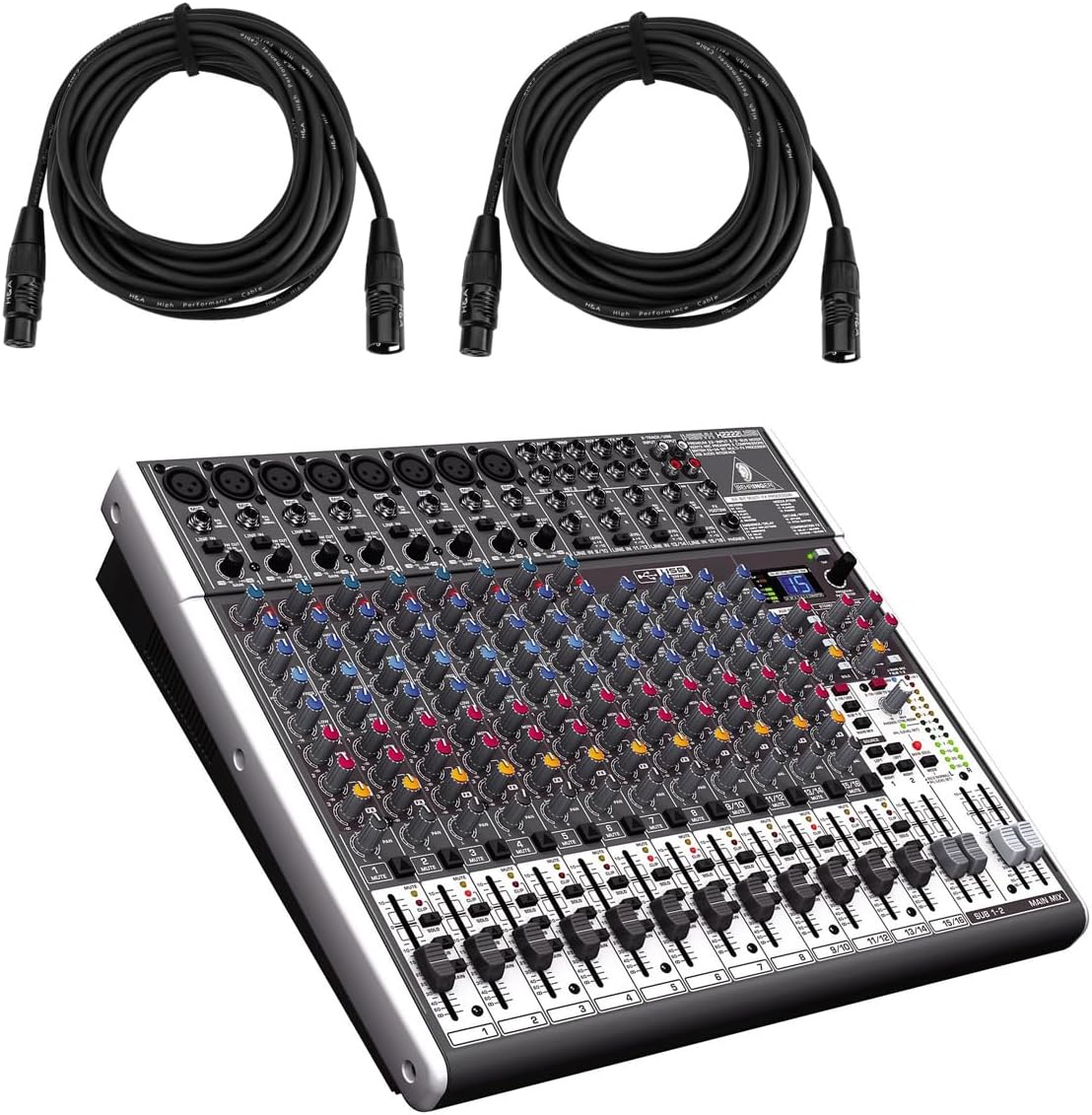
Figure 1: Behringer XENYX X2222USB Mixer with included XLR cables. This image shows the mixer from an angled top-front view, alongside two coiled XLR microphone cables.
Vigtige sikkerhedsinstruktioner
- Læs disse instruktioner.
- Gem disse instruktioner.
- Overhold alle advarsler.
- Følg alle instruktioner.
- Brug ikke dette apparat i nærheden af vand.
- Rengør kun med en tør klud.
- Bloker ikke nogen ventilationsåbninger. Installer i overensstemmelse med producentens anvisninger.
- Må ikke installeres i nærheden af varmekilder såsom radiatorer, varmeapparater, komfurer eller andre apparater (inklusive ampløftere), der producerer varme.
- Undgå at omgå sikkerhedsformålet med det polariserede stik eller stik med jordforbindelse. Et polariseret stik har to knive, hvor den ene er bredere end den anden. Et stik med jordforbindelse har to knive og et tredje jordstik. Det brede blad eller det tredje ben er tilvejebragt for din sikkerhed. Hvis det medfølgende stik ikke passer i din stikkontakt, skal du kontakte en elektriker for at få udskiftet den forældede stikkontakt.
- Beskyt netledningen mod at blive trådt på eller klemt, især ved stik, stikkontakter og det punkt, hvor de kommer ud af apparatet.
- Brug kun tilbehør/tilbehør specificeret af producenten.
- Brug kun den vogn, stativ, stativ, beslag eller bord, der er specificeret af producenten eller solgt sammen med apparatet. Når en vogn bruges, skal du være forsigtig, når du flytter kombinationen af vognen/apparatet for at undgå skader ved at vælte.
- Træk stikket ud af dette apparat under tordenvejr, eller når det ikke skal bruges i længere perioder.
- Overlad al service til kvalificeret servicepersonale. Service er påkrævet, når apparatet er blevet beskadiget på nogen måde, såsom strømforsyningsledning eller stik er beskadiget, væske er blevet spildt, eller genstande er faldet ind i apparatet, apparatet har været udsat for regn eller fugt, ikke fungerer normalt , eller er blevet droppet.
Pakkens indhold
Kontroller venligst, at alle nedenstående varer er inkluderet i din pakke:
- Behringer XENYX X2222USB Mixer
- Rackbeslag
- EnergyXT2.5 Software (download/license information)
- 2 x H&A XLR Cables (15' 8mm)
- Strømledning
- Brugervejledning (dette dokument)
Opsætning
Follow these steps to set up your Behringer XENYX X2222USB mixer for initial use.
1. Strømtilslutning
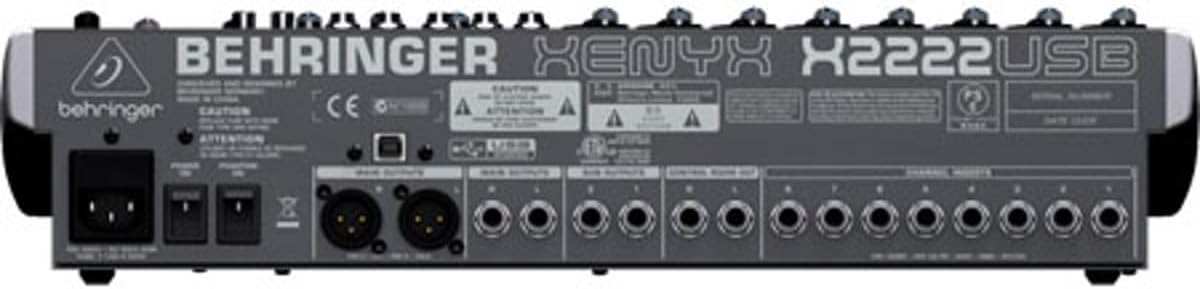
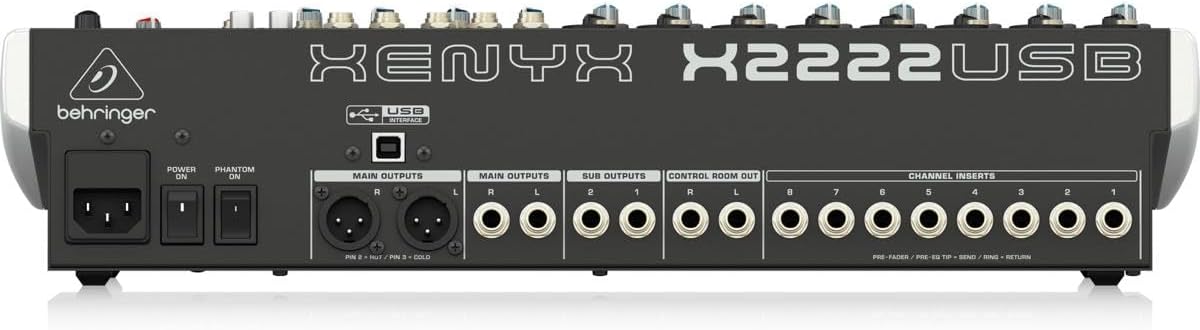
Connect the supplied power cord to the mixer's power input on the rear panel and then to a suitable AC power outlet. Ensure the power switch is in the OFF position before connecting.

Figure 2: Rear panel of the XENYX X2222USB mixer, highlighting power input, main outputs, sub outputs, control room out, and channel inserts.
2. Lydindgangsforbindelser
The mixer features 8 XLR mic inputs with XENYX preamps and 12 line inputs (8 mono, 4 stereo). Connect your microphones, instruments, and other audio sources to the appropriate input jacks.
- Mikrofoner: Use XLR cables (like the included H&A cables) to connect microphones to the XLR inputs (1-8).
- Linjeniveau-enheder: Use 1/4" TRS or TS cables for line-level instruments or devices to the 1/4" line inputs.
Figur 3: Eksamples of XLR male (left) and female (right) connectors, commonly used for microphone connections.
3. Lydudgangsforbindelser
Connect your main speakers, monitors, or recording devices to the mixer's output jacks.
- Hovedudgange: Use XLR or 1/4" TRS cables for your main stereo speakers.
- Control Room Out: Til tilslutning af studiemonitorer.
- Sub Outputs: For routing specific groups of channels.
4. USB Connection (for Computer Audio Interface)
Connect the mixer to your computer using a standard USB cable. This enables bi-directional audio transfer for recording and playback.
- Ensure your computer meets the system requirements for the EnergyXT2.5 software.
- Install any necessary drivers (usually automatically detected by modern operating systems, but check Behringer's website if issues arise).
- Install the included EnergyXT2.5 software for advanced recording and production capabilities.
Betjening af mixeren
Dette afsnit giver en overview of the mixer's controls and basic operation.

Figur 4: Frontpanel overview of the XENYX X2222USB mixer, displaying all channels, faders, knobs, and the effects section.
Channel Strips (Mono Channels 1-8)
- Gain Control: Adjusts the input sensitivity for microphones and line-level signals. Set this to achieve a healthy signal level without clipping.
- Kompressor: One-knob compressor for dynamic range control. Turn clockwise to increase compression.
- EQ (Equalizer): 3-band British-style EQ with swept mid.
- HØJ: Justerer diskantfrekvenser.
- MID: Adjusts mid-range frequencies. The FREKV knob selects the specific mid-frequency to be adjusted.
- LAV: Justerer basfrekvenser.
- AUX afsender: Three auxiliary sends per channel (FX1, MON1, MON2) for routing signals to external effects processors or stage skærme.
- PANDE: Placerer kanalens signal i stereofeltet (venstre mod højre).
- STUM: Mutes the channel's output.
- SOLO: Isolerer kanalen for overvågning.
- Kanal fader: Styrer udgangsniveauet for den enkelte kanal.
Stereo Channels (9/10, 11/12, 13/14, 15/16)
These channels are designed for stereo line-level inputs and feature simplified controls compared to mono channels.
Effekt processor
The built-in 24-bit dual engine effects processor offers 16 editable presets including reverb, chorus, flanger, delay, and pitch shifter. Use the PROGRAM knob to select an effect and the FX SEND controls to apply it to channels.
USB Audio Interface
The integrated USB interface allows for bi-directional audio streaming with your computer. This enables direct recording of your mix and playback of audio from your computer through the mixer.
- Indspilning: The main stereo mix can be sent to your computer for recording in a DAW (Digital Audio Workstation) like EnergyXT2.5.
- Afspilning: Audio from your computer can be routed back into the mixer for monitoring or integration into your live mix.
Hovedblandingssektion
- Hovedmix-fadere: Styr det samlede udgangsniveau for stereo main mix.
- Niveaumålere: Provide visual indication of the main mix output level. Aim for levels around 0 dB to avoid clipping.
- Fantomstrøm (+48V): Activates phantom power for condenser microphones connected to XLR inputs. Ensure microphones requiring phantom power are connected before activating.
Opretholdelse
Korrekt vedligeholdelse sikrer din mixers levetid og optimale ydeevne.
- Rensning: Use a soft, dry cloth to clean the exterior of the mixer. Avoid using abrasive cleaners, solvents, or waxes. Do not spray liquids directly onto the mixer.
- Ventilation: Sørg for, at ventilationsåbningerne ikke er blokerede. Tilstrækkelig luftgennemstrømning er afgørende for at forhindre overophedning.
- Opbevaring: When not in use for extended periods, store the mixer in a cool, dry place, away from direct sunlight and extreme temperatures. If possible, use the original packaging or a protective case.
- Kabelstyring: Regularly check all cables for damage. Replace frayed or damaged cables immediately to prevent signal loss or electrical hazards.
Fejlfinding
Dette afsnit omhandler almindelige problemer, du kan støde på, og giver løsninger.
| Problem | Mulig årsag | Løsning |
|---|---|---|
| No sound output from main mix. |
|
|
| Forvrænget lyd. |
|
|
| USB audio not working. |
|
|
Specifikationer
| Feature | Detalje |
|---|---|
| Mærke | Behringer |
| Model | XENYX X2222USB |
| Antal kanaler | 22 (8 mono, 4 stereo) |
| Mikrofon Preamps | 8 x XENYX Mic Preamps |
| Kompressorer | 8 x One-knob Compressors |
| Equalizer | British-style 3-band EQ with swept mid on mono channels |
| Effekt processor | 24-bit dual engine with 16 presets |
| Forbindelsesteknologi | USB (bi-directional audio interface) |
| Udgangsstiktype | XLR, 6,3 mm TRS |
| Strømkilde | Elektrisk med ledning |
| Produktdimensioner | 20.75 x 15.8 x 6 tommer (52.7 x 40.1 x 15.2 cm) |
| Varens vægt | 15.22 pund (6.9 kg) |
Garantioplysninger
The Behringer XENYX X2222USB Mixer bundle includes Adorama's 1-year warranty. For specific terms, conditions, and to register your product, please refer to the warranty documentation provided with your purchase or visit the official Behringer or Adorama support webwebsteder.
Gem venligst dit købsbevis for garantikrav.
Støtte
For further assistance, technical support, or to download the latest drivers and software, please visit the official Behringer webwebsted:
You may also refer to the Behringer Store on Amazon for product information and related accessories: Behringer Amazon Store


