1. Introduktion
This manual provides essential instructions for the installation, operation, and maintenance of the Moxa EDS-305 Unmanaged Ethernet Switch. The EDS-305 is a robust industrial Ethernet switch designed for reliable network connectivity in demanding environments. It features 5 10/100BaseT(X) ports and includes a smart relay output for alarm notifications.
2. Funktioner
- 5 10/100BaseT(X) Ethernet ports for flexible network expansion.
- Unmanaged operation for plug-and-play simplicity.
- Relay output warning for power failure and port break alarm.
- Broadcast storm protection to prevent network congestion.
- Rugged design suitable for industrial applications.
3. Sikkerhedsoplysninger
Please read and understand all safety instructions before installing or operating the device. Failure to do so may result in injury or damage to the equipment.
- Strømforsyning: Sørg for, at strømkilden voltage is within the specified range (12-48 VDC). Incorrect voltage kan beskadige enheden.
- Miljø: Install the switch in an environment that meets the specified operating temperature and humidity ranges. Avoid excessive dust, moisture, and direct sunlight.
- Montering: Monter enheden sikkert for at forhindre utilsigtede fald.
- Kabelføring: Use appropriate cabling for industrial environments to ensure reliable operation and minimize interference.
4. Opsætning og installation
4.1 Pakkens indhold
- Moxa EDS-305 Unmanaged Ethernet Switch
- Hurtig installationsvejledning (hvis inkluderet)
- Klemblok til strømindgang og relæudgang
4.2 Fysisk beskrivelse
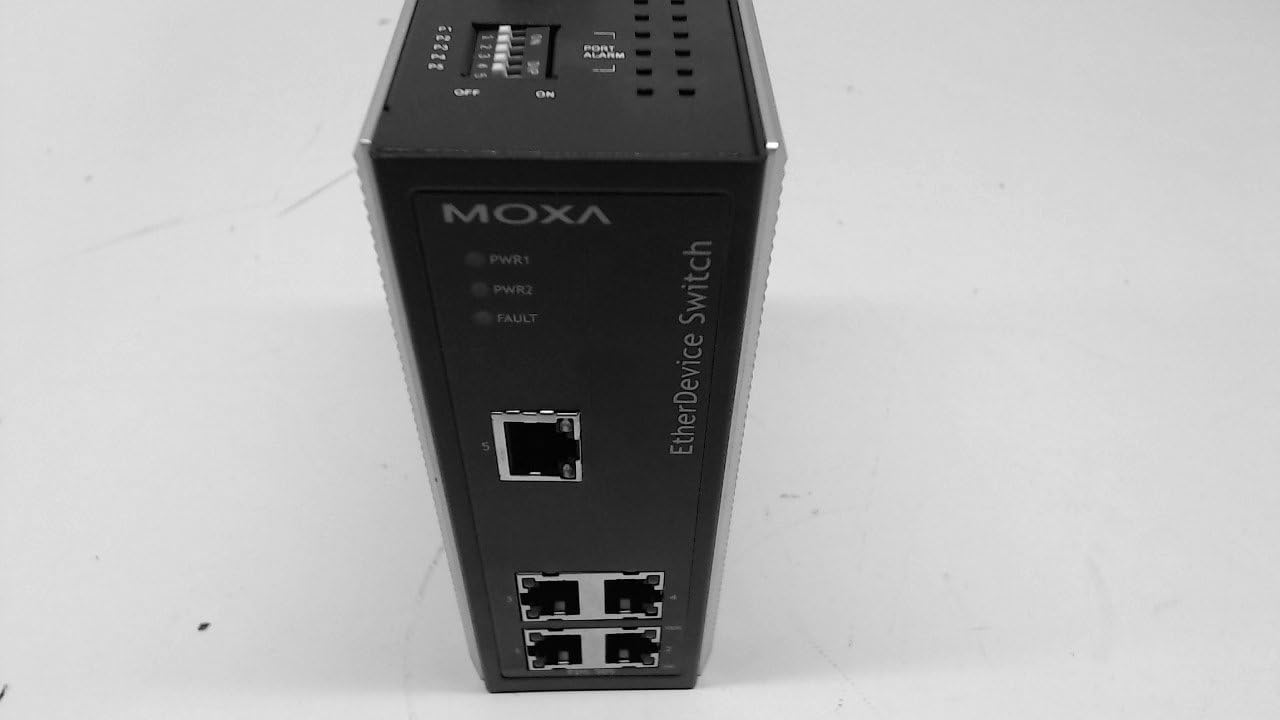
The EDS-305 features LED indicators for power and fault status, along with 5 10/100BaseT(X) Ethernet ports on the front panel. The rear panel includes power input terminals and DIP switches for alarm configuration.
4.3 Strømtilslutning
Connect the 12-48 VDC power supply to the terminal block on the rear panel. The EDS-305 supports redundant power inputs (PWR1 and PWR2) for enhanced reliability.

4.4 Netværksforbindelse
Connect standard Ethernet cables (Cat5e or better) from your network devices (e.g., computers, servers, other switches) to the 10/100BaseT(X) ports on the front panel of the EDS-305.
4.5 Alarm Relay Configuration
The EDS-305 features a smart relay output for alarm notifications. The DIP switches on the rear panel allow you to enable or disable port break alarms for individual ports (P1-P5) and the overall POST ALARM function.

Refer to Figure 3 for the location of the DIP switches. Set the switches to 'ON' to enable the port alarm for the corresponding port, or 'OFF' to disable it. The 'POST ALARM' switch controls the power-on self-test alarm.
5. Betjeningsvejledning
5.1 LED-indikatorer
- PWR1/PWR2 (Green): Lit when power input 1/2 is connected and operational.
- FEJL (Rød): Lit when a power failure or a configured port break alarm is triggered.
- Link/Act (Green, per port): Lit when a network link is established. Blinks when data is being transmitted or received.
5.2 Grundlæggende betjening
Once powered on and network cables are connected, the EDS-305 operates automatically as an unmanaged switch. It forwards Ethernet frames between connected devices without requiring any configuration.
5.3 Alarmrelæudgang
The relay output provides a dry contact closure when an alarm condition (power failure or enabled port break) occurs. This can be connected to an external alarm system or indicator.
6. Vedligeholdelse
The Moxa EDS-305 is designed for minimal maintenance. However, periodic checks are recommended:
- Rensning: Hold enheden fri for støv og snavs. Brug en blød, tør klud til rengøring. Brug ikke flydende rengøringsmidler.
- Kabelintegritet: Periodically inspect network and power cables for damage or loose connections.
- Miljøforhold: Sørg for, at driftsmiljøet holder sig inden for de angivne temperatur- og fugtighedsgrænser.
7. Fejlfinding
If you encounter issues with your EDS-305, consider the following troubleshooting steps:
- Ingen strøm: Check if the PWR1/PWR2 LEDs are off. Verify the power supply connection and voltage. Sørg for, at strømkilden er aktiv.
- Intet link: If a Link/Act LED is off for a connected device, check the Ethernet cable connection at both ends. Ensure the connected device is powered on and functioning correctly.
- FAULT LED Lit: This indicates a power failure or a port break alarm. Check power connections. If a port break alarm is configured, verify the status of the connected network devices and cables for the enabled ports.
- Problemer med netværksydelse: Ensure all cables are in good condition. Check for broadcast storms (though the device has protection, severe issues might still occur).
8. Specifikationer
| Attribut | Specifikation |
|---|---|
| Modelnummer | EDS-305 |
| Ethernet-porte | 5 x 10/100BaseT(X) |
| Input bindtage | 12-48 VDC (Redundant Inputs) |
| Strømforbrug | 12 VDC @ 0.7A (Max) |
| Alarmudgang | 1 relay output with current carrying capacity of 1A @ 24 VDC |
| Driftstemperatur | -40 to 75°C (Note: Product description mentions -40 to 75°C for EDS-308-T, assuming similar for EDS-305) |
| Opbevaringstemperatur | -40 til 85°C |
| Fugtighed | 5 til 95 % RH (ikke-kondenserende) |
| Dimensioner (L x B x H) | 0.31 x 0.28 x 0.16 inches (Product Dimensions from data) |
| Varens vægt | 2.17 pund |
| Fabrikant | MOXA |
| ASIN | B07C7K7YDD |
| Dato først tilgængelig | 6. juli 2015 |
9. Garanti og support
For warranty information and technical support, please refer to the official Moxa website or contact your authorized Moxa distributor. Ensure you have your product model number (EDS-305) and serial number available when seeking support.


