Indledning
The AUNA Roadie KIDS Boombox is a versatile and portable audio system designed for children, offering multiple playback options including CD, Bluetooth, USB, and AM/FM radio. It features integrated multi-color LED lights that synchronize with the music, enhancing the listening experience. This manual provides detailed instructions for the safe and effective use of your boombox.
Vigtige sikkerhedsinstruktioner
Læs og forstå venligst alle sikkerhedsinstruktioner, før du bruger dette produkt. Gem denne manual til senere brug.
- Udsæt ikke enheden for regn eller fugt for at forhindre brand eller elektrisk stød.
- Bloker ikke ventilationsåbninger. Installer i overensstemmelse med producentens anvisninger.
- Må ikke installeres i nærheden af varmekilder såsom radiatorer, varmeapparater, komfurer eller andre apparater (inklusive ampløftere), der producerer varme.
- Beskyt netledningen mod at blive trådt på eller klemt, især ved stik, stikkontakter og det sted, hvor de kommer ud af apparatet.
- Brug kun tilbehør/tilbehør specificeret af producenten.
- Træk stikket ud af dette apparat under tordenvejr, eller når det ikke skal bruges i længere perioder.
- Overlad al service til kvalificeret servicepersonale. Service er påkrævet, når apparatet er blevet beskadiget på nogen måde.
Pakkens indhold
Kontroller, at alle varer er til stede, når du åbner pakken:
- 1 x AUNA Roadie KIDS Boombox
- 1 x AC strømkabel
- 1 x User Manual (English, German, French)
Produkt overview
Familiarize yourself with the various parts and controls of your AUNA Roadie KIDS Boombox.

Figur 1: Forside view of the AUNA Roadie KIDS Boombox, showcasing the main unit with illuminated speakers and central display.
Front Panel and Display

Figur 2: Detaljeret view of the boombox's front, highlighting the digital display, USB port, and power/FM ST indicators.
- Digital skærm: Viser spornummer, radiofrekvens og tilstand.
- USB-port: For connecting USB flash drives for MP3/WMA playback.
- Power/FM ST Indicators: Lights indicating power status and FM stereo reception.
- LED lys: Multi-color LEDs integrated into the speaker grilles, changing with the music.
Top Panel and CD Compartment

Figure 3: The top-loading CD compartment, shown open for disc insertion.
- CD-rum: Top-loading tray for Audio CDs, CD-R, CD-RW, and MP3-CDs.
- Kontrolknapper: Play/Pause, Stop, Skip/Search (forward/backward), Program, Repeat, Mode.
Side and Rear Panels

Figur 4: Side view illustrating the volume control knob and the function selector switch.
- Lydstyrkeknap: Analog control for adjusting audio output level.
- Funktionskontakt: Selects between AM, FM, CD/USB, Bluetooth, and AUX modes.
- Lyskontakt: On/Off switch for the LED lights.
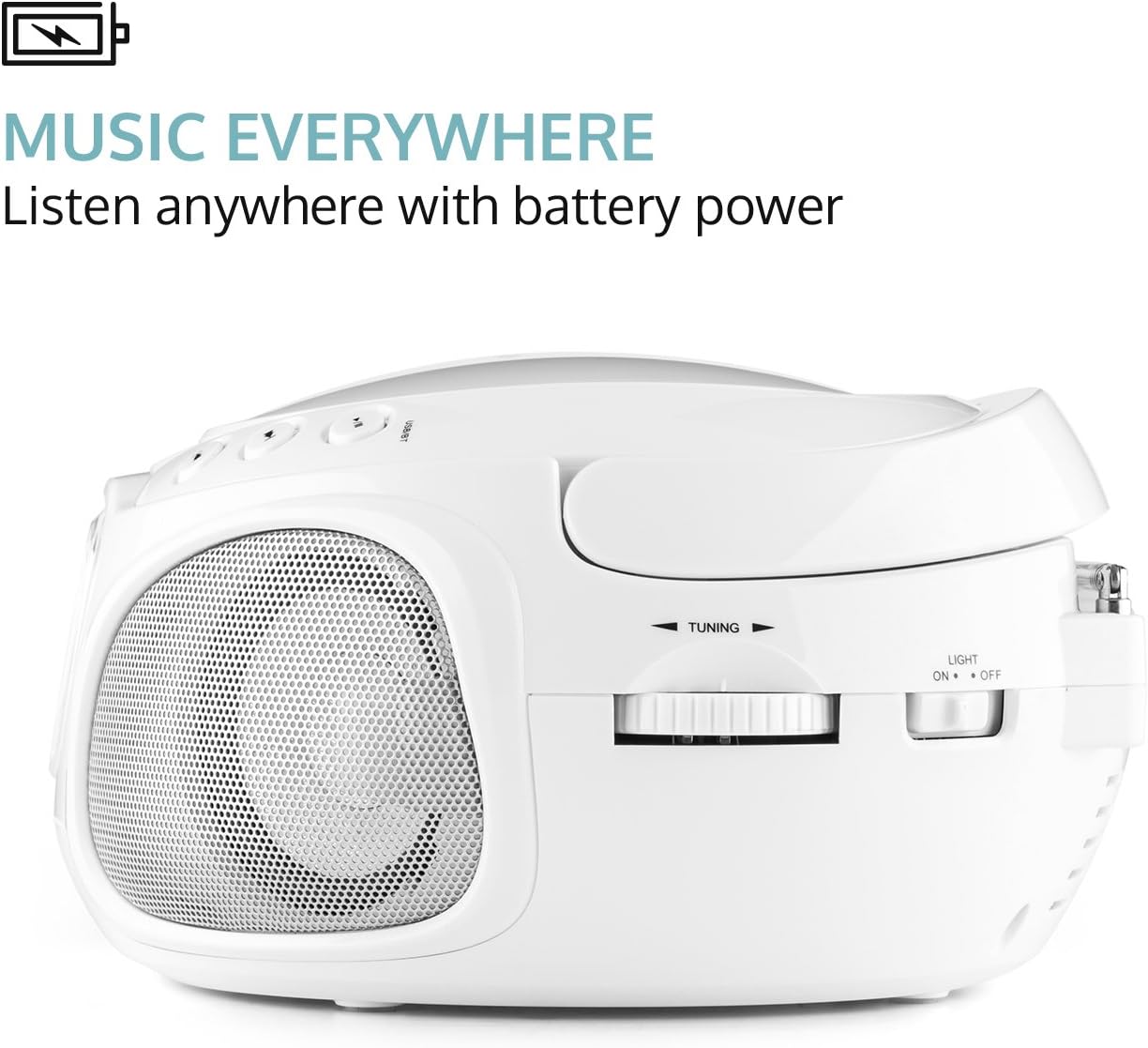
Figur 5: Bagside view displaying the extendable antenna, AUX input, headphone output, and AC power input.
- Udtrækkelig antenne: For forbedret radiomodtagelse.
- AUX-indgang (3.5 mm): Til tilslutning af eksterne lydenheder.
- Hovedtelefonudgang (3.5 mm): Til privat lytning.
- AC strømindgang: For connecting the included power cable.
- Batterirum: Located on the bottom, for 6 x C-type batteries (not included).
Opsætning
Strøm til Ghettoblasteren
The AUNA Roadie KIDS Boombox can be powered by either AC power or batteries.
AC Power (Recommended for stationary use)
- Ensure the boombox is switched off.
- Insert the included AC power cable into the AC power input jack on the rear of the boombox.
- Plug the other end of the power cable into a standard 110-120V ~ / 50-60Hz wall outlet.
Battery Power (For portable use)
- Ensure the boombox is switched off and disconnected from AC power.
- Find batterirummet i bunden af enheden.
- Åbn batterirummets dæksel.
- Insert 6 x C-type batteries (not included), ensuring correct polarity (+/-) as indicated inside the compartment.
- Luk batterirummets dæksel forsvarligt.
Note: Remove batteries if the unit will not be used for an extended period to prevent leakage and damage.
Betjeningsvejledning
Generel drift
- Tænd/sluk: Use the on/off switch located on the left outer side of the unit.
- Valg af tilstand: Use the function switch on the side to select desired mode (AM, FM, CD/USB, BT/AUX).
- Lydstyrkejustering: Rotate the analog volume knob on the side to increase or decrease the sound level.
- LED lys: Use the "Light On/Off" switch on the rear to control the multi-color LED lights.
CD-afspilning
- Switch the function selector to "CD/USB" mode.
- Open the CD compartment cover on the top of the unit.
- Place an Audio CD, CD-R, CD-RW, or MP3-CD onto the spindle with the label side facing up.
- Close the CD compartment cover. The display will show the total number of tracks.
- Tryk på AFSPIL/PAUSE knappen for at starte afspilning.
- Brug SKIP/SØG buttons to navigate between tracks. Hold to fast forward/rewind.
- Tryk på STOP for at stoppe afspilning.
- Programafspilning: Tryk på PROGRAM button to create a playlist of up to 20 tracks for CDs or 99 tracks for MP3-CDs.
- Gentag funktioner: Tryk på GENTAGE button to cycle through repeat modes (repeat one, repeat all, repeat folder for MP3-CDs).
- Tilfældig afspilning: Tryk på TILFÆLDIG button for shuffled playback.
Bluetooth-forbindelse
Stream music wirelessly from your smartphone or tablet.
- Switch the function selector to "BT/AUX" mode. The unit will enter Bluetooth pairing mode, indicated by a flashing Bluetooth icon on the display.
- Aktiver Bluetooth på din Bluetooth-aktiverede enhed, og søg efter tilgængelige enheder.
- Select "AUNA Roadie" from the list of devices.
- Once paired, the Bluetooth icon will stop flashing, and you can play music from your device through the boombox.
USB-afspilning

Figure 6: USB port with a flash drive inserted, ready for media playback.
The boombox supports MP3 and WMA file types from USB flash drives.
- Switch the function selector to "CD/USB" mode.
- Indsæt et USB-flashdrev i USB-porten på frontpanelet.
- The unit will automatically detect and begin playing supported audio files.
- Brug AFSPIL/PAUSE, STOP, og SKIP/SØG knapper til kontrol.
Radiobetjening (AM/FM)
- Switch the function selector to "AM" or "FM" mode.
- Extend the telescopic antenna on the rear of the unit for optimal FM reception. For AM, rotate the unit for best reception.
- Brug TUNING knob on the side to manually tune to your desired radio station.
AUX-indgang
Tilslut eksterne lydenheder med et 3.5 mm lydkabel (medfølger ikke).
- Switch the function selector to "BT/AUX" mode.
- Connect one end of a 3.5mm audio cable to the AUX input jack on the rear of the boombox.
- Tilslut den anden ende til hovedtelefonstikket eller lydudgangen på din eksterne enhed (f.eks. MP3-afspiller, smartphone).
- Audio from the external device will now play through the boombox speakers. Control playback from your external device.
Hovedtelefonudgang
For private listening, connect headphones to the 3.5mm headphone output jack on the rear of the unit. The speakers will automatically mute when headphones are connected.
Opretholdelse
- Rensning: Brug en blød, tør klud til at rengøre enhedens yderside. Brug ikke slibende rengøringsmidler eller opløsningsmidler.
- CD-linsepleje: If the CD player experiences reading errors, use a commercially available CD lens cleaner disc to clean the lens.
- Opbevaring: Når den ikke er i brug i længere perioder, skal den opbevares køligt og tørt, væk fra direkte sollys og ekstreme temperaturer. Fjern batterierne, hvis den opbevares i længere tid.
Fejlfinding
| Problem | Mulig årsag | Løsning |
|---|---|---|
| Ingen strøm | Power cable not connected; Batteries depleted or incorrectly inserted; Power switch off. | Ensure AC cable is securely plugged in; Replace batteries or check polarity; Turn the power switch to "On". |
| Ingen lyd | Volume too low; Headphones connected; Incorrect mode selected; Mute function active on connected Bluetooth device. | Increase volume; Disconnect headphones; Select the correct mode (CD, BT, USB, AM, FM, AUX); Check volume/mute on connected device. |
| CD'en afspiller ikke/springer over | CD dirty or scratched; CD inserted incorrectly; Unsupported CD format. | Clean CD with a soft cloth; Insert CD with label side up; Ensure CD is Audio CD, CD-R, CD-RW, or MP3-CD. |
| Bluetooth ikke parring | Boombox not in pairing mode; Bluetooth disabled on device; Device too far from boombox. | Ensure boombox is in "BT/AUX" mode; Enable Bluetooth on your device; Move device closer to the boombox (within 10 meters). |
| Dårlig radiomodtagelse | Antennen ikke strakt ud; Svagt signal. | Fully extend the telescopic antenna; Try repositioning the unit for better reception. |
Specifikationer
| Mærke | AUNA |
| Model | 00819885021020US |
| Dimensioner (B x H x D) | 9.4 x 5.1 x 7.9 tommer (ca.) |
| Vægt | 3.4 pund (ca.) |
| Power Supply (AC) | 110-120 V ~ / 50-60 Hz |
| Strømforsyning (batteri) | 6 x C-type batteries (9 V DC, not included) |
| Højttaler output | 2 x 1.5 W |
| Compatible CD Formats | Audio CD, CD-R, CD-RW, MP3-CDs |
| Understøttet USB File Typer | MP3, WMA |
| Bluetooth version | 2.1 + EDR |
| Bluetooth Profiles | A2DP, AVRCP |
| Forbindelse | Bluetooth, Auxiliary (3.5mm), USB, AM/FM Radio |
Garanti og support
For warranty information or technical support, please refer to the contact details provided with your purchase or visit the official AUNA website. This product includes a user manual in English, German, and French.


