1. Introduktion
Tak for købetasing the Ematic EMHD130LED HD 16GB Music Player. This compact and portable device allows you to enjoy your favorite music on the go. Featuring a 1.3-inch OLED display and a MicroSD slot for expanded storage, it is designed for ease of use and portability. This manual provides detailed instructions for setting up, operating, and maintaining your music player.
2. Vigtige sikkerhedsoplysninger
- Udsæt ikke enheden for ekstreme temperaturer, direkte sollys eller høj luftfugtighed.
- Undgå at tabe eller udsætte enheden for kraftige stød.
- Forsøg ikke selv at skille enheden ad eller reparere den. Overlad al service til kvalificeret personale.
- Hold enheden væk fra vand og andre væsker.
- Brug kun tilbehør, der er godkendt af producenten.
- Bortskaf enheden og dens batteri på en ansvarlig måde i henhold til lokale regler.
3. Pakkens indhold
Tjek venligst pakken for følgende varer:
- Ematic EMHD130LED HD 16GB Music Player
- Brugervejledning (dette dokument)
- Note: A USB charging/data transfer cable is typically required and may be sold separately.
4. Produktet er slutview
Familiarize yourself with the components and controls of your Ematic music player.
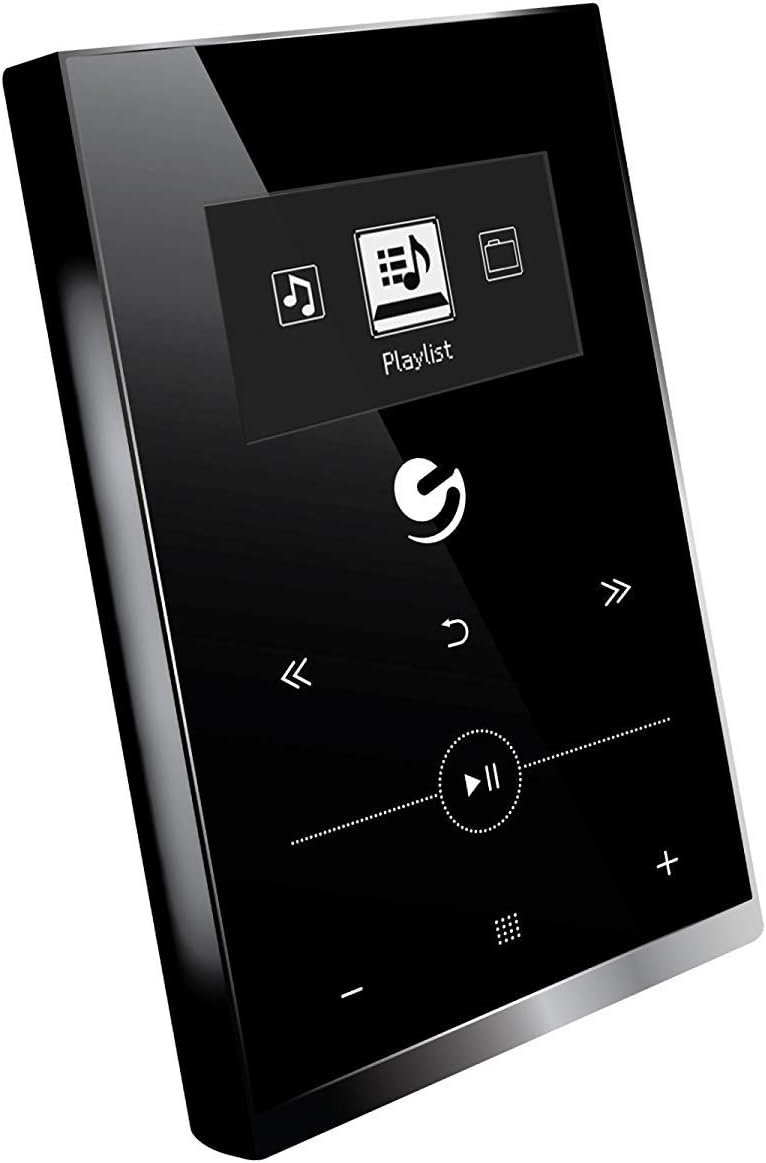
Figur 4.1: Front view of the Ematic EMHD130LED Music Player, highlighting its 1.3-inch OLED display and touch-sensitive controls for navigation and playback.

Figur 4.2: The Ematic EMHD130LED Music Player shown in a typical usage scenario, demonstrating its small form factor suitable for connection to a computer for media transfer.
Kontrol og porte:
- OLED-skærm: 1.3-inch screen for track information and menu navigation.
- Navigationsknapper: (Implied from image) Up, Down, Left, Right, Select/Play/Pause.
- Lydstyrkekontrol: (Implied from image) Plus (+) and Minus (-) buttons for adjusting audio output.
- MicroSD slot: For expanding storage capacity beyond the internal 16GB.
- USB-port: For connecting to a computer for charging and data transfer.
5. Opsætning
5.1 Opladning af enheden
Before first use, fully charge your music player. Connect the device to a computer's USB port or a compatible USB wall adapter using a USB cable. The OLED display will indicate charging status. A full charge typically takes a few hours.
5.2 Indlæsning af musik
The Ematic EMHD130LED has 16GB of internal storage. You can add more music using a MicroSD card (sold separately).
- Via computer: Plug your media player directly into your computer using a USB cable. The device will appear as a removable drive. Drag and drop your MP3 audio files into the player's music folder.
- Via MicroSD Card: Insert a MicroSD card into the designated slot on the player. You can transfer music files directly to the MicroSD card via a card reader on your computer, or transfer them to the card once it's in the player and connected to the computer.
6. Betjeningsvejledning
6.1 Tænd/sluk
Press and hold the Power button (location not specified, typically a side button or integrated with Play/Pause) for a few seconds to turn the device on or off.
6.2 Grundlæggende navigation
Use the navigation buttons (Up, Down, Left, Right) to browse through menus and select options on the 1.3-inch OLED display. Press the central Select button to confirm a selection or play a track.
6.3 Musikafspilning
- From the main menu, navigate to 'Music' or 'Playlist'.
- Browse through your stored music by artist, album, genre, or all songs.
- Select a track and press the Play/Pause button to begin playback.
- Use the Skip Forward/Backward buttons to change tracks.
- Adjust the volume using the Volume Up (+) and Volume Down (-) buttons.
6.4 Using the MicroSD Card
Once a MicroSD card is inserted and contains music, the player will automatically detect it. You can typically switch between internal storage and MicroSD card content through the music menu settings.
7. Vedligeholdelse
- Rensning: Use a soft, dry, lint-free cloth to clean the device. Do not use abrasive cleaners or solvents.
- Opbevaring: Når enheden ikke er i brug i længere perioder, skal den opbevares køligt og tørt, væk fra direkte sollys.
- Batteripleje: For at forlænge batteriets levetid bør du undgå at aflade batteriet helt ofte. Oplad enheden regelmæssigt, selvom den ikke er i brug.
8. Fejlfinding
| Problem | Mulig årsag | Løsning |
|---|---|---|
| Enheden tændes ikke. | Batteriet er afladet. | Oplad enheden i mindst 30 minutter. |
| Ingen lyd. | Volume is too low or muted; Headphones not connected properly. | Increase volume; Ensure headphones are fully plugged in. |
| Kan ikke overføre files. | Incorrect USB connection; Driver issue; Corrupted files. | Ensure USB cable is securely connected; Try a different USB port or cable; Restart computer and player; Check file format (only MP3 supported). |
| Skærmen er tom eller frosset. | Softwarefejl. | Tryk og hold tænd/sluk-knappen nede i 10-15 sekunder for at fremtvinge en genstart. |
9. Specifikationer
| Feature | Detalje |
|---|---|
| Mærke | Ematic |
| Model | EMHD130LED |
| Modelnavn | 16GB High Definition Music Player with 1.3-inch OLED Display |
| Hukommelseslagringskapacitet | 16 GB (intern) |
| Digital lagerkapacitet | 16 GB |
| Kompatible enheder | Bærbar, personlig computer |
| Display Type | OLED |
| Skærmstørrelse | 1.3 tommer |
| Connector Type | USB |
| Compatible Media Type | MP3 |
| Medietype | Micro SD |
| Produktdimensioner | 11.99 x 8.48 x 2.84 cm; 312.98 g |
| Battericellesammensætning | Lithium Ion |
| Genopladeligt batteri | Ja |
| Fabrikant | Shaghai LTD |
| Første ledige dato | 26. marts 2018 |
10. Garanti og support
For warranty information and customer support, please refer to the warranty card included with your product or visit the official Ematic website. You may also contact Ematic customer service directly for assistance with product issues or inquiries.
Ematic Official Webwebsted: www.ematic.us (Note: This is a general placeholder link for Ematic's website. Please verify the correct support URL for din region.)


