1. Introduktion
This manual provides comprehensive instructions for the setup, operation, and maintenance of your BFT B RCB TX4 Remote Control. Please read this manual carefully before using the device to ensure proper functionality and longevity.
2. Produktet er slutview
The BFT B RCB TX4 is an ergonomic radio frequency remote control designed for various compatible devices, including televisions, DVD/Blu-ray players, set-top boxes, and audio/video receivers. It features 12 buttons and operates with a range of up to 150 meters.
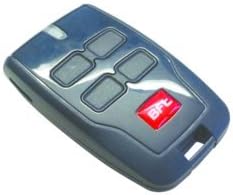
Figur 1: Front view of the BFT B RCB TX4 Remote Control, showing its four main buttons and the BFT logo.
3. Opsætning og programmering
The BFT B RCB TX4 remote control is designed for easy programming. The specific programming method may vary depending on the receiver unit it is being paired with. Below is a general programming procedure. Refer to your receiver's manual for precise instructions if these steps do not apply.
- Forbered modtageren: Locate the programming button or learn mode activation on your compatible device (e.g., gate opener, garage door opener, or other receiver). This button is often labeled "PROG," "LEARN," or "SET."
- Aktivér læringstilstand: Press and hold the programming button on your receiver until an indicator light (LED) illuminates or flashes, signifying that the receiver is in learn mode.
- Programmér fjernbetjeningen: While the receiver is in learn mode, press and hold the desired button on your BFT B RCB TX4 remote control that you wish to assign to the function. Hold the button for approximately 2-3 seconds.
- Bekræft programmering: The indicator light on the receiver should change (e.g., flash rapidly, turn solid, or turn off) to confirm successful programming. Release the button on the remote control.
- Test funktionalitet: Press the programmed button on your BFT B RCB TX4 remote control to test its operation with the receiver.
- Program Additional Buttons (if applicable): Repeat steps 2-5 for any other buttons you wish to program for different functions or devices.
Note: If programming fails, ensure the remote control has fresh batteries and that you are within the operational range of the receiver. Some receivers may require a specific sequence or a master remote for programming.
4. Betjeningsvejledning
Once programmed, operating the BFT B RCB TX4 remote control is straightforward:
- Knap funktioner: Each of the 12 buttons on the remote control corresponds to a specific function or device as programmed during the setup process.
- Aktivering: To activate a function, simply press the corresponding button firmly and release it.
- Rækkevidde: The remote control has an operational range of up to 150 meters in open areas. Obstructions such as walls, vehicles, or adverse weather conditions may reduce this range.
- Indikatorlys: Some remote controls may feature a small LED indicator that illuminates when a button is pressed, confirming signal transmission.
5. Vedligeholdelse
5.1 Udskiftning af batteri
The BFT B RCB TX4 remote control uses an alkaline battery, which is included with the device. When the remote's range decreases significantly or it stops responding, it is likely time to replace the battery.
- Find batterirummet: The battery compartment is typically located on the back or side of the remote control. It may be secured with a small screw or a clip.
- Åbent rum: Use a small screwdriver or a coin to gently open the battery compartment cover.
- Fjern det gamle batteri: Carefully remove the old battery, noting its orientation (+/- terminals).
- Isæt nyt batteri: Insert a new alkaline battery of the same type, ensuring correct polarity.
- Luk rum: Sæt batterirummets dæksel på igen og fastgør det.
- Prøve: Test the remote control's functionality after replacing the battery.
5.2 Rengøring
To clean the remote control, use a soft, dry cloth. Avoid using abrasive cleaners, solvents, or excessive moisture, as these can damage the device.
6. Fejlfinding
| Problem | Mulig årsag | Løsning |
|---|---|---|
| Fjernbetjeningen svarer ikke. | Fuldt eller lavt batteri. Forkert programmering. Uden for rækkevidde. | Replace battery. Re-program the remote. Move closer to the receiver. |
| Reduceret rækkevidde. | Low battery. Obstructions. Interference. | Replace battery. Ensure clear line of sight. Check for sources of radio interference. |
| Remote programs but does not operate. | Incorrect programming. Receiver issue. | Verify programming steps with receiver manual. Check receiver's power and status. |
7. Specifikationer
- Model: TX4
- Mærke: BFT (Manufacturer: Remote)
- Materiale: Plast
- Antal knapper: 12
- Forbindelse teknologi: Radiofrekvens
- Driftsområde: Op til 150 meter (åbent område)
- Batteritype: Alkalisk (inkluderet)
- Særlige funktioner: Ergonomisk design
- Kompatible enheder: Television, DVD/Blu-ray Player, Set Top Box, Audio/Video Receiver (requires compatible receiver unit)
8. Garanti og support
For warranty information or technical support, please refer to the documentation provided with your purchase or contact the retailer or manufacturer directly. Keep your proof of purchase for warranty claims.
Manufacturer: Remote


