1. Introduktion
The KanexPro EXT-AVIP120M is an HDMI Over IP Extender designed to transmit HDMI signals over a standard Cat5e/6 network cable. This system allows for the extension of high-definition video and audio signals over long distances, utilizing existing network infrastructure. It supports point-to-point, point-to-multipoint, and multipoint-to-multipoint configurations, making it suitable for various professional AV installations.
2. Sikkerhedsoplysninger
- Læs alle instruktioner omhyggeligt, før du betjener enheden.
- Do not expose this unit to rain, moisture, or excessive humidity.
- Sørg for korrekt ventilation for at forhindre overophedning.
- Brug kun de medfølgende strømadaptere.
- Forsøg ikke at skille enheden ad eller ændre den. Overlad al service til kvalificeret personale.
- Hold enheden væk fra varmekilder, direkte sollys og stærke magnetfelter.
3. Pakkens indhold
Kontroller venligst pakkens indhold omhyggeligt. Hvis der mangler eller er beskadigede dele, skal du straks kontakte din forhandler.
- 1x KanexPro EXT-AVIP120M Transmitter (TX)
- 1x KanexPro EXT-AVIP120M Receiver (RX)
- 2x DC 5V strømadaptere
- 1x IR-senderkabel
- 1x IR-modtagerkabel
- Mounting Brackets (pre-attached or included)
- Instruktionsmanual (dette dokument)
4. Produktet er slutview
The KanexPro EXT-AVIP120M system consists of a Transmitter (TX) and a Receiver (RX) unit. Both units feature an Ethernet port for network connection, a DC 5V power input, and IR ports for remote control extension. The Transmitter has an HDMI Input, while the Receiver has an HDMI Output.

Figure 1: KanexPro EXT-AVIP120M Transmitter (left) and Receiver (right) Units. Both units feature an Ethernet port, DC 5V power input, IR ports, and status indicators. The Transmitter has an HDMI Input, and the Receiver has an HDMI Output.
5. Opsætning og installation
Follow these steps to set up your KanexPro EXT-AVIP120M system. Refer to the system diagram for visual guidance.
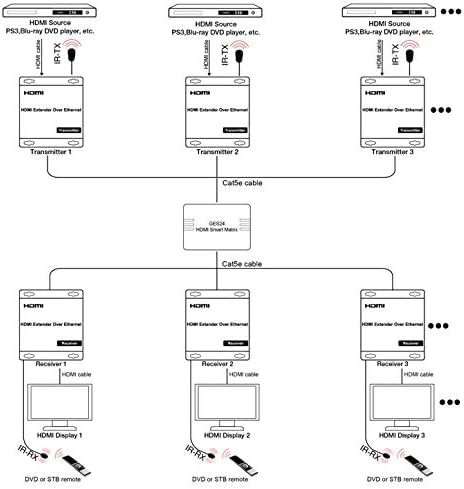
Figure 2: Typical System Diagram for KanexPro EXT-AVIP120M. This diagram illustrates how multiple transmitters and receivers can be connected via a network switch (HDMI Smart Matrix) using Cat5e cables to extend HDMI signals and IR control.
- Tilslut HDMI-kilde til sender: Connect an HDMI cable from your HDMI source (e.g., PS3, Blu-ray DVD player, PC) to the HDMI Input port on the EXT-AVIP120M Transmitter unit.
- Connect IR TX Cable (Optional): If you wish to control the source device from the display location, connect the IR Transmitter (TX) cable to the IR TX port on the Transmitter unit. Position the IR emitter head near the IR sensor of your source device.
- Connect Transmitter to Network: Connect a Cat5e/6 Ethernet cable from the Ethernet port on the Transmitter unit to a network switch or directly to the Receiver unit for point-to-point. For multiple units, connect to a dedicated Gigabit Ethernet switch (e.g., HDMI Smart Matrix).
- Connect Receiver to Network: Connect a Cat5e/6 Ethernet cable from the Ethernet port on the Receiver unit to the same network switch or directly to the Transmitter unit.
- Connect HDMI Display to Receiver: Connect an HDMI cable from your HDMI display (e.g., TV, monitor) to the HDMI Output port on the EXT-AVIP120M Receiver unit.
- Connect IR RX Cable (Optional): If you are using IR extension, connect the IR Receiver (RX) cable to the IR RX port on the Receiver unit. Position the IR receiver head in a location where it can receive signals from your remote control.
- Power On Units: Connect the provided DC 5V power adapters to both the Transmitter and Receiver units and plug them into power outlets. The Power LED on each unit should illuminate.
- Bekræft forbindelsen: Once both units are powered on and connected, the Status LED should indicate a successful connection and signal transmission.
6. Betjeningsvejledning
The KanexPro EXT-AVIP120M operates automatically once properly connected and powered. No additional software or configuration is typically required for basic operation.
- Tænd/sluk: Simply connect or disconnect the power adapter to power the units on or off.
- Signaloverførsel: The HDMI signal from the source connected to the Transmitter will be automatically extended to the display connected to the Receiver.
- IR kontrol: If IR cables are connected, you can use your source device's remote control at the display location to control the source device. Point the remote at the IR Receiver on the RX unit.
- Nulstil knap: A small reset button is available on both units. In case of signal issues, a brief press of the reset button may help re-establish the connection. Use a thin, non-metallic object to press it.
7. Vedligeholdelse
To ensure the longevity and optimal performance of your EXT-AVIP120M units, follow these simple maintenance guidelines:
- Rensning: Brug en blød, tør klud til at rengøre enhedernes yderside. Brug ikke flydende rengøringsmidler eller rengøringsmidler på sprayform.
- Ventilation: Ensure that the units have adequate airflow and that ventilation openings are not blocked.
- Kabelforbindelser: Kontrollér regelmæssigt alle kabelforbindelser for at sikre, at de er sikre.
- Opbevaring: Hvis enhederne opbevares i længere tid, skal de afbrydes fra strømmen og opbevares et køligt og tørt sted.
8. Fejlfinding
| Problem | Mulig årsag | Løsning |
|---|---|---|
| No picture on display. |
|
|
| Picture flickering or intermittent. |
|
|
| IR-styringen virker ikke. |
|
|
9. Specifikationer
| Feature | Detalje |
|---|---|
| Modelnummer | EXT-AVIP120M |
| Produktdimensioner | 8.2 x 6.3 x 4.5 inches (approximate, per unit) |
| Varens vægt | 1 pund (pr. enhed) |
| Farve | Sort |
| Kompatible enheder | Computers, Smart TVs, Gaming Consoles, and other devices with HDMI input |
| Understøttede frekvensbånd | IR |
| Fabrikant | KANEXPRO |
| Dato først tilgængelig | 23. februar 2018 |
10. Garantioplysninger
KanexPro products are designed for reliability and performance. This product comes with a standard manufacturer's warranty. For specific warranty terms, duration, and claim procedures, please refer to the warranty card included with your product or visit the official KanexPro webwebsted. Gem din købsbevis til garantiservice.
11. Teknisk support
If you encounter any issues that cannot be resolved using the troubleshooting guide, or if you require further assistance, please contact KanexPro technical support. You can find contact information on the official KanexPro webhjemmeside eller gennem din lokale forhandler.
Når du kontakter support, bedes du have følgende oplysninger klar:
- Product Model Number (EXT-AVIP120M)
- Serienummer (hvis relevant)
- Købsdato
- En detaljeret beskrivelse af problemet


