1. Introduktion
Thank you for choosing the Baseus Encok S06 Magnetic Bluetooth In-Ear Earphones. This manual provides essential information for the proper setup, operation, maintenance, and troubleshooting of your new earphones. Please read this manual thoroughly before use to ensure optimal performance and longevity of the product.
The Baseus Encok S06 features a dual battery design for extended playback, Bluetooth 4.1 for stable connectivity, and a magnetic design for convenient storage. It includes an in-built microphone with CVC Noise Suppression and a 3-button remote for easy control of music and calls.

Billede 1.1: Overview of the Baseus Encok S06 Earphones.
This image displays the complete Baseus Encok S06 earphones, highlighting their in-ear design, magnetic earbuds, and the inline control module. The black color and sleek design are visible.
2. Hvad er der i æsken
Upon unboxing your Baseus Encok S06 earphones, please verify that all the following components are present:
- Baseus Encok S06 Earphones
- Ear-hooks (various sizes)
- Ear-muffs (small and big sizes)
- Opladningskabel (Micro USB)

Billede 2.1: Produktpakkens indhold.
This image shows all items included in the Baseus Encok S06 package: the earphones themselves, two pairs of ear-hooks, two pairs of ear-muffs (small and large), and a Micro USB charging cable.
3. Opsætning
3.1 Opladning af øretelefonerne
Before first use, fully charge your earphones.
- Locate the charging port on the inline control module.
- Connect the provided Micro USB charging cable to the port.
- Tilslut den anden ende af kablet til en USB-strømkilde (f.eks. en computers USB-port eller en vægadapter).
- The indicator light will show charging status (refer to product specific LED behavior, typically red for charging, blue/off for fully charged).
- Opladning tager typisk cirka 1-2 timer for en fuld opladning.
3.2 Parring med en Bluetooth-enhed
To connect your earphones to a smartphone, tablet, or other Bluetooth-enabled device:
- Sørg for, at høretelefonerne er slukkede.
- Press and hold the multi-function button (usually the center button on the inline remote) for approximately 5-7 seconds until the indicator light flashes red and blue alternately. This indicates pairing mode.
- Aktiver Bluetooth på din enhed, og søg efter nye enheder.
- Select "Baseus Encok S06" (or similar name) from the list of available devices.
- Once connected, the indicator light on the earphones will typically flash blue slowly or turn off.
- Hvis du bliver bedt om en adgangskode, skal du indtaste "0000".
Høretelefonerne vil automatisk forsøge at genoprette forbindelsen til den sidst parrede enhed, når de tændes.
4. Betjeningsvejledning
The Baseus Encok S06 features an intuitive 3-button inline remote for easy control.
| Knap/handling | Fungere |
|---|---|
| Multi-function Button (Center) |
|
| Knappen Lydstyrke op (+) |
|
| Lydstyrke ned (-)-knap |
|
The magnetic design allows the earbuds to snap together when not in use, preventing tangles and making them easy to wear around your neck.
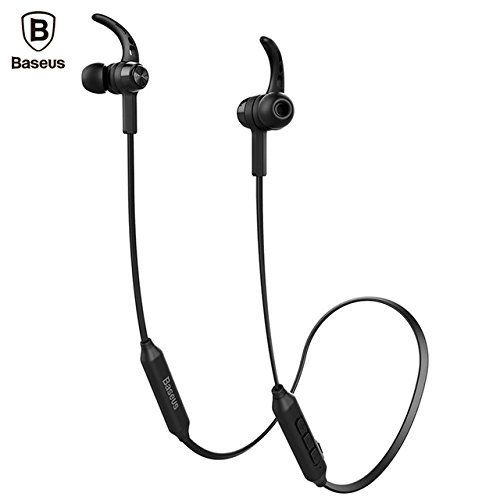
Image 4.1: Close-up of the inline control module.
Dette billede giver en detaljeret view of the Baseus Encok S06 earphones, specifically highlighting the inline control module with its three buttons and the magnetic earbuds.
5. Vedligeholdelse
Korrekt vedligeholdelse sikrer dine øretelefoners levetid og optimale ydeevne.
- Rensning: Use a soft, dry, lint-free cloth to clean the earphones. Do not use harsh chemicals, cleaning solvents, or strong detergents. For ear tips, remove them and clean with a mild soap solution, then rinse thoroughly and dry completely before reattaching.
- Opbevaring: When not in use, store the earphones in a cool, dry place, away from direct sunlight and extreme temperatures. The magnetic design helps keep the cables tangle-free.
- Undgå fugt: Do not expose the earphones to water or excessive moisture. While designed for daily use, they are not waterproof.
- Håndteres med forsigtighed: Avoid dropping the earphones or subjecting them to strong impacts. Do not pull on the cable excessively.
6. Fejlfinding
If you encounter issues with your Baseus Encok S06 earphones, refer to the following common solutions:
| Problem | Mulig årsag/løsning |
|---|---|
| Earphones won't turn on. |
|
| Kan ikke parres med enheden. |
|
| Ingen lyd eller lav lydstyrke. |
|
| Opkaldskvaliteten er dårlig. |
|
7. Specifikationer
| Feature | Detalje |
|---|---|
| Modelnavn | ENCKS6 |
| Mærke | Baseus |
| Forbindelsesteknologi | Trådløs (Bluetooth) |
| Trådløs kommunikationsteknologi | Bluetooth 4.1 |
| Øreplacering | In Ear |
| Formfaktor | In Ear |
| Kontrolmetode | Button (3-button inline remote) |
| Særlige funktioner | Magnetic design, Built-in microphone with CVC Noise Suppression, Dual Battery |
| Varens vægt | 60 gram |
8. Garanti og support
8.1 Garantioplysninger
Dette produkt leveres med en 6 måneders garanti provided by the manufacturer from the date of purchase. Please retain your proof of purchase for warranty claims. The warranty covers manufacturing defects and malfunctions under normal use. It does not cover damage caused by misuse, accidents, unauthorized modifications, or normal wear and tear.
8.2 Kundesupport
For further assistance, technical support, or warranty inquiries, please contact Baseus customer service through their official webwebstedet eller den forhandler, hvorfra du købte produktet.
Vigtig: Do not attempt to disassemble or repair the earphones yourself, as this will void the warranty.


