1. Introduktion
This manual provides essential information for the safe and efficient operation of your APC Smart-UPS 600 VA Battery Backup System. This Uninterruptible Power Supply (UPS) is designed to provide temporary battery power during power outages and protect your electronic equipment from power surges and fluctuations. Please read this manual thoroughly before installation and use.
2. Vigtige sikkerhedsoplysninger
Observe the following safety precautions during installation, operation, and maintenance of the UPS unit.
- Do not open the UPS enclosure. There are no user-serviceable parts inside.
- Do not dispose of the battery in a fire as it may explode.
- Do not connect non-computer related items, such as medical equipment, life support equipment, microwave ovens, or vacuum cleaners, to the UPS.
- Sørg for, at UPS'en er tilsluttet en jordet stikkontakt.
- Operate the UPS in a well-ventilated area, free from excessive dust, corrosive fumes, and conductive contaminants.
3. Pakkens indhold
Kontroller, at alle genstande er til stede ved udpakning:
- APC Smart-UPS 600 VA Battery Backup System
- Brugervejledning (dette dokument)
- USB Communication Cable (if applicable)

Figur 3.1: Forside view of the APC Smart-UPS 600 VA Battery Backup System, showing the power button and outlets.
4. Produktet er slutview
4.1. Komponenter og kontroller
Familiarize yourself with the key components of your UPS unit.
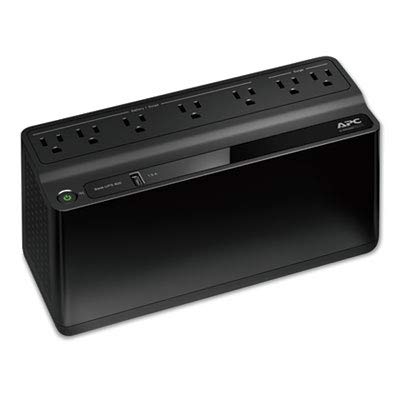
Figur 4.1: Top-down view of the UPS, highlighting the seven power outlets. Four outlets are for battery backup and surge protection, and three are for surge protection only.
- Power knap: Tænder eller slukker UPS'en.
- Batteribackup- og overspændingsbeskyttede stikkontakter (4): Provide battery power during outagog beskytte mod overspænding.
- Surge Protected Only Outlets (3): Provide surge protection but no battery backup.
- USB Charging Port (1.5A): Til opladning af mobile enheder.
- AC Input Cord: Connects the UPS to wall power.
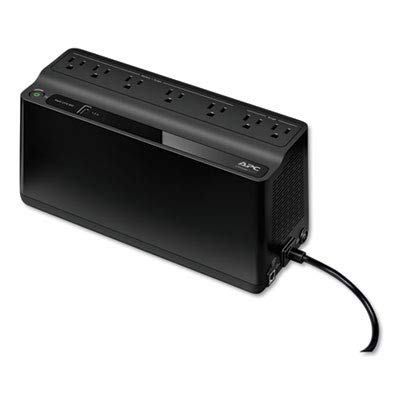
Figur 4.2: Bagside view of the UPS, showing the integrated power cord and ventilation grilles.
5. Opsætning
5.1. Placering
Place the UPS on a flat, stable surface away from direct sunlight, heat sources, and excessive moisture. Ensure adequate airflow around the unit.
5.2. Første batteritilslutning
The UPS battery is disconnected for safety during shipping. Before initial use, connect the battery as follows:
- Lay the UPS on its side.
- Find dækslet til batterirummet.
- Remove the cover and connect the battery terminal.
- Sæt dækslet på igen.
5.3. Tilslutning af udstyr
Connect your computer, monitor, and other critical equipment to the Batteribackup og overspændingsbeskyttede stikkontakter. Connect less critical peripherals, such as printers or scanners, to the Kun overspændingsbeskyttede stikkontakter.
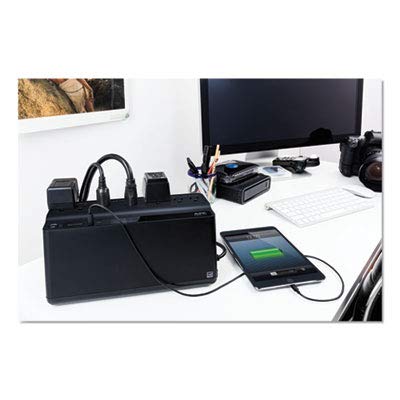
Figure 5.1: The UPS connected to a typical desktop computer setup, providing power and protection to the computer, monitor, and other accessories.
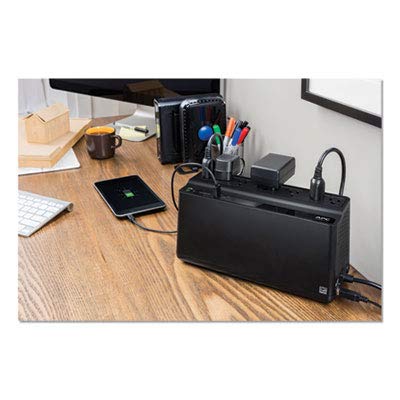
Figure 5.2: The UPS providing power and surge protection to multiple office devices, including a smartphone charging via the USB port.
5.4. Connecting to AC Power
Plug the UPS power cord directly into a grounded 2-pole, 3-wire wall receptacle. Avoid using extension cords or surge strips with the UPS.
6. Betjening af UPS'en
6.1. Tænd/sluk
- At tænde: Tryk én gang på tænd/sluk-knappen. UPS'en udsender et kort bip, og strømindikatoren lyser.
- At slukke: Tryk på tænd/sluk-knappen, og hold den nede, indtil UPS'en bipper, og strømindikatoren slukker.
6.2. Batteriopladning
The UPS battery charges automatically when connected to AC power. Allow the battery to charge for at least 8 hours before initial use to ensure full runtime capacity.
6.3. Power Outage Betjening
Under en magt outage, the UPS will automatically switch to battery power. It will emit a series of beeps to indicate it is operating on battery. The duration of battery power depends on the load connected. Save your work and shut down your equipment gracefully when the battery is low.
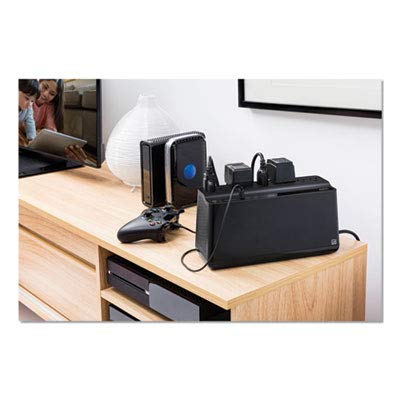
Figure 6.1: The UPS integrated with a home entertainment system, providing backup power for devices like a gaming console and media server.
7. Vedligeholdelse
7.1. Udskiftning af batteri
The battery in your UPS is designed for a service life of 3-5 years under normal operating conditions. Battery replacement should only be performed by qualified service personnel. Contact APC support for battery replacement options.
7.2. Rensning
Rengør UPS'ens yderside med en blød, tør klud. Brug ikke flydende rengøringsmidler eller rengøringsmidler på aerosolbasis. Sørg for, at ventilationsåbningerne er fri for støv og snavs.
8. Fejlfinding
Se tabellen nedenfor for almindelige problemer og deres løsninger.
| Problem | Mulig årsag | Løsning |
|---|---|---|
| UPS'en tænder ikke. | Battery not connected or low. | Ensure battery is connected. Charge UPS for 8 hours. |
| UPS'en bipper kontinuerligt. | Kører på batteristrøm. | Save work and shut down equipment. Restore AC power. |
| Ingen strøm til tilsluttede enheder. | Overload or tripped circuit breaker. | Reduce load. Check and reset circuit breaker on UPS (if present). |
9. Specifikationer
| Feature | Detalje |
|---|---|
| Modelnummer | 600M1 |
| Kapacitet | 600 VA / 490 J |
| Input bindtage | 120 volt |
| Ampslette | 1.6 Amps |
| Outlets | 7 (4 Batteribackup og overspænding, 3 Kun overspænding) |
| Batteritype | Lithium Ion |
| Farve | Sort |
| Dimensioner (L x B x H) | 10.7 x 5.47 x 4.13 tommer |
| Fabrikant | AMERICAN POWER CONVERSION |
| Dato først tilgængelig | 16. marts 2017 |
10. Garanti og support
For warranty information and technical support, please visit the official APC webwebstedet eller kontakt deres kundeservice. Behold din købskvittering som købsbevis.
Fabrikant: AMERICAN POWER CONVERSION (APC)
Webwebsted: www.apc.com


