1. Introduktion
Tak for købetasing the Sharp HT-SB140MT 2.0 150W Soundbar. This soundbar is designed to enhance your audio experience, providing clear and powerful sound for your television, music, and other media. With its sleek design and versatile connectivity options, including Bluetooth, HDMI ARC/CEC, Optical, and Auxiliary inputs, it integrates seamlessly into any home entertainment setup. This manual provides essential information for safe and effective use, including setup, operation, maintenance, and troubleshooting.
2. Sikkerhedsoplysninger
- Strømkilde: Sørg for, at strømforsyningen voltage matches the requirements specified on the soundbar. Use only the provided power cable.
- Ventilation: Bloker ikke ventilationsåbninger. Sørg for tilstrækkelig plads omkring soundbaren for korrekt luftgennemstrømning.
- Vand og fugt: Do not expose the soundbar to dripping or splashing water. Do not place objects filled with liquids, such as vases, on the apparatus.
- Varme: Do not place the soundbar near heat sources such as radiators, heat registers, stoves, or other apparatus (including ampløftere), der producerer varme.
- Rensning: Unplug the soundbar from the power outlet before cleaning. Use a dry, soft cloth for cleaning. Do not use liquid cleaners or aerosol cleaners.
- Service: Forsøg ikke selv at servicere dette produkt. Overlad al service til kvalificeret servicepersonale.
- Batterier: The remote control uses a CR2 battery. Ensure correct polarity when inserting batteries. Do not mix old and new batteries.
3. Pakkens indhold
Kontroller venligst, at alle varer er til stede i pakken:
- Sharp HT-SB140MT Soundbar
- Fjernbetjening
- Strømkabel
- Brugervejledning (dette dokument)
4. Produktet er slutview

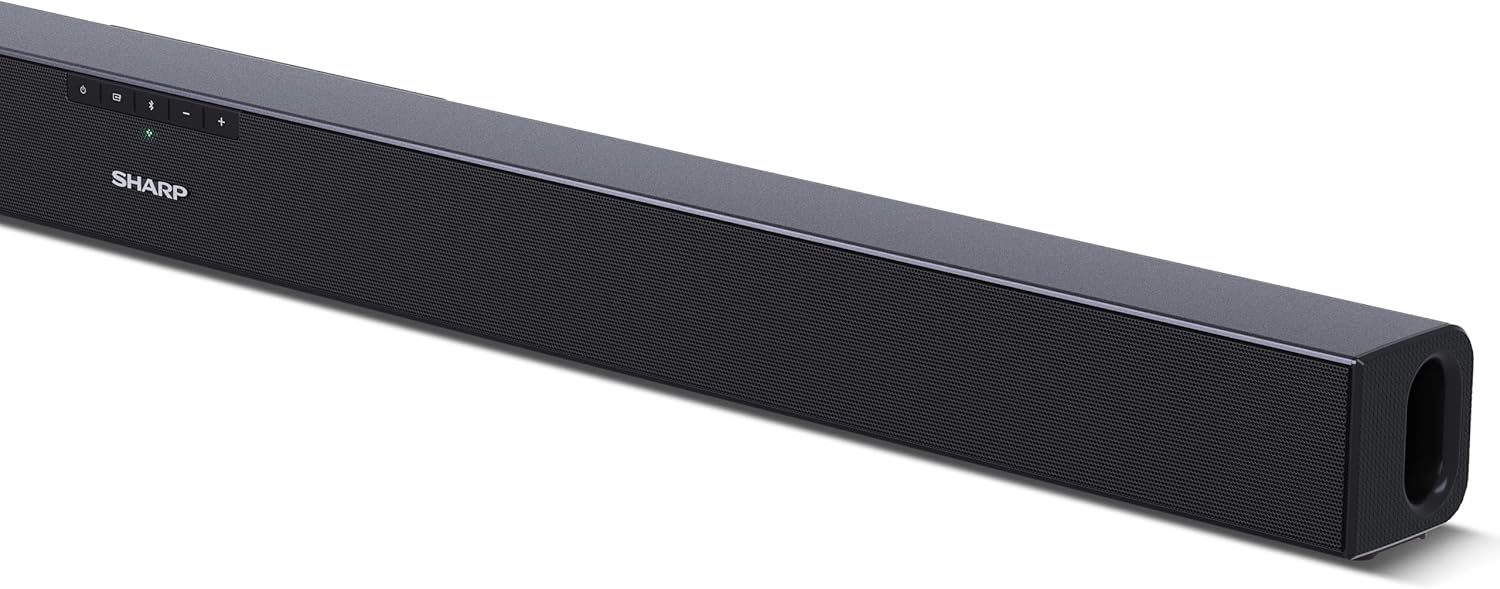
Figur 4.1: Forside View
The front of the soundbar features the Sharp logo and LED indicators for source selection and status. Control buttons for power, input, and volume are located on the top panel.
Figur 4.2: Bagside View (Connections)
The rear panel provides all necessary connection ports: HDMI ARC, Optical (S/PDIF), and Auxiliary (3.5mm) input, along with the power input.

Figur 4.3: Fjernbetjening
The included remote control allows for convenient operation of the soundbar, including power, input selection, volume, bass, and treble adjustments.
5. Opsætning
5.1 Placering
The Sharp HT-SB140MT Soundbar can be placed on a flat surface, such as a TV stand, or wall-mounted. Its slim profile of 6 cm allows it to fit easily under most TV screens without obstructing the view.

Figure 5.1: Soundbar Placement
The soundbar is ideally positioned directly in front of your television for optimal sound projection.
5.2 Tilslutning til dit tv
Vælg en af følgende tilslutningsmetoder:
- HDMI ARC/CEC (Recommended): Connect an HDMI cable (not included) from the HDMI ARC port on your TV to the HDMI ARC port on the soundbar. This allows your TV remote to control the soundbar's volume and power. Ensure HDMI ARC/CEC is enabled in your TV's settings.
- Digital Optical Audio (S/PDIF): Connect an optical cable (not included) from the Optical Out port on your TV to the OPTICAL IN port on the soundbar. Select the Optical input on the soundbar.
- Hjælpeenhed (AUX): Connect a 3.5mm audio cable (not included) from the headphone jack or AUX Out port on your TV to the AUX IN port on the soundbar. Select the AUX input on the soundbar.
5.3 Strømtilslutning
After connecting the audio cable, plug the power cable into the soundbar's power input and then into a wall outlet (220-240V / 50Hz).
6. Betjeningsvejledning
6.1 Tænd/sluk
Tryk på tænd/sluk-knappen på soundbaren eller fjernbetjeningen for at tænde eller slukke enheden.
6.2 Kildevalg
Press the Input button on the soundbar or the remote control repeatedly to cycle through the available input sources: HDMI ARC, Optical, AUX, and Bluetooth. The LED indicator on the soundbar will change to reflect the selected source.
6.3 Lydstyrkejustering
Brug knapperne Lydstyrke op (+) og Lydstyrke ned (-) på soundbaren eller fjernbetjeningen til at justere lydniveauet.
6.4 Bluetooth -parring
Sådan tilslutter du en Bluetooth-enhed:
- Select Bluetooth input on the soundbar. The Bluetooth LED indicator will flash, indicating pairing mode.
- Aktiver Bluetooth på din smartenhed (smartphone, tablet osv.) og søg efter tilgængelige enheder.
- Select "SHARP HT-SB140MT" from the list of devices.
- Once connected, the Bluetooth LED indicator will stop flashing and remain solid. You can now stream audio wirelessly to the soundbar.
6.5 Sound Modes (Equalizer)
The soundbar features an equalizer with different sound modes to optimize audio for various content types. Use the EQ button on the remote control to cycle through these modes (e.g., Movie, Music, News). You can also adjust Bass and Treble levels using dedicated buttons on the remote.
7. Vedligeholdelse
7.1 Rengøring
To clean the soundbar, unplug it from the power outlet. Use a soft, dry, lint-free cloth to wipe down the surfaces. Do not use abrasive cleaners, waxes, or solvents as they may damage the finish.
7.2 Opbevaring
If you plan to store the soundbar for an extended period, disconnect it from the power supply and store it in a cool, dry place, away from direct sunlight and extreme temperatures.
8. Fejlfinding
Hvis du støder på problemer med din soundbar, kan du se følgende almindelige problemer og løsninger:
| Problem | Mulig årsag | Løsning |
|---|---|---|
| Ingen lyd fra soundbaren. | Soundbaren er slukket eller på lydløs. Forkert inputkilde valgt. Kablerne er ikke tilsluttet korrekt. TV'ets lydudgangsindstillinger er forkerte. | Sørg for, at soundbaren er tændt og ikke er slået fra. Select the correct input source (HDMI ARC, Optical, AUX). Kontroller alle kabelforbindelser (HDMI, optisk, AUX). Verify your TV's audio output settings are set to external speakers or the correct digital output. |
| Bluetooth-enheden kan ikke oprette forbindelse. | Soundbar is not in pairing mode. Enheden er uden for rækkevidde. Interferens fra andre enheder. | Ensure the soundbar is in Bluetooth input mode and the LED is flashing. Move your Bluetooth device closer to the soundbar (within 10 meters). Turn off other Bluetooth devices nearby. Try unpairing and re-pairing. |
| Fjernbetjeningen virker ikke. | Battery is low or inserted incorrectly. Blokering mellem fjernbetjening og soundbar. Remote control is faulty. | Replace the CR2 battery and ensure correct polarity. Remove any obstructions between the remote and the soundbar's sensor. Kontakt kundesupport, hvis problemerne fortsætter. |
9. Specifikationer
| Modelnavn | HT-SB140(MT) |
| Højttaler type | Soundbar |
| Surround Sound Kanalkonfiguration | 2.0 |
| Maksimal højttalerudgangseffekt | 150 watt |
| Frekvensrespons | 60 Hz |
| Forbindelsesteknologi | Bluetooth, HDMI ARC/CEC, Digital Optical Audio (S/PDIF), 3.5mm Auxiliary (AUX) |
| Trådløs kommunikationsteknologi | Bluetooth |
| Maksimal rækkevidde (Bluetooth) | 10 meter |
| Kontrolmetode | Fjernbetjening |
| Strømkilde | AC (Mains) |
| Input bindtage | 220-240 volt |
| Farve | Sort |
| Materiale | Plast, Metal |
| Monteringstype | Vægmontering, bordplade |
| Produktmål (L x B x H) | 95 x 6 x 6 cm |
| Varens vægt | 1.5 kilo |
| Inkluderede komponenter | Fjernbetjening |
| Batteri påkrævet | 1 CR2 batteri |
| Vandtæt | Ingen |
| Tilgængelighed af reservedele | 5 år |
| Softwareopdateringer garanteret indtil | Information ikke tilgængelig |
10. Garanti og support
The Sharp HT-SB140MT Soundbar comes with a Limited Warranty. Please refer to the warranty card included in your package for specific terms and conditions. Spare parts are available for up to 5 years from the date of purchase.
For technical support, service, or warranty claims, please contact Sharp customer service through their official website or the contact information provided in your product documentation. When contacting support, please have your product model number (HT-SB140(MT)) and purchase details ready.


