1. Introduktion
The BRESSER Temeo Life Weather Station provides essential weather information for your home. This wireless system includes a main display unit and an outdoor sensor, offering real-time data on indoor and outdoor temperatures, humidity, and a 12-24 hour weather trend forecast. It also features a DCF 77 time signal for accurate time and date, along with mould, frost, and heat warning functions.
Please read this manual carefully before operating the device to ensure proper use and to maximize its functionality.
2. Pakkens indhold
Bekræft at alle varer er til stede i din pakke:
- BRESSER Temeo Life Colour Weather Station (Main Unit)
- Trådløs udendørs sensor
- Strømadapter til hovedenhed
- Instruktionsmanual (dette dokument)
3. Produktet er slutview
3.1 Hoveddisplayenhed
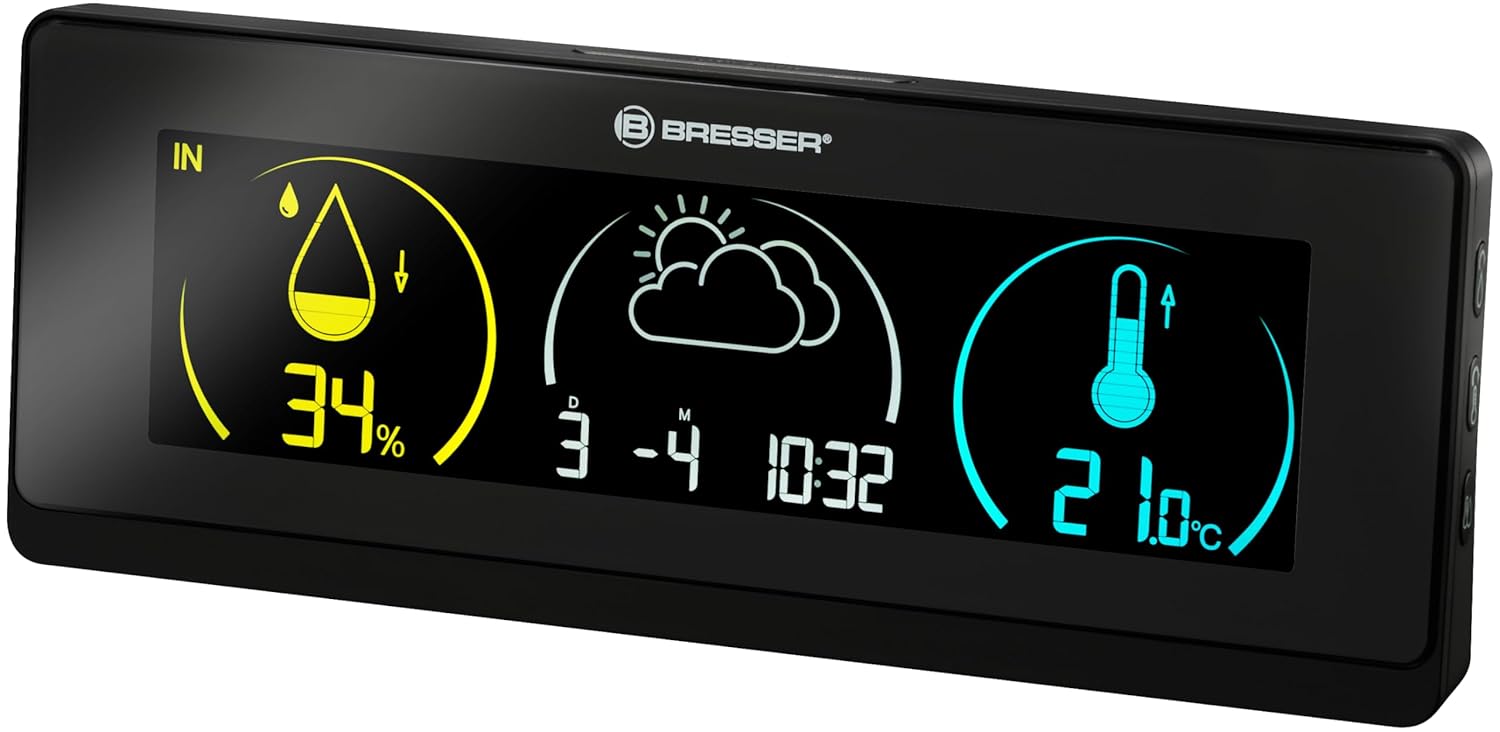
The main unit features a large, clear colour display that shows all relevant weather data, time, and warnings. It is powered by the included power adapter.
3.2 Trådløs udendørssensor

The compact outdoor sensor measures external temperature and humidity. It transmits data wirelessly to the main unit. The sensor requires 2x AA batteries (not included).

The back of the outdoor sensor includes the battery compartment and a channel selection switch, which must match the main unit for proper communication.
4. Opsætning
4.1 Strømforsyning til hovedenheden
- Connect the included power adapter to the main unit's power input port.
- Sæt strømadapteren i en almindelig stikkontakt. Displayet lyser.
4.2 Installation af batterier i udendørssensoren
- Åbn batterirummet på bagsiden af udesensoren.
- Insert 2x AA batteries (not included), observing the correct polarity (+/-).
- Luk batterirummet forsvarligt.
4.3 Initial Synchronization and DCF Signal Reception
After powering both units, the main unit will automatically attempt to connect with the outdoor sensor and receive the DCF 77 time signal. This process may take a few minutes.
- Ensure the outdoor sensor is within range of the main unit (typically up to 30 meters in open air).
- Place the main unit away from large metal objects or electronic devices that may interfere with the DCF signal.
- Once synchronized, the outdoor temperature and humidity will appear on the main display, and the time and date will be automatically set.
4.4 Placering af udendørs sensorer
For accurate readings, place the outdoor sensor in a shaded, dry location, protected from direct sunlight and precipitation. Avoid placing it near heat sources or reflective surfaces.
5. Betjening
5.1 Vis information
The colour display provides the following information at a glance:
- Indendørs luftfugtighed: Procenttage of relative humidity inside.
- Indendørs temperatur: Aktuel temperatur indeni.
- Udendørs luftfugtighed: Procenttage of relative humidity from the outdoor sensor.
- Udendørs temperatur: Aktuel temperatur fra udeføleren.
- Weather Trend: Graphical representation of the weather forecast for the next 12-24 hours.
- Tid og dato: Automatically updated via DCF 77 signal.
- Ugens dag: Can be displayed at the touch of a button.
5.2 Mould Alarm
The weather station features a mould alarm that triggers when indoor humidity levels are excessively high, indicating a potential risk for mould growth. Refer to the specific settings section in the full manual for adjustment options.
5.3 Frost and Heat Warnings
The device provides warnings for frost (low temperatures) and excessive heat (high temperatures) to help you monitor outdoor conditions. These thresholds are typically pre-set but may be adjustable.
5.4 Display Colour Customization
The main unit's display allows you to choose from 256 different background colours to suit your preference or environment.

Example of the display with a customized background color.
6. Vedligeholdelse
6.1 Rengøring
Tør hovedenheden og udendørssensoren af med en blød kludamp klud. Brug ikke slibende rengøringsmidler eller opløsningsmidler, da disse kan beskadige overflader eller elektroniske komponenter.
6.2 Battery Replacement (Outdoor Sensor)
When the battery indicator on the main unit shows low battery for the outdoor sensor, replace the 2x AA batteries. Ensure correct polarity during replacement.
7. Fejlfinding
- Ingen udendørs temperaturvisning:
Ensure the outdoor sensor has fresh batteries and is within range. Check that the channel selection switch on the sensor matches the setting on the main unit. Re-synchronize by removing and reinserting batteries in both units, starting with the outdoor sensor. - Upræcise læsninger:
Verify the outdoor sensor's placement. It should be in a shaded, well-ventilated area, away from direct sunlight, rain, and heat sources. - Time/Date Not Updating (DCF Signal):
Relocate the main unit to a position with better reception, away from electronic interference. The DCF signal is strongest at night. Manual time setting may be an option if automatic reception is consistently poor. - Skærm virker ikke:
Check the power adapter connection to the main unit and the electrical outlet. Ensure the outlet is functional.
8. Specifikationer
| Feature | Specifikation |
|---|---|
| Modelnummer | 7008001CM3000 |
| Produktmål (hovedenhed) | 83 x 220 x 39 mm (ca. 3.27 x 8.66 x 1.54 tommer) |
| Varens vægt | 0.29 kilogram (ca. 10.23 ounces) |
| Strømkilde (hovedenhed) | AC-strømadapter (inkluderet) |
| Strømkilde (udendørs sensor) | 2 x AA batterier (medfølger ikke) |
| Materiale | Plast |
| Trådløs frekvens | 433 MHz (til sensorkommunikation) |
9. Garanti og support
For warranty information, technical support, or service inquiries, please refer to the warranty card included with your product or visit the official BRESSER webwebstedet. Behold din købskvittering som købsbevis.
For further assistance, you may contact BRESSER customer service directly.


