1. Introduktion
This manual provides essential information for the safe and efficient operation of your AUXUS iRis AX32LSP01-SM 32-inch Smart Android LED TV. Please read these instructions thoroughly before using the product and retain them for future reference.
The AUXUS iRis AX32LSP01-SM features a 32-inch HD Ready LED display, integrated Android operating system for smart functionality, wireless display capabilities, and multiple connectivity options. It is designed to provide an immersive viewing and interactive experience.

Figur 1.1: Forside view of the AUXUS iRis 32-inch Smart Android LED TV, showcasindens display.
2. Sikkerhedsoplysninger
Overhold følgende sikkerhedsforanstaltninger for at forhindre skader på tv'et og sikre din personlige sikkerhed:
- Udsæt ikke tv'et for regn eller fugt for at undgå brand eller elektrisk stød.
- Åbn ikke tv'etasing. Overlad al service til kvalificeret personale.
- Sørg for tilstrækkelig ventilation. Bloker ikke ventilationsåbningerne.
- Placer tv'et på en stabil, plan overflade for at forhindre det i at falde ned.
- Beskyt netledningen mod at blive trådt på eller klemt.
- Tag stikket ud af tv'et under tordenvejr eller når det ikke bruges i længere perioder.
3. Pakkens indhold
Bekræft at alle varer er til stede i pakken:
- 1 x AUXUS iRis 32-inch LED TV
- 1 x Bordstativ (sæt)
- 1 x Brugermanual (dette dokument)
- 1 x garantikort
- 1 x fjernbetjening
4. Opsætning
4.1 Udpakning
Carefully remove the TV and all accessories from the packaging. Retain the packaging materials for future transport or servicing.
4.2 Montering af stativ
If using the table-top stand, attach the stand bases to the bottom of the TV using the provided screws. Ensure the stand is securely fastened before placing the TV on a flat, stable surface.
4.3 Vægmontering
The TV supports VESA-compatible wall mounts (not included). Consult a professional for wall mounting to ensure proper installation and safety.
4.4 Tilslutning af eksterne enheder
Refer to the back panel diagram for port locations. Ensure the TV is powered off before making any connections.
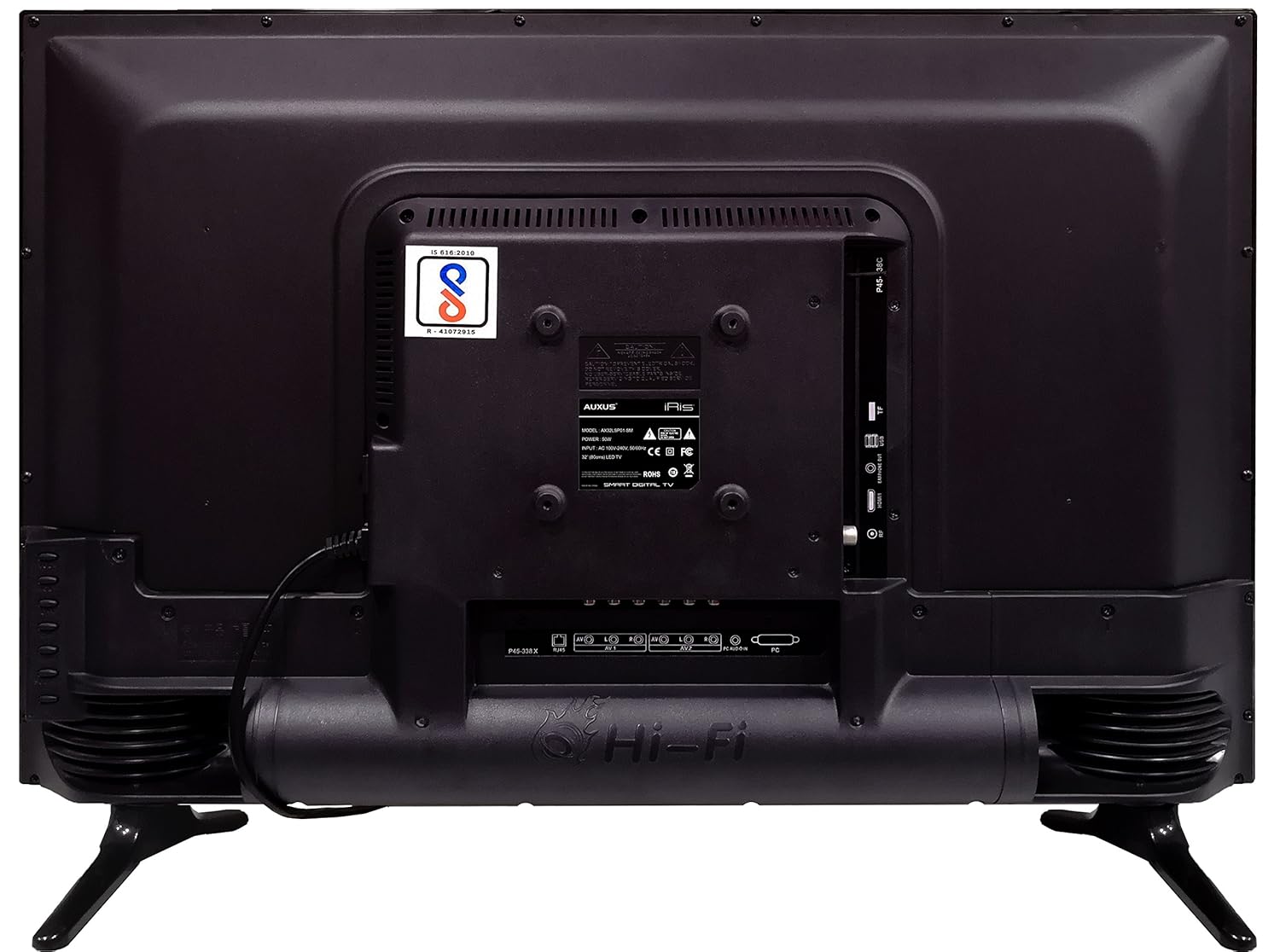
Figure 4.1: Rear panel of the TV with various input/output ports.

Figur 4.2: Detaljeret view of the bottom interface ports.

Figure 4.3: Icons representing multiple connectivity options.
- Magt: Tilslut netledningen til tv'et og derefter til en stikkontakt.
- Antenne/kabel: Connect an antenna or cable TV signal to the RF port.
- USB: Insert USB drives for media playback or software updates into the USB ports. The TV has 2 USB ports.
- Ethernet (RJ45): Tilslut et Ethernet-kabel for en kablet internetforbindelse.
- AV (Audio/Video): Use RCA cables for older devices. The TV has AV1 and AV2 inputs.
- PC IN (VGA): Connect a computer using a VGA cable for video and a 3.5mm audio cable for sound (PC AUDIO IN).
- Hovedtelefoner: Tilslut hovedtelefoner til 3.5 mm-stikket for privat lytning.
5. Betjening af tv'et
5.1 Førstegangsopsætning
- After connecting the power, press the Power button on the remote control or TV.
- Følg vejledningen på skærmen for at vælge dit sprog, land og tidszone.
- Connect to your network: Choose Wi-Fi and enter your password, or ensure an Ethernet cable is connected.
- Complete the channel scan if connecting an antenna/cable.
5.2 Fjernbetjening
The remote control allows you to navigate menus, adjust volume, change channels, and access smart features. Familiarize yourself with its buttons for optimal use.
5.3 Smart TV Features (Android OS)
Your TV runs on the Android operating system, providing access to a variety of applications and internet services.

Figure 5.1: TV displaying a smart interface, such as Netflix.
- Navigation: Use the directional pad and 'OK' button on the remote to browse the Android interface.
- Trådløs skærm: Utilize the built-in wireless display feature to mirror content from compatible smartphones or tablets to your TV.
- Internet Browsing & Apps: Connect to the internet to browse websites or download and use applications from the app store.
- Spil: The Android platform supports various games, offering an adrenaline-pumping gaming experience.
5.4 Billed- og lydindstillinger
Få adgang til tv'ets indstillingsmenu for at tilpasse billed- og lydpræferencer.
- Billede: Juster lysstyrke, kontrast, farve, skarphed og vælg billedtilstande (f.eks. Standard, Dynamisk, Film).
- Sund: Optimize audio with settings for volume, balance, equalizer, and sound modes. The TV features 'Boomr Speakers' for enhanced audio output.
5.5 Valg af indgangskilde
Press the 'Source' or 'Input' button on your remote to switch between connected devices (HDMI 1, HDMI 2, AV 1, AV 2, PC, TV).
6. Vedligeholdelse
6.1 Rengøring af tv'et
- Tag altid stikket ud af tv'et inden rengøring.
- Use a soft, dry cloth to wipe the screen and TV casing.
- For stubborn marks on the screen, use a screen cleaner specifically designed for LED displays, applied to the cloth, not directly to the screen.
- Undgå at bruge slibende rengøringsmidler, voks eller opløsningsmidler.
6.2 Softwareopdateringer
Tjek regelmæssigt for softwareopdateringer via tv'ets indstillingsmenu for at sikre optimal ydeevne og adgang til de nyeste funktioner.
7. Fejlfinding
Hvis du støder på problemer med dit tv, kan du se følgende almindelige problemer og løsninger:
| Problem | Mulig løsning |
|---|---|
| Ingen strøm | Check if the power cord is securely connected and the power outlet is working. |
| Intet billede, men der er lyd | Sørg for, at den korrekte inputkilde er valgt. Kontroller kabelforbindelserne til eksterne enheder. |
| Ingen lyd, men der er billede | Kontroller lydstyrkeniveau og mute-status. Kontroller lydkabelforbindelser. |
| Fjernbetjening virker ikke | Udskift batterierne. Sørg for, at der ikke er nogen forhindringer mellem fjernbetjeningen og tv'et. |
| Android system hangs or is slow | Restart the TV by unplugging it for a few minutes. Close unused applications. |
| Problemer med netværksforbindelse | Check Wi-Fi password or Ethernet cable connection. Restart your router. |
8. Specifikationer
| Feature | Specifikation |
|---|---|
| Mærke | AUXUS |
| Modelnavn | AX32LSP01-SM |
| Skærmstørrelse | 32 tommer (82 cm) |
| Displayteknologi | LED, IPS-panel |
| Opløsning | HD-klar (1366 x 768p) |
| Viewi vinkel | 178 grader |
| Operativsystem | Android |
| Digital lagerkapacitet | 8 GB |
| VÆDDER | 1 GB |
| Lydudgangstilstand | Surround (Boomr Speakers) |
| HDMI porte | Flere |
| USB-porte | 2 |
| Forbindelsesteknologi | Ethernet, Wi-Fi (Wireless Display) |
| Andre havne | AV (RCA), PC IN (VGA), PC Audio In, Headphone (3.5mm), RF (Antenna) |
| Monteringstype | Wall Mount / Table Top Stand |
| Produktmål (LxBxH) | 84 x 13 x 59 cm |
| Varens vægt | 6.5 kg |
9. Garanti og support
Your AUXUS iRis AX32LSP01-SM TV comes with a warranty. Please refer to the included Warranty Card for specific terms, conditions, and duration of the warranty coverage.
For technical support, service requests, or further inquiries, please contact AUXUS customer service. Contact details can typically be found on the warranty card or the official AUXUS webwebsted.


