1. Introduktion
The Moxa EDS-408A is an 8-port entry-level managed Ethernet switch designed for industrial applications. It features eight 10/100 BaseTx ports and supports advanced network management functions such as Port Base VLAN and Quality of Service (QoS). This manual provides detailed instructions for the installation, operation, maintenance, and troubleshooting of the EDS-408A switch, ensuring reliable performance in demanding environments.
2. Produktfunktioner
- Network Redundancy: Supports Turbo Ring and Turbo Chain with a recovery time of less than 20 ms for up to 250 switches, along with RSTP/STP for enhanced network reliability.
- Advanced Network Management: Features IGMP Snooping, QoS, IEEE 802.1Q VLAN, and port-based VLAN capabilities to optimize network traffic and performance.
- Flexible Management Interfaces: Easy network management via web browser, Command Line Interface (CLI), Telnet/serial console, Windows utility, and ABC-01.
- Industrial Protocol Support: PROFINET or EtherNet/IP enabled by default (for PN or EIP models), facilitating integration into industrial automation systems.
- Visualized Network Management: Compatible with MXstudio for easy and visualized industrial network management.
3. Pakkens indhold
Kontroller venligst, at din pakke indeholder følgende varer:
- Moxa EDS-408A Managed Ethernet Switch
- Hurtig installationsvejledning
- Klemrække til strømindgang
- Vægmonteringssæt
- Garantikort
Hvis nogen af disse varer mangler eller er beskadiget, bedes du kontakte din salgsrepræsentant for at få hjælp.
4. Hardware overview

Figur 1: Front view of the Moxa EDS-408A Managed Ethernet Switch, showing the 8 Ethernet ports, power inputs, and status LEDs.
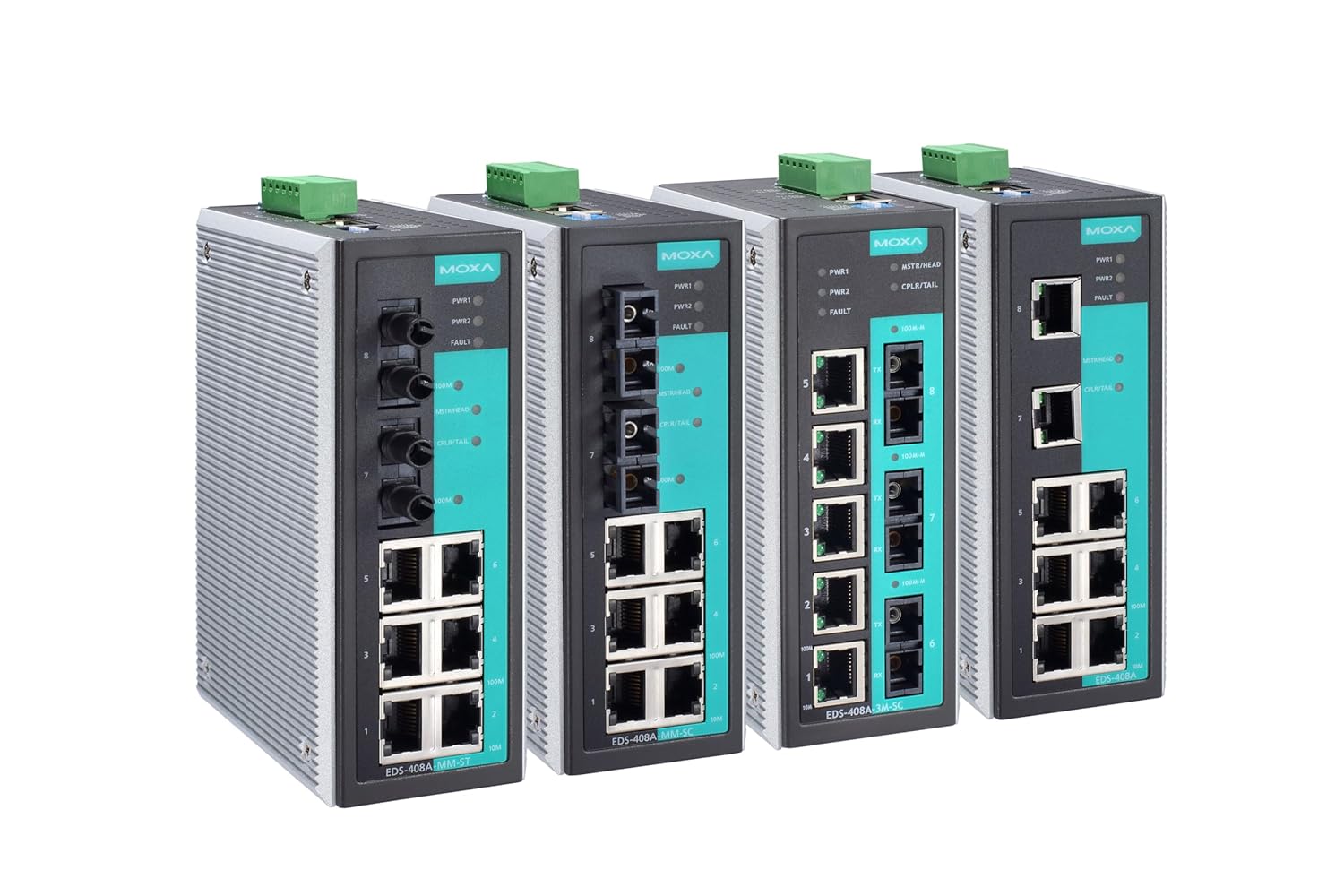
Figur 2: A lineup of multiple Moxa EDS-408A Managed Ethernet Switches, illustrating their compact industrial design and various port configurations.
4.1 Frontpanelets layout
- Ethernet-porte (1-8): 10/100BaseT(X) auto-sensing RJ45 ports.
- PWR1/PWR2 LEDs: Indicate the status of the primary and secondary power inputs.
- FEJL LED: Illuminates to indicate a system fault or alarm condition.
- MSTR/HEAD LED: Indicates the switch's role in a redundant ring topology.
- CPLR/TAIL LED: Indicates the switch's role as a coupler or tail in a redundant ring.
4.2 Bagpanellayout
- Klemmeblok: For redundant DC power input.
- Jordingsskrue: For korrekt jordforbindelse af enheden.
5. Opsætning
5.1 Montering af kontakten
The EDS-408A can be mounted on a DIN-rail or wall-mounted using the provided kit.
- DIN-skinne montering: Attach the DIN-rail mounting plate to the rear of the switch. Hook the top of the plate over the DIN-rail and push the bottom until it clicks into place.
- Vægmontering: Secure the wall mounting plates to the sides of the switch. Use appropriate screws to fasten the switch to a sturdy wall surface.
5.2 Strømtilslutning
The EDS-408A supports redundant DC power inputs. Connect your power sources to the terminal block on the rear panel. Ensure the voltage is within the specified range (e.g., 12-48 VDC) and observe correct polarity. Secure the terminal block to the switch.
5.3 Netværksforbindelse
Connect Ethernet cables from your network devices (e.g., PCs, servers, other switches) to the RJ45 ports on the front panel of the EDS-408A. The ports support 10/100 Mbps speeds and auto-negotiation.
6. Betjeningsvejledning
6.1 Indledende konfiguration
The EDS-408A can be configured via a web browser, CLI, or Moxa's Windows utility.
- Web-baseret ledelse: Connect a PC to any Ethernet port on the switch. Configure your PC's IP address to be in the same subnet as the switch's default IP address (refer to the Quick Installation Guide for default IP). Open a web browser and enter the switch's IP address. Log in using the default credentials.
- CLI (Console/Telnet): Connect a console cable to the switch's console port (if available) or use Telnet to access the command-line interface for advanced configuration.
6.2 Grundlæggende netværksindstillinger
Once logged in, you can configure various network settings:
- IP-adresse: Change the switch's IP address to match your network's addressing scheme.
- VLAN-konfiguration: Create and assign VLANs to ports to segment your network.
- QoS-indstillinger: Prioritize critical traffic using QoS settings to ensure optimal performance for sensitive applications.
- Redundancy Protocols: Configure Turbo Ring, Turbo Chain, RSTP, or STP for network redundancy.
7. Vedligeholdelse
7.1 Rengøring
Regularly clean the exterior of the switch with a soft, dry cloth. Do not use liquid or aerosol cleaners. Ensure the device is powered off before cleaning.
7.2 firmwareopdateringer
Tjek Moxaen regelmæssigt webwebsted for firmwareopdateringer. At holde firmwaren opdateret sikrer optimal ydeevne, sikkerhed og adgang til nye funktioner. Følg instruktionerne, der følger med firmwareopdateringspakken, omhyggeligt.
7.3 Backup-konfiguration
It is recommended to regularly back up the switch's configuration settings. This allows for quick restoration in case of a device replacement or accidental configuration changes.
8. Fejlfinding
This section addresses common issues you might encounter with the EDS-408A switch.
- Ingen strøm: Ensure both power inputs are correctly connected and receiving power. Check the PWR1/PWR2 LEDs. If they are off, verify the power source and cabling.
- Intet link på porten: Verify the Ethernet cable connection between the switch and the connected device. Check the link/activity LED on the port. Ensure the connected device is powered on and functioning correctly.
- Kan ikke få adgang Web Interface: Confirm your PC's IP address is in the same subnet as the switch. Try pinging the switch's IP address. If unsuccessful, reset the switch to factory defaults (refer to the Quick Installation Guide for reset procedure).
- Problemer med netværksydelse: Check QoS settings to ensure critical traffic is prioritized. Verify VLAN configurations to prevent broadcast storms. Inspect cable quality and length.
- FAULT LED On: This indicates a system fault. Check the system logs via the web interface or CLI for specific error messages. Common faults include power supply issues or network redundancy failures.
If you are unable to resolve an issue, please contact Moxa technical support.
9. Tekniske specifikationer
| Attribut | Specifikation |
|---|---|
| Mærke | Moxa |
| Model | EDS-408A |
| Antal havne | 8 |
| Ethernet-porte | 8 x 10/100BaseT(X) (RJ45) |
| Farve | Sort |
| Kompatible enheder | Desktop |
| Varens vægt | 1.08 kilo |
| Driftstemperatur | 0 til 60°C (32 til 140°F) |
| Strømindgang | Redundant 12/24/48 VDC (range may vary by specific model) |
| Ledelse | Web, CLI, Telnet, Windows utility, ABC-01, MXstudio |
| Redundans | Turbo Ring, Turbo Chain, RSTP/STP |
| VLAN | IEEE 802.1Q VLAN, Port-based VLAN |
| QoS | Understøttet |
10. Garanti og support
The Moxa EDS-408A switch comes with a standard manufacturer's warranty. Please refer to the warranty card included in your package or visit the official Moxa webhjemmeside for detaljerede garantivilkår.
For technical support, product inquiries, or service requests, please contact Moxa's customer support team through their official website or the contact information provided in your product documentation. When contacting support, please have your product model and serial number ready.


