Indledning
Thank you for choosing the Kienzle Digi Time Digital Alarm Clock. This device is designed to provide accurate timekeeping, alarm functions, and environmental readings (temperature and humidity) in a compact and stylish form. Please read this manual carefully before using the product to ensure proper operation and to maximize its lifespan.
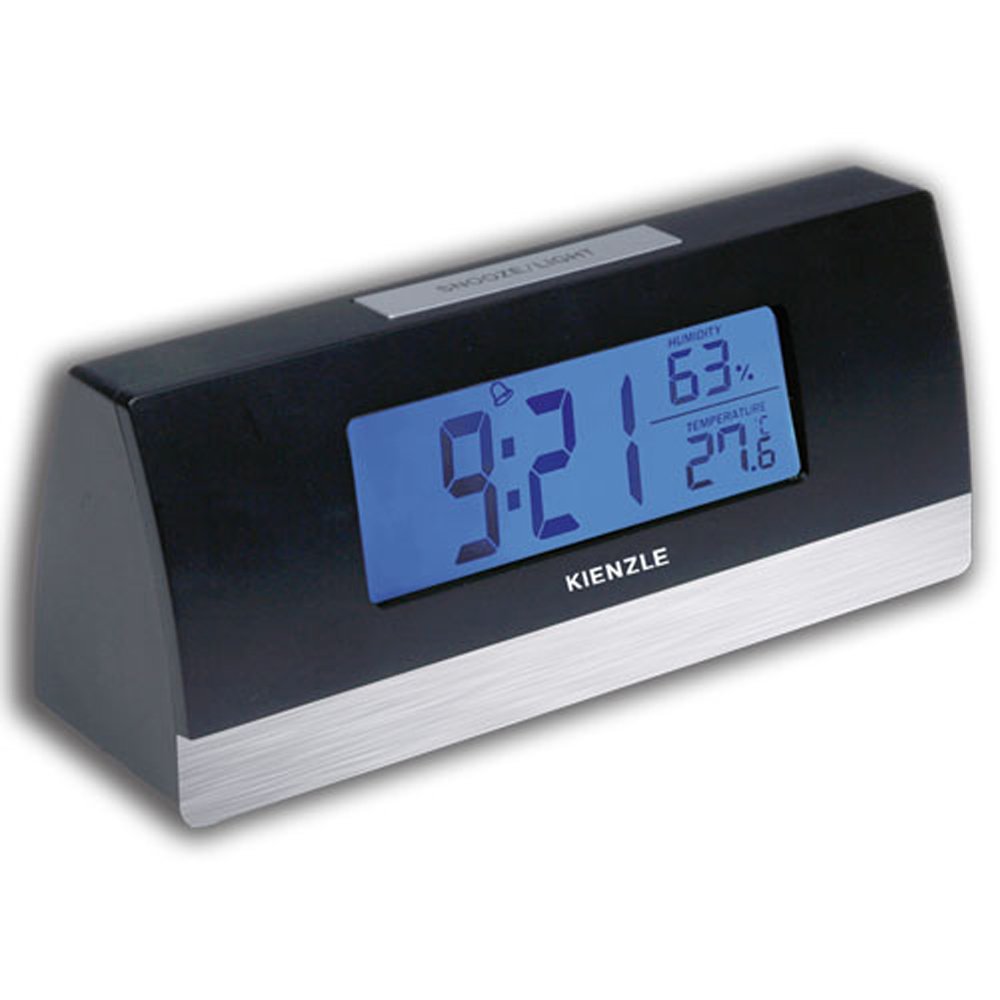
Image: The Kienzle Digi Time Digital Alarm Clock, black with a silver base, displaying the time 9:21, humidity at 63%, and temperature at 27.6 degrees Celsius on its blue backlit screen. The Kienzle logo is visible below the display, and a 'SNOOZE/LIGHT' button is on top.
Opsætning
1. Batteriinstallation
The Kienzle Digi Time alarm clock requires three (3) AAA batteries (not included) for operation.
- Locate the battery compartment cover on the back or bottom of the unit.
- Skub eller løft dækslet for at åbne rummet.
- Insert three AAA batteries, ensuring the correct polarity (+ and -) as indicated inside the compartment.
- Sæt batterirummets dæksel på igen.
2. Første opstart
Once batteries are installed, the display should light up, and the clock will typically show a default time (e.g., 12:00 AM) or begin counting from zero. The temperature and humidity readings will also appear.
3. Indstilling af tid
Refer to the buttons on the back or side of the clock. Common buttons include MODE, SET, UP/+, DOWN/-.
- Tryk på MODE button repeatedly until the time setting mode is activated (e.g., the hour digits start flashing).
- Brug OP/+ or NED/- knapper for at justere timen.
- Trykke MODE again to move to the minute setting.
- Brug OP/+ or NED/- knapper for at justere minutterne.
- Trykke MODE one more time to confirm and exit the time setting mode.
4. Indstilling af alarmen
The alarm setting process is similar to setting the time.
- Tryk på MODE button until the alarm time is displayed or the alarm setting mode is activated (e.g., an alarm icon flashes).
- Brug OP/+ or NED/- knapperne for at indstille den ønskede alarmtime.
- Trykke MODE again to move to the alarm minute setting.
- Brug OP/+ or NED/- knapperne til at indstille de ønskede alarmminutter.
- Trykke MODE to confirm. An alarm icon (e.g., a bell) should appear on the display, indicating the alarm is active.
Betjeningsvejledning
1. Using the Alarm
When the set alarm time is reached, the alarm will sound. To turn off the alarm, press any button other than the SNOOZE/LIGHT button. The alarm will reset for the next day.
2. Snooze-funktion
To temporarily silence the alarm and activate the snooze function, press the SNOOZE / LYS button located on the top of the clock. The alarm will pause for approximately 5-10 minutes (duration may vary) and then sound again.
3. Blue Backlight
To illuminate the display with a blue backlight for easy viewing in low light conditions, press the SNOOZE / LYS button. The backlight will typically stay on for a few seconds and then turn off automatically to conserve battery life.
4. Temperatur- og fugtighedsvisning
The clock continuously displays the current air temperature and humidity. No special action is required to view these readings.
Opretholdelse
1. Rensning
To clean the clock, use a soft, dry cloth. For stubborn marks, a slightly damp cloth can be used, but ensure no water enters the device. Do not use abrasive cleaners, solvents, or chemical sprays, as these can damage the surface and internal components.
2. Udskiftning af batteri
When the display dims or the clock functions become erratic, it is time to replace the batteries. Follow the battery installation steps outlined in the Setup section. Always replace all three AAA batteries at the same time with new ones. Dispose of old batteries responsibly according to local regulations.
3. Opbevaring
If the clock will not be used for an extended period, remove the batteries to prevent leakage and potential damage to the unit.
Fejlfinding
| Problem | Mulig årsag | Løsning |
|---|---|---|
| Skærmen er tom eller svag. | Lave eller døde batterier; forkert batteripolaritet. | Udskift batterierne med nye AAA-batterier, og sørg for at polariteten vender korrekt. |
| Alarmen lyder ikke. | Alarm not set or not activated; low batteries. | Ensure alarm is set and the alarm icon is visible on the display. Replace batteries if needed. |
| Tidspunktet er forkert. | Time not set correctly; batteries removed or low. | Reset the time following the instructions in the Setup section. Replace batteries if they are low. |
| Temperatur-/fugtighedsaflæsningerne virker unøjagtige. | Clock placed near heat/cold sources or in direct sunlight/drafts. | Relocate the clock to a stable environment away from extreme temperature fluctuations or direct air currents. |
Specifikationer
- Mærkenavn: Kienzle
- Fabrikant: Kienzle
- Farve: Sort
- Produktdimensioner: 20 x 10 x 10 cm; 100 g (approx. 7.87 x 3.94 x 3.94 inches; 3.53 oz)
- ASIN: B0797SYY1Y
- EAN: 7896733521591
- Pakkedimensioner: 10 x 10 x 10 centimeter
- Battery(ies) Required: 3 AAA batterier (medfølger ikke)
- Kan købes siden: 23. januar 2018
- Discontinued by manufacturer: Ingen
- Form: Rektangulær
- Vækkeur: Ja
- Vise: Digital with blue backlight
- Yderligere funktioner: Temperature and humidity display, Snooze function
Garanti og support
For information regarding warranty coverage, technical support, or service inquiries, please contact Kienzle customer service directly. Details can typically be found on the product packaging or the official Kienzle webwebsted. Gem venligst din købskvittering som købsbevis i tilfælde af garantikrav.


