1. Produktet er slutview
The KADAMS Shower Clock is a versatile digital device designed for efficient time management in various environments, particularly those with high humidity. It features a clear LCD display, a countdown timer, and monitors both temperature and humidity. Its robust waterproof design (IP54 rating) makes it ideal for bathrooms, kitchens, and other damp areas. Multiple installation options provide flexible placement.

2. Opsætningsvejledning
2.1. Batteriinstallation
The KADAMS Shower Clock requires two AAA batteries (not included). To install:
- Find batterirummet på bagsiden af uret.
- Twist the circular backing counter-clockwise to open the compartment.
- Isæt to nye AAA alkaline-batterier, og sørg for at polariteten (+/-) vender korrekt.
- Replace the circular backing and twist clockwise to secure, ensuring the seal is tight to maintain waterproof integrity.
Vigtig bemærkning:
- Use only new alkaline batteries of the same kind for optimal performance and to prevent issues like random beeping or display malfunctions.
- Do not mix different battery brands or types (alkaline, standard, rechargeable).
2.2. Indstilling af tid og temperaturenhed
The setting buttons are located inside the battery compartment:
- Indstil tid: Press and hold the "TIME" button until the hour flashes. Use the "UP" or "DOWN" buttons to adjust the hour. Press "TIME" again to set minutes, then use "UP" or "DOWN" to adjust. Press "TIME" once more to save.
- 12H/24H Mode: Press the "12H/24H" button to switch between 12-hour and 24-hour display formats.
- Celsius/Fahrenheit: Press the "°C/°F" button to toggle between Celsius and Fahrenheit temperature units.
- Nulstil: Use the "RESET" button (small pinhole) to reset the clock to factory defaults if needed.
2.3. Monteringsmuligheder
The KADAMS Shower Clock offers four flexible installation methods:
- Stå: Flip out the integrated stand on the back for tabletop placement (e.g., vanity bench, office desk).
- Wall Mount (Hook): Use the keyhole slot on the back to hang the clock on a nail or hook.
- Sugekop: Attach the included suction cup to the back of the clock and press firmly onto a clean, smooth, non-porous surface like glass, mirrors, granite, or stainless steel. Avoid porous tiles.
- Magnetic Pads: The clock has magnetic pads for attachment to metallic surfaces like refrigerators or magnetic strips.
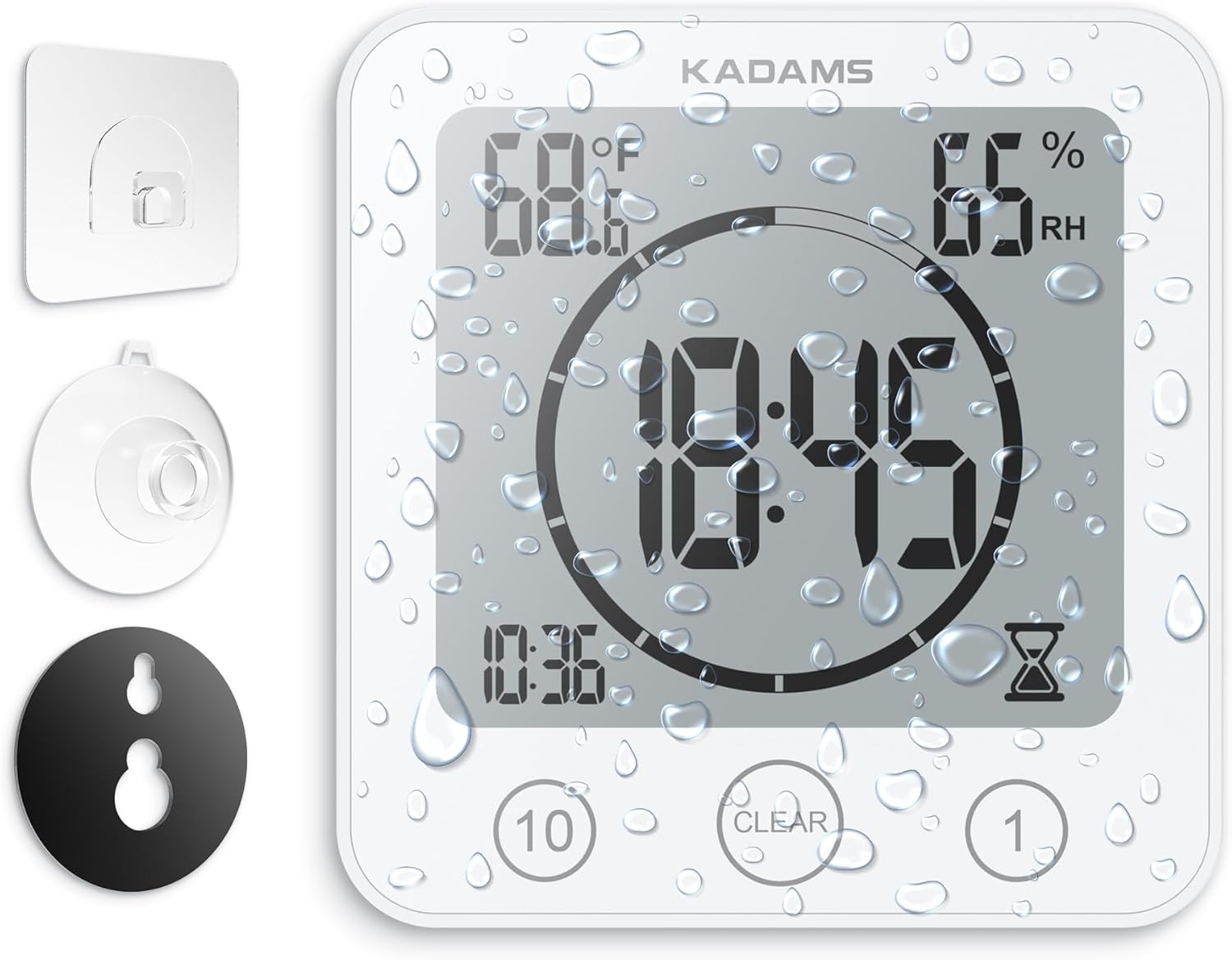
Suction Cup Tip:
Before attaching the suction cup to a clean and dry mirror or smooth surface, add a bit of moisture to the suction cup for better adhesion. Periodically check the suction strength to ensure it securely holds the clock and timer to prevent any accidental falls. Avoid using the suction cup method on porous or uneven tiles.
3. Betjeningsvejledning
3.1. Ur Display
In normal mode, the clock displays the current time prominently in the center. The temperature (°F or °C) is shown in the upper left, and relative humidity (%RH) in the upper right. The current time is also shown in smaller digits at the bottom left.
3.2. Countdown Timer Function
The clock features an easy-to-use countdown timer, perfect for managing shower times or other activities.
- Indstilling af timeren:
- Press the "10" button to add 10-minute increments to the timer.
- Press the "1" button to add 1-minute increments to the timer.
- Timeren kan indstilles op til 99 minutter.
- Start af timeren: After setting the desired time, the timer will automatically start counting down after a few seconds of inactivity. A short beep will confirm activation.
- During Countdown: The large central display will show the remaining countdown time. The current time will be shown in smaller digits at the bottom left. An hourglass icon will flash on the right.
- Alarm: Once the timer reaches 0:00, an alarm will sound for three minutes.
- Stopping the Alarm/Clearing the Timer: Press the "CLEAR" button to stop the alarm and reset the timer to 0:00, returning to clock mode.

4. Vedligeholdelse
- Rensning: Clean the clock with a soft, damp cloth. Do not immerse the product in water or use harsh chemicals.
- Udskiftning af batteri: Replace batteries when the display becomes dim or functions become erratic. Always use new, high-quality alkaline batteries of the same kind.
- Opbevaring: Hvis produktet opbevares i længere tid, skal batterierne fjernes for at forhindre lækage.
- Miljøforhold: Avoid subjecting the clock to extreme force, shock, or extreme fluctuations in temperature or humidity. While waterproof, avoid placing the clock directly in front of heavy water spray due to its touchscreen sensitivity, which may cause it to activate or deactivate.
5. Fejlfinding
| Problem | Mulig årsag | Løsning |
|---|---|---|
| Skærmen er svag eller tom. | Lave eller døde batterier. | Udskift med to nye AAA alkaliske batterier. |
| Clock functions erratically or beeps randomly. | Mixed battery types or old/low quality batteries. | Replace all batteries with new, high-quality alkaline batteries of the same kind. Use the reset button if issues persist. |
| Sugekoppen holder ikke. | Surface is not clean, dry, smooth, or non-porous. Insufficient moisture. | Clean and dry the surface thoroughly. Apply a small amount of moisture to the suction cup. Ensure surface is suitable (glass, mirror, granite, stainless steel). Avoid porous tiles. |
| Timer activates/deactivates unexpectedly in shower. | Direct heavy water spray hitting the touchscreen. | Reposition the clock to avoid direct heavy water spray on the screen. |
6. Specifikationer
- Modelnummer: K0007STHW
- Skærmtype: LCD
- Strømkilde: 2 x AAA batterier (medfølger ikke)
- Vandtæt vurdering: IP54 (Vand- og sprøjtebestandig)
- Temperaturområde: 0°C-50°C (32°F-122°F)
- Fugtighedsområde: 20% til 95% RH
- Timerområde: Op til 99 minutter
- Produktdimensioner: 5"W x 5"H (105.7 x 109.7 x 41.5mm)
- Varens vægt: 4.7 ounces (134 gram)
- Materiale: ABS High Quality and Lightweight Material, Shatterproof Screen Face (PET)
- Monteringsmuligheder: Table Stand, Hanging Wall Hole, Suction Cup, Magnetic Pads
7. Garanti og support
For warranty information or technical support, please refer to the contact details provided with your purchase or visit the official KADAMS webwebstedet. Behold din købskvittering som købsbevis.
Official KADAMS Store: KADAMS Store on Amazon


