1. Introduktion
Tak for købetasing the GPX PDB1077B Portable DVD Player. This device offers versatile entertainment with its 10.1-inch display, DVD/CD playback capabilities, and built-in Bluetooth wireless transmitter for audio streaming to compatible headphones. This manual provides detailed instructions for setup, operation, and maintenance to ensure optimal performance and longevity of your device.
2. Vigtige sikkerhedsoplysninger
Please read all safety warnings and instructions carefully before using this product. Retain this manual for future reference.
- Strømkilde: Use only the specified power adapter. Incorrect voltage kan beskadige enheden og ugyldiggøre garantien.
- Vand og fugt: Do not expose the device to rain, moisture, or immerse it in water.
- Varme: Hold enheden væk fra varmekilder såsom radiatorer, varmeapparater, komfurer eller andre apparater (herunder ampløftere), der producerer varme.
- Ventilation: Sørg for tilstrækkelig ventilation. Bloker ikke ventilationsåbninger.
- Rensning: Rengør kun med en tør klud. Brug ikke flydende rengøringsmidler eller aerosolrens.
- Service: Forsøg ikke selv at servicere dette produkt. Overlad al service til kvalificeret servicepersonale.
- Batterisikkerhed: The device contains a rechargeable battery. Do not expose to excessive heat or direct sunlight. Dispose of batteries properly according to local regulations.
- Høreværn: Undgå at lytte ved høje lydstyrker i længere perioder for at forhindre høreskader.
3. Pakkens indhold
Bekræft, at alle nedenstående varer er inkluderet i din pakke:
- GPX PDB1077B Portable DVD Player
- Trådløse Bluetooth hovedtelefoner
- Fjernbetjening
- AC/DC strømadapter
- Bil strømadapter
- AV-kabel
- Brugervejledning (dette dokument)
4. Produktet er slutview
Familiarize yourself with the components of your GPX PDB1077B Portable DVD Player.
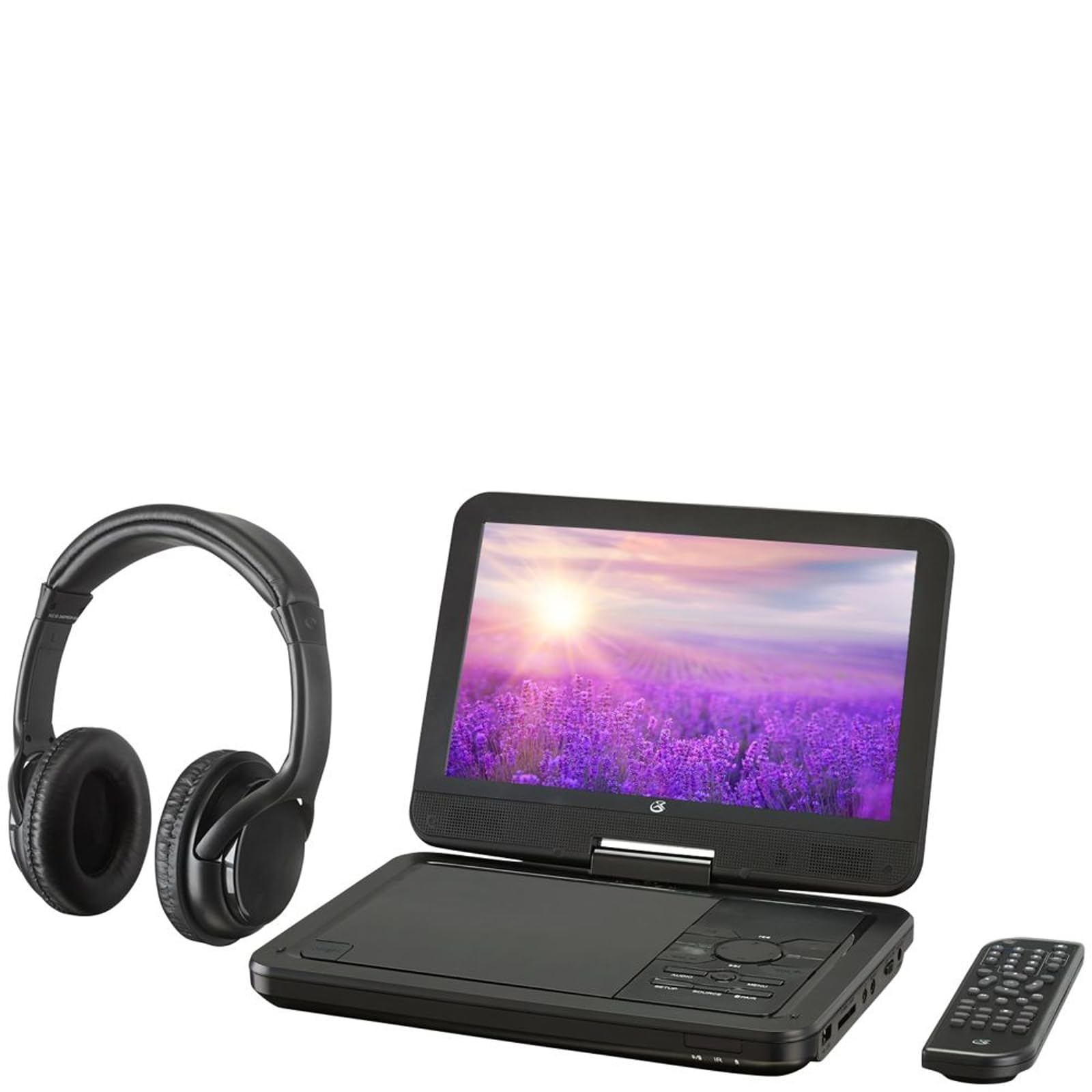
Figur 4.1: The GPX PDB1077B Portable DVD Player, showing the 10.1-inch screen, control panel, wireless Bluetooth headphones, and remote control.
4.1 Portable DVD Player Unit
The main unit features a swivel screen, disc tray, and control buttons. Key components include:
- 10.1 tommer LCD-skærm: For viewing video content.
- Diskbakke: For inserting DVDs and CDs.
- Kontrolpanel: Buttons for playback, menu navigation, volume, and source selection.
- Porte: USB, SD card slot, AV out, headphone jack, DC in.
- Højttalere: Integrerede stereohøjttalere.
4.2 Wireless Bluetooth Headphones
The included headphones connect wirelessly to the DVD player via Bluetooth for private listening.
Figur 4.2: Et nærbillede view of the black wireless Bluetooth headphones, featuring padded earcups and an adjustable headband.
4.3 Fjernbetjening
Fjernbetjeningen giver nem adgang til alle funktioner på afstand.
Figur 4.3: Et nærbillede view of the compact black remote control with various buttons for playback, menu navigation, and volume adjustment.
5. Opsætningsvejledning
5.1 Opladning af enheden
- Connect the AC/DC power adapter to the DC IN port on the DVD player.
- Sæt adapteren i en almindelig stikkontakt.
- Opladningsindikatoren lyser. Det tager cirka 3-4 timer at oplade batteriet fuldt.
- For in-car use, connect the car power adapter to the DC IN port and your vehicle's 12V power outlet.
5.2 Tænd/sluk
- To power on, slide the POWER switch to the ON position. The screen will light up.
- For at slukke skal du skubbe POWER-knappen til OFF-positionen.
5.3 Connecting Bluetooth Headphones
- Ensure the DVD player is powered on.
- Turn on the Bluetooth headphones and put them into pairing mode (refer to headphone manual if needed).
- On the DVD player, navigate to the Bluetooth settings menu.
- Select "Scan for Devices" or similar option.
- Choose your headphones from the list of available devices to pair.
- Once paired, audio will automatically transmit to the headphones.
5.4 Connecting to an External Display (Optional)
Use the included AV cable to connect the DVD player to a TV or monitor.
- Tilslut den ene ende af AV-kablet til AV OUT-porten på DVD-afspilleren.
- Connect the other end to the AV IN ports (Yellow for Video, White for Left Audio, Red for Right Audio) on your external display.
- Select the correct AV input on your external display.
6. Betjeningsvejledning
6.1 Playing DVDs and CDs
- Åbn diskbakken ved forsigtigt at løfte skærmen.
- Place a DVD or CD onto the spindle with the label side facing up.
- Gently close the disc tray.
- The player will automatically detect the disc and begin playback or display the disc menu.
- Use the navigation buttons (Up, Down, Left, Right, Enter) on the control panel or remote to navigate menus.
- Tryk på AFSPIL/PAUSE knappen for at starte eller sætte afspilning på pause.
- Tryk på STOP for at stoppe afspilning.
6.2 Brug af USB- og SD-kortmedier
- Sæt et USB-flashdrev i USB-porten eller et SD-kort i SD-kortstikket.
- Tryk på KILDE button on the control panel or remote to select "USB" or "SD".
- Naviger gennem din files using the control buttons.
- Vælg en file (e.g., MP3, JPEG) and press ENTER at spille eller view.
6.3 Justering af indstillinger
Access the system settings to customize your viewlyd- og lytteoplevelse.
- Tryk på OPSÆTNING button on the remote or control panel.
- Use the navigation buttons to select options such as:
- Skærmindstillinger: Adjust brightness, contrast, color.
- Lydindstillinger: Adjust volume, equalizer.
- Sprogindstillinger: Select OSD language, audio language, subtitle language.
- Forældrekontrol: Set rating levels for disc playback.
- Trykke ENTER for at bekræfte valg og OPSÆTNING igen for at forlade.
6.4 Brug af fjernbetjeningen
The remote control provides full functionality. Ensure batteries are correctly inserted (2 x AAA, not included).
| Knap | Fungere |
|---|---|
| MAGT | Tænder eller slukker for afspilleren. |
| OPSÆTNING | Åbner systemopsætningsmenuen. |
| KILDE | Switches between DVD, USB, SD, and AV input modes. |
| AFSPIL/PAUSE | Starter eller sætter afspilning på pause. |
| STOP | Stopper afspilning. |
| VOL + / VOL- | Justerer lydstyrken. |
| NAVIGATE (Up/Down/Left/Right/ENTER) | Navigerer i menuer og bekræfter valg. |
| MENU | Accesses the disc menu during DVD playback. |
7. Vedligeholdelse
7.1 Rengøring af enheden
- Sørg for, at enheden er slukket og frakoblet før rengøring.
- Brug en blød, tør og fnugfri klud til at tørre de udvendige overflader af.
- For the screen, use a screen-specific cleaning solution and a microfiber cloth, applying gentle pressure.
- Brug ikke slibende rengøringsmidler, voks eller opløsningsmidler.
7.2 Pleje af disken
- Hold diskene i kanterne for at undgå fingeraftryk.
- Opbevar diske i deres æsker, når de ikke er i brug, for at forhindre ridser.
- Rengør snavsede diske med en blød, fnugfri klud, og tør af fra midten og udad.
7.3 Pleje af batterier
- To prolong battery life, fully charge the device before first use.
- If storing the device for an extended period, charge it to approximately 50% every few months.
- Undgå at udsætte enheden for ekstreme temperaturer.
8. Fejlfinding
If you encounter issues with your GPX PDB1077B, refer to the following common problems and solutions.
| Problem | Mulig årsag | Løsning |
|---|---|---|
| Ingen strøm | Battery drained; Power adapter not connected properly; Power switch off. | Charge the device; Ensure power adapter is securely connected; Slide power switch to ON. |
| No Disc Playback | Disc inserted incorrectly; Disc is dirty or scratched; Disc format not supported. | Reinsert disc label-side up; Clean or replace disc; Check supported media types in specifications. |
| Ingen lyd | Volume too low; Mute function active; Headphones not connected/paired correctly. | Increase volume; Deactivate mute; Reconnect or re-pair headphones. |
| Bluetooth Headphones Not Pairing | Headphones not in pairing mode; Player not in Bluetooth scan mode; Interference. | Ensure headphones are in pairing mode; Activate Bluetooth scan on player; Move closer to player, away from other devices. |
| Fjernbetjeningen virker ikke | Batterierne er døde eller isat forkert; Blokering mellem fjernbetjening og afspiller; Fjernbetjeningssensor blokeret. | Replace batteries, check polarity; Remove obstructions; Ensure remote sensor on player is clear. |
9. Specifikationer
Technical specifications for the GPX PDB1077B Portable DVD Player.
| Feature | Detalje |
|---|---|
| Model | PDB1077B |
| Skærmstørrelse | 10.1 tommer |
| Display Type | LCD |
| Indfødt opløsning | 1024 x 600 |
| Understøttede medier | DVD, DVD±R/RW, CD, CD-R/RW, MP3 CD, JPEG CD |
| Forbindelse | Bluetooth wireless transmitter, USB port, SD card slot, AV Out, Headphone Jack, DC In |
| Strømkilde | Built-in rechargeable battery, AC/DC adapter, Car adapter |
10. Garanti og kundesupport
GPX products are designed for reliability and performance. For specific warranty information, please refer to the warranty card included with your purchase or visit the official GPX website. If you require technical assistance or have questions regarding your device, please contact GPX customer support.
GPX Official Webwebsted: www.gpx.com
Please note that warranty terms and customer support availability may vary by region.


