Indledning
Thank you for choosing the Spigen Essential F301W Qi Fast Charge Wireless Charging Pad. This manual provides important information regarding the setup, operation, maintenance, and troubleshooting of your device. Please read this manual thoroughly before use to ensure proper function and safety.

Image: The Spigen Essential F301W wireless charging pad, showcasing dens kompakte og elegante design.
Pakkens indhold
Bekræft at alle varer er til stede i din pakke:
- Spigen Essential F301W Wireless Charging Pad
- Micro5pin USB Cable (5 feet)
- Brugervejledning (dette dokument)
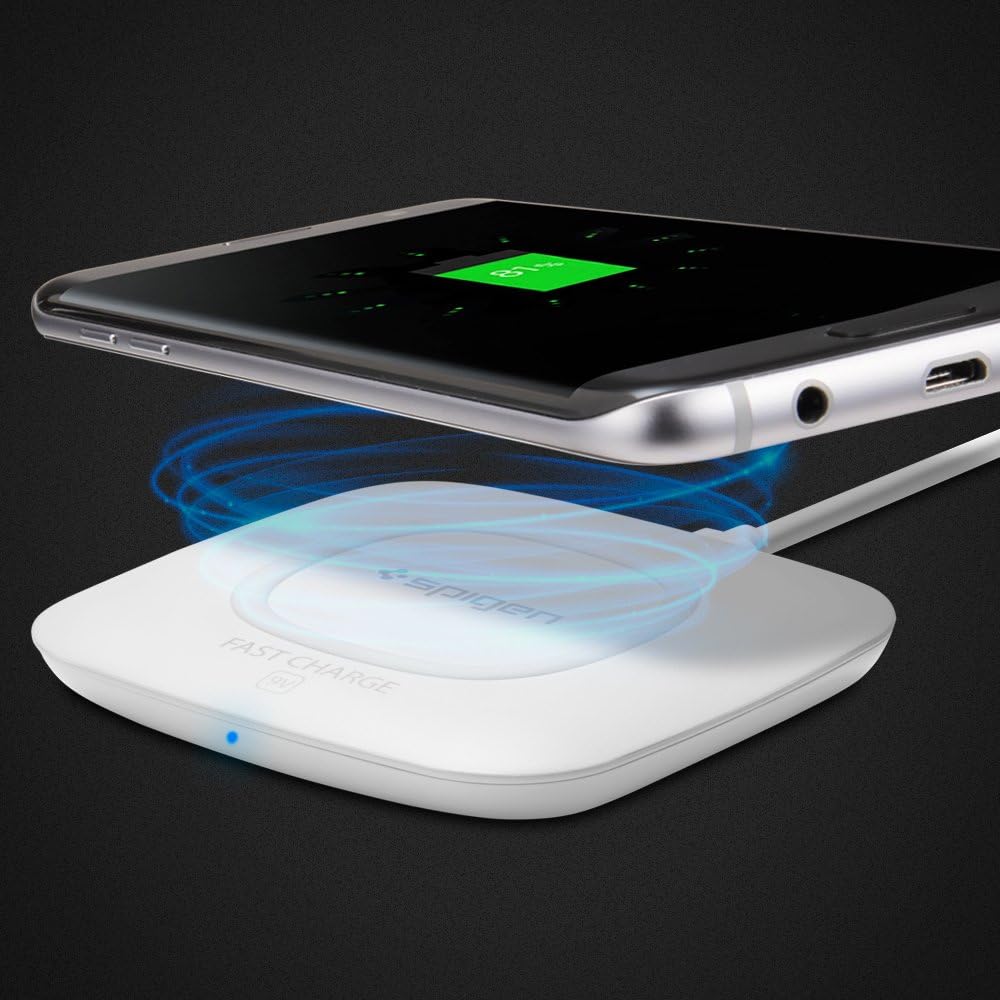
Image: Illustration of the Spigen F301W wireless charging pad and its included 5-foot Micro5pin USB cable.
Produkt overview
The Spigen Essential F301W is a Qi-certified wireless charging pad designed for convenience and efficiency.
Nøglefunktioner:
- Qi Certified for universal compatibility
- Fast Charge capability (up to 10W for compatible Android devices)
- Smart IC Chip Protection against overcharging and overheating
- Slank profile for portability and minimal desk footprint
- Case compatible design

Image: Icons representing key features: Qi Certified, Smart IC Chip Protection, CE Mark, and Fast Charge (9V).

Billede: En side view of the Spigen F301W, highlighting its slim 0.4-inch profile.
Opsætning
Follow these steps to set up your wireless charging pad:
- Connect the Micro5pin USB cable to the charging port on the Spigen F301W pad.
- Connect the other end of the USB cable to a compatible power adapter (not included). For fast charging, a QC 2.0/3.0 standard power adapter (10W or higher) is recommended.
- Plug the power adapter into a wall outlet. The LED indicator on the charging pad will illuminate briefly, indicating it is ready for use.
Betjeningsvejledning
To charge your Qi-enabled device:
- Ensure the charging pad is connected to a power source.
- Place your Qi-enabled smartphone or device directly onto the center of the charging pad.
- The LED indicator on the charging pad will light up to confirm that charging has begun. Your device's screen should also indicate that it is charging wirelessly.
- For optimal charging, ensure your device is centered on the pad. Remove any metal plates or credit cards from your phone case before charging. Wireless charging is not recommended with wallet cases.

Image: A smartphone placed on the Spigen F301W charging pad, showing the wireless charging process with blue light waves.

Image: A hand placing an iPhone X onto the Spigen F301W charging pad, illustrating the simplicity of wireless charging.

Image: A smartphone with a protective case charging on the Spigen F301W, demonstrating its case compatibility.
Kompatibilitet:
The Spigen F301W is compatible with all Qi-enabled devices. Fast charging is supported for Samsung Galaxy and Note Series that support fast charge. Standard charging will be applied to all iPhone models.

Image: Multiple Qi-enabled devices, including Samsung and iPhone models, positioned around the Spigen F301W, indicating broad compatibility.
Opretholdelse
To ensure the longevity and optimal performance of your charging pad:
- Keep the charging pad clean and free from dust and debris. Use a soft, dry cloth for cleaning.
- Undgå at udsætte enheden for ekstreme temperaturer, direkte sollys eller fugt.
- Du må ikke selv skille enheden ad eller forsøge at reparere den. Dette vil ugyldiggøre garantien.
- Store the charging pad in a cool, dry place when not in use.
Fejlfinding
If you encounter issues with your Spigen F301W, refer to the following table:
| Problem | Løsning |
|---|---|
| Enheden oplader ikke | Ensure the charging pad is properly connected to a power source. Verify your device is Qi-enabled and correctly centered on the pad. Remove any metal objects or thick cases. Try a different power adapter (QC 2.0/3.0 recommended). |
| Langsom opladning | Use a QC 2.0/3.0 compatible power adapter (10W or higher). Ensure your device supports fast wireless charging. Some phone models (e.g., iPhones) charge at a standard rate. |
| LED-indikator lyser ikke | Check the power connection. Ensure the USB cable is securely plugged into both the pad and the power adapter. Try a different power outlet. |
| Device or charger getting hot | Some heat generation during wireless charging is normal. If it becomes excessively hot, remove the device immediately. Ensure proper ventilation and that no foreign objects are between the device and the pad. |
Specifikationer
| Feature | Detalje |
|---|---|
| Modelnummer | F301W |
| Produktdimensioner | 3.15 x 3.15 x 0.53 tommer |
| Varens vægt | 1.7 ounce |
| Input bindtage | 9 Volts (with compatible adapter) |
| Wattage | 10 watt (maks.) |
| Forbindelse | Wireless (Qi Standard) |
| Opladningsafstand | 5-7 mm |
| Farve | Hvid |
Vigtige sikkerhedsretningslinjer
- Do not place metal objects, magnetic cards, or other foreign materials on the charging pad during operation.
- Undgå at tabe eller udsætte enheden for kraftige stød.
- Opbevares utilgængeligt for børn.
- Do not use the device in environments with high humidity or near water.
- Hvis produktet er beskadiget, skal brugen straks ophøre og kundesupport kontaktes.
Garanti og support
Spigen products are manufactured with quality and care. For warranty information and customer support, please refer to the official Spigen webwebstedet eller kontakt deres kundeserviceafdeling direkte. Gem venligst din købsbevis til garantikrav.
For yderligere hjælp, besøg: www.spigen.com


