1. Introduktion
The PRUVEEO Smart Acc Hardwire Kit is designed to provide continuous power to your dash cam, enabling 24-hour parking surveillance and protecting your vehicle's battery from discharge. This kit converts 12V-30V vehicle power to 5V/3A, ensuring stable operation for your dash cam. It features an ACC detection function for automatic parking mode switching and a low voltage protection system to safeguard your car battery.
2. Pakkens indhold
Kontroller venligst, at alle nedenstående varer er inkluderet i din pakke:
- 1 x Mini USB to Hardwire Kit
- 1 x Installing Crowbar
- 8 x Fuse Tap Cables (various types to ensure compatibility)
- 1 x Mini USB to Type-C Port Converter
- 4 x kabelklemmer
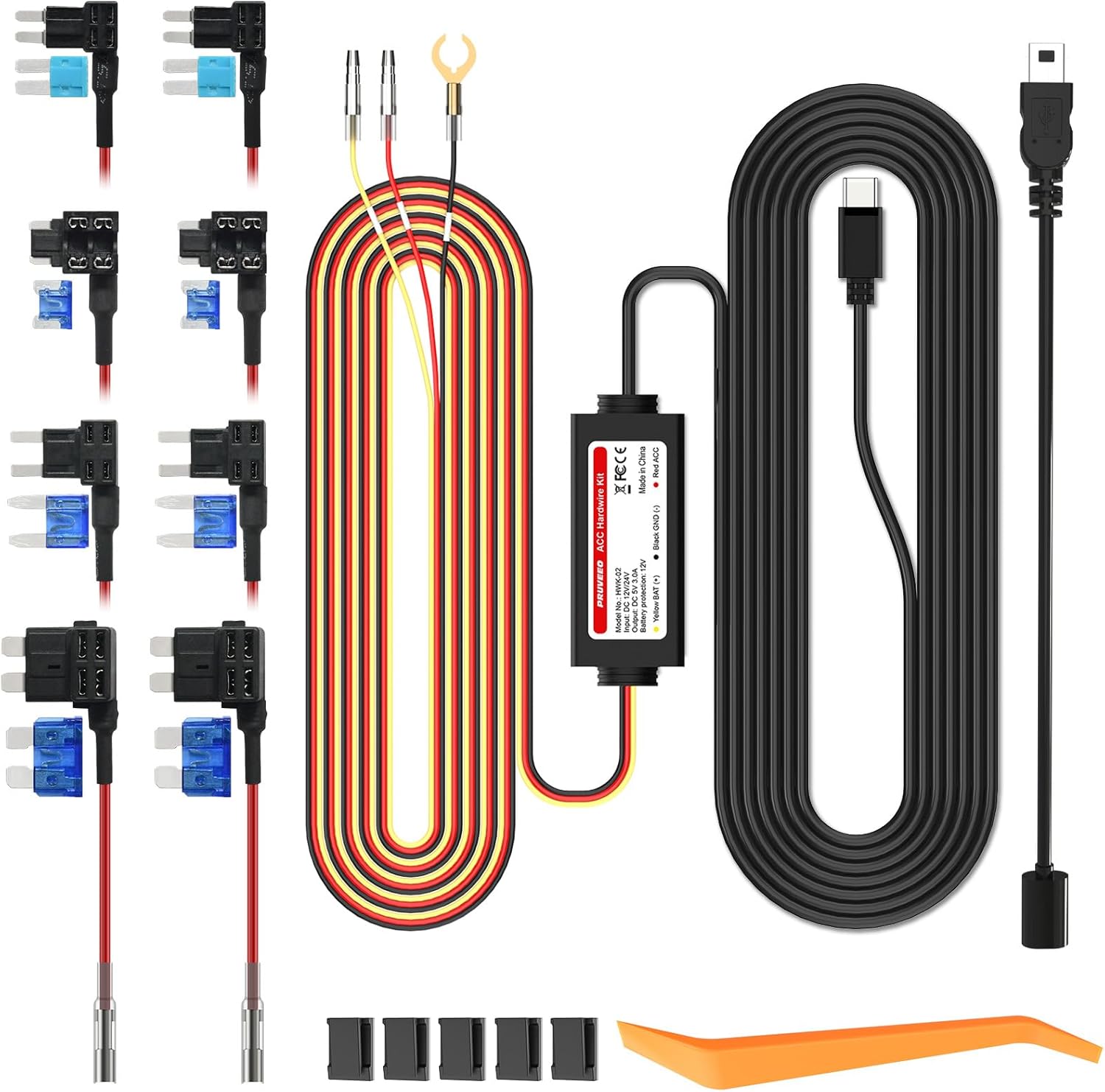
Figure 2.1: PRUVEEO Smart Acc Hardwire Kit Components
3. Opsætning og installation
3.1 Ledningsforbindelse
The hardwire kit features three main wires for connection to your vehicle's fuse box:
- Rød ledning (ACC): Connects to an ACC (Accessory) fuse that provides power only when the vehicle's ignition is on. This enables the dash cam to switch to parking mode when the engine is off.
- Yellow Wire (12V Normal Power): Connects to a constant 12V fuse that provides continuous power, even when the vehicle is off. This is essential for 24-hour parking surveillance.
- Sort ledning (jord): Connects to a metal part of the vehicle's chassis for grounding.

Figure 3.1: Hardwire Kit Wiring Diagram
3.2 Fuse Tap Selection
The kit includes 8 different fuse tap cables to accommodate various vehicle fuse box types (Standard, Low Profile Mini, Mini, Micro Fuse). Select the appropriate fuse tap that matches your vehicle's fuse type. Ensure the fuse tap is inserted correctly into the fuse slot.

Figure 3.2: Included Fuse Tap Types
3.3 LED-indikatorlys
The hardwire kit features an LED indicator to confirm correct installation:
- When the ACC line (Red Wire) is correctly connected to the fuse slot, the ACC LED on the hardwire unit will light up.
- When the Yellow Wire is correctly connected to the fuse slot, the Yellow Wire LED will light up.

Figure 3.3: LED Indicator in Use
3.4 Kabelstyring
Use the included installing crowbar to neatly tuck cables along the vehicle's trim and the cable hiding clips to secure them, ensuring a clean and professional installation that does not obstruct the driver's view.

Figur 3.4: Eksample of Cable Routing
4. Driftsfunktioner
4.1 24-timers parkeringsovervågning
Once hardwired, your dash cam will receive continuous power, allowing its parking monitor feature to function 24 hours a day. This ensures your vehicle is protected even when the engine is off, capturing events like impacts or motion around the vehicle.

Figure 4.1: 24-Hour Parking Surveillance
4.2 ACC Detection
The ACC detection feature allows your dash cam to automatically switch between normal recording mode (when the engine is on) and parking mode (when the engine is off). This seamless transition ensures optimal recording based on your vehicle's status.
4.3 Lav Voltage Beskyttelse
The built-in smart low voltage protection system monitors your car battery's voltage. Hvis voltage drops below a safe threshold (11.8V for 12V systems or 23.5V for 24V systems), the hardwire kit will automatically cut off power to the dash cam. This prevents excessive battery drain, ensuring you have enough power to start your car.

Figure 4.2: Battery Protection Mechanism
5. Vedligeholdelse
The PRUVEEO Smart Acc Hardwire Kit is designed for durability and minimal maintenance. To ensure optimal performance and longevity:
- Periodically check all connections to ensure they remain secure and free from corrosion.
- Ensure the hardwire unit and connections are kept dry and away from excessive heat or moisture.
- Avoid pulling on the cables excessively, especially during installation or removal.
6. Fejlfinding
If you encounter issues with your PRUVEEO Smart Acc Hardwire Kit, refer to the following table for common problems and solutions:
| Problem | Mulig årsag | Løsning |
|---|---|---|
| Dash cam does not power on after installation. | Incorrect wiring; Loose connection; Blown fuse; Incompatible fuse tap. | Verify all wire connections (Red, Yellow, Black) are secure and connected to the correct fuse types. Check the vehicle's fuse box for any blown fuses and replace if necessary. Ensure the fuse tap is fully seated. |
| Parkeringstilstand aktiveres ikke. | ACC wire not connected to an ignition-switched fuse; Dash cam parking mode settings. | Ensure the Red (ACC) wire is connected to a fuse that only receives power when the ignition is on. Check your dash cam's settings to confirm parking mode is enabled and configured correctly. |
| Car battery drains quickly. | Lav voltage protection not functioning; Excessive power draw from dash cam; Faulty car battery. | Confirm the Yellow wire is connected to a constant 12V source. Verify the hardwire kit's LED indicators are functioning. If the issue persists, consult a professional to check your car battery's health. |
| LED-indikatoren lyser ikke. | Incorrect wire connection; No power to the connected fuse. | Double-check that the respective wires (Red for ACC, Yellow for constant power) are securely connected to active fuse slots. Test the fuse slot with a multimeter if unsure. |
7. Specifikationer
| Feature | Specifikation |
|---|---|
| Produktdimensioner | 1.2 x 1.5 x 2.33 tommer |
| Varens vægt | 3.98 ounce |
| Modelnavn | HWK-02 |
| Varemodelnummer | 8523726601 |
| Input bindtage | DC 12V-30V |
| Udgang Voltage/Strøm | DC 5V/3A (compatible with 1A) |
| Lav voltage-beskyttelse (12V) | 11.8V |
| Lav voltage-beskyttelse (24V) | 23.5V |
| Forbindelsesteknologi | USB |
| Speciel funktion | Parking Monitor, Low Voltage Protection, ACC Detection, LED Indicator |
| Fabrikant | PRUVEEO |
| Dato først tilgængelig | 4. oktober 2017 |
8. Garanti og support
PRUVEEO products are manufactured to high-quality standards. For any questions, technical assistance, or warranty inquiries, please contact PRUVEEO customer support. Refer to your purchase documentation for specific warranty terms and contact details. You may also visit the official PRUVEEO store on Amazon for further information and support resources.
Online support: PRUVEEO Amazon Store


