Indledning
This manual provides essential information for the safe and efficient operation of your APC 1500VA Smart UPS with SmartConnect, model SMT1500RM2UC. This Uninterruptible Power Supply (UPS) is designed to protect your critical electronic equipment, such as servers, switches, routers, and networking devices, from power outages, harmful power conditions, spikes, and surges. It features APC SmartConnect for cloud-enabled remote monitoring and management.
Pakkens indhold
Before proceeding with installation, ensure all items listed below are present in your package:
- UPS enhed
- Støtteskinner til rackmontering
- SmartConnect-installationsvejledning
- Brugervejledning (dette dokument)
- PowerChute Business Edition installations-cd
- Sikkerhedsoplysninger
- Ethernet kabel
- USB kabel
Opsætning
Fysisk installation
The SMT1500RM2UC is a 2U rackmount UPS. Install the unit into a standard equipment rack using the provided rack-mounting support rails. Ensure adequate ventilation around the unit.

Figur 1: Forside view of the APC Smart-UPS SMT1500RM2UC.
Connect your equipment to the six NEMA 5-15R output receptacles located on the rear of the UPS. One of these outlet groups is switchable, allowing for controlled power cycling of connected devices.
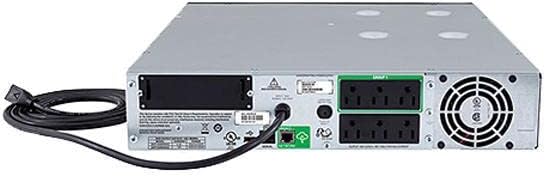
Figur 2: Bagside view with power connections and network port.
SmartConnect Setup
The APC SmartConnect feature allows for remote monitoring of your UPS. Follow these steps for initial setup:
- Connect the UPS to your network using the dedicated Ethernet port on the rear of the unit.
- Scan the QR code located on the UPS or refer to the SmartConnect Installation Guide to automatically register your device with the SmartConnect web portal.
- Opret en konto på SmartConnect web portalen, hvis du ikke allerede har en.
- Register your UPS using the product ID and product key provided.

Figure 3: SmartConnect QR code scanning for easy registration.
For a visual guide on setting up SmartConnect, please watch the official video below:
Video 1: Official APC SmartConnect Setup Guide. This video demonstrates the simple steps to connect and register your Smart-UPS with the cloud-enabled SmartConnect platform, enabling remote monitoring and management.
Betjening af UPS'en
The APC Smart-UPS SMT1500RM2UC operates automatically to provide continuous power protection. Key operational features include:
- Automatisk voltage Forordning (AVR): Adjusts high and low voltages to a safe level, preserving battery life and protecting connected equipment.
- Pure Sine Wave Output: Provides the highest degree of compatibility for sensitive electronic devices, ensuring clean and stable power.
- Grøn tilstand: An automatic green mode ensures the UPS operates at the highest levels of efficiency, reducing energy consumption and heat generation.
- LCD-skærm: The configurable, multilingual LCD display on the front panel provides key status information at a glance, including operating mode, device health, and battery charge.

Figure 4: Configurable multilingual LCD Display for quick status checks.
Runtime Information
The UPS provides reliable runtime to continue critical activities during power outages:
- At half load (500W): Approximately 25 minutes, 51 seconds
- At full load (1000W): Approximately 7 minutes, 9 seconds

Figure 5: UPS Runtime estimates.
Opretholdelse
Intelligent batteristyring
UPS'en har intelligent batteristyring, som forlænger batteriets levetid ved at regulere ladevolumen.tage in relation to battery temperature. This system also provides:
- Periodic battery self-tests to ensure optimal performance.
- Battery replacement recommendations when necessary.
- Disconnect battery notifications for safety and awareness.

Figure 6: Intelligent Battery Management features.
Udskiftning af batteri
The UPS uses 4 12V Sealed Lead Acid (AGM) batteries wired in series. When the UPS indicates a need for battery replacement, it is recommended to replace them with genuine APC replacement battery cartridges (RBCs) to ensure continued optimal performance and safety. Refer to the full user manual for detailed battery replacement instructions.
Firmware opdateringer
APC SmartConnect simplifies firmware updates, ensuring your UPS always runs with the latest enhancements and security patches. Automatic notifications will inform you when updates are available.
Fejlfinding
If you encounter issues with your APC Smart-UPS, consider the following general troubleshooting steps:
- Tjek forbindelser: Ensure all power cables and network cables are securely connected to the UPS and connected devices.
- Review LCD-skærm: The LCD display provides immediate status and error codes. Consult the full user manual for a comprehensive list of error codes and their meanings.
- Check SmartConnect Portal: Log into your SmartConnect web portal from any internet-connected device. The portal provides detailed UPS status, event logs, and diagnostic information, which can help identify the root cause of an issue.
- Power Cycling: For minor issues, try safely shutting down the UPS and connected equipment, then restarting the UPS.
- Batteristatus: If the UPS is not providing expected runtime or is frequently switching to battery power, check the battery health indicators on the LCD or SmartConnect portal. Batteries may need replacement if they are old or degraded.
- Overbelaste: Ensure the total load connected to the UPS does not exceed its capacity (1000W). Disconnect non-critical devices if an overload warning is present.
For more detailed troubleshooting, refer to the comprehensive User Manual (PDF) available via the link in the "Additional Resources" section.
Specifikationer
| Feature | Detalje |
|---|---|
| Modelnummer | SMT1500RM2UC |
| Kapacitet | 1500VA / 1000W |
| Input bindtage | 120 Volts (NEMA 5-15P) |
| Outputbeholdere | (6) NEMA 5-15R (one switchable group) |
| Batteritype | Sealed Lead Acid (2 Product Specific batteries required, included) |
| Formfaktor | 2U Rackmount |
| Produktdimensioner | 23.2" D x 24" B x 9.3" H |
| Varens vægt | 5 pund |
| Farve | Sort |
| Dato først tilgængelig | 11. oktober 2017 |
Garanti og support
Your APC Smart-UPS SMT1500RM2UC comes with a comprehensive warranty:
- Enhedsgaranti: 3-year repair or replacement.
- Batterigaranti: 2-year repair or replacement.
For technical support, product advice, or warranty claims, please utilize the APC SmartConnect portal or contact APC customer support directly. The SmartConnect portal provides easy access to support and advice from APC experts.
Yderligere ressourcer
For more in-depth information, please refer to the official PDF documents:


