Artlii Stone 1 Full HD Projector User Manual
Model: Artlii Stone 1 | Brand: Artlii
1. Introduktion
This manual provides comprehensive instructions for the safe and efficient operation of your Artlii Stone 1 Full HD Projector. Please read this manual thoroughly before using the projector and retain it for future reference. The Artlii Stone 1 is designed to deliver a high-quality visual experience with its native 1080P resolution and advanced features.
2. Sikkerhedsoplysninger
Overhold følgende sikkerhedsforanstaltninger for at forhindre brand, elektrisk stød eller personskade og for at forlænge projektorens levetid:
- Strømforsyning: Use only the power adapter supplied with the projector. Ensure the power outlet voltage matcher projektorens krav.
- Ventilation: Bloker ikke ventilationsåbningerne. Sørg for tilstrækkelig plads omkring projektoren for korrekt luftgennemstrømning og for at forhindre overophedning.
- Varme: Projektoren lamp and internal components generate heat. Avoid touching the projector's surface immediately after use.
- Væske og fugt: Do not expose the projector to rain, moisture, or any liquids. If liquid enters the projector, disconnect the power immediately and contact customer support.
- Rensning: Tag stikket ud af stikkontakten før rengøring. Brug en blød, tør klud. Brug ikke flydende rengøringsmidler eller rengøringsmidler på sprayform.
- Beliggenhed: Place the projector on a stable, level surface. Avoid placing it in direct sunlight, near heat sources, or in environments with excessive dust or humidity.
- Øjenbeskyttelse: Se ikke direkte ind i projektorlinsen, når lamp er tændt. Det skarpe lys kan forårsage øjenskader.
- Service: Forsøg ikke at reparere projektoren selv. Overlad al service til kvalificeret servicepersonale.
3. Pakkens indhold
Bekræft at alle varer er til stede i pakken:
- Artlii Stone 1 Full HD Projector
- Strømkabel
- Fjernbetjening (batterier medfølger ikke)
- AV-kabel
- HDMI kabel
- Brugermanual
4. Produktet er slutview
Familiarize yourself with the components of your Artlii Stone 1 projector.
4.1 Foran View

Billede: Forside view of the Artlii Stone 1 projector, showing the lens, focus ring, and keystone correction dial.
- Projektionsobjektiv: Sender billedet ud på skærmen.
- Fokusring: Justerer klarheden af det projicerede billede.
- Keystone-korrektion: Korrigerer trapezformet forvrængning af billedet.
4.2 Bagtil og på siden Views (Porte)

Billede: Side view of the Artlii Stone 1 projector highlighting the various input and output ports, including HDMI, USB, VGA, and audio out.
- HDMI-porte (x2): Connect to HDMI-enabled devices such as laptops, gaming consoles (PS4, Xbox, Switch), TV sticks, and Blu-ray players.
- USB-port: Tilslut USB-drev til medieafspilning.
- VGA port: Connect to computers with VGA output.
- SD-kortplads: Indsæt SD-kort for medieafspilning.
- 3.5 mm lydudgang: Tilslut eksterne højttalere eller hovedtelefoner.
- Strømindgang: Tilslut strømkablet.
5. Opsætning
5.1 Placering og skærmstørrelse
Optimal projection distance and screen size are crucial for the best viewing experience. The Artlii Stone 1 supports screen sizes up to 300 inches.
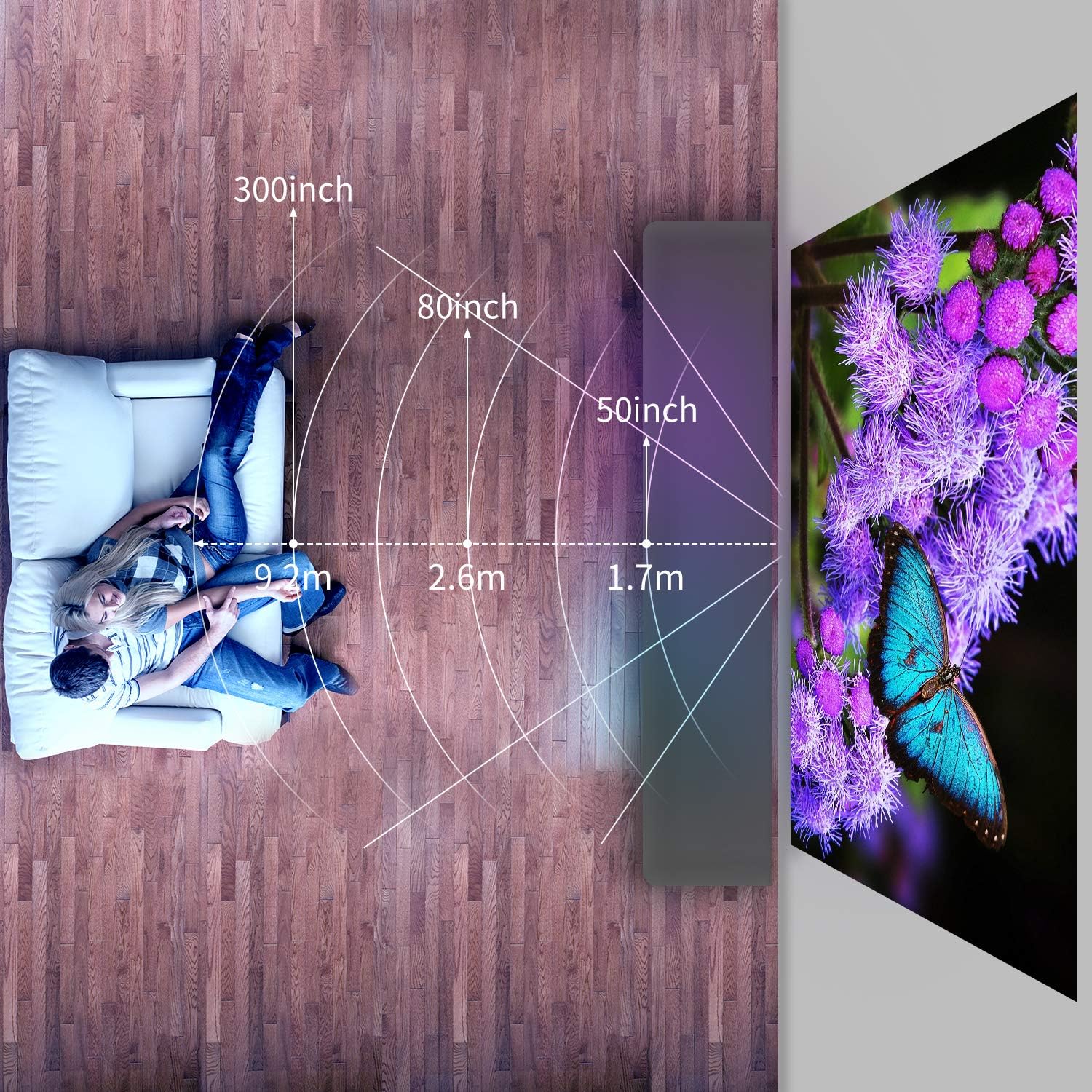
Image: Diagram illustrating recommended projection distances for various screen sizes, showing distances for 50-inch, 80-inch, and 300-inch projections.
Refer to the diagram for recommended distances. Adjust the projector's position to achieve your desired screen size.
5.2 Strømtilslutning
- Tilslut strømkablet til projektorens strømindgang.
- Sæt den anden ende af strømkablet i en stikkontakt.
- Strømindikatorlampen på projektoren vil lyse.
5.3 Indledende justeringer
- Fokusjustering: Rotate the focus ring on the lens until the projected image appears sharp and clear.
- Keystone-korrektion: If the image appears trapezoidal (wider at the top or bottom), rotate the keystone correction dial to square the image.
6. Betjeningsvejledning
6.1 Tænd/sluk
- For at tænde: Tryk på tænd/sluk-knappen på projektoren eller fjernbetjeningen. Projektoren starter op og viser hovedgrænsefladen.
- For at slukke: Press the power button again. Confirm shutdown if prompted. Allow the fan to run briefly to cool down the lamp before disconnecting power.
6.2 Tilslutning af enheder
The Artlii Stone 1 offers multiple connectivity options:
- HDMI: Connect your device (e.g., laptop, game console, TV stick) to one of the HDMI ports using the provided HDMI cable.
- USB: Insert a USB flash drive into the USB port. The projector will typically detect the drive automatically.
- VGA: Connect your computer to the VGA port using a VGA cable.
- SD-kort: Insert an SD card into the SD card slot.
- AV: Use the provided AV cable to connect older devices with AV output.
6.3 Valg af indgangskilde
After connecting a device, you may need to manually select the input source:
- Press the "Source" or "Input" button on the remote control or the projector's control panel.
- Navigate through the options (HDMI1, HDMI2, USB, VGA, AV, SD) using the arrow keys and press "OK" to confirm your selection.
6.4 Menunavigation
Use the remote control to navigate the projector's on-screen menu:
- Press the "Menu" button to access settings.
- Use the arrow keys to move between options (Picture, Sound, Time, Option).
- Press "OK" to enter a sub-menu or confirm a setting.
- Press "Exit" or "Return" to go back to the previous menu or exit the menu.
6.5 Zoomfunktion
The Artlii Stone 1 features a digital zoom function, allowing you to adjust the screen size from 75% to 100% without moving the projector.
Image: Screenshot of the projector's on-screen display showing the zoom adjustment from 100% down to 75%, demonstrating the digital zoom feature.
Access the zoom setting through the projector's menu (usually under "Picture" or "Option" settings) and adjust the percentage efter behov.
6.6 Lydudgang
The projector has built-in speakers. For enhanced audio, connect external speakers or headphones to the 3.5mm audio out port.
7. Vedligeholdelse
Regelmæssig vedligeholdelse sikrer optimal ydeevne og forlænger projektorens levetid.
- Rengøring af linser: Brug en blød, fnugfri klud, der er specielt designet til optiske linser, til forsigtigt at tørre projektorlinsen af. Brug ikke slibende rengøringsmidler eller overdreven kraft.
- Fjernelse af støv: Periodically clean the projector's exterior with a soft, dry cloth. The Artlii Stone 1 features an accessible design for internal dust cleaning, which can be performed by opening a designated trap door. For persistent dust spots on the projection, professional cleaning may be required.
- Lamp Liv: LED lamp in the Artlii Stone 1 has an estimated lifespan of over 50,000 hours under normal usage conditions. No lamp Udskiftning er typisk nødvendig i løbet af produktets levetid.
8. Fejlfinding
Hvis du støder på problemer med din projektor, kan du se følgende almindelige problemer og løsninger:
| Problem | Mulig årsag | Løsning |
|---|---|---|
| Intet billede projiceret | Strøm ikke tilsluttet; Forkert inputkilde; Enhed ikke tilsluttet korrekt. | Ensure power cable is securely connected. Select the correct input source (HDMI, USB, etc.). Check all cable connections. |
| Billedet er sløret | Fokus ikke justeret; Projektoren er for tæt på/langt fra skærmen. | Adjust the focus ring on the lens. Reposition the projector for optimal distance. |
| Billedet er trapezformet | Keystone ikke rettet. | Juster keystone-korrektionshjulet, indtil billedet er rektangulært. |
| Ingen lyd | Lydstyrken er for lav; Lydkabel ikke tilsluttet; Slået fra. | Increase volume. Ensure audio cables are connected correctly. Unmute the projector or source device. |
| Ventilatorstøjen er høj | Normal operation; Blocked ventilation. | A certain level of fan noise is normal for cooling. Ensure ventilation openings are not blocked. |
| Dust spots on projection | Dust accumulated inside the optical path. | Clean the lens. If spots persist, refer to the maintenance section regarding internal dust cleaning or contact support. |
9. Specifikationer
Key technical specifications for the Artlii Stone 1 Full HD Projector:
| Feature | Detalje |
|---|---|
| Model | Artlii Stone 1 |
| Indfødt opløsning | 1920 x 1080P (Full HD) |
| Lysstyrke | 330 ANSI Lumens |
| Kontrastforhold | 7000:1 |
| Lamp Liv | 50,000 timer (LED) |
| Projektionsstørrelse | 50-300 tommer |
| Aspektforhold | 4:3 / 16:9 |
| Forbindelse | 2x HDMI, 1x USB, 1x VGA, 1x SD Card, 1x 3.5mm Audio Out |
| Keystone korrektion | Manuel |
| Zoomfunktion | 75% - 100% (Digital) |
| Dimensioner (L x B x H) | 23.1 x 30.7 x 10.4 cm |
| Vægt | 2.6 kg |
Bemærk: Specifikationerne kan ændres uden forudgående varsel.
10. Garanti og support
Artlii products come with a standard manufacturer's warranty. For detailed warranty information, product support, or technical assistance, please refer to the warranty card included in your package or visit the official Artlii website. You can also contact Artlii customer service through the platform where you purchased the product.
For yderligere hjælp, besøg venligst: Artlii Official Store


