Indledning
This manual provides detailed instructions for the setup, operation, and maintenance of your Casio LA20WH Series Women's Digital Watch. Please read this manual thoroughly to ensure proper use and to maximize the lifespan of your timepiece.
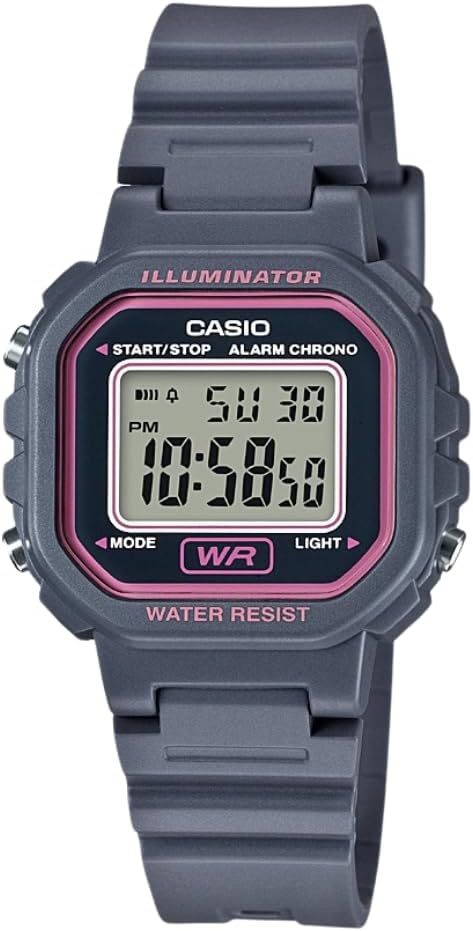
Billede: Forside view of the Casio LA20WH Series Digital Watch, displaying time and date.
Nøglefunktioner
- Digital time display (Hours, Minutes, Seconds, AM/PM)
- Date and Day display
- 1/100 second Stopwatch function
- Daglig Alarm
- LED Light for illumination
- Automatisk kalender
- Vandafvisende design
- Long-lasting 5-year battery life
Opsætning
Indledende indstilling af tid og dato
To set the time and date on your Casio LA20WH watch, follow these general steps. Specific button labels are usually found on the watch casing.
- Tryk på MODE button (usually on the bottom left) repeatedly until the time setting mode is displayed. The seconds digits may start flashing.
- Brug START/STOP button (usually on the top right) to adjust the flashing digits (seconds, hours, minutes, year, month, day).
- Tryk på LYS button (usually on the bottom right) to cycle through the different settings (seconds, hours, minutes, etc.).
- Når alle indstillinger er korrekte, skal du trykke på MODE knappen igen for at forlade indstillingstilstanden.
Bære uret
Adjust the watch strap to fit comfortably around your wrist. It should be snug enough not to slide freely but not so tight as to restrict circulation. The resin strap features multiple holes for a customizable fit.
Betjeningsvejledning
Tidtagningstilstand
In the default timekeeping mode, the watch displays the current time (hours, minutes, seconds), AM/PM indicator, day of the week, and date.
Alarm funktion

To access the alarm setting mode, press the MODE button until "AL" appears on the display. Use the START/STOP og LYS buttons to set the desired alarm time. Press MODE to confirm and activate/deactivate the alarm.
Stopur funktion

Navigate to the stopwatch mode by pressing the MODE button until "ST" is displayed. Press START/STOP to begin and end timing. Press LYS for at nulstille stopuret.
LED lys
Tryk på LYS knappen for at oplyse displayet for nem viewunder dårlige lysforhold. Lyset vil forblive tændt i et par sekunder.
Vandmodstand

This watch is water-resistant. It is suitable for everyday use and can withstand splashes or brief immersion in water. Avoid operating buttons while the watch is submerged to prevent water ingress.
Opretholdelse
Rensning
To clean your watch, wipe it with a soft, dry cloth. For stubborn dirt, use a soft cloth dampened with mild soap and water, then wipe dry. Avoid using harsh chemicals or abrasive cleaners.
Udskiftning af batteri
The watch is equipped with a battery designed for approximately 5 years of operation. When the display becomes dim or functions become erratic, it may be time for a battery replacement. It is recommended to have the battery replaced by a qualified watch technician to ensure water resistance is maintained.
Vandtæthedspleje
To maintain the water resistance of your watch, ensure the back cover is securely fastened. Avoid exposing the watch to extreme temperatures or sudden temperature changes, as this can affect the seals. If the watch is exposed to saltwater, rinse it thoroughly with fresh water and dry it with a soft cloth.
Fejlfinding
- Blank eller svag skærm: Batteriet kan være lavt eller afladet. Udskift batteriet.
- Forkert tidspunkt/dato: Re-set the time and date following the "Initial Time and Date Setting" instructions.
- Knapper reagerer ikke: Ensure the watch is not in a locked mode (if applicable, though not a feature of this model). If issues persist, a battery replacement or professional inspection may be required.
- Vand indeni display: If condensation or water appears inside the watch, have it inspected by a professional immediately to prevent further damage.
Specifikationer
| Mærke | Casio |
| Modelnummer | LA20WH-8A |
| Afdeling | Kvinders |
| Materiale | Harpiks |
| Produktdimensioner | 10 x 10 x 10 tommer; 3.53 ounce |
| Batteritype | 1 CR2 batteri (medfølger) |
| Vandmodstand | Ja |
| Særlige funktioner | Alarm, LED Light, Auto Calendar, 1/100 SEC Stopwatch |
Garanti og support
Your Casio LA20WH Series watch comes with a battery designed for approximately 5 years of life. For warranty claims or technical support, please refer to the official Casio webwebstedet eller kontakt deres kundeservice. Gem din købsbevis for at validere garantien.

Official Casio Brand Logo


