1. Introduktion
This manual provides essential information for the safe and effective use of your Vivibright GP90 UP Portable Video Projector. Please read it thoroughly before operating the device and retain it for future reference. The Vivibright GP90 UP is a portable video projector featuring an Android 4.42 operating system, 3200 lumens brightness, and 1280x800 native resolution, designed for multimedia entertainment and presentations.
2. Sikkerhedsinstruktioner
- Bloker ikke ventilationsåbningerne. Sørg for tilstrækkelig luftgennemstrømning omkring projektoren for at forhindre overophedning.
- Udsæt ikke projektoren for regn eller fugt for at undgå elektrisk stød eller brand.
- Undgå at se direkte ind i projektorlinsen, når lamp er tændt, da det skarpe lys kan forårsage øjenskader.
- Placer projektoren på en stabil, plan overflade for at forhindre den i at falde.
- Brug kun den strømadapter, der følger med projektoren.
- Forsøg ikke selv at skille projektoren ad eller reparere den. Overlad al service til kvalificeret personale.
- Hold projektoren væk fra varmekilder og direkte sollys.
3. Pakkens indhold
Bekræft at alle varer er til stede i pakken:
- Vivibright GP90 UP Projector
- Strømkabel
- Remote Control (may not be included with all models)
- Brugervejledning (dette dokument)
4. Produktet er slutview
Familiarize yourself with the projector's components and connection ports.
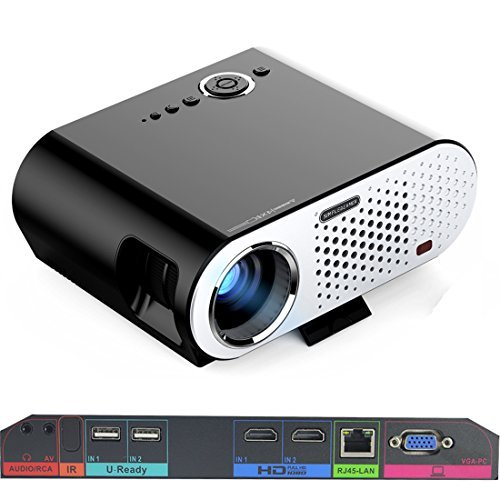
Image: The Vivibright GP90 UP projector showing its top controls, lens, and various input/output ports on the rear panel. The top features power and navigation buttons. The front has the projection lens. The rear panel includes Audio/RCA, IR receiver, two USB ports (U-Ready), two HDMI ports (HD), an RJ45-LAN port, and a VGA-PC port.
4.1 Frontpanel
- Projektionsobjektiv: Udsender billedet.
4.2 Toppanel
- Kontrolknapper: Power, navigation, and menu access.
4.3 Bagpanel (input-/outputporte)
- AUDIO/RCA: Audio output and composite video input.
- IR: Infrarød modtager til fjernbetjening.
- IN 1 / IN 2 (USB): Two USB ports for connecting USB storage devices.
- IN 1 / IN 2 (HDMI): Two HDMI inputs for digital video and audio sources.
- RJ45-LAN: Ethernet-port til kablet netværksforbindelse.
- VGA-PC: VGA input for connecting to computers.
5. Opsætning
5.1 Placering
- Place the projector on a flat, stable surface or mount it on a ceiling or tripod.
- Ensure the projector is positioned directly in front of the screen or wall. Avoid angled placement as horizontal keystone correction is not available.
- The optimal projection distance ranges from 1.2m to 8.5m, producing screen sizes from 35 to 280 inches. For a 100-inch image, a distance of approximately 3 meters is recommended.
5.2 Strømtilslutning
- Tilslut strømkablet til projektorens strømindgang.
- Plug the other end of the power cable into a suitable electrical outlet (90~240V/50~60Hz).
5.3 Tilslutning af inputenheder
- HDMI: Connect an HDMI cable from your source device (e.g., laptop, Blu-ray player, gaming console) to one of the projector's HDMI ports.
- USB: Insert a USB flash drive or external hard drive into a USB port to access media files.
- VGA: Connect a VGA cable from your computer to the projector's VGA-PC port.
- AV: Use an RCA cable to connect older devices to the AV input.
- LAN: Connect an Ethernet cable to the RJ45-LAN port for a wired internet connection.
5.4 Fokus- og Keystone-justering
- Fokus: Rotate the focus ring around the lens until the projected image is sharp and clear.
- Keystone-korrektion: Use the manual vertical keystone correction feature (±15°) to adjust the image shape if the projector is not perfectly perpendicular to the screen. This corrects trapezoidal distortion.
6. Betjeningsvejledning
6.1 Tænd/sluk
- Tænd: Press the power button on the projector or the remote control. The indicator light will change, and the projector will start.
- Sluk: Press the power button again. Confirm shutdown if prompted. Allow the projector to cool down before unplugging.
6.2 Navigering i Android OS
- The projector runs on Android 4.42. Use the remote control or connect a wireless mouse (recommended for easier navigation) to interact with the interface.
- Access pre-installed apps or download compatible applications from the app store. Note that some newer applications may not be compatible with Android 4.42.
6.3 Trådløs projektion
- Wi-Fi: Connect to a wireless network via the settings menu. Supports dual-band Wi-Fi 2.4G.
- Bluetooth: Supports Bluetooth 4.0 for connecting wireless devices such as speakers. Note that Bluetooth audio output may only be available when using USB or Android sources, not HDMI.
- Wireless Push (EZCast / Miracast / Airplay): Use compatible apps on your smartphone or tablet to mirror your device's screen to the projector. Ensure your device and the projector are on the same Wi-Fi network.
6.4 Lydindstillinger
- The projector features built-in 4Ω, 5W stereo speakers with SRS sound technology.
- For enhanced audio, connect external speakers via the Audio Out port or wirelessly via Bluetooth (when using Android or USB sources).
7. Vedligeholdelse
7.1 Rengøring
- Linse: Brug en blød, fnugfri klud, der er specielt designet til optiske linser. Brug ikke slibende rengøringsmidler.
- Casing: Tør projektorens yderside af med en blød, tør klud. Brug en let tør klud til genstridigt snavs.amp klud og tør derefter grundigt.
- Ventilationsåbninger: Rengør ventilationsåbningerne regelmæssigt med en blød børste eller trykluft for at forhindre støvophobning, hvilket kan påvirke ydeevne og levetid.
7.2 Opbevaring
- Når projektoren ikke er i brug i længere perioder, skal den opbevares køligt og tørt, væk fra direkte sollys og ekstreme temperaturer.
- Dæk objektivet med dækslet for at beskytte det mod støv og ridser.
8. Fejlfinding
| Problem | Mulig årsag | Løsning |
|---|---|---|
| Intet billede projiceret | Power not connected; Input source not selected; Lens cap on | Check power connection; Select correct input source; Remove lens cap |
| Billedet er sløret | Fokus ikke justeret; Projektor for tæt på/for langt væk | Adjust focus ring; Adjust projection distance |
| Billedet er trapezformet | Projektoren er ikke vinkelret på skærmen | Adjust vertical keystone correction; Reposition projector to be centered |
| Ingen lyd | Volume too low; Muted; External speakers not connected/selected | Increase volume; Unmute; Check external speaker connections/settings |
| Wireless projection unstable | Weak Wi-Fi signal; Device incompatibility; Outdated Android OS | Ensure strong Wi-Fi signal; Check device compatibility with Miracast/Airplay; Consider wired connection if issues persist with older Android version. |
9. Specifikationer
| Feature | Detalje |
|---|---|
| Mærke | Vivibright |
| Model | GP90 UP |
| Operativsystem | Android 4.42 |
| Lysstyrke | 3200 Lumens (LED Luminous efficiency) |
| Indfødt opløsning | 1280 x 800 (supports up to 1080P) |
| Kontrastforhold | 3000:1 (Dynamic up to 10,000:1) |
| Projektionsstørrelse | 35-280 tommer |
| Projektionsafstand | 1.2 m - 8.5 m |
| Kasteforhold | 1.45:1 |
| Keystone korrektion | Manuel lodret ± 15 ° |
| Lyskildeliv | Op til 30,000 timer |
| Forbindelse | Wi-Fi (2.4G), Bluetooth 4.0, 2x HDMI, 2x USB, VGA, AV, RJ45-LAN |
| Lyd | Built-in 4Ω, 5W stereo speakers with SRS sound |
| Strømforsyning | 90~240V/50~60Hz |
| Produktdimensioner | 27 x 22 x 9 cm |
| Varens vægt | 3.17 kg |
10. Garanti og support
For warranty information and technical support, please refer to the documentation provided at the time of purchase or contact Vivibright customer service. Keep your purchase receipt as proof of purchase for warranty claims.


