1. Introduktion
This manual provides detailed instructions for the setup, operation, and maintenance of your Xerox VersaLink C505/X Color Laser Multifunction Printer. The C505/X is designed for efficient performance in fast-paced work environments, offering print, copy, scan, and fax functionalities.
Key features include a customizable 7-inch color touchscreen for intuitive control, mobile and cloud connectivity, and robust security measures.
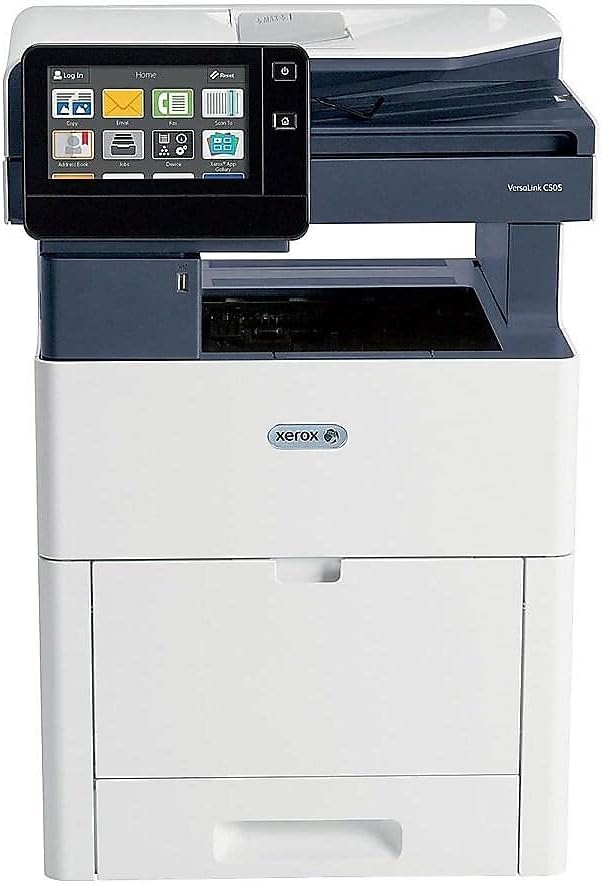
Figur 1: Forside view of the Xerox VersaLink C505/X Multifunction Printer.
2. Opsætning
2.1 Udpakning og første inspektion
Carefully remove the printer from its packaging. Verify that all components listed below are present and undamaged:
- Xerox VersaLink C505 Color MFP
- Starter capacity toner cartridges (one each of cyan, magenta, yellow: 2,400 capacity; black: 5,000 capacity)
- Software og dokumentations-cd
- Installationsvejledning
- Quick User Guides
- Strømledning
2.2 Strømtilslutning
- Placer printeren på en stabil, plan overflade.
- Connect the provided power cord to the printer's power input and then to a grounded electrical outlet.
- Do not power on the device until all other connections are made.
2.3 Installation af tonerpatron
Install the starter toner cartridges into their respective slots. Refer to the Quick User Guides for specific instructions on opening the toner access panel and inserting cartridges.

Figure 2: Toner cartridge access panel open, showing toner installation.
2.4 Network and USB Connection
The printer supports both Ethernet and USB connectivity.
- Ethernet: Tilslut et Ethernet-kabel fra printerens Ethernet-port til din netværksrouter eller -switch.
- USB: Tilslut et USB-kabel fra printerens USB-port til din computer.
2.5 Softwareinstallation
Insert the provided software and documentation CD into your computer's CD/DVD drive. Follow the on-screen instructions to install the necessary drivers and utilities. Alternatively, visit the official Xerox support webwebsted for de nyeste drivere.
3. Betjening af printeren
3.1 Berøringsskærmsgrænseflade
The 7-inch color touchscreen provides access to all printer functions. Navigate through menus by tapping and swiping, similar to a smartphone. The home screen displays icons for various functions such as Print, Copy, Scan, and Fax.

Figure 3: Close-up of the 7-inch color touchscreen control panel.
3.2 Udskrivning
Sådan udskriver du dokumenter:
- Ensure the printer is connected to your computer or network.
- Open the document on your computer and select the print option.
- Choose the Xerox VersaLink C505/X from the list of available printers.
- Adjust print settings (e.g., color/monochrome, duplex printing, paper size) as needed. The printer supports up to 43 ppm color and 45 ppm monochrome, with automatic duplexing.
- Confirm the print job.
3.3 Kopiering
Sådan laver du kopier:
- Place the original document on the scanner glass or in the automatic document feeder (ADF).
- On the touchscreen, tap the "Copy" icon.
- Select desired settings such as number of copies, color/black and white, and two-sided copying. The maximum copy speed is 45 ppm (black & white) with resolutions up to 1200 x 2400 dpi.
- Tryk på "Start"-knappen.
3.4 Scanning
To scan documents:
- Placer dokumentet på scannerglaspladen eller i den automatiske dokumentføder.
- On the touchscreen, tap the "Scan" icon.
- Choose the scan destination (e.g., email, network folder, USB drive) and adjust scan settings.
- Tryk på "Start"-knappen.
3.5 Faxning
Sådan sender du en fax:
- Placer dokumentet på scannerglaspladen eller i den automatiske dokumentføder.
- On the touchscreen, tap the "Fax" icon.
- Indtast modtagerens faxnummer.
- Juster alle nødvendige faxindstillinger.
- Tryk på "Start"-knappen.
3.6 Mobile and Cloud Connectivity
The VersaLink C505/X offers out-of-the-box connectivity to cloud services like Google Drive, Microsoft OneDrive, and DropBox. Additional options are available through the Xerox App Gallery, allowing for flexible workflow integration.
4. Vedligeholdelse
4.1 Udskiftning af tonerpatron
When a toner cartridge is low or empty, the printer's display will indicate which cartridge needs replacement. Always use genuine Xerox toner cartridges for optimal performance and print quality.
- Open the front access panel of the printer.
- Carefully remove the empty toner cartridge by pulling it straight out.
- Unpack the new toner cartridge and gently shake it to distribute the toner.
- Sæt den nye patron i den tilsvarende holder, indtil den klikker på plads.
- Close the front access panel.
4.2 Rengøring
Regelmæssig rengøring hjælper med at opretholde udskriftskvaliteten og forlænger printerens levetid.
- Ydre: Tør de udvendige overflader af med en blød, damp, fnugfri klud.
- Scannerglas: Use a soft cloth moistened with glass cleaner to clean the scanner glass. Ensure no residue remains.
- Interne komponenter: Refer to the detailed user manual on the software and documentation CD for instructions on cleaning internal components, such as the print heads or rollers, if necessary.
5. Fejlfinding
This section addresses common issues you might encounter with your Xerox VersaLink C505/X. For more complex problems, consult the full user manual or contact support.
5.1 Papirstop
If a paper jam occurs, the touchscreen will display an error message indicating the location of the jam. Follow the on-screen instructions to clear the jammed paper. Always pull paper in the direction of the paper path to avoid tearing.
5.2 Problemer med udskriftskvaliteten
If printouts show streaks, faded areas, or incorrect colors:
- Kontroller tonerniveauet, og udskift eventuelle lave tonerpatroner.
- Sørg for at bruge det rigtige papir til dit udskriftsjob.
- Perform a print quality diagnostic from the printer's control panel.
- Clean the print heads or other internal components as instructed in the detailed manual.
5.3 Forbindelsesproblemer
If the printer is not communicating with your computer or network:
- Verify that all cables (power, USB, Ethernet) are securely connected.
- Genstart printeren og din computer/router.
- Check network settings on the printer's touchscreen.
- Sørg for, at de korrekte printerdrivere er installeret på din computer.
6. Specifikationer
| Feature | Detalje |
|---|---|
| Modelnavn | Xerox C505/X VersaLink |
| Funktioner | Udskriv, kopiér, scan, fax |
| Udskrivningsteknologi | Farvelaser |
| Maksimal udskrivningshastighed (monokrom) | 45 ppm |
| Maksimal udskrivningshastighed (farve) | 43 ppm |
| Maksimal udskriftsopløsning (sort/hvid) | 2400 dpi |
| Maksimal udskriftsopløsning (farve) | 1200 x 2400 dpi |
| Duplex udskrivning | Automatisk |
| Scanner type | Dokument |
| Maksimal kopieringshastighed (sort/hvid) | 45 ppm |
| Maksimal kopiopløsning (farve) | Op til 1200 x 2400 dpi |
| Kontrolmetode | App, Touch (7-inch display) |
| Forbindelse | USB, Ethernet |
| Max input arkkapacitet | 3250 ark |
| Standardbakker | 2 (550 Sheet Tray, 150 Sheet Multi Purpose Tray) |
| Understøttede mediestørrelser | Letter (8.5 x 11 inches), Legal (8.5 x 14 inches) |
| Blæktype | Toner (Black, Cyan, Magenta, Yellow) |
| Hukommelseslagringskapacitet | 4096 MB |
| Produktdimensioner | 26" D x 23" B x 31" H |
| Varens vægt | 77.2 pund |
| Wattage | 600 watt |
7. Garanti og support
7.1 Produktgaranti
The Xerox VersaLink C505/X Color Laser MFP comes with a standard one-year full warranty from the date of purchase. This warranty covers defects in materials and workmanship under normal use. For detailed terms and conditions, please refer to the warranty documentation included with your product or visit the official Xerox webwebsted.
7.2 Kundesupport
For technical assistance, troubleshooting, or service requests, please contact Xerox customer support. Support contact information can be found on the Xerox webwebstedet eller i den dokumentation, der fulgte med din printer.
Online ressourcer: Visit the official Xerox support website for FAQs, driver downloads, and additional user guides.


