Indledning
The ELEGOO Smart Robot Car Kit V4.0 is an educational learning kit designed for individuals interested in programming, electronic assembly, and robotics. Compatible with Arduino IDE, this kit provides a comprehensive solution for hands-on learning experiences. It includes various module components to build a functional robot car capable of multiple operational modes.
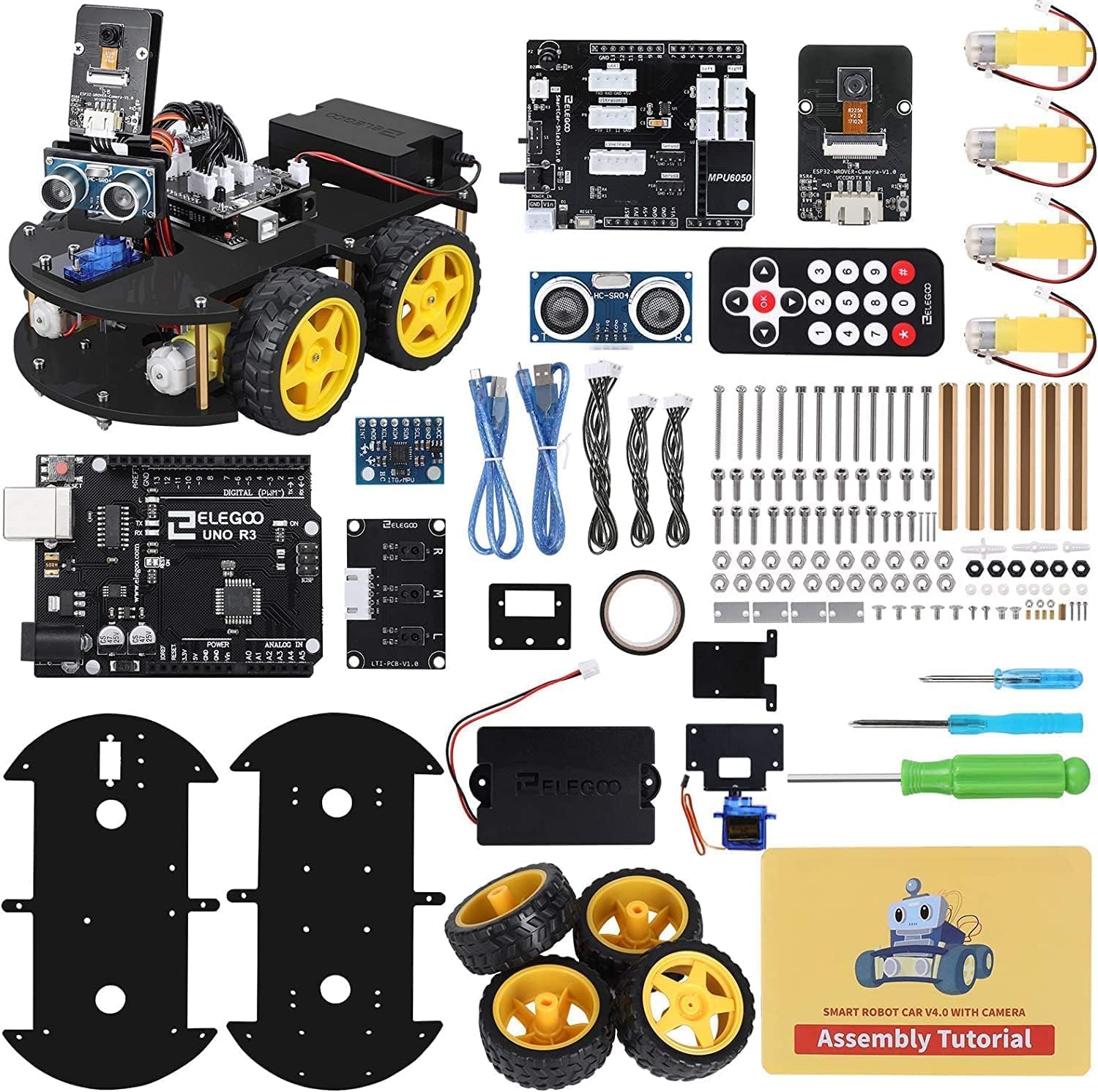
Billede: Overview of the ELEGOO Smart Robot Car Kit V4.0, showing all included components and the fully assembled robot car.
Sikkerhedsoplysninger
- This kit contains small parts and is recommended for users aged 12 and above. Adult supervision is advised for younger users.
- Ensure all connections are secure before powering on the device to prevent short circuits.
- Do not expose electronic components to water or excessive moisture.
- Handle circuit boards and sensors with care to avoid damage.
Pakkens indhold
The ELEGOO Smart Robot Car Kit V4.0 includes a comprehensive set of components for assembly and operation.
- UNO R3 Microcontroller
- Smart Car Shield V1.0
- ESP32-WROVER-B Camera Module
- Ultrasonic Sensor (HC-SR04)
- Line Tracking Module
- Infrarød fjernbetjening
- DC Motors and Wheels
- Acrylic Chassis Plates
- Batteriholder
- Servo motor
- USB kabel
- Various Screws, Nuts, and Spacers
- Tilslutningsledninger
- Skruetrækkere
- Assembly Tutorial Card

Billede: En detaljeret view of the various electronic modules, mechanical parts, and tools included in the kit.
Opsætning og montering
The assembly process for the ELEGOO Smart Robot Car V4.0 is designed to be straightforward, with all module interfaces adapted with XH2.54 ports to simplify connections and reduce errors.
- Forbered komponenter: Pak alle komponenter ud, og kontroller dem med pakkens indholdsliste.
- Assemble Chassis: Attach the DC motors to the acrylic chassis plates using the provided screws and nuts. Mount the wheels onto the motor shafts.
- Install Main Board: Secure the UNO R3 Microcontroller and the Smart Car Shield V1.0 onto the chassis.
- Tilslut sensorer: Attach the Ultrasonic Sensor and the ESP32-WROVER-B Camera Module to their designated positions on the chassis. Connect them to the Smart Car Shield using the XH2.54 cables.
- Wire Motors and Power: Connect the DC motors to the motor driver ports on the Smart Car Shield. Install batteries into the battery holder and connect it to the power input of the Smart Car Shield.
- Afsluttende kontrol: Double-check all connections to ensure they are firm and correctly oriented.
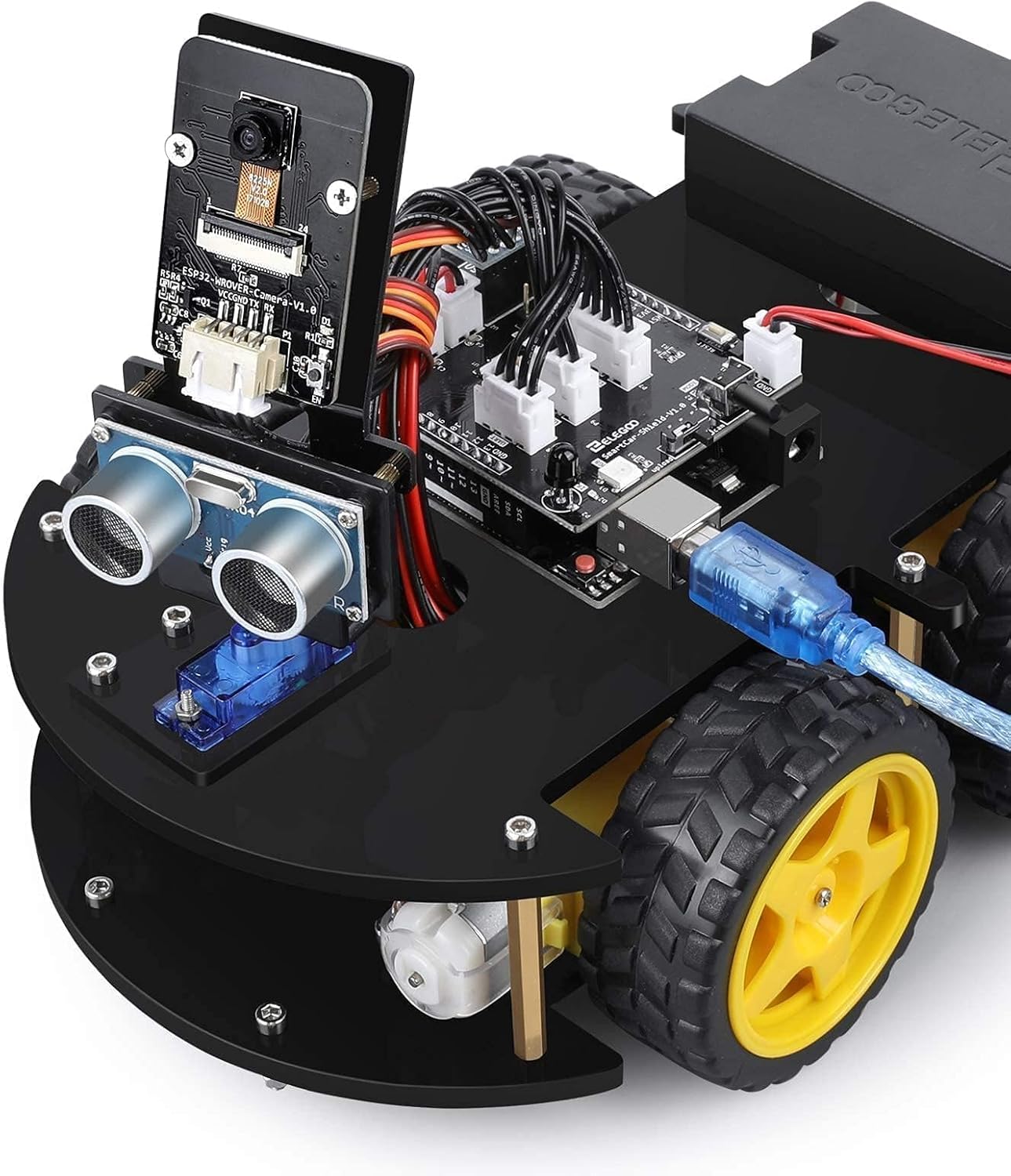
Billede: Et nærbillede view of the assembled robot car, highlighting the main control board and the USB connection for programming.
Betjeningsvejledning
The ELEGOO Smart Robot Car V4.0 supports five primary operating modes, offering diverse functionalities.
- FPV (First-Person View) Tilstand: Utilize the integrated camera module to stream live video to a connected smartphone or tablet, allowing for remote control with a driver's perspective.
- Linjesporingstilstand: The robot car follows a designated black line on a light surface using its line tracking module.
- Forhindrings-undgåelsestilstand: The ultrasonic sensor detects obstacles in the robot's path, causing it to autonomously navigate around them.
- Infrared Remote Control Mode: Control the robot car's movements using the included infrared remote control.
- App-kontroltilstand: Control the robot car via a dedicated smartphone or tablet application, offering a user-friendly interface for various commands.
For a visual demonstration of the robot car's capabilities, you may refer to the official video: ELEGOO Smart Robot Car V4.0 Demonstration Video.

Image: The robot car actively avoiding obstacles, illustrating its autonomous navigation capability.

Image: A smartphone screen showing the First-Person View (FPV) feed from the robot car's camera, demonstrating remote operation.
Programmering og tilpasning
The ELEGOO Smart Robot Car Kit V4.0 is fully compatible with Arduino IDE, allowing users to upload custom code and expand its functionalities.
- Arduino IDE: Download og installer Arduino IDE fra den officielle Arduino webwebsted.
- Installer biblioteker: Install necessary libraries for the sensors and modules included in the kit (e.g., ultrasonic sensor library, servo library).
- Uploadkode: Connect the UNO R3 Microcontroller to your computer via the USB cable. Select the correct board and port in the Arduino IDE, then upload your custom sketches.
- Eksperiment: Modify existing code examples or write new programs to explore different behaviors and interactions with the environment.
Opretholdelse
- Rensning: Gently wipe the robot car and its components with a dry, soft cloth to remove dust. Avoid using liquid cleaners.
- Batteripleje: Remove batteries if the robot car will not be used for an extended period to prevent leakage. Use only recommended battery types.
- Komponentinspektion: Periodically check all connections and physical components for any signs of wear or damage. Tighten loose screws as needed.
Fejlfinding
- Robotten bevæger sig ikke:
- Check battery level and ensure they are correctly inserted.
- Verify all motor connections to the Smart Car Shield.
- Ensure the correct code is uploaded to the UNO R3 Microcontroller.
- Sensors not responding:
- Confirm sensor cables are securely connected to the correct pins on the Smart Car Shield.
- Check if the sensor libraries are correctly installed in Arduino IDE.
- Problemer med app-forbindelse:
- Ensure the robot car is powered on and within range of your device.
- Verify that the ESP32-WROVER-B Camera Module is correctly configured for Wi-Fi communication.
- Restart both the robot car and your controlling device.
- Infrared remote not working:
- Check the remote control's battery.
- Ensure there is no obstruction between the remote and the robot's IR receiver.
Specifikationer
| Produktdimensioner | 24.99 x 19 x 8 cm (9.84 x 7.48 x 3.15 tommer) |
| Vægt | 1.25 kg (2.76 lbs) |
| Anbefalet alder | 12 år og opefter |
| Modelnummer | ES-GYE-KIT-027 |
| Uddannelsesmål | Programming skills, building skills, robotics fundamentals |
| Materiale Type | Aluminium |
| Batterier påkrævet | Yes (1 product-specific battery, Lithium-ion type recommended, not included) |
| Fjernbetjening inkluderet | Yes (Infrared remote control is part of the kit) |
Note: While some general specifications might indicate 'Remote Control Included: No', the product features explicitly list an infrared remote control as part of the complete package.
Support og garanti
For technical support, troubleshooting assistance, or warranty inquiries, please contact ELEGOO customer service through their official website or the platform where the product was purchased. ELEGOO is committed to providing efficient customer service.
Additional resources and tutorials may be available on the ELEGOO webwebsted.


