Indledning
The SubZero VOXLINK-2VH Wireless Microphone System is engineered to deliver high-quality audio performance and operational flexibility. This system is suitable for various applications, including vocal presentations and artistic performances, providing reliable wireless connectivity. Its straightforward design comprises a receiver unit and two handheld wireless microphones. The system's variable frequency capability ensures broad coverage, allowing users freedom of movement without signal drops or interference. For portability, the entire system can be conveniently transported in the included carry bag.
Produkt overview
The VOXLINK 2VH system includes a central receiver unit and two handheld microphones, designed for ease of use and robust performance.

Figur 1: The complete SubZero VOXLINK 2VH Wireless Microphone System, showing the receiver unit and two handheld microphones.
Modtagerenhed
The receiver unit is the central hub of the wireless system, processing audio signals from the microphones. It features a front panel display for channel information and controls for synchronization.

Figur 2: Front panel of the receiver, displaying channel indicators and control buttons.
The rear panel of the receiver provides audio output connections and the power input.
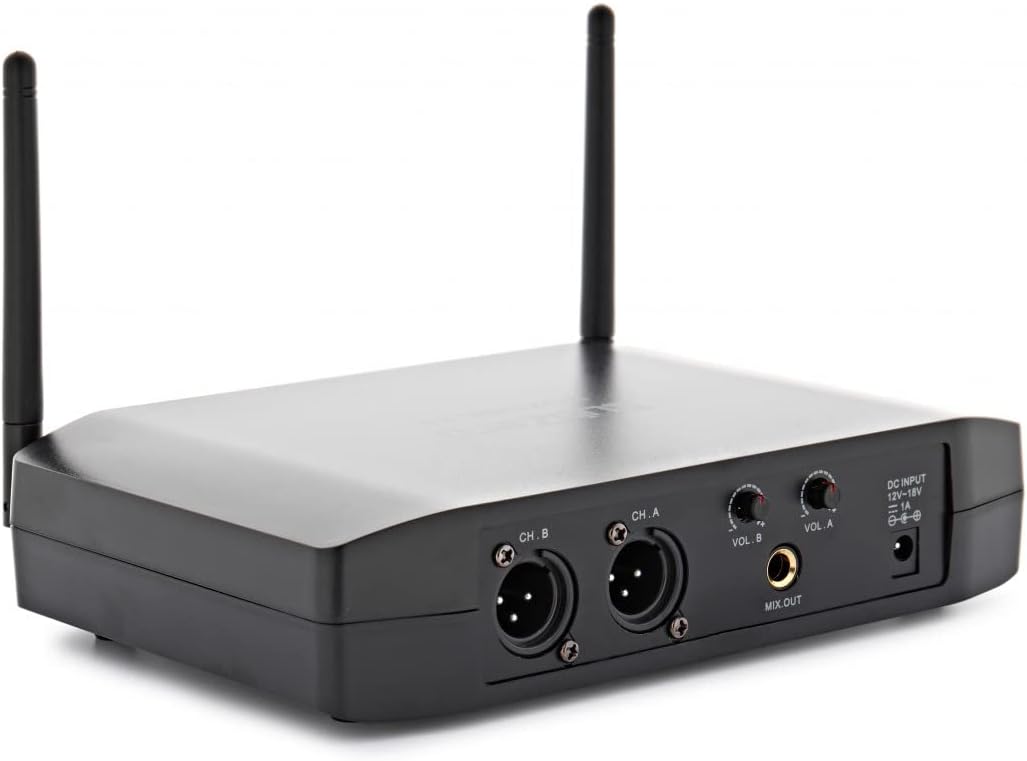
Figur 3: Rear panel of the receiver, featuring individual XLR outputs for channels A and B, a mixed XLR output, and the DC power input.
Håndholdte mikrofoner
The system includes two handheld microphones, each designed for comfortable use and clear audio capture. They are powered by batteries and feature a display for channel information.
Pakkens indhold
Upon opening the product packaging, verify that all the following items are present and in good condition:
- 1 x VOXLINK 2VH Receiver Unit
- 2 x håndholdte trådløse mikrofoner
- 1 x strømadapter til modtager
- 1 x bæretaske
- Brugervejledning (dette dokument)

Figur 4: All components of the system, including the receiver, two microphones, and power adapter, stored within the protective carry case.
Opsætning
Follow these steps to set up your SubZero VOXLINK 2VH Wireless Microphone System:
- Place the Receiver: Position the receiver unit on a stable, flat surface, away from potential sources of interference such as large metal objects or other wireless devices. Ensure the antennas are extended and oriented vertically for optimal signal reception.
- Tilslut strøm: Connect the provided power adapter to the DC IN port on the rear of the receiver and plug it into a suitable power outlet.
- Tilslut til lydsystem: Use XLR cables (not included) to connect the receiver's XLR outputs (CH. A, CH. B, or MIX OUT) to the input of your amplifier, mixer eller lydgrænseflade.
- Installer mikrofonbatterier: Unscrew the bottom part of each handheld microphone to access the battery compartment. Insert the required batteries (typically AA, check microphone markings for polarity) into each microphone. Securely reattach the bottom part.
- Tænd: Press the POWER button on the receiver's front panel to turn it on. The display will illuminate. Turn on each microphone by pressing its power button.
- Synchronize Microphones: The system uses infrared (IR) synchronization. With the receiver and microphones powered on, align the IR sensor on each microphone with the IR window on the receiver's front panel. Press the 'IR' button on the receiver for the corresponding channel (RF-A or RF-B) to initiate synchronization. The microphone display should show the same channel as the receiver once synchronized.

Figur 5: The receiver unit with both handheld microphones, illustrating a typical setup configuration.
Drift
Once set up, operating the VOXLINK 2VH system is straightforward:
- Kanalvalg: The system operates on 16 channels. To change the channel for a microphone, use the 'UP' buttons on the receiver for the respective channel (AF-A or AF-B) to cycle through available frequencies. After selecting a new channel on the receiver, re-synchronize the corresponding microphone using the IR function as described in the Setup section.
- Lydstyrkejustering: Use the 'VOL A' and 'VOL B' knobs on the rear of the receiver to adjust the individual output volume for each microphone channel. Adjust these levels in conjunction with your mixer or amplifier's input gain to achieve optimal sound without distortion.
- Mikrofonbrug: Hold the microphone approximately 2-6 inches (5-15 cm) from your mouth for best vocal pickup. Avoid covering the microphone grille with your hand, as this can affect sound quality and signal stability.
- Rækkevidde: The system offers a wide coverage area. However, maintain a clear line of sight between the microphones and the receiver whenever possible to ensure stable signal transmission. Obstacles can reduce the effective range.
Frekvenskompatibilitet
The system operates on frequencies above 863.7/864.9MHz. Users should be aware of local regulations regarding wireless microphone frequencies. The following image provides a general overview of frequency usage in Europe:

Figur 6: General frequency compatibility map for Europe. Green indicates areas where the system's frequencies are generally compatible, while grey indicates areas that may have restrictions or require specific licensing. Consult local authorities for precise regulations.
Opretholdelse
Proper maintenance ensures the longevity and optimal performance of your wireless microphone system:
- Udskiftning af batteri: Replace microphone batteries when the low battery indicator appears on the microphone display or when audio quality degrades. Always use fresh, high-quality batteries. Remove batteries if the microphones will not be used for an extended period to prevent leakage.
- Rensning: Use a soft, dry cloth to clean the exterior of the receiver and microphones. For stubborn dirt, a slightly damp cloth can be used, but ensure no moisture enters the device. Do not use abrasive cleaners or solvents.
- Opbevaring: When not in use, store the system in its original carry case in a cool, dry place, away from direct sunlight and extreme temperatures.
- Antennepleje: Handle the receiver antennas carefully. Avoid bending or forcing them, as damage can impair signal reception.
Fejlfinding
If you encounter issues with your SubZero VOXLINK 2VH system, refer to the following common problems and solutions:
| Problem | Mulig årsag | Løsning |
|---|---|---|
| Ingen lyd fra mikrofonen | Microphone off; Low/dead batteries; Microphone not synchronized; Receiver not powered; Audio cable disconnected; Mixer/amplifier input issues. | Ensure microphone is on; Replace batteries; Re-synchronize microphone with receiver; Check receiver power; Verify audio cable connections; Check mixer/amplifier indstillinger. |
| Intermittent sound or dropouts | Out of range; Interference from other devices; Obstacles blocking signal; Low microphone battery. | Move closer to receiver; Identify and eliminate interference sources; Ensure clear line of sight; Replace microphone batteries. |
| Poor sound quality (static, distortion) | Interference; Incorrect gain staging; Microphone too close/far from source; Damaged microphone/cable. | Change channel to avoid interference; Adjust receiver volume and mixer/amplifier gain; Maintain proper microphone distance; Inspect equipment for damage. |
| Microphone not synchronizing | IR sensors not aligned; Microphone not in sync mode; Receiver channel not set. | Ensure IR sensors are directly facing each other; Follow synchronization steps precisely; Verify receiver channel is selected before syncing. |
Specifikationer
Detailed technical specifications for the SubZero VOXLINK 2VH Wireless Microphone System:
| Feature | Specifikation |
|---|---|
| Modelnummer | SZ-VOXLINK-2VH /BM-630D HH |
| Antal kanaler | 16 |
| Frekvensrespons | 865 MHz (operates above 863.7/864.9MHz) |
| Forbindelsesteknologi | UHF, Infrared, XLR |
| Connector Type | XLR |
| Mikrofon formfaktor | Håndholdt |
| Polar mønster | Ensrettet |
| Strømkilde | Battery Powered (Microphones), DC Power Adapter (Receiver) |
| Inkluderede komponenter | Carry Case, Receiver, 2 Handheld Microphones, Power Adapter |
| Farve | Sort |
| Kompatible enheder | Amplivligere |
| Fabrikant | SubZero |
| Dato først tilgængelig | 6. december 2020 |
Garanti og support
For information regarding warranty coverage, technical support, or service inquiries, please refer to the documentation provided at the time of purchase or contact the manufacturer, SubZero, directly through their official webwebstedet eller kundeservicekanaler. Gem din købskvittering som købsbevis i tilfælde af garantikrav.


