1. Introduktion
The Philips Hue White A19 Smart LED Bulb (Model 472027) enhances your home with soft white lighting that can be dimmed and controlled remotely. This smart bulb allows you to automate your lighting, making it appear as if you are home even when you are not, and to set convenient timers. It integrates seamlessly into your existing Philips Hue system, offering a versatile and energy-efficient lighting solution.

Image 1.1: Philips Hue White A19 Smart LED Bulbs (Pack of 4)
This manual provides essential information for setting up, operating, and maintaining your Philips Hue White A19 Smart LED Bulbs.
Video 1.1: Introduction to Philips Hue Lighting System. This video provides an overview of the Philips Hue system, including remote control, scheduling, and personalization features.
2. Hvad er der i æsken
Your Philips Hue White A19 Smart LED Bulb package includes:
- 4 x Philips Hue White A19 60W Equivalent Dimmable LED Smart Bulbs
Note: A Philips Hue Hub (Model: 458471) is required for the full Hue experience and to enable features like voice control and remote access. The Hue Hub is sold separately.
3. Opsætning og installation
Follow these steps to install and set up your Philips Hue White A19 Smart LED Bulbs:
- Installer pærerne: Ensure the power is off at the light switch. Screw the Philips Hue White A19 Smart LED Bulbs into your desired light fixtures.
- Tænd: Turn the power back on at the light switch.
- Connect to Hue Bridge: If you do not have a Philips Hue Hub, please acquire one (Model: 458471) and set it up according to its instructions. The Hue Hub connects to your home Wi-Fi router.
- Download appen: Download the Philips Hue mobile app from your device's app store (available for iOS and Android).
- Pair Bulbs: Open the Philips Hue app. Navigate to 'Settings' and then 'Light setup'. Tap the '+' icon to add new lights. The app will search for your new bulbs. If a bulb is not found automatically, you can manually enter its serial number (found on the bulb itself) and tap 'Search'.
- Bekræft forbindelse: Once found, tap on your new light in the app. The bulb will blink to confirm the connection.
- Tildel til rum: Name your new light and assign it to a room within the app. This allows for organized control and integration into existing scenes and timers.
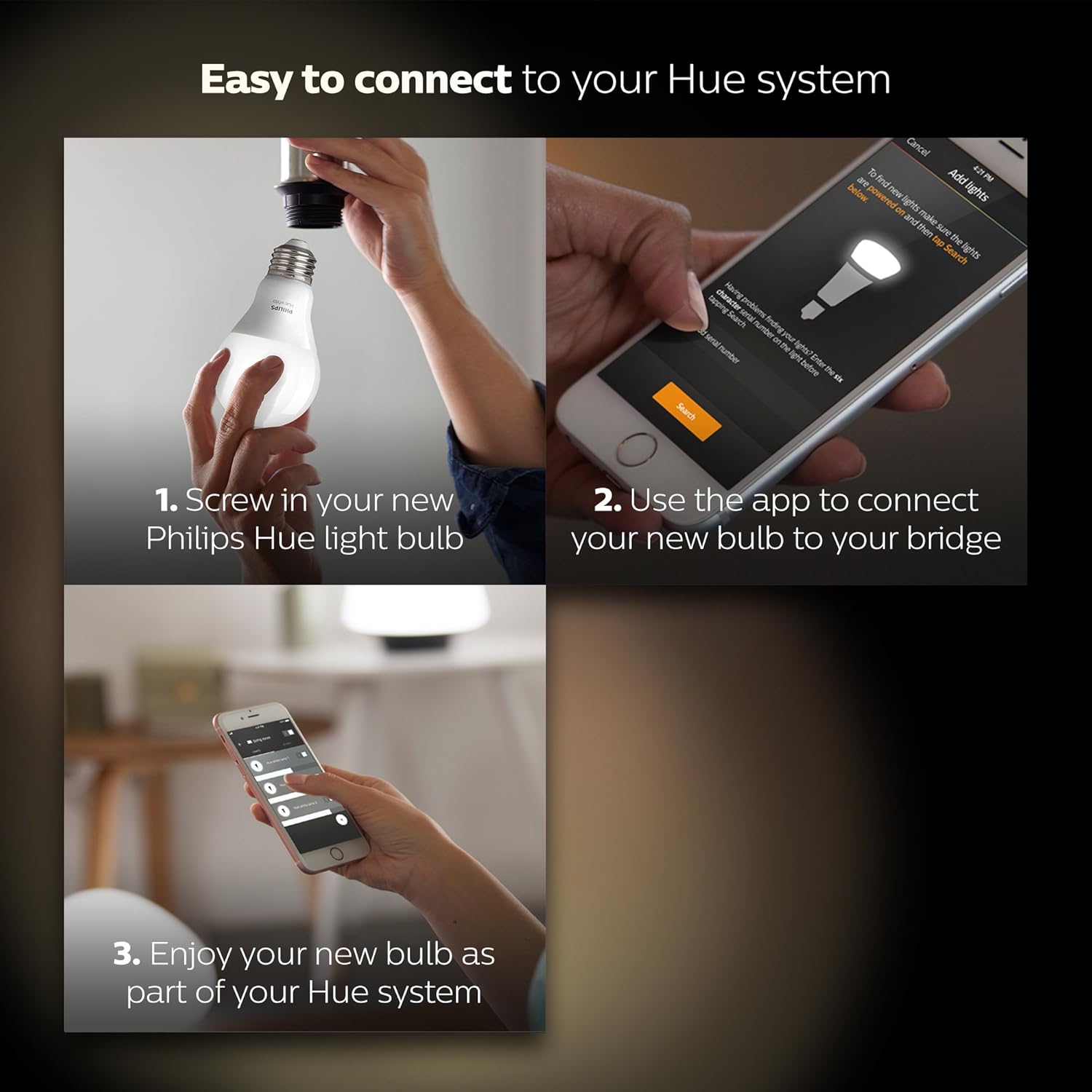
Image 3.1: Easy connection steps for Philips Hue bulbs.
Video 3.1: Installing Philips Hue Smart Bulbs. This video demonstrates the process of adding new Philips Hue bulbs to your system using the mobile application.
4. Operating Your Smart Bulbs
Once installed and paired with your Philips Hue Hub, you can control your bulbs using various methods:
4.1. Philips Hue App Control
The Philips Hue app provides comprehensive control over your lighting system:
- On/Off kontrol: Turn lights on or off from anywhere with a Wi-Fi connection.
- Dæmpning: Adjust the brightness to your desired level.
- Planlægning: Set up daily schedules to automate when your lights turn on or off, or to create routines that simulate presence when you are away.

Image 4.1: Controlling lights using the Philips Hue app on a smart device.

Image 4.2: Setting daily schedules within the Philips Hue app.
4.2. Stemmekontrol
The Philips Hue White A19 bulbs are compatible with popular voice assistants when connected to a Philips Hue Hub:
- Amazon Alexa: Use voice commands with your Alexa-enabled devices.
- Apple HomeKit: Control your lights using Siri on your Apple devices.
- Google Assistant: Manage your lighting with voice commands through Google Assistant.
4.3. Smart Home Integration
Expand your smart home capabilities by connecting your Philips Hue system to other smart home devices and platforms, such as Amazon Echo Plus, Nest, or SmartThings systems. You can also integrate with accessories like the Hue Dimmer Switch, Hue Tap, or Hue Motion Sensor (sold separately) for additional control options.

Image 4.3: Philips Hue integration with various smart home partners.
5. Vedligeholdelse
To ensure optimal performance and longevity of your Philips Hue White A19 Smart LED Bulbs:
- Rensning: Disconnect power before cleaning. Use a soft, dry cloth to gently wipe the bulbs. Avoid using liquid or abrasive cleaners.
- Bortskaffelse: These LED bulbs contain electronic components and should be recycled according to local regulations. Do not dispose of them in household waste.
- Driftsmiljø: Use the bulbs in dry indoor environments within their specified temperature range. Avoid exposure to excessive moisture or extreme temperatures.
6. Fejlfinding
If you encounter issues with your Philips Hue White A19 Smart LED Bulbs, consider the following:
- Pære reagerer ikke: Ensure the light switch is in the 'ON' position. Philips Hue bulbs require continuous power to function as smart bulbs. If the switch is turned off, the bulb loses power and cannot be controlled remotely.
- Forbindelsesproblemer: Verify that your Philips Hue Hub is properly connected to your router and powered on. Check your Wi-Fi connection. If issues persist, try restarting your Hue Hub and router.
- Flimrende: Ensure the bulbs are not connected to a traditional dimmer switch, as this can cause flickering or damage. Philips Hue bulbs are designed to be dimmed via the Hue app or compatible smart dimmers.
- Bulb Not Found During Setup: Double-check the serial number if manually entering. Ensure the bulb is powered on and within range of your Hue Hub.
- Stemmestyring virker ikke: Confirm that your voice assistant device (e.g., Alexa, Google Home) is properly linked to your Philips Hue account and that the Hue skill/service is enabled.
For further assistance, refer to the Philips Hue support webwebsted eller kontakt kundeservice.
7. Specifikationer
| Feature | Detalje |
|---|---|
| Mærke | Philips |
| Modelnavn | Hue White A19 |
| Varemodelnummer | 472027 |
| Lys type | LED |
| Pære form størrelse | A19 |
| Pære base | E26 medium |
| Wattage | 9.5 watt |
| Glødelampe Tilsvarende Wattage | 60 watt |
| Lysstyrke | 840 Lumen |
| Lys farve | Blød hvid |
| Farvetemperatur | 2700 Kelvin |
| Voltage | 120 volt |
| Kontrolmetode | Stemme |
| Speciel funktion | Dæmpbar (med Hub eller Echo Plus), Instant On, skal genbruges |
| Indendørs/Udendørs brug | Indendørs |
| Produktdimensioner | 2.25 x 2.25 x 4.25 tommer |
| Varens vægt | 7.2 ounce |
| UPC | 046677472023 |
8. Garanti og support
For detailed warranty information, product support, and frequently asked questions, please visit the official Philips Hue webwebstedet eller kontakt Philips kundeservice direkte. Gem din købsbevis til garantikrav.


