1. Introduktion
The FEELWORLD FH7 is a 7-inch on-camera field monitor designed to enhance your video shooting experience. Featuring a Full HD 1920x1200 IPS display, 4K HDMI input/output, and a suite of advanced monitoring tools, the FH7 provides precise visual feedback for professional and amateur videographers alike. This manual provides detailed instructions for setting up, operating, and maintaining your FH7 monitor.
2. Produktfunktioner
- 7-tommer Full HD IPS-skærm: 1920x1200 resolution with 323 PPI for sharp, clear images and a 160° wide viewvinkel.
- 4K HDMI Input/Output: Supports 4K HDMI signals for versatile connectivity with various cameras and simultaneous monitoring on multiple displays.
- Advanced Monitoring Functions: Includes Histogram, Peaking Focus Assist, False Color, Exposure, Check Field, Nine Grid, Zoom, DSLR Scale, Anamorphic Mode, Embedded Audio, Pixel-to-Pixel, and Image Flip.
- Fleksibel kontrol: Four assignable function buttons for quick access to frequently used features.
- Let og bærbar: Thin design (23.1mm) and light weight (approx. 310g) for easy integration with handheld gimbals and other camera setups.
- Holdbart design: Features wire drawing processing on the front and a fashion dermatoglyphic rear panel.
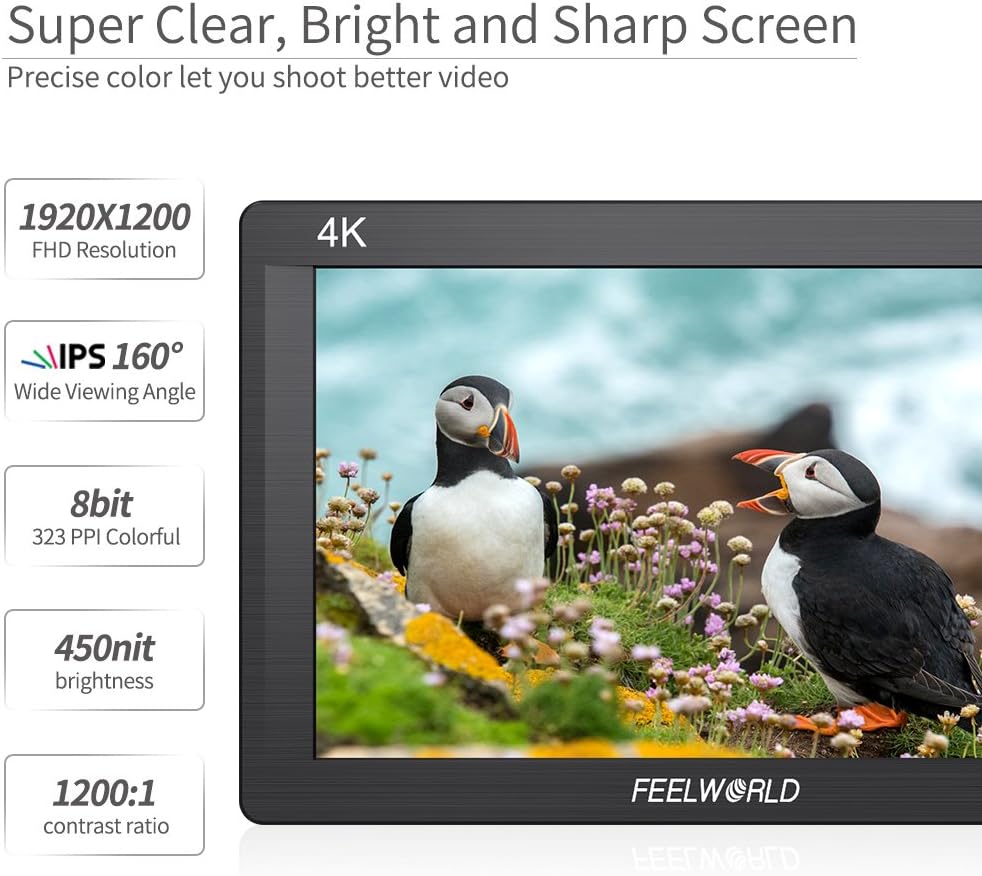
Image: The FEELWORLD FH7 monitor screen showcasing its high-resolution display and key specifications like 1920x1200 FHD resolution, 160° IPS wide viewing angle, 8-bit color depth, 323 PPI, 450 nit brightness, and 1200:1 contrast ratio.
3. Pakkens indhold
Kontroller venligst pakkens indhold ved udpakning for at sikre, at alle varer er til stede:
- 1x FEELWORLD FH7 Monitor
- 1x Mini HDMI-kabel
- 1 x solsejl
- 1x Hot Shoe Mount
- 1x F970 Battery Plate (Note: Battery not included)
- 1x betjeningsvejledning
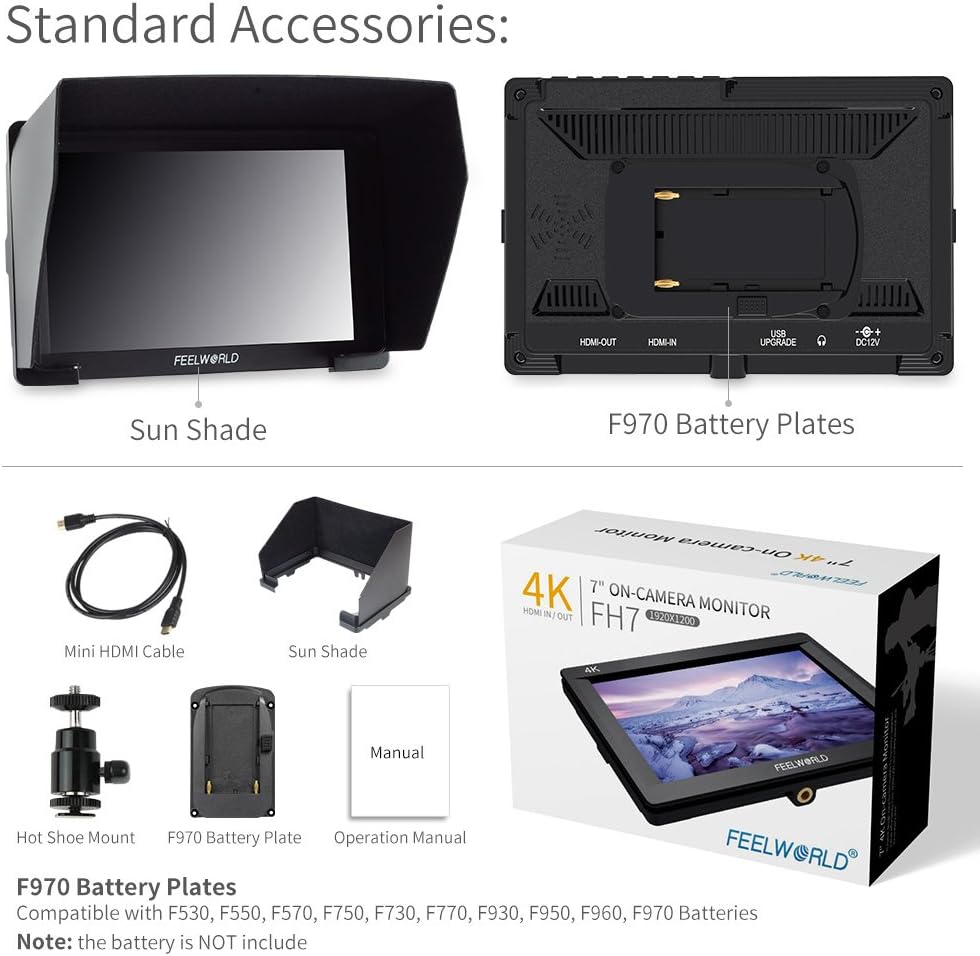
Image: Standard accessories included with the FEELWORLD FH7 monitor, showing the sun shade, F970 battery plate, mini HDMI cable, hot shoe mount, and the operation manual.
4. Opsætningsvejledning
4.1 Strømforsyning til skærmen
The FH7 monitor can be powered using an F970 series battery (not included) or via a DC 12V power adapter (not included).
- Batteri installation: Align the F970 battery with the battery plate on the rear of the monitor and slide it into place until it clicks securely.
- Jævnstrøm: Connect a compatible DC 12V power adapter to the DC 12V input port on the side of the monitor.

Billede: Bagside view of the FEELWORLD FH7 monitor, illustrating the F970 battery plate for power and the DC 12V input port.
4.2 Connecting to a Camera (HDMI)
Use the provided Mini HDMI cable to connect your camera to the FH7 monitor.
- Connect one end of the Mini HDMI cable to the HDMI output port on your camera.
- Connect the other end of the Mini HDMI cable to the HDMI-IN port on the FH7 monitor.
- If you need to loop out the HDMI signal to another display, connect an HDMI cable from the HDMI-UDGANG port on the FH7 monitor to your secondary display.
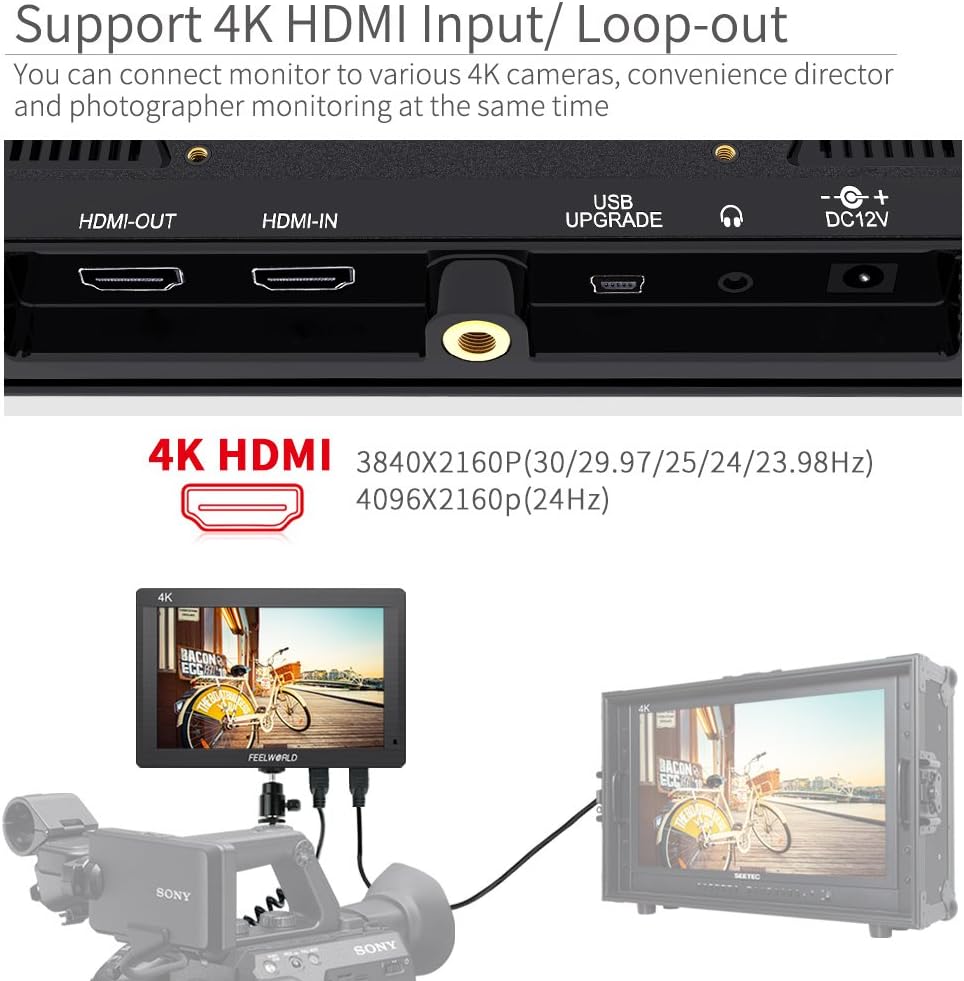
Image: The FEELWORLD FH7 monitor connected to a camera, demonstrating the use of the HDMI-IN and HDMI-OUT ports for signal input and loop-out.
4.3 Montering af skærmen
The FH7 monitor can be mounted to your camera rig using the included hot shoe mount or its 1/4"-20 thread socket.
- Hot Shoe-beslag: Attach the hot shoe mount to your camera's hot shoe or a compatible cold shoe accessory. Then, screw the monitor onto the hot shoe mount's 1/4"-20 screw.
- 1/4"-20 Thread Socket: The monitor features a 1/4"-20 thread socket on its bottom for direct mounting to tripods, arms, or gimbals.

Image: The FEELWORLD FH7 monitor integrated into a camera setup, illustrating its lightweight design suitable for various mounting options like gimbals and stabilizers.
5. Betjeningsvejledning
5.1 Grundlæggende betjening
- Tænd/sluk: Press and hold the power button (usually located on the side or top) to turn the monitor on or off.
- Menu navigation: Use the menu button and navigation buttons (up/down/left/right or a scroll wheel) to access and navigate the on-screen display (OSD) menu.
- Funktionsknapper (F1-F4): The FH7 features four customizable function buttons. These can be assigned to frequently used features like Peaking, False Color, Histogram, etc., for quick access. Refer to the OSD menu for assigning functions.
5.2 Advanced Monitoring Functions
The FH7 monitor includes several tools to assist with accurate exposure and focus:
- Peaking Focus Assist: Highlights sharp edges in red, green, or blue to indicate areas that are in focus. Adjust sensitivity in the menu.
- Falsk farve: Displays different exposure levels as distinct colors, helping to identify overexposed or underexposed areas.
- Histogram: A graphical representation of the tonal distribution of your image, showing the brightness levels of pixels.
- Exposure (Zebras): Overlays zebra stripes on areas exceeding a set exposure threshold, indicating overexposure.
- Afkrydsningsfelt: Displays the image in monochrome (red, green, blue, or mono) to help calibrate color.
- Nine Grid: Divides the screen into nine equal sections, useful for composition using the rule of thirds.
- Zoom: Magnifies a portion of the image for critical focus checking.
- Indlejret lyd: Displays audio level meters for monitoring sound input.
- Pixel-to-Pixel: Displays the image at its native resolution without scaling, useful for checking fine details.
- Billedflip: Flips the image horizontally or vertically, useful for various mounting orientations.

Image: The FEELWORLD FH7 monitor demonstrating its advanced features, including Peaking Focus Assist, False Color, Histogram, and other tools designed to aid in accurate exposure and focus during video recording.
6. Vedligeholdelse
- Rensning: Use a soft, dry cloth to clean the monitor's body. For the screen, use a specialized screen cleaning solution and a microfiber cloth. Avoid harsh chemicals or abrasive materials.
- Opbevaring: When not in use, store the monitor in a cool, dry place, away from direct sunlight and extreme temperatures. Use the included sunshade or a protective case to prevent screen damage.
- Batteripleje: If using batteries, remove them if the monitor will not be used for an extended period. Follow battery manufacturer guidelines for charging and storage.
- Firmwareopdateringer: Check the FEELWORLD official website periodically for any available firmware updates for your FH7 monitor. Updates can be installed via the USB UPGRADE port.
7. Fejlfinding
- Ingen strøm:
- Ensure the battery is correctly installed and charged, or the DC power adapter is securely connected and providing power.
- Kontroller, at tænd/sluk-knappen er korrekt aktiveret.
- Intet videosignal:
- Verify that the HDMI cable is securely connected to both the camera's HDMI output and the monitor's HDMI-IN port.
- Confirm that your camera's HDMI output is enabled and configured correctly.
- Prøv et andet HDMI-kabel for at udelukke kabelproblemer.
- Ensure the monitor's input source is set to HDMI.
- Image is Distorted or Incorrect Colors:
- Check your camera's video output settings (resolution, frame rate).
- Nulstil skærmens skærmindstillinger til fabriksindstillingerne via OSD-menuen.
- Disable any active monitoring functions (e.g., False Color, Check Field) to see if they are causing the perceived distortion.
- Audio Meter Not Working:
- Ensure your camera is outputting audio via HDMI.
- Check the monitor's audio settings in the OSD menu.
- Note that some cameras may not output audio through HDMI during live view or in certain recording modes.
- Knapper reagerer ikke:
- Power cycle the monitor (turn off and on again).
- Sørg for, at der ikke er snavs, der blokerer knapperne.
8. Specifikationer
| Feature | Specifikation |
|---|---|
| Modelnummer | FH7 |
| Skærmstørrelse | 7 tommer |
| Opløsning | 1920x1200 pixels |
| Pixel Density (PPI) | 323 |
| Paneltype | IPS LCD |
| Viewi vinkel | 160° (H/V) |
| Lysstyrke | 450 nit |
| Kontrastforhold | 1200:1 |
| HDMI indgang/udgang | 4K HDMI (3840x2160P, 4096x2160P) |
| Strømindgang | DC 12V, F970 Battery Plate |
| Produktdimensioner | 7.1 x 0.9 x 4.1 tommer (180 x 23.1 x 104 mm) |
| Varens vægt | Ca. 310 g (1.95 pund) |
9. Supportoplysninger
For technical support, warranty information, or service inquiries, please visit the official FEELWORLD webwebstedet eller kontakt deres kundeserviceafdeling. Gem din købskvittering som købsbevis i tilfælde af garantikrav.
Fabrikant: FEELWORLD


