
1. Introduktion
This manual provides detailed instructions for the installation, operation, and maintenance of your Blackweb BWA17AV015 HDMI 4K 4-Way Splitter. This device is designed to distribute a single HDMI input signal to up to four high-definition display devices simultaneously. It supports various source devices such as DVD players, Blu-ray players, satellite receivers, set-top boxes, DV cameras, A/V receivers, and other HDMI-enabled video products.
2. Pakkens indhold
Kontroller venligst pakkens indhold omhyggeligt. Hvis der mangler eller er beskadigede dele, skal du kontakte din forhandler.
- Sortweb BWA17AV015 HDMI 4K 4-Way Splitter Unit
- 5V DC strømadapter
- Brugermanual
3. Produktet er slutview
Den sorteweb BWA17AV015 HDMI 4K 4-Way Splitter features one HDMI input and four HDMI outputs, allowing for simultaneous display on multiple screens. It is housed in a compact black casing.
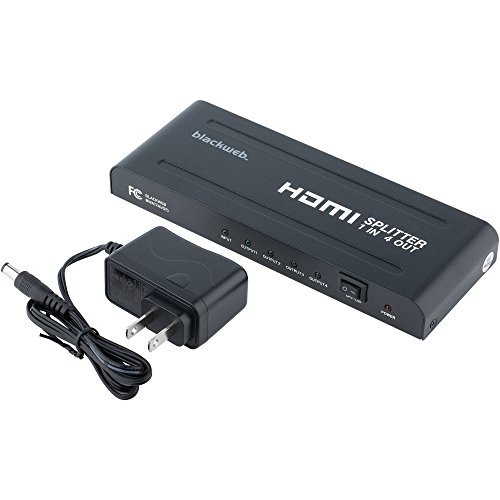
Figur 1: For og bag View af den sorteweb BWA17AV015 HDMI 4K 4-Way Splitter. The image shows the compact black unit with various ports. The front typically includes status indicators, while the rear features the HDMI input, four HDMI outputs, and the power input.
3.1 Frontpanel
- Power LED: Lyser, når enheden er tændt.
- Input LED: Illuminates when an HDMI input signal is detected.
- Output LEDs (1-4): Illuminates when an HDMI output device is connected and receiving a signal.
3.2 Bagpanel
- HDMI IN: Connect your HDMI source device (e.g., Blu-ray player, game console).
- HDMI OUT (1-4): Connect up to four HDMI display devices (e.g., TVs, monitors).
- DC 5V: Tilslut den medfølgende 5V DC-strømadapter.
4. Opsætningsvejledning
Follow these steps to set up your HDMI splitter:
- Sluk for enheder: Ensure all HDMI source devices and display devices are powered off before making connections.
- Tilslut HDMI-kilde: Connect one end of an HDMI cable (not included) to the HDMI output of your source device (e.g., DVD player, set-top box) and the other end to the HDMI-IN porten på splitteren.
- Tilslut HDMI-skærme: Connect one end of an HDMI cable (not included) to an HDMI OUT port on the splitter and the other end to the HDMI input of your display device (e.g., TV, monitor). Repeat this step for up to four display devices.
- Tilslut strøm: Connect the provided 5V DC power adapter to the DC 5V port on the splitter, then plug the adapter into a standard electrical outlet. The Power LED on the splitter should illuminate.
- Tænd enheder: Tænd først dine HDMI-skærme, og tænd derefter din HDMI-kildeenhed.
- Bekræft signal: Check that the video and audio signals are displayed correctly on all connected screens. The Input LED and corresponding Output LEDs should be illuminated.
Note: Use high-quality HDMI cables for optimal performance, especially for 4K resolutions and longer cable runs.
5. Betjeningsvejledning
Once properly set up, the Blackweb BWA17AV015 HDMI 4K 4-Way Splitter operates automatically.
- Automatic Signal Distribution: The splitter will automatically detect the HDMI input signal and distribute it to all connected and powered-on HDMI output devices.
- Opløsningssupport: The splitter supports various HDMI resolutions, including 4K (3840x2160) and 1080p. The output resolution will be determined by the lowest common resolution supported by all connected display devices.
- Lydstøtte: The splitter passes through various audio formats supported by HDMI.
No additional user interaction is typically required after initial setup.
6. Fejlfinding
Hvis du støder på problemer, kan du se følgende fejlfindingsvejledning:
| Problem | Mulig årsag/løsning |
|---|---|
| No picture or sound on display(s). |
|
| Picture quality is poor or flickering. |
|
| Only some displays show a picture. |
|
7. Specifikationer
The following are the technical specifications for the Blackweb BWA17AV015 HDMI 4K 4-Way Splitter:
- Model: BWA17AV015
- Produktdimensioner: 7.6 x 3.3 x 0.7 tommer
- Varens vægt: 12.8 ounce
- Farve: Sort
- Connector Type: HDMI
- Kabeltype: HDMI
- Input: 1 x HDMI
- Produktion: 4 x HDMI
- Understøttede opløsninger: Op til 4K (3840x2160)
- Strømforsyning: DC 5V (adapter included)
- Kompatible enheder: Blu-Ray Player, Camera, DVD Player, Satellite Receiver, Set-Top Box, A/V Receiver, etc.
8. Vedligeholdelse
For at sikre din HDMI-splitters lange levetid og optimale ydeevne, skal du følge disse vedligeholdelsesretningslinjer:
- Rensning: Brug en blød, tør klud til at rengøre enhedens yderside. Brug ikke flydende rengøringsmidler eller aerosoler.
- Miljø: Opbevar enheden et køligt, tørt sted, væk fra direkte sollys, varmekilder og fugt.
- Ventilation: Sørg for tilstrækkelig ventilation omkring enheden for at forhindre overophedning. Bloker ikke ventilationsåbninger.
- Håndtering: Undgå at tabe enheden eller udsætte den for kraftige stød.
9. Sikkerhedsoplysninger
Please read and follow these safety precautions to prevent damage to the unit and ensure your safety:
- Do not expose this unit to water or excessive moisture.
- Do not attempt to open or modify the unit. There are no user-serviceable parts inside.
- Use only the provided power adapter. Using an incorrect power adapter may damage the unit and void the warranty.
- Keep the unit away from sources of heat, such as radiators, heat registers, stoves, or other heat-producing appliances.
- Tag stikket ud af enheden under tordenvejr, eller når den ikke skal bruges i længere perioder.
10. Garanti og support
For warranty information or technical support, please refer to the documentation included with your purchase or contact Blackweb customer service. Keep your proof of purchase for warranty claims.
Note: Specific warranty terms and conditions may vary by region and retailer.