Indledning
Thank you for choosing the Dörr 204473 8 MP Snapshot IR TFT Trail Camera. This camera is designed for versatile surveillance, offering high-quality images and videos both day and night. Its robust, weatherproof design makes it ideal for outdoor use, capturing wildlife or monitoring property with its motion detection capabilities. Please read this manual carefully before operating the camera to ensure proper use and to maximize its performance.
Sikkerhedsoplysninger
- Udsæt ikke kameraet for ekstreme temperaturer eller direkte sollys i længere perioder.
- Ensure the battery compartment is securely closed to maintain water resistance.
- Use only recommended battery types (AA batteries). Do not mix old and new batteries, or different types of batteries.
- Hold kameraet væk fra stærke magnetfelter.
- Forsøg ikke at skille kameraet ad eller ændre det. Dette vil ugyldiggøre garantien.
- Bortskaf batterier og elektroniske komponenter ansvarligt i henhold til lokale regler.
Produkt overview
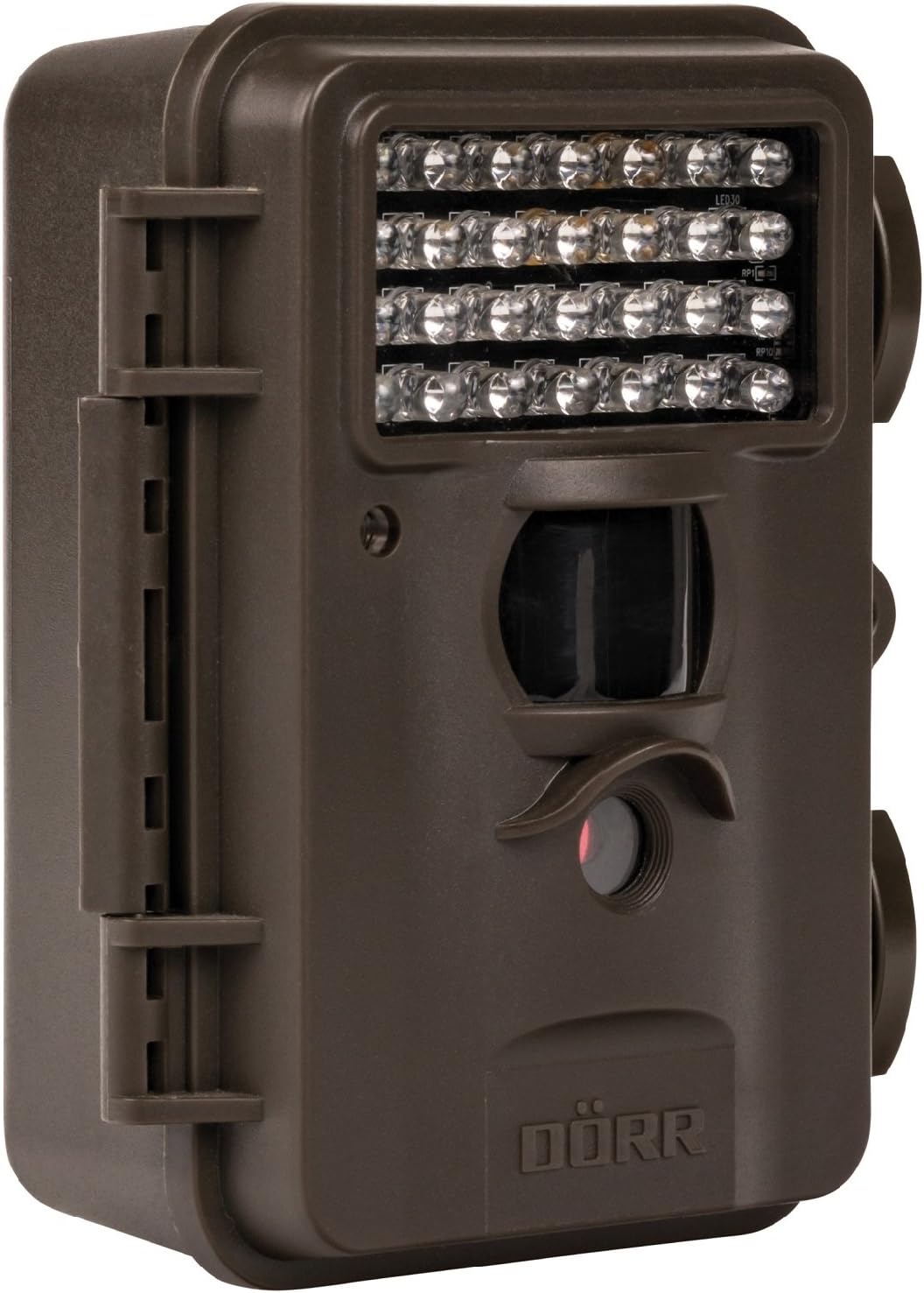
This image displays the front of the Dörr 204473 Trail Camera. Visible features include the array of 28 infrared LEDs at the top, the passive infrared (PIR) motion sensor below the LEDs, and the camera lens at the bottom. The camera has a rugged, dark brown, weatherproof casing with a latch on the left side.
The Dörr 204473 camera features a compact and durable design. Key components include:
- Infrarøde lysdioder: 28 nearly invisible LEDs for night illumination up to 15 meters.
- PIR Motion Sensor: Detects movement to trigger photo or video capture.
- Kameraobjektiv: Captures 8MP still images and video.
- TFT skærm: For menu navigation and viewing captured media (located inside the camera).
- Control Keypad: For setting up and operating the camera.
- Weatherproof Housing: Protects the camera from environmental elements.
Opsætning
1. Batteriinstallation
- Open the camera housing latch on the side.
- Find batterirummet.
- Insert 4 or 8 AA batteries, ensuring correct polarity (+/-).
- Luk batterirummets dæksel forsvarligt.
2. Installation af SD-kort
- With the camera housing open, locate the SD/SDHC card slot.
- Insert an SD/SDHC memory card (up to 32 GB) into the slot until it clicks into place. Ensure the card is inserted in the correct orientation.
- For at fjerne det skal du forsigtigt skubbe kortet ind, indtil det springer ud.
3. Montering af kameraet
The camera can be mounted using a strap or a wall mount. Ensure the camera is positioned to capture the desired area without obstructions. The mounting type is wall mount.
- Montering af rem: Thread the provided strap through the slots on the back of the camera and secure it around a tree or pole.
- Vægmontering: Use appropriate screws and anchors (not included) to secure the camera to a wall or flat surface.
Betjeningsvejledning
1. Tænd/sluk
- To power on, slide the power switch to the 'ON' position.
- To power off, slide the power switch to the 'OFF' position.
2. Menu navigation
Once powered on, the TFT display will activate. Use the keypad buttons (UP, DOWN, LEFT, RIGHT, OK, MENU) to navigate through the settings menu. The menu is available in English and German.
3. Indstilling af dato og klokkeslæt
- Enter the menu and navigate to 'Date/Time' settings.
- Use the navigation buttons to set the current date and time.
- Confirm with 'OK'. Each captured image will display the time, date, and temperature in °C.
4. Photo/Video Modes and Settings
The camera supports both still image and video capture. Adjust settings such as resolution, trigger interval, and burst mode via the menu.
- Opløsning: Set to 8MP for still images.
- Trigger Tid: The camera has a fast trigger time of 1.3 seconds.
- Bevægelsesdetektion: Configure the sensitivity of the PIR sensor.
- Nattesyn: The 28 IR LEDs automatically activate in low light conditions for night vision up to 15 meters.
5. Viewing Files
Det kan du view captured photos and videos directly on the camera's TFT display or by connecting the camera to a computer via USB (cable not included) or by inserting the SD card into a card reader.
Opretholdelse
- Rensning: Brug en blød, tør klud til at rengøre kameralinsen og huset. Brug ikke slibende rengøringsmidler eller opløsningsmidler.
- Batteripleje: Fjern batterierne, hvis kameraet ikke skal bruges i længere tid, for at forhindre lækage.
- Opbevaring: Opbevar kameraet et køligt, tørt sted væk fra direkte sollys, når det ikke er i brug.
Fejlfinding
| Problem | Mulig årsag | Løsning |
|---|---|---|
| Kameraet tænder ikke | Lave eller døde batterier; forkert batteripolaritet. | Udskift batterierne; sørg for korrekt polaritet. |
| Ingen billeder/videoer optaget | SD card full or not inserted correctly; motion sensor blocked or sensitivity too low. | Insert/replace SD card; format SD card; clear sensor path; increase sensor sensitivity. |
| Poor image quality at night | Subject too far from camera; IR LEDs obstructed. | Ensure subject is within 15m range; clear any obstructions from IR LEDs. |
| Camera not detecting motion | PIR sensor sensitivity too low; camera positioned incorrectly. | Increase PIR sensitivity; reposition camera for optimal detection angle. |
Specifikationer
| Feature | Detalje |
|---|---|
| Mærke | DÖRR |
| Modelnummer | 204473 |
| Effektiv stillopløsning | 8 MP |
| Effektiv videoopløsning | 8 MP |
| Night Vision Range | 15 meter |
| Antal IR LED'er | 28 |
| Trigger Time | 1.3 sekunder |
| Opbevaring | SD/SDHC Memory Card (up to 32 GB) |
| Strømkilde | 4x or 8x AA Batteries |
| Farve | Sort |
| Materiale | Metal |
| Varedimensioner (L x B x H) | 10 x 7 x 12.2 cm |
| Vandmodstandsniveau | Vandtæt |
| Monteringstype | Vægmontering |
| Anbefalede applikationer | Motion Detection, Night Vision |
Garanti og support
For warranty information and technical support, please refer to the documentation provided with your purchase or visit the official Dörr webwebsted. Gem din købsbevis i tilfælde af garantikrav.


