1. Introduktion
This manual provides comprehensive instructions for the safe and efficient use of your Aligator A321 mobile phone. Designed with seniors in mind, the A321 features large buttons, a clear display, and an essential SOS function for emergencies. Please read this manual thoroughly before operating your device.
2. Pakkens indhold
Markér venligst feltet for følgende elementer:
- Aligator A321 Mobile Phone
- Batteri
- Opladningsadapter
- USB opladningskabel
- Brugervejledning (dette dokument)
Hvis der mangler eller er beskadigede varer, bedes du kontakte din forhandler.
3. Telefon overview
Familiarize yourself with the key components of your Aligator A321 phone.

Image 1: Aligator A321 Front View. This image displays the front of the Aligator A321 mobile phone, showing the screen, large numeric keypad, call and end call buttons, and navigation keys. The brand "ALIGATOR" is visible below the screen.
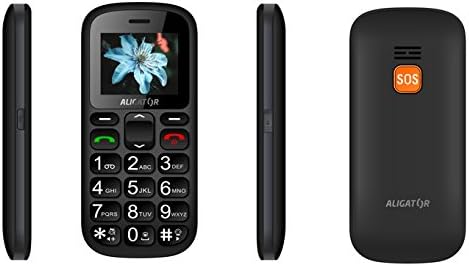
Image 2: Aligator A321 Side and Back View. This image shows multiple views of the Aligator A321. From left to right: left side profile, foran view, right side profile, and the back of the phone. The back view prominently features the orange SOS button and the "ALIGATOR" logo.
Nøglekomponenter:
- Skærm: 1.8-inch color screen for viewmenuer, kontakter og beskeder.
- Numerisk tastatur: Large, easy-to-press buttons for dialing numbers and typing messages.
- Opkalds-/afslut-knapper: Green button to initiate calls, red button to end calls or return to the home screen.
- Navigationstaster: Op, Ned, Venstre, Højre og OK/Bekræft-knap til menunavigation.
- SOS knap: Located on the back of the phone, used for emergency calls and SMS (see Section 5.4).
- Lommelygte: Integrated light for convenience.
- Opladningsport: Placeret i bunden til tilslutning af opladningskablet.
4. Opsætning
4.1. Isætning af SIM-kort og batteri
- Fjern forsigtigt telefonens bagcover.
- If the battery is already inserted, remove it by gently lifting it from the notch.
- Locate the SIM card slot(s). The Aligator A321 supports Dual SIM. Insert your SIM card(s) into the designated slot(s) with the gold contacts facing down, ensuring it clicks into place.
- Insert the battery, aligning the gold contacts on the battery with those in the phone.
- Replace the back cover, pressing firmly until it snaps securely.
4.2. Indsættelse af et MicroSD-kort (valgfrit)
The phone supports MicroSD cards for additional storage (e.g., for photos or music).
- Fjern bagdækslet og batteriet som beskrevet ovenfor.
- Find MicroSD-kortstikket.
- Insert the MicroSD card with the gold contacts facing down until it is securely in place.
- Udskift batteriet og bagdækslet.
4.3. Opladning af batteriet
Oplad telefonens batteri helt før første brug.
- Connect the USB charging cable to the charging adapter.
- Sæt opladningsadapteren i en almindelig stikkontakt.
- Connect the other end of the USB cable to the charging port at the bottom of your phone.
- Batteriindikatoren på skærmen viser opladningsstatus. Frakobl opladeren, når batteriet er fuldt.
4.4. Tænd/sluk
- For at tænde: Tryk og hold på Opkaldsknap (green button) until the screen lights up.
- For at slukke: Tryk og hold på Afslut opkald-knap (red button) until the power-off options appear, then confirm.
5. Betjeningsvejledning
5.1. Foretage og modtage opkald
- Sådan foretager du et opkald: Indtast telefonnummeret ved hjælp af det numeriske tastatur, og tryk på Opkaldsknap.
- For at besvare et opkald: Når telefonen ringer, tryk på Opkaldsknap.
- Sådan afslutter du et opkald: Tryk på Afslut opkald-knap.
5.2. Afsendelse og modtagelse af SMS-beskeder
- Sådan sender du en SMS: Navigate to the "Messages" menu, select "New Message," enter the recipient's number and your message, then send.
- Sådan læser du en SMS: New messages will typically display a notification. Navigate to the "Messages" menu to view din indbakke.
5.3. Managing Contacts (Phonebook)
The phonebook can store up to 500 entries.
- Sådan tilføjer du en kontakt: Go to "Contacts" or "Phonebook," select "Add New," enter the name and phone number, then save.
- Sådan ringer du til en kontakt: Go to "Contacts," select the desired contact, and press the Opkaldsknap.
5.4. SOS-nødfunktion
The SOS button is a critical safety feature. It allows you to quickly contact pre-set emergency numbers and send an SOS message with your location.
- Opsætning af SOS-numre: Access the "SOS Settings" menu. You can typically add up to 5 emergency contact numbers. These numbers will be called sequentially until one answers.
- Aktivering af SOS: I en nødsituation skal du trykke på og holde SOS knap på bagsiden af telefonen i et par sekunder.
- SOS Action: The phone will automatically:
- Send an emergency SMS message to all pre-set SOS numbers.
- Initiate calls to the pre-set SOS numbers in a loop until one is answered.
- Activate the SOS Locator function (see Section 5.5).
5.5. SOS Locator
The SOS Locator feature sends your phone's approximate location via SMS to your emergency contacts when the SOS button is activated. This allows the recipient to view your location on a map (if their device supports it).
- This function is automatically triggered when the SOS button is pressed.
- Ensure your phone has network coverage for the SMS to be sent successfully.
5.6. Andre funktioner
- Lommelygte: Often activated by a dedicated side button or through the menu.
- FM-radio: Requires headphones (not included) to be plugged in as an antenna. Access via the "Multimedia" or "Tools" menu.
- Vækkeur: Set multiple alarms through the "Tools" or "Settings" menu.
- Lommeregner: Basic arithmetic functions available in the "Tools" menu.
6. Vedligeholdelse og pleje
- Rensning: Brug en blød, tør klud til at rengøre telefonens overflade. Undgå flydende rengøringsmidler.
- Batteripleje:
- Udsæt ikke batteriet for ekstreme temperaturer.
- Undgå at aflade batteriet helt ofte.
- If the phone will not be used for an extended period, charge it partially before storing.
- Vandtæthed: This phone is not waterproof. Keep it away from water and moisture.
- Indvirkning: Undgå at tabe telefonen eller udsætte den for hårde stød.
7. Fejlfinding
| Problem | Mulig årsag | Løsning |
|---|---|---|
| Telefonen tænder ikke. | Batteriet er afladet eller ikke isat korrekt. | Oplad batteriet. Sørg for, at batteriet er korrekt isat. |
| Kan ikke foretage eller modtage opkald. | Intet netværkssignal, SIM-kort ikke isat, eller problem med SIM-kort. | Kontroller netværkssignalets styrke. Sæt SIM-kortet i igen. Kontakt din tjenesteudbyder. |
| SOS-funktionen virker ikke. | SOS numbers not set, no network, or button not pressed long enough. | Ensure SOS numbers are configured. Check network coverage. Press and hold the SOS button for several seconds. |
| Batteriet aflades hurtigt. | Heavy usage, old battery, or background processes. | Reduce usage. Consider replacing the battery if it's old. Close unused applications. |
8. Specifikationer
| Feature | Detalje |
|---|---|
| Mærke | ALIGATOR |
| Modelnavn | A321 |
| Farve | Sort |
| Produkttype | Mobile Phone (Feature Phone) |
| Operativsystem | KaiOS |
| Skærmstørrelse | 1.8 tommer |
| Cellulær teknologi | 2G (GSM) |
| Forbindelsesteknologi | 2G (GSM) |
| Number of SIM Slots | Dobbelt SIM |
| Telefonbogskapacitet | 500 poster |
| Taletid | Op til 4 timer |
| Standby tid | Op til 240 timer |
| Særlige funktioner | SOS Button, SOS Locator, Large Keys, Flashlight, FM Radio, Alarm Clock, Calculator, Micro SD Card Support |
| Kompatible enheder | A321 |
9. Garanti og support
Your Aligator A321 mobile phone comes with a standard manufacturer's warranty. Please refer to the warranty card included in your package for specific terms and conditions, including the warranty period and coverage details.
Kundesupport:
For technical assistance, troubleshooting beyond this manual, or warranty claims, please contact your retailer or the official ALIGATOR customer support. Contact information can usually be found on the manufacturer's webwebstedet eller på emballagen.
When contacting support, please have your product model (A321) and purchase details ready.


