Indledning
Thank you for choosing the NILLKIN X-on X1 Portable Bluetooth Speaker. This device combines a portable Bluetooth speaker with a 5200 mAh power bank, designed for versatility and durability. It features Bluetooth 4.0 connectivity, dual 45mm speakers, an integrated microphone for hands-free calls, and IPX4 water resistance. Please read this manual carefully to ensure proper use and optimal performance.
Produktegenskaber
- 2-i-1 funktionalitet: Portable Bluetooth speaker and 5200 mAh power bank.
- Bluetooth 4.0-forbindelse: Compatible with Bluetooth-enabled devices such as smartphones, tablets, and computers, offering stable, high-speed, long-range transmission.
- Lyd af høj kvalitet: Equipped with two 45mm speakers and a separate acoustic chamber for clear sound.
- Håndfri opkald: Integrated microphone allows for answering calls directly through the speaker; music pauses during calls for high-definition communication.
- Intuitive kontroller: Four buttons for volume adjustment, call management, play/pause, and track navigation.
- IPX4 vandtæthed: Resists water splashes and adverse weather conditions, suitable for outdoor use.
- Power Bank funktion: 5200 mAh battery can charge smartphones or tablets (output: 5.25V/1A max).
- Bærbart design: Includes a hook for attaching to a lanyard or carabiner (carabiner provided).
- Holdbar konstruktion: Anti-scratch design, resistant to harsh outdoor environments.
- AUX lydindgang: Universal 3.5mm audio connector for multimedia AUX audio input; AUX mode is automatically detected when connected.
Pakkens indhold
Tjek venligst pakken for følgende varer:
- NILLKIN X-on X1 Portable Bluetooth Speaker
- USB opladningskabel
- AUX lydkabel
- Karabinhage
- Brugervejledning (dette dokument)
Introduktion: Opsætning
1. Opladning af højttaleren
Before first use, fully charge the NILLKIN X-on X1 speaker.
- Tilslut det medfølgende USB-opladerkabel til højttalerens opladningsport.
- Tilslut den anden ende af USB-kablet til en USB-strømadapter (medfølger ikke) eller en computers USB-port.
- Opladningsindikatorlampen lyser. Når den er fuldt opladet, kan lampen skifte farve eller slukke, afhængigt af modellen.
Note: En fuld opladning tager typisk flere timer.
2. Tænd/sluk
- For at tænde: Press and hold the Power button for a few seconds until you hear an audible prompt or see the indicator light illuminate.
- For at slukke: Tryk på tænd/sluk-knappen igen, og hold den nede i et par sekunder, indtil du hører en lydmeddelelse, eller indikatorlampen slukker.
Betjeningsvejledning
1. Bluetooth-parring
Pair your NILLKIN X-on X1 speaker with a Bluetooth-enabled device.
- Ensure the speaker is powered on and in Bluetooth pairing mode (indicated by a flashing LED light, usually blue). If not, press the Bluetooth button (if available) or power cycle the device.
- Gå til Bluetooth-indstillingerne på din enhed (smartphone, tablet osv.), og aktiver Bluetooth.
- Søg efter available devices. The speaker should appear as "NILLKIN X-on X1" or similar.
- Select the speaker from the list to connect. Once connected, you will hear a confirmation sound, and the LED indicator will typically turn solid blue.
- Højttaleren vil automatisk forsøge at genoprette forbindelsen til den sidst parrede enhed, når den tændes.

Image: The NILLKIN X-on X1 speaker shown next to a smartphone displaying its Bluetooth settings, indicating a successful pairing process.
2. Musikafspilningskontroller
Use the buttons on the speaker to control music playback.
- Afspil/pause: Tryk én gang på knappen Afspil/Pause for at afspille eller sætte musik på pause.
- Lydstyrke op: Tryk på '+'-knappen for at øge lydstyrken.
- Skrue ned for lyden: Tryk på '-' knappen for at sænke lydstyrken.
- Næste nummer: Press and hold the '+' button (or a dedicated next track button) to skip to the next song.
- Forrige nummer: Press and hold the '-' button (or a dedicated previous track button) to go to the previous song.
3. Håndfri opkald
When connected via Bluetooth, the speaker can be used for phone calls.
- Besvar opkald: When a call comes in, press the Call button (often the Play/Pause button) once to answer.
- Afslut opkald: Under et opkald skal du trykke én gang på opkaldsknappen for at afslutte opkaldet.
- Afvis opkald: Press and hold the Call button for a few seconds to reject an incoming call.
4. Brug som powerbank
The NILLKIN X-on X1 features a 5200 mAh battery that can charge other devices.
- Locate the USB output port on the speaker.
- Connect your smartphone, tablet, or other USB-powered device to this port using its charging cable.
- Højttaleren vil begynde at oplade din enhed.
Note: Using the power bank function will deplete the speaker's battery, reducing its music playback time.

Billede: En side view of the NILLKIN X-on X1 speaker, highlighting the protected USB output port and AUX input port, which are typically covered by a flap for water resistance.
5. AUX-tilstand
For devices without Bluetooth, you can use the AUX input.
- Connect one end of the provided 3.5mm AUX audio cable to the speaker's AUX input port.
- Connect the other end to the audio output jack of your device (e.g., MP3 player, computer).
- Højttaleren skifter automatisk til AUX-tilstand.
- Styr afspilning og lydstyrke fra din tilsluttede enhed.
Opretholdelse
- Rensning: Tør højttaleren af med en blød, damp klæde. Brug ikke skrappe kemikalier eller slibende rengøringsmidler.
- Vandtæthed: The speaker is IPX4 water-resistant, meaning it can withstand splashes. Do not submerge it in water. Ensure all port covers are securely closed when exposed to water.
- Opbevaring: Opbevar højttaleren et køligt, tørt sted væk fra direkte sollys og ekstreme temperaturer.
- Batteripleje: For at forlænge batteriets levetid, undgå at aflade batteriet helt ofte. Oplad det regelmæssigt, selvom det ikke er i brug i længere perioder.
Fejlfinding
| Problem | Mulig årsag | Løsning |
|---|---|---|
| Højttaleren tænder ikke. | Lavt batteri. | Oplad højttaleren helt. |
| Kan ikke parres via Bluetooth. | Højttaleren er ikke i parringstilstand; enhedens Bluetooth er slået fra; for langt fra højttaleren. | Ensure speaker is in pairing mode. Turn on Bluetooth on your device. Move device closer to speaker (within 10 meters). Forget previous pairings and try again. |
| Ingen lyd fra højttaleren. | Lydstyrken er for lav; forkert inputtilstand; enheden afspiller ikke lyd. | Increase speaker and device volume. Ensure correct mode (Bluetooth or AUX) is selected. Check if audio is playing on the connected device. |
| Powerbanken oplader ikke enheden. | Speaker battery low; incorrect cable; device not compatible. | Ensure speaker has sufficient charge. Use a functional charging cable. Verify device compatibility with 5V/1A output. |
| Lydforvrængning eller knitren. | Low battery; device too far; interference. | Charge the speaker. Move device closer. Avoid sources of strong electromagnetic interference. |
Specifikationer
- Modelnavn: X-Man X1
- Modelnummer: X1
- Mærke: Nillkin
- Forbindelse teknologi: Bluetooth 4.0
- Højttalertype: Multimedier
- Højttalerudgangseffekt: 2 x 3W RMS (4 Ohms) / Max 10 Watts
- Frekvensrespons: 80Hz-20KHz
- Signal-til-støj-forhold (SNR): ≥75dB
- Impedans: 4 Ohm
- Batteri: 5200 mAh Lithium-ion (included)
- Power Bank Output: 5.25V/1A (max 4.75V)
- Strømkilde: Batteridrevet
- Trådløs rækkevidde: Op til 10 meter (33 fod)
- Vandtæthed: IPX4 (stænksikker)
- Dimensioner (L x B x H): 17 x 4 x 9.8 cm (6.7 x 1.6 x 3.9 tommer)
- Varens vægt: 518.2 gram (1.14 pund)
- Kompatible enheder: All mobile phones with Bluetooth, Tablets

Image: A visual representation of the NILLKIN X-on X1 speaker's dimensions (170mm length, 40mm width, 98mm height) alongside an iPhone 6s for scale.
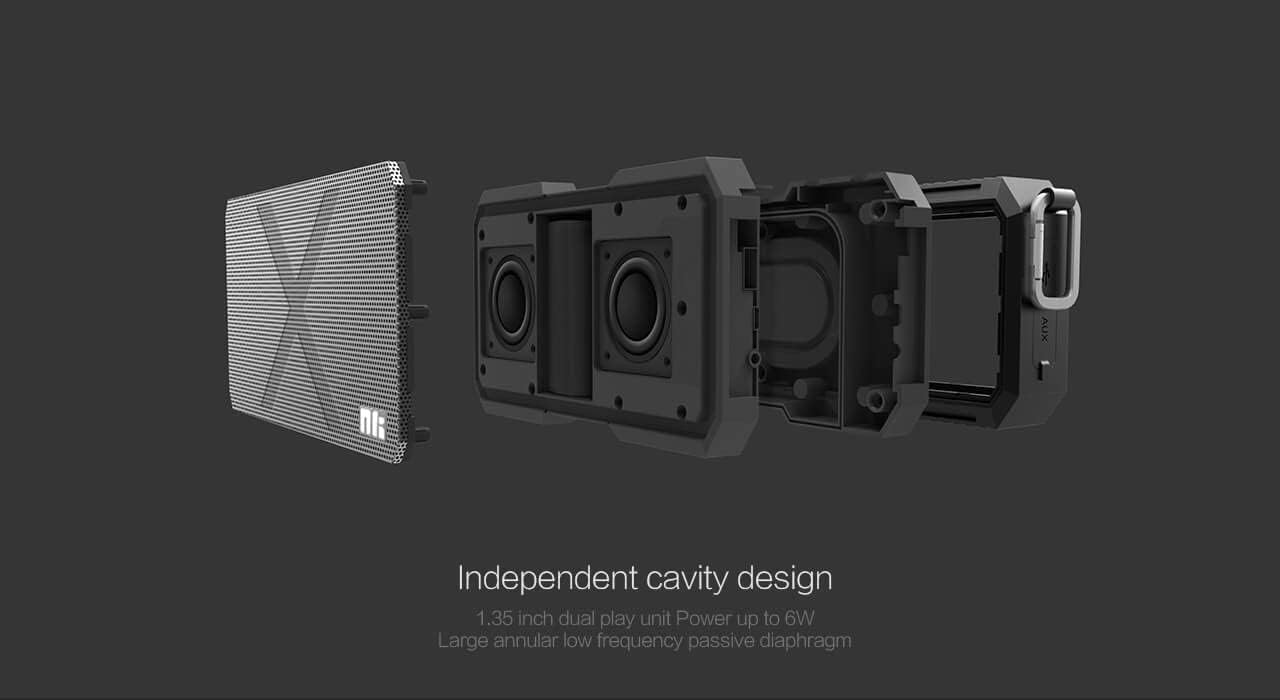
Image: An exploded diagram of the NILLKIN X-on X1 speaker, illustrating its internal structure including the 1.35-inch dual play unit and passive diaphragm for enhanced bass.
Garanti og support
NILLKIN products are designed and manufactured to the highest quality standards. For warranty information and customer support, please refer to the warranty card included with your purchase or visit the official NILLKIN webwebsted. Gem din købsbevis i tilfælde af garantikrav.
If you encounter any issues not covered in the troubleshooting section, please contact NILLKIN customer support for assistance.


