1. Introduktion og overview
The Ewent EW7012 USB 3.1 Gen1 Docking Station provides a convenient and efficient solution for connecting 2.5-inch and 3.5-inch SATA hard disk drives (HDDs) or solid-state drives (SSDs) to your computer via a USB port. This docking station is ideal for quick data transfers, backups, and accessing data from multiple drives without needing to install them internally. It supports SuperSpeed USB 3.1 Gen1 (USB 3.0) for high-speed data transfer and is backward compatible with USB 2.0.

Figur 1: Forside view of the Ewent EW7012 USB 3.1 Gen1 Docking Station with its blue LED indicator.
2. Hvad er der i æsken
Kontroller venligst pakkens indhold for at sikre, at alle varer er til stede:
- Ewent EW7012 USB 3.1 Gen1 Docking Station
- USB 3.1 Gen1 (USB 3.0) Cable
- AC strømadapter
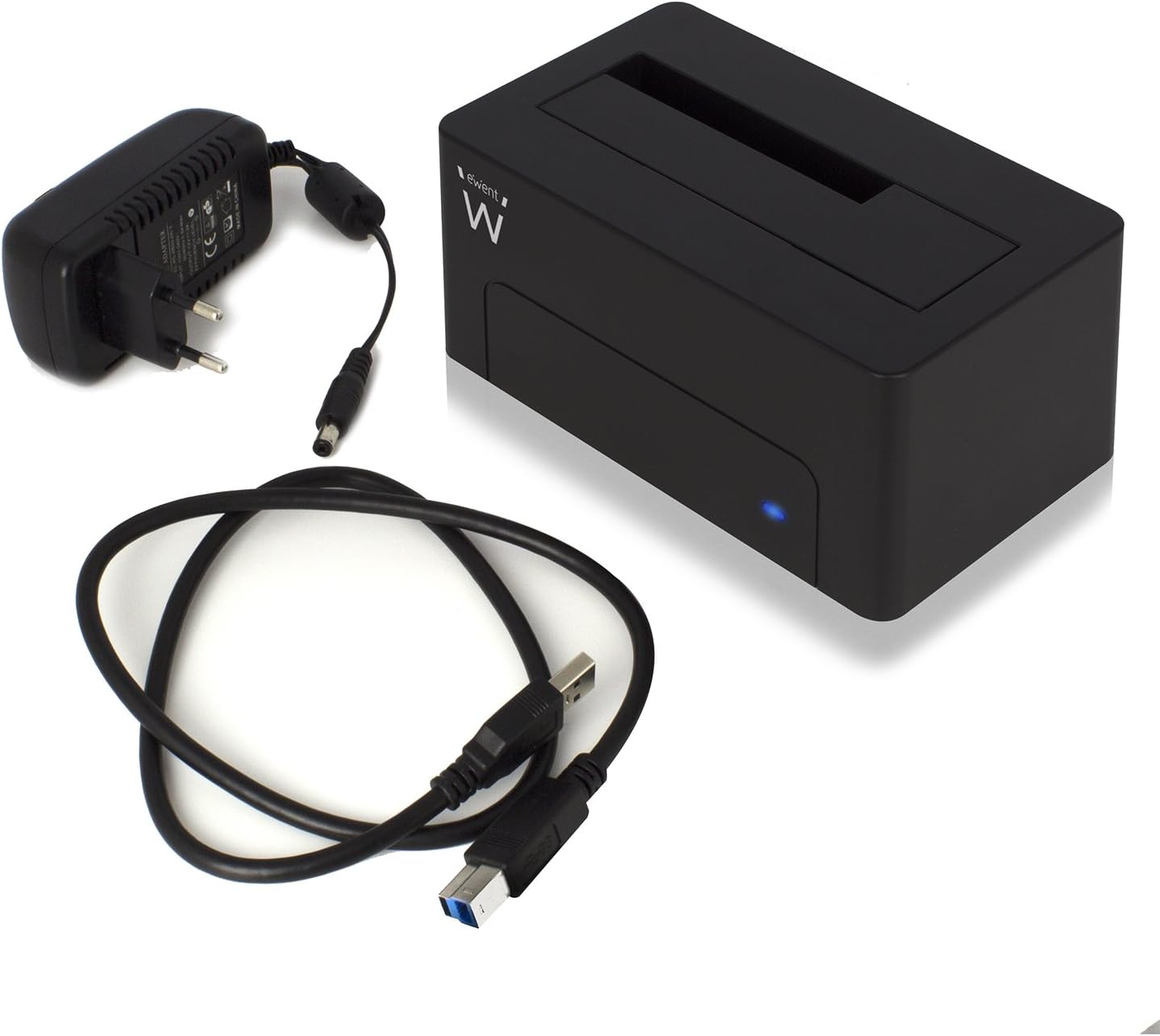
Figure 2: The Ewent EW7012 docking station, USB 3.1 Gen1 cable, and AC power adapter included in the package.
3. Funktioner
- Universal kompatibilitet: Supports both 2.5-inch and 3.5-inch SATA I/II/III HDDs and SSDs.
- Superhurtig dataoverførsel: Equipped with USB 3.1 Gen1 (USB 3.0) interface, offering data transfer rates up to 5 Gbps.
- Bagudkompatibilitet: Fully compatible with USB 2.0 ports, though at USB 2.0 speeds.
- Plug & Play: Ingen driverinstallation kræves for de fleste operativsystemer.
- LED-indikator: A blue LED light indicates power status and data activity.
- Kompakt design: Space-saving and portable, with dimensions of approximately 4.92 x 2.91 x 2.24 inches.
- Ekstern strømforsyning: Includes an AC adapter for stable power delivery to the drive.
4. Opsætningsvejledning
- Tilslut strøm: Plug the AC power adapter into the "POWER" port on the back of the docking station. Connect the other end of the adapter to a wall outlet.
- Tilslut til computer: Connect one end of the supplied USB 3.1 Gen1 cable to the "USB 3.1" port on the back of the docking station. Connect the other end of the USB cable to an available USB port on your computer. For optimal performance, use a USB 3.0 or USB 3.1 port.
- Indsæt harddisk: Gently slide your 2.5-inch or 3.5-inch SATA HDD/SSD into the top slot of the docking station, ensuring the SATA connectors align properly. Apply gentle pressure until the drive is fully seated.
- Tænd: Flip the "ON/OFF" switch on the back of the docking station to the "ON" position. The blue LED indicator on the front will illuminate, indicating the device is powered on.

Figur 3: Bagside view of the docking station showing the USB 3.1 port, power input, and ON/OFF switch.

Figure 4: A 3.5-inch hard drive being inserted into the docking station.
5. Betjeningsvejledning
Once the docking station is set up and powered on, your operating system should automatically detect the connected hard drive. The blue LED on the front will blink during data transfer activity.
- Adgang til data: The connected drive will appear as a removable disk in your computer's file explorer (e.g., "This PC" on Windows, "Finder" on macOS). You can then access, copy, or move filesom du ville gøre med enhver anden lagringsenhed.
- Data backup: The docking station is ideal for creating backups of your valuable photos, videos, and files. Simply drag and drop files to and from the docked drive.
- Removing a Drive: Before removing a drive, always safely eject it from your operating system to prevent data corruption. On Windows, use the "Safely Remove Hardware and Eject Media" icon in the system tray. On macOS, drag the drive icon to the Trash or use the Eject button in Finder. Once safely ejected, gently pull the drive out of the docking station.

Figure 5: A hard drive fully inserted into the docking station, ready for use. Note the QR code on the drive for additional information: http://qr.wdc.com/wdred
6. Vedligeholdelse
To ensure the longevity and optimal performance of your Ewent EW7012 docking station, follow these simple maintenance guidelines:
- Rensning: Use a soft, dry, lint-free cloth to clean the exterior of the docking station. Do not use liquid cleaners or aerosols.
- Opbevaring: Når dockingstationen ikke er i brug, skal den opbevares køligt og tørt, væk fra direkte sollys og ekstreme temperaturer.
- Håndtering: Håndter enheden forsigtigt. Undgå at tabe den eller udsætte den for hårde stød.
- Ventilation: Ensure the docking station is placed in an area with adequate ventilation to prevent overheating, especially during prolonged use.
7. Fejlfinding
| Problem | Mulig årsag | Løsning |
|---|---|---|
| Drevet blev ikke fundet af computeren. |
|
|
| Langsomme dataoverførselshastigheder. |
|
|
| Blå LED lyser ikke. |
|
|
8. Specifikationer
| Modelnummer | EW7012 |
| Mærke | Ewent |
| Kompatible drevtyper | 2.5-tommer og 3.5-tommer SATA I/II/III harddisk/SSD |
| Maksimal lagerkapacitet | Up to 4 TB (as per listed specifications) |
| Interface | USB 3.1 Gen1 (USB 3.0) |
| Dataoverførselshastighed | Op til 5 Gbps (USB 3.1 Gen1) |
| Materiale | Plast |
| Farve | Sort |
| Produktmål (L x B x H) | 4.92 x 2.91 x 2.24 tommer (12.5 x 7.4 x 5.7 cm) |
| Varens vægt | 8.7 ounce (248 gram) |
| Strømforsyning | AC-adapter (medfølger) |
| Operativsystemkompatibilitet | Windows, macOS, Linux (Plug & Play) |
9. Garanti og support
The Ewent EW7012 USB 3.1 Gen1 Docking Station comes with a 5 års garanti, hvilket sikrer ro i sindet med hensyn til dens kvalitet og holdbarhed.
For technical support, product information, or warranty claims, please visit the official Ewent webwebsted:

Figure 6: Product packaging highlighting the 5-year warranty and webwebstedsadresse.


