1. Introduktion
This manual provides essential information for the safe and efficient operation of your Salicru SLC 700 Twin Pro2 Uninterruptible Power System (UPS). This online double conversion UPS is designed to provide clean, stable, and reliable power to critical equipment, protecting against power outages, surges, and fluctuations. Please read this manual thoroughly before installation and operation.
2. Sikkerhedsinstruktioner
Always observe the following safety precautions to prevent injury and damage to the UPS or connected equipment.
- Åbn ikke UPS'en casing. Der er ingen dele indeni, som brugeren kan servicere. Overlad al service til kvalificeret servicepersonale.
- Installer ikke UPS'en i direkte sollys, i nærheden af varmekilder eller i miljøer med meget støv, fugtighed eller ætsende stoffer.
- Sørg for, at UPS'en er tilsluttet en jordet stikkontakt.
- Do not block ventilation openings. Adequate airflow is crucial for proper operation and to prevent overheating.
- In case of fire, use a CO2 or dry chemical extinguisher. Do not use water.
- Disconnect the UPS from the AC power source before cleaning or performing any maintenance.
- UPS'en indeholder interne batterier. Smid ikke UPS'en eller dens batterier i ild. Batterier kan eksplodere.
- Battery servicing should be performed or supervised by personnel knowledgeable about batteries and the required precautions.
3. Pakkens indhold
Bekræft at alle varer er til stede i pakken:
- Salicru SLC 700 Twin Pro2 UPS Unit
- Brugervejledning (dette dokument)
- Strømledning
- USB kommunikationskabel
- Software-cd (hvis relevant)
4. Produktet er slutview
4.1 Frontpanel

Figur 4.1: Front view of the Salicru SLC 700 Twin Pro2 UPS, showing the LCD display and control panel.
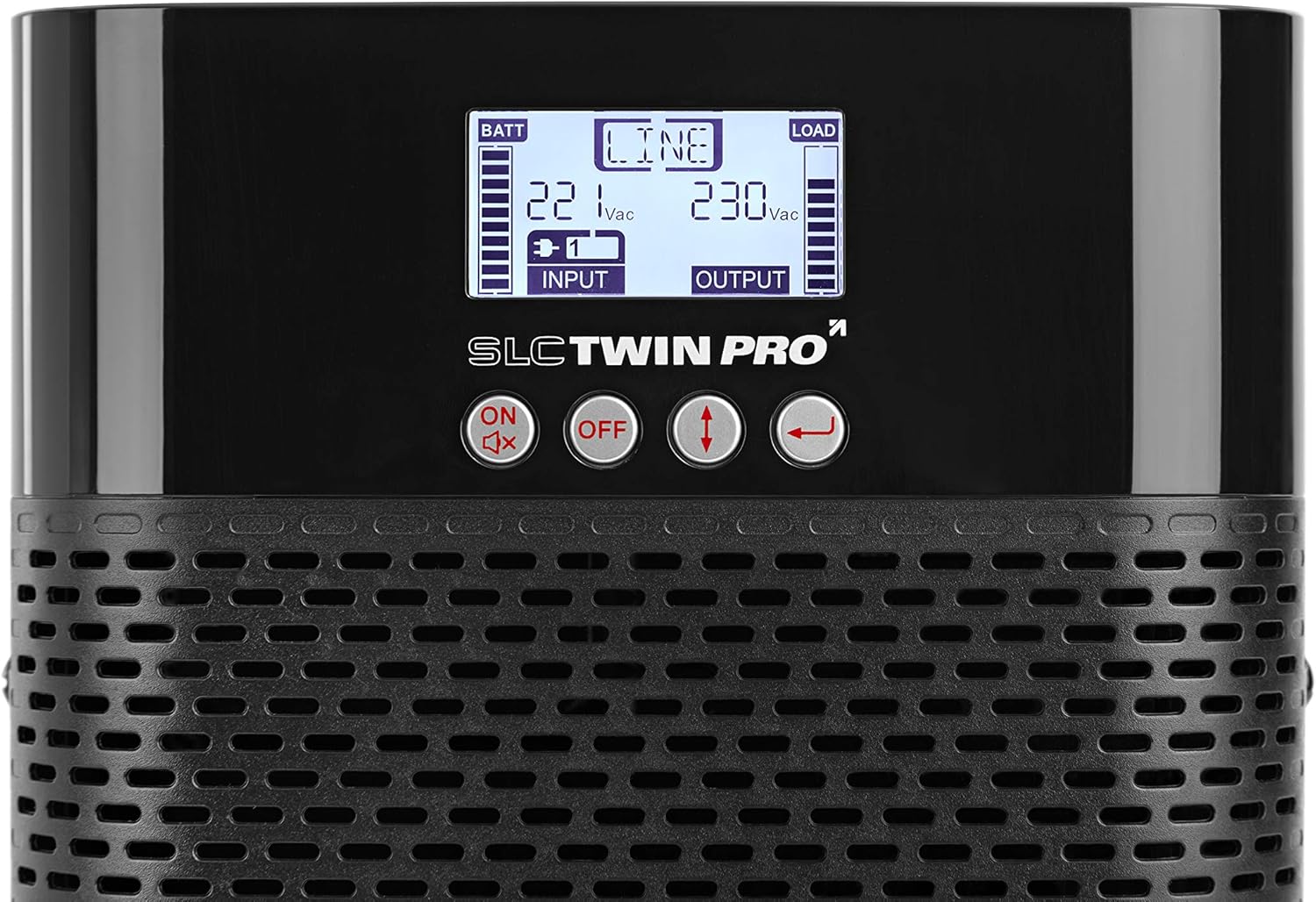
Figur 4.2: Close-up of the LCD display and control buttons. The display shows battery status, input/output voltage, and load level. Buttons include ON/Mute, OFF, Up/Down arrows, and Enter.
- LCD-skærm: Shows real-time UPS status, input/output voltage, battery level, load capacity, and various operational modes.
- Kontrolknapper:
- ON/Mute: Tænder UPS'en eller slår alarmen fra.
- OFF: Slukker for UPS'en.
- Pil op/ned: Navigate through LCD menu options.
- Indtast: Bekræfter valg eller åbner undermenuer.
- Ventilationsgitter: Ensures proper airflow for cooling the internal components.
4.2 Bagpanel

Figur 4.3: Bag view of the Salicru SLC 700 Twin Pro2 UPS, detailing the connection ports and cooling fan.
- AC-indgang: Power cord connection for incoming utility power.
- AC udgangsstik: Outlets for connecting protected equipment.
- Afbryder: Nulstillingsbar afbryder til overbelastningsbeskyttelse.
- Køleventilator: Dissipates heat from the unit.
- USB-port: For connecting to a computer for monitoring and management software.
- EPO-port (nødafbrydelse): For remote emergency shutdown.
- Intelligent slot: Til valgfrie kommunikationskort (f.eks. SNMP-kort).
5. Opsætning
5.1 Placering
Choose a suitable location for the UPS:
- Placer UPS'en på en flad, stabil overflade.
- Ensure adequate clearance around the ventilation openings (front, sides, and rear) for proper airflow.
- Avoid areas with high humidity, extreme temperatures, or direct sunlight.
- Keep the UPS away from strong electromagnetic fields.
5.2 Tilslutning til strøm
- Tilslut det medfølgende netkabel til AC indgang port on the rear panel of the UPS.
- Sæt den anden ende af netledningen i en jordet stikkontakt.
- Allow the UPS to charge its internal batteries for at least 8 hours before initial use to ensure full runtime capacity. The UPS will charge even if it is turned off.
5.3 Tilslutning af enheder
Connect your critical equipment to the AC udgangsstik on the rear panel of the UPS. Ensure that the total power consumption of all connected devices does not exceed the UPS's capacity (700VA / 630W).
- Connect computers, monitors, network devices, and other sensitive electronics.
- Do not connect laser printers or other high-surge current devices to the UPS output, as this may overload the unit.
6. Betjening
6.1 Tænd UPS'en
- Ensure the UPS is connected to AC utility power.
- Tryk og hold på ON/Mute button on the front panel for approximately 2 seconds until you hear a beep.
- UPS'en udfører en selvtest, og LCD-displayet lyser op og viser den aktuelle status.
6.2 Slukning af UPS'en
- If the UPS is supplying power to connected devices, ensure they are properly shut down.
- Tryk og hold på SLUKKET button on the front panel for approximately 2 seconds until you hear a beep.
- The UPS will shut down, and the LCD display will turn off.
- To completely remove power, disconnect the power cord from the wall outlet.
6.3 LCD-displayinformation
The LCD display provides real-time operational status. Use the Up/Down arrow buttons to cycle through different information screens.
| Indikator | Beskrivelse |
|---|---|
| BATT | Batteriopladningsniveau. |
| LINE | Indicates the UPS is operating on utility power (Online mode). |
| LÆS | Output load level. |
| Input bindtage | Current incoming AC voltage. |
| Udgang Voltage | Current outgoing AC voltage supplied by the UPS. |
| Batteritilstand | Angiver, at UPS'en kører på batteristrøm under en udeladelse.tage. |
| Bypass-tilstand | Indicates the UPS is supplying utility power directly to the load, bypassing the inverter. |
7. Vedligeholdelse
Korrekt vedligeholdelse sikrer din UPS' levetid og optimal ydeevne.
- Batteripleje:
- Recharge the batteries every 3 months if the UPS is not in use to prevent battery degradation.
- Perform a battery calibration (if supported by software) annually to ensure accurate runtime estimates.
- Batteries typically last 3-5 years. Contact qualified service personnel for battery replacement.
- Rensning:
- Use a soft, dry cloth to clean the exterior of the UPS.
- Brug ikke flydende eller aerosolrengøringsmidler.
- Rengør ventilationsgitterne med jævne mellemrum for at forhindre støvophobning.
- Opbevaring:
- Hvis UPS'en opbevares i en længere periode, skal du sørge for, at batterierne er fuldt opladede.
- Opbevares på et køligt, tørt sted.
- Recharge the batteries every 3 months during storage.
8. Fejlfinding
This section addresses common issues you might encounter with your UPS. If the problem persists, contact technical support.
| Problem | Mulig årsag | Løsning |
|---|---|---|
| UPS'en tænder ikke. | Ingen vekselstrøm; Lavt batteri; UPS-fejl. | Check power cord connection and wall outlet. Allow batteries to charge. If problem persists, contact support. |
| UPS'en bipper kontinuerligt. | I batteritilstand; Overbelastning; Batterifejl. | Check if utility power is present. Reduce connected load. Check battery status on LCD. |
| UPS goes to battery mode frequently. | Ustabil strøm fra elnettet; Følsomhedsindstillingen er for høj. | Check utility power quality. Adjust UPS input voltage sensitivity via software (if available). |
| Kort batterilevetid. | Batteries not fully charged; Old batteries; Overload. | Allow batteries to fully charge. Consider battery replacement if old. Reduce connected load. |
9. Specifikationer
Key technical specifications for the Salicru SLC 700 Twin Pro2 UPS.
| Feature | Detalje |
|---|---|
| Modelnummer | 699CA000001 |
| Mærke | SALICRU |
| Produktdimensioner | 35.6 x 14.4 x 22.8 cm |
| Varens vægt | 9.3 kg |
| Udgangseffektkapacitet | 700 VA / 630 W |
| Input bindtage | 220 V |
| Udgang Voltage | 230 V |
| Nuværende vurdering | 2 Amps |
| Formfaktor | Tårn |
| Connector Type | ATX, EPS, USB |
| Batterier påkrævet | 1 lithium-ion batteri (medfølger) |
| Farve | Sort |
| Teknologi | Online Double Conversion |
| Udgangseffektfaktor | 0.9 |
10. Garanti og support
For warranty information and technical support, please refer to the warranty card included with your product or visit the official Salicru webwebsted. Behold din købskvittering som købsbevis i tilfælde af garantikrav.
Salicru Official Webwebsted: www.salicru.com


